Add MobilityArena as a preferred source on Google
You need to learn how to forward calls on iPhone (or Android phone) if you find yourself in a situation in which you know you need to be reached by voice call but you will have no access to your phone for a period of time.
To forward calls on iPhone is relatively easy to do. You probably just have not given much thought to it. We will walk you through the few steps it takes to setup call forwarding on iPhone.
The below steps work for setting up call forwarding on iPhone on GSM networks only. This means that the process will work on most mobile networks around the world, including networks like MTN, Airtel, Glo, and 9mobile, as well as American wireless carriers like AT&T, T-Mobile, Metro PC, Cricket Wireless, and other GSM carriers.
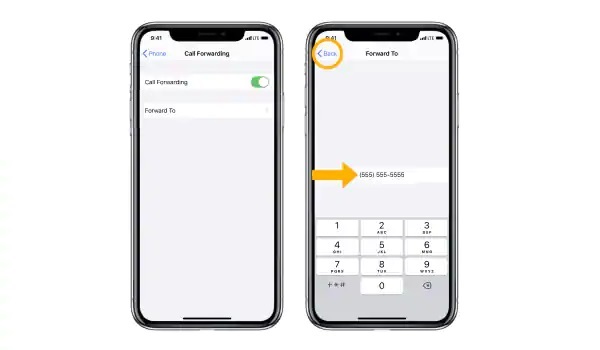
How to forward calls on iPhone
These steps will not work if your line is on a CDMA carrier like Verizon or Boost Mobile.
How to forward calls on iPhone on GSM networks
- Go to your iPhone’s general Settings menu,
- Choose Phone ,
- Scroll down to find the Call Forwarding option, then tap on it.
- On the Call Forwarding page, swipe the button to the right to turn on call forwarding.
- Tap Forward To , and enter the phone number that you want to forward to.
- Return to the previous menu to quit the call forwarding settings. Your changes will be saved automatically.
That is it. You have set up call forwarding on your Apple iPhone. Whenever you get access to your device again, do not forget to turn off the forwarding.
How to turn off call forwarding on iPhone on GSM networks
- Go to your iPhone’s general Settings menu,
- Choose Phone ,
- Scroll down to find the Call Forwarding option, then tap on it.
- On the Call Forwarding page, swipe the button to the left to turn call forwarding off.
- Return to the previous menu to quit the call forwarding settings. Your changes will be saved automatically.
You will now be able to receive incoming calls on your line again.
Meanwhile, what of call forwarding on Android phones? The process is similar to how to activate for iPhone. Let’s have a quick look.
How to forward calls on Android Phone on GSM networks
- On your Android phone, open the Phone app .
- Tap the 3-dot menu button or the 3-line menu button in the top right corner.
- Tap ‘ Settings ’
- Scroll to find ‘Call settings’ and tap on it.
- Tap on ‘ Call forwarding ’ or ‘ Call forwarding settings ‘.
- If it is a dual SIM phone, you will be presented with options to select which line or SIM you want to forward incoming calls for. Tap on your preferred choice.
- You will see multiple options, including: Always forward : enable this if you want all your incoming calls go to another number, even when you have access to your line or phone. When busy : enable this to forward incoming calls when you are on another call or when you reject an incoming call. When unanswered : enable this to forward an incoming call only when you don’t take a call. When unreached : enable this to forward incoming calls only when your phone is switched off, in Airplane/Offline mode, or is out of coverage area.
- Tap your preserred choce and enter the number you want to forward your calls to.
- Select ‘T urn on’ ,, ‘ Enable ’, or ‘ Okay ’, depending on what terminology your phone uses.
That is it. You have set up call forwarding on your Android smartphone. Note that the above steps work only for lines/numbers on GSM networks.
How to turn off call forwarding on Android Phone on GSM networks
To turn off call forwarding on Android phone, follow steps 1 to 7 above and then disable any existing call forward that you have there.
Author:InfoDesk
Add MobilityArena as a preferred source on Google
If you are interested in a Samsung Galaxy A51 vs Galaxy A71 comparison, it has to be that you are interested in the Samsung brand and want a mid-range option, or you already own the Galaxy A51 and are thinking of a possible upgrade to the A71. Or you are here just for the fun of trivia.
- Samsung Galaxy A51 vs Galaxy A71: The Preamble
- Samsung Galaxy A51 vs Galaxy A71: Quick Specs Comparison
- Samsung Galaxy A51 vs Galaxy A71: Where the A51 has the edge
- Samsung Galaxy A51 vs Galaxy A71: Where the A71 has the edge
- Samsung Galaxy A51 vs Galaxy A71: Who wins?
Samsung Galaxy A51 vs Galaxy A71: The Preamble
Both the Galaxy A51 and A71 are 2020 smartphones, though they were released in December 2019 and January 2020 respectively. They are both mid-rangers, though at different price points. The naming scheme tells you upfront that the Galaxy A71 is the superior device in terms of spcs and features, and definitely costs more.
The Galaxy A71 has more of pretty much everything – display size, processor, RAM, battery, etc. It is slimmer, though it is taller, wider, and weighs a little bit more.
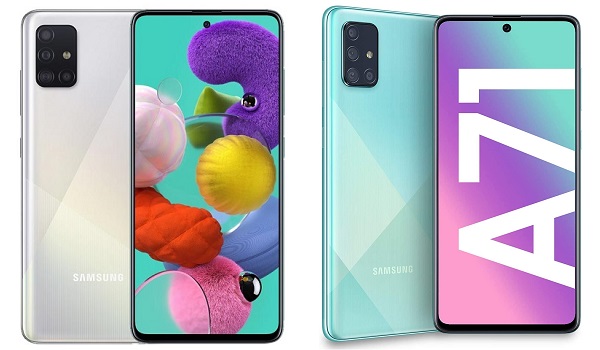
compare Samsung Galaxy A51 vs Galaxy A71
Samsung Galaxy A51 vs Galaxy A71: Quick Specs Comparison
First up is our quick comparison table so you can view the similarities and distinguishing differences of the two devices at a glance.
| Samsung Galaxy A51 | Samsung Galaxy A71 |
|---|---|
| 6.5 inches, 1080 x 2400 pixels, Super AMOLED display, Gorilla Glass 3 | 6.7 inches, 1080 x 2400 pixels, Super AMOLED display, Gorilla Glass 3 |
| Android 10, One UI 2.1 | Android 10, One UI 2.1 |
| In-display fingerprint scanner | In-display fingerprint scanner |
| Octa-core, Exynos 9611 (10 nm), 2.3 GHz | Octa-core, Snapdragon 730 (8 nm), 2.2 GHz |
| 32MP selfie camera | 32MP selfie camera |
| 48MP + 12MP + 5MP + 5MP rear quad camera with LED flash | 64MP + 12MP + 5MP + 5MP rear quad camera with LED flash |
| 64 GB / 128 GB internal storage + dedicated microSD slot | 128 GB internal storage + dedicated microSD slot |
| 4 GB / 6 GB / 8 GB RAM | 6 GB / 8 GB RAM |
| 4000 mAh battery + 15W quick charging | 4500 mAh battery + 25W quick charging |
| $275 | $370 |
Appearance-wise, both devices share some similarities: both screens have a centred punch hole with a 32MP shooter, similar bezels, under-display fingerprint scanner, and an L-shaped quad camera at the back.
Samsung Galaxy A51 vs Galaxy A71: Where the A51 has the edge
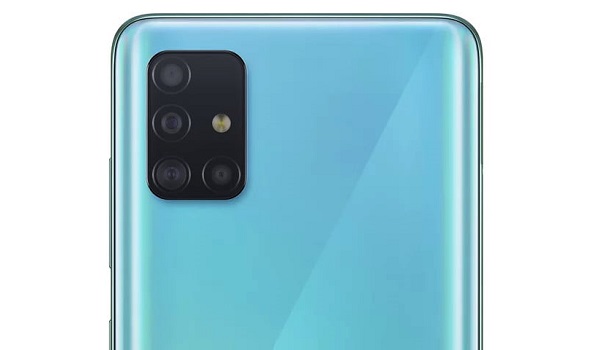
Peep the Samsung Galaxy A51’s L-shaped quad camera setup
Both models have the same sreen resolution, but because the screen of the A51 is smaller than the A71’s, it has greater pixel density. That means, technically, the A51 has a sharper display than the A71.
The Galaxy A51 offers more memory options than the A71 does . Four of them, to be specific – 4/64GB, 4/128GB, 6/128GB, and 8/128GB. It is the cheaper model too, meaning that you have four, more affordable, price options of the A51 to pick from.
And these are all the advantages that Samsung Galaxy A51 has over the Galaxy A71.
Samsung Galaxy A51 vs Galaxy A71: Where the A71 has the edge
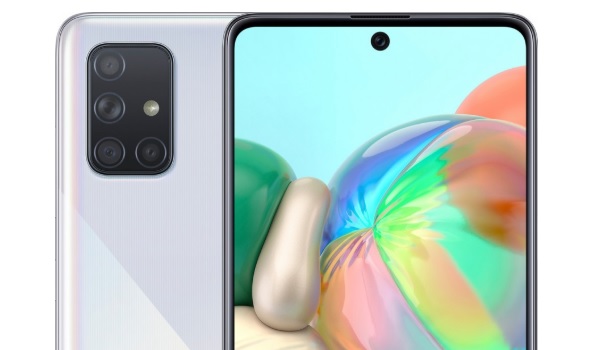
Samsung Galaxy A71
Samsung Galaxy A71 has a bigger display, a more powerful processor, a bigger battery, faster battery charging, and higher spec’d rear camera than the A51 has.
In practical terms, you get a bigger viewing experience, better performance, longer battery life, faster battery top ups, and better photos and videos.
Samsung Galaxy A51 vs Galaxy A71: Who wins?
Samsung Galaxy A71 was designed to be the more capable sibling of the A51, and a step higher on the ladder of their product portfolio. The whole idea is that if you can afford to spend more, you get a better smartphone. As such, there is no question about which of these two models is better and more expensive.
The question is, What is your budget? How much can you afford to spend? If you have not more than $275 to spend on a smartphone in 2020, you get the A51. If you have a more robust budget and can afford to spend as much as $370, the Galaxy A71 is yours.
Author:Mister Mobility
Digital Skills and Communication Coach | Mobile Phone Connoisseur since 2001 | Tech Blogging since 2004
