Add MobilityArena as a preferred source on Google
Did you know that you can share Internet via Bluetooth on Android, iPhone, Windows 10, and Mac? Sharing an Internet connection over Bluetooth is not new either; it has been around for about 2 decades. I have personally used it many times since the early 2000s.
Sometimes you have an Internet connection on your mobile phone and need to share it with your laptop or PC, and for some reason cannot use Wi-Fi. You can share your Internet connection over Bluetooth instead. As with all things that require a Bluetooth connection, both terminals you want to use must be paired.
Did you know that you can share Internet via Bluetooth?
To pair them, dive into the Bluetooth menu of both devices till the names of the other device appears on one of them, then tap or click on the name to pair. Note that you can share your Internet via Bluetooth with only one device at a time. Unlike a Wi-Fi hotspot, you cannot share with multiple devices at a time. Also, the connection is slower than a Wi-Fi connection, but it still delivers fast enough speeds for everyday usage and for fast downloads and uploads.
- How to Share Internet via Bluetooth from Phone to PC
- A great alternative to WiFi
- Advantages of sharing internet via Bluetooth
- Disadvantages of sharing Internet via Bluetooth
How to Share Internet via Bluetooth from Phone to PC
Sharing your phone Internet over Bluetooth with another device requires a simple procedure. You must have paired the two devices, as described above. Bluetooth must also be active on both devices. It doesn’t matter what type of device you are sharing to is desktop, laptop, tablet, or even another phone. You also already have an active 3G, 4G, or 5G connection on your cell phone.
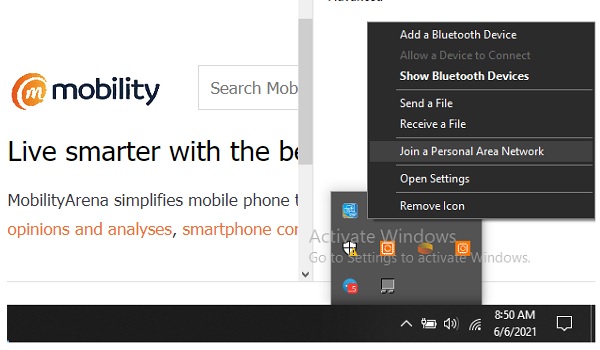
For sharing with a Windows 10 PC, as seen in the screenshot above, click on that “Show hidden icons” menu icon in the taskbar (that’s the inverted “v” icon). Click on the Bluetooth icon, then select “ Join a Personal Area Network ” in the pop-up menu.
A box will appear with a list of all available devices your PC can connect to. Right-click on the name of your phone there > Connect using > Access point . A Bluetooth connection between your PC/laptop and your cell phone will be established in a few moments. You can now proceed to browse on your PC or laptop. All your browsing will be charged to your mobile data plan.
A great alternative to WiFi
Sometimes, my laptop develops a mind of its own and refuses to connect to a Wi-Fi hotspot, and it is this being able to share Internet via Bluetooth that saves the day. One other advantage of being able to share Internet via Bluetooth is that it uses less power than sharing over Wi-Fi, so this is good for situations where you need to conserve battery power, e.g. when you are out hiking or away from a power source. Let’s look at the advantages and disadvantages in detail.
Sharing the internet via Bluetooth has both advantages and disadvantages, depending on your specific needs and circumstances. Here’s a breakdown of the pros and cons:
Advantagesof sharing internet via Bluetooth
No Additional Hardware: Bluetooth is available on almost all modern smartphones and computers, so you don’t need additional hardware or cables to share your internet connection.
Secure Connection: Bluetooth connections are typically more secure than public Wi-Fi networks. This can be beneficial when you want to share your internet connection with trusted devices.
Low Power Consumption: Bluetooth is designed for low power consumption, which can be advantageous when sharing your mobile data with a laptop or tablet without draining your phone’s battery rapidly. In my experience, hearing an internet connection over Bluetooth conserves both devices’ battery much better than when using WiFi.
Limited Range: Bluetooth has a limited range, making it more challenging for unauthorized users to access your shared connection. This is a bonus for security.
Disadvantagesof sharing Internet via Bluetooth
One Device At A Time : You can share Internet via Bluetooth with only one device at a time. This is in contrast to using WiFi, which allows multiple devices to use it at once. With Bluetooth tethering, only one device can benefit at a time.
Slow Data Transfer: Bluetooth is not designed for high-speed data transfer. In my experience, when I share internet via Bluetooth, I am still able to stream audio and video on the recipient device, so while it is much slower than WiFi, the reduced speed is not crippling for most needs. I expect that sharing an internet connection over Bluetooth may be problematic for online gaming, depending on the graphics need of the game in question. I am not a gamer and so have never had to use it that way.
Limited Range: The limited range of Bluetooth can be a disadvantage if you need to share your internet connection with a device located at a distance from your phone or computer.
Device Compatibility: Not all devices support Bluetooth tethering . Compatibility issues may arise if you want to share your internet connection with older devices or those without Bluetooth tethering capabilities.
Complex Setup: Setting up a Bluetooth connection for internet sharing can be more complex than using Wi-Fi or USB tethering, which may require additional configuration.
Battery Drain: While Bluetooth is more power-efficient than Wi-Fi for short tasks, using it for extended periods of internet sharing can still drain your smartphone’s battery faster than other methods like USB tethering.
Slower than Wi-Fi Hotspot: Bluetooth tethering is generally slower than using a Wi-Fi hotspot on your phone, which can be a disadvantage if you need a faster internet connection for multiple devices.
I have been using this feature, on and off, for many years. Knowing that I can always fall back on the ability to share Internet via Bluetooth is a comfort. I am not entirely at the messy of the availability and connection quality of WiFi.
- Don’t miss our mobile phone reviews .
- Follow our news on Google News .
- Follow us on Instagram , Facebook , Twitter , and YouTube .
Author:Mister Mobility
Digital Skills and Communication Coach | Mobile Phone Connoisseur since 2001 | Tech Blogging since 2004
Add MobilityArena as a preferred source on Google
What Is a VPN? The word is an acronym for “ virtual private network ”. What it does is allow the user to connect to the Internet as if they were on a private network, therefore boosting functionality and security of the system. It also helps users access features that are naturally blocked on a public network.
The above might seem like a lot to digest, but let us break it down into simpler and more practical bits. Every time that you access a website via the internet, the website immediately has the permission to access certain data relating to you. Some sites do not even need our permission before they access the information. Websites and web page use the information they pull from you to serve you better ads or content that relate to our “supposed” needs.
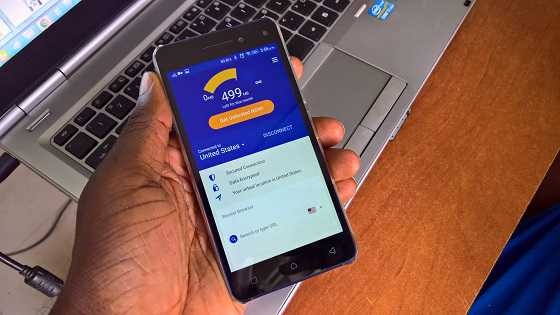
What is Virtual Private Network (VPN)
The kind of information that websites tap into are our browsing history, location, the kind of device we are using, IP address, session information, network traffic, and so on. Have you ever being surfing the web and seen an advert that seems to be aimed directly to you? If yes, that is the result of data that has been gathered on you. What a VPN does is that it puts you on a private network and so shields you from most of this data collection.
The main reason why websites on the Internet can have access to our information is because the network we are browsing on is public, hence this information that we leave there are also public and can be easily accessed. So when you browse with a VPN it takes this information and encrypts them therefore making them anonymous. A virtual private network gives you a different IP address or location, conceals your history, etc.
Why use a VPN?
A lot of people opt to using a VPN because they do not want their personal information given out on the Internet. Another reason is that certain services on the Internet that we might want to make use of are blocked from internet users in our current location. This is known as geo-blocking . With the help of a VPN, users can conceal their IP address or current location and gain access to these services. For example if you stream movies on Netflix you will know that certain movies or series are not available in all locations, so if you want to access those movies, you will need the aid of a VPN.
Not all VPNs are equal
Having explained the basics, it is important to know that not all VPN service providers give their users a true private network. Many just provide an Internet Proxy (IP) that employs the technology, what does this mean for users? It simply means that if you are transferring data that is not encrypted over the internet with the aid of a VPN, the data gets to the provider’s servers almost naked and unprotected, so they have access to your data. This can be avoided by using a secure VPN that offers complete oversight of the data path to the users at both end. So this means that when choosing, it is wise that you choose one that is secured, and that you can trust.
Some Best VPNs
- Surf Shark VPN: I can personally recommend this one to anyone looking out for a secure VPN and won’t mind paying for its services. One reason I love this Surf Shark is that a single subscription can be used on multiple devices at the very same time. So I might be surfing the net on my phone and want to check something up on the PC, all I need to do is to put down my phone and be assured that I am still browsing on a secure private network. You can check their website out here or download the application from Google Play Store, or the Apple Store.
- Nord VPN: This is yet another paid VPN which like the previous I personally have used, and it is a very good one. Also has the multiple device support and is also very secure. It is also pretty cheap, you can check out their website for pricing right here .
- ProtonVPN: If you really want to use a VPN but do not agree to the idea of paying for it, then ProtonVPN is a good choice for you. It has three free locations that you can easily connect to, but if you want more options you will have to pay. For security reasons I’ll advise that you go for a paid service especially if you are using it for business or work. Check the ProtonVPN website over here .
Author:KittysTech
Tech analyst, Collins Eshiet, writes about technology. Follow me on Twitter @KittysTech.
