Add MobilityArena as a preferred source on Google
Everyone enjoys surfing the internet every now and then, so it’s always a good idea to optimize the browsing experience. Unfortunately, ads are one of those things that have the potential to ruin your smartphone browsing experience, and they often show up as random ads popping up on your phone.
Thankfully, it’s possible to block or stop random ads popping up while browsing on Android smartphones. So, if you’re truly fed up with annoying intrusions and would like to optimize your browsing experience by blocking random pop-ups, pay close attention to the instructions and helpful tips in this guide.
How Can I Block Random Ads While Browsing on my Android?
Google seems just as fed up with intrusive ads as its users, so it has built its own ad blocker and integrated it into the Chrome browser for Android smartphones. Google’s ad-blocking functionality follows the guidelines included in the Coalition for Better Adverts, which is more of a compromise than conventional techniques that completely stop ads.
As such, you can expect that pop-up ads, huge banners, animated commercials, big sticky ads, and other forms of advertising are among the intrusive ads that Google’s ad blocker will prevent from disrupting your browsing experience.
Keep in mind, however, this capability isn’t available in Chrome for iOS since the iPhone uses WebKit, a component of Safari, as the foundation for all browsers. However, we’ll be happy to demonstrate how this ad-blocking function works below for Android smartphone users.
Turning on Google Chrome’s Ad-blocking Feature
First, you’ll want to turn off pop-up adverts, so choose “Pop-ups” and click the toggle to activate Chrome’s blocking feature on the following page. Ensure that the switch is turned off and gray in color. By using the back button on your device, return to “Site settings,” where the “Pop-ups” tab should read “Blocked.”
The next step is to prevent additional annoying advertising from showing, so click “Ads” in the “Site settings” menu and follow the same steps as described above for blocking pop-ups. When you return to “Site options,” it will now show “Blocked from some sites” directly under the “Ads” menu.
What Alternatives are Available for Blocking Intrusive, Random Ads Popping Up On Your Phone?
This extension is called Content blocker, and its integration is one of Samsung Internet’s strongest features. You’ll feel quite at home here if your computer has an ad blocker of any kind. Choose any or all of the suggested ad blockers Samsung provides for you to use, and then download them from the Play Store.
Return to the Extensions menu to open the Content blockers window after downloading the content blocker or blockers of your choice. Here, you can do as you wish; you can turn on up to five content blockers at once to optimize browsing on your Samsung device.
In summary , you don’t have to endure the intrusion of random ads popping up on your phone any longer, just optimize your browsing by blocking these ads. Follow the instructions we’ve provided for you in this guide and you should be able to get this done easily.
- Don’t miss our mobile phone reviews .
- Follow our news on Google News .
- Join our WhatsApp Group , to be notified of the most important articles and deals,
- Follow us on Instagram , Facebook , Twitter , and YouTube .
Author:Joan Agie
Add MobilityArena as a preferred source on Google
Shopping for the best camera phones in 2022 in the USA and Canada is not particularly difficult. These two major North American markets do not have the complications of having numerous options that obtain in many other locations in the world. The number of available cell phone brands are limited. As a matter of fact, in terms of popularity, they are essentially a duopoly.
For example, Apple iPhone and Samsung Galaxy phones are the top two brands, by far. Everyone else is a minor player. In addition, highly successful brands elsewhere like Huawei, Xiaomi, and OPPO are pretty much non-existent here. That leaves us with camera phones from Samsung, Apple, Google, and a handful of others.
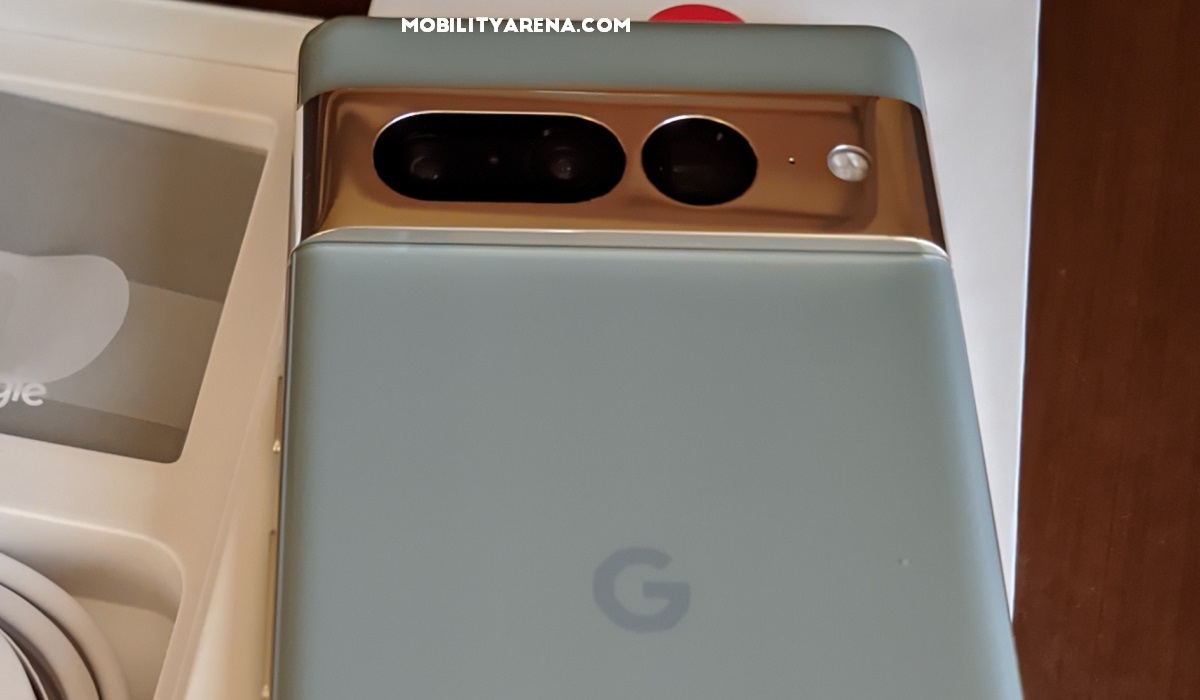
Google Pixel 7 Pro is one of the best camera phones in 2022 in the USA and Canada
What are the best camera phones in the world?
The best camera phones in the world in 2022 include the following models:
- Google Pixel 7 Pro
- Honor Magic4 Ultimate
- Apple iPhone 14 Pro Max
- Apple iPhone 14 Pro
- Huawei P50 Pro
- Apple iPhone 13 Pro
- Apple iPhone 13 Pro Max
- Xiaomi Mi 11 Ultra
- Huawei Mate 40 Pro+
- Xiaomi 12S Ultra
But half of the devices listed here are not available in the United States or Canada. Of course, you could buy any of them online and have it shipped to you, if you really, really want to get it. But for purposes of support and easy access, it is best to buy a phone that is officially available in the country. That means your options for best came phones in 2022 are limited to Google and Apple.
The best camera phones you can buy in 2022 in the USA and Canada
Let’s look at the very best camera phones in 2022 that you can buy in the United States of America and Canada. We will explore them in terms of the specific categories they fit into.
The overall best camera phone in 2022
This title goes to Google’s Pixel 7 Pro . Apple and Samsung fans may not like to hear this, but Google’s 2022 flagship. With a 6.7-inch OLED 120Hz display, Tensor G2 processsor, and 12GB of RAM, the Pixel 7 Pro’s cameras just blow everything else out of the water.
And speaking of the camera, the front shooter is a 10.8MP unit, while at the back is a rear combination that includes a 50MP wide angle shooter, a 12MP ultrawide shooter, and 48MP telephoto lens with 5x optical zoom.
The best camera phone for social media in 2022
The iPhone 14 Pro Max is one of the best camera phones in 2022 that you can buy. It still falls short of the Pixel 7 Pro’s camera, though it outguns it in terms of performance and hardware quality. The 14 Pro Max is heads and shoulders taller in those departments. Of course, it costs much more.
One characteristic of the iPhone’s cameras is how it is designed and programmed for the social media generation. How do i mean? There is quite some processing to make the images pop out brighter and more colourful, which is what the social media generation wants.
Apple iPhone 14 Pro Max has a 6.7-inch OLED screen, A16 Bionic processor, and 6GB RAM. The front camera is a 12MP shooter, while at the back is a combination of 48MP main camera, 12MP ultrawide camera, and a 12MP telephoto lens with 3x optical zoom.
The best camera phone for accurate reproduction
I mentioned how the iPhone’s camera spices photos up to make them sharper and more colourful than real life? The Google Pixel 7 Pro camera is the opposite of that. If you want the most accurate reproduction of what you see in real life, the Pixel 7 Pro’s cameras have no competition. Professional photographers and purists will love this one.
The best camera phone on a budget
The above are the two best camera phones in 2022 that you can buy in the US and Canada. But they cost an arm and a leg. The iPhone 14 Pro Max is by far the most expensive, starting from $1,099 for the base storage. The Pixel 7 Pro costs $799. If those prices are way above your budget, the best camera phone on a budget that you ought to consider is Google Pixel 6a . It costs just US $329.
In Canada, these phones cost C$1,549, C$ 799, and C$ 713.41, respectively. Google Pixel 7 Pro, iPhone 14 Pro Max, and Google Pixel 6a are the best camera phones in 2022 available in North America’s top two markets. The ball is now in your court, and your choice will depend on what you want and what you can afford. Happy shopping.
- Don’t miss our mobile phone reviews .
- Follow our news on Google News .
- Join our WhatsApp Group , to be notified of the most important articles and deals,
- Follow us on Instagram , Facebook , Twitter , and YouTube .
Author:Mister Mobility
Digital Skills and Communication Coach | Mobile Phone Connoisseur since 2001 | Tech Blogging since 2004
