Add MobilityArena as a preferred source on Google
Some WhatsApp users have found their accounts temporally banned, and the developers of the app have made a statement to say that this is because those accounts use apps like GB WhatsApp and WhatsApp Plus , both of which are unsupported, altered versions of the official WhatsApp app.
Over the years, WhatsApp has grown to become a worldwide chatting platform that helps connect family, friends, colleges and so much more together regardless of distance. That in itself is the exact idea behind the evolution of telecommunication over time. The benefits of WhatsApp over normal messaging is that it cost less, and it is more far-reaching in its uses.
WhatsApp is an application that offers centralized messaging and voice-over IP to its users, and it has been growing stronger ever since it’s inception in the year 2009. At the moment, the application is owned by Facebook. Now we have talked about WhatsApp, let us delve into the main topic, which is “GB WhatsApp” and why its users are called out, first let us find out what it is all about then we will talk about why we should be worried.
- What is GB WhatsApp?
- Why should GB WhatsApp Users be concerned?
- How to switch to from GB WhatsApp to the official WhatsApp app
- How to switch to from WhatsApp Plus to the official WhatsApp app
What is GB WhatsApp?
GB WhatsApp is a MOD of the actual WhatsApp messenger application. What that means is that it is a modified version of the main application that can be installed on any Android device with some extra features baked into the software.
How can you get the GB WhatsApp application? The application can be downloaded from a web browser by searching for it and downloading it as an APK file. The application can be downloaded on either Android or iOS.
One major reason most people choose to download and use the GB WhatsApp application as against the main WhatsApp messenger application is because of the level of customization it brings to the table and some other extra features that it offers. But are these reasons actually enough for you to trust this unofficial application with your personal information? Is the application available on Google PlayStore or the Apple App Store? Is it safe?
The GB WhatsApp application is not available on either the Google PlayStore or the Apple App Store, unlike the WhatsApp messenger application, which is readily available on either of the app stores mentioned. This is because the app is not owned by Facebook (the actual owners of WhatsApp) and it is not also recognized by either app stores in question.
Why should GB WhatsApp Users be concerned?
One can immediately conclude that GB WhatsApp is a clear case of piracy. This modified app uses the original source codes that were used to develop the main WhatsApp messenger application, but without permission from the owners of WhatsApp messenger. There is every possibility that your chats on GB WhatsApp are being monitored and do not use the end-to-end encryption used in WhatsApp.
The main reason why users of this unofficial app should be concerned is because WhatsApp has decided to take action against users that are on unofficial apps by banning their accounts permanently. So to be on the safer side, it is advisable that you switch over to the regular WhatsApp messenger application.
This move by WhatsApp will not only affect GB WhatsApp Users but also the users of WhatsApp Plus, as the application is also unofficial. As a matter of fact, to be on the safe side, you should stay off using any modified version of WhatsApp.
How to switch to from GB WhatsApp to the official WhatsApp app
Follow the steps below to switch from WhatsApp Plus to the official app.
- Wait for your temporary ban to end. The timer will show you the length of the ban.
- In GB WhatsApp, tap More options > Chats > Back up chats .
- Go to Phone Settings > tap Storage > Files .
- Find the folder GB WhatsApp and tap and hold to select it.
- In the upper right corner tap More > Rename and rename the folder to “WhatsApp”.
- Launch the Play Store and download the official WhatsApp app. If you can’t access the Play Store, download the app here .
- In WhatsApp, verify your phone number.
- On the Backup found screen, tap Restore > Next .
- WhatsApp should load with your existing chats. WhatsApp says there is no guarantee, though, as they do not support unofficial apps.
How to switch to from WhatsApp Plus to the official WhatsApp app
Follow the steps below to switch from WhatsApp Plus to the official app.
- On your device, open WhatsApp Plus and save your chat history to increase your chances of having your chats carried over to the official app. There is no guarantee that they will get carried over, as WhatsApp does not support unofficial apps.
- Launch Play Store and download the WhatsApp app. If you can’t access the Play Store, download the app here .
- Verify your phone number.
You are reading Mobility Arena .
- Don’t miss our reviews .
- Follow us on Instagram , Facebook , Twitter , and YouTube .
Author:KittysTech
Tech analyst, Collins Eshiet, writes about technology. Follow me on Twitter @KittysTech.
Add MobilityArena as a preferred source on Google
| Samsung Galaxy A52s 5G Quick Phone Specs |
|---|
| OS: Android 11. Release Date: August 2021. Network Type: 2G/3G/4G/5G Display: 6.4-inch Super AMOLED, 90Hz Processor: Snapdragon 778G Selfie Camera: 32 MP Rear camera: 64 MP quad sensors RAM: 8 GB ROM: 256 GB Battery: 4500 mAh. |
- Samsung Galaxy A52s 5G Specs
- Samsung A52s 5G Prices Is Samsung Galaxy A52s a 5G phone? Does Samsung Galaxy A52s have a fingerprint scanner? Does Samsung Galaxy A52s 5G have Gorilla Glass? Does Samsung Galaxy A52s have quick charging? Does Samsung A52s support wireless charging?
Samsung Galaxy A52s 5G Specs
Mobile Wireless Network and Software
- 2G mobile network bands : GSM, GPRS, EDGE 850 / 900 / 1800 / 1900 MHz.
- 3G mobile network bands : UMTS, WCDMA, HSDPA 850 / 900 / 2100 MHz
- 4G mobile network bands : LTE 1(2100) / 3(1800) / 5(850) / 8(900) / 38(2600) / 40(2300) / 41(2500)
- 5G mobile network bands : Yes: n5 / n66
- SIM Type : Nano-SIM, Dual SIM
- Software / OS : Android 11 + One UI 3.1
Design, Form Factor, Appearance
- Dimensions : 159.9 x 75.1 x 8.4 mm
- Weight : 188g
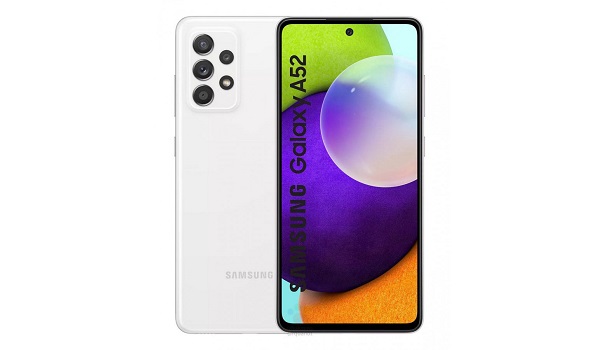
- Display : 6.5 inches, 1080 x 2340 pixels, 19.5:9 aspect ratio, 90Hz refresh rate, Super AMOLED, waterdrop screen, Corning’s Gorilla Glass 5 protection.
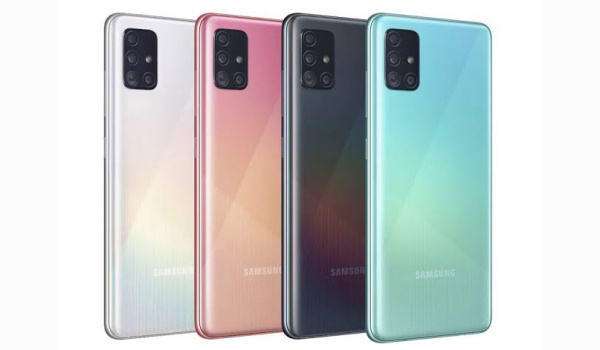
- Colours : Awesome Black, Awesome White, Awesome Violet, Awesome Blue.
- Physical Build : Plastic. IP67 (dust resistance, up to 1m of water for 30 minutes)
Internal Hardware Specs
- Processor Type : 64-bit, 2.2 GHz Octa-core, Cortex-A78
- Processor Name : Qualcomm Snapdragon 778G (6 nm).
- Graphics Processor : Adreno 642L
- RAM : 4 GB, 6 GB, 8 GB
- Internal Storage : 128 GB, and 256 GB
- External Storage : microSD, up to 1 TB (dedicated slot)
Photography, Video Recording
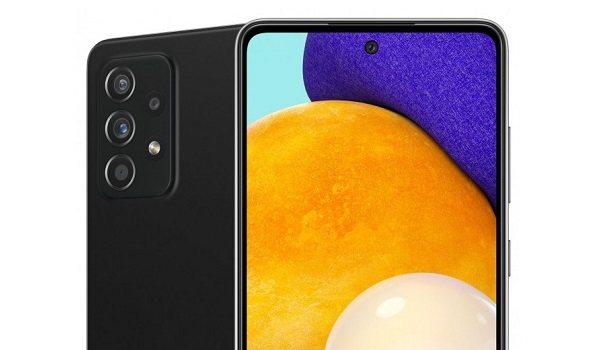
- Rear Camera : 64 MP main sensor with OIS + 12 MP ultrawide sensor + 5 MP depth sensor + 5MP lens, LED flash, HDR, EIS, 4k@30fps, 2160p@30fps video recording
- Front-facing Camera : 32 MP, Face Recognition, HDR, 1080p@30fps video capture.
Audio, Video Playback
- Music Support : PCM, AAC / AAC + / eAAC + / MP3 / AMR – NB / WB / APE
- Audio : 3.5 mm audio jack
- Loudspeaker : Dual speakers
- Video Support : H.264/MP4/MPEG4 player
- FM Radio : Yes.
Phone Sensors
- Digital Compass : Yes.
- Accelerometer : Yes.
- Proximity Sensor : Yes.
- Ambient Light Sensor : Yes.
- Barometer : No.
- Pedometer : No.
- Heart Rate Monitor : No.
- Gyroscope (G-Sensor) : Yes.
- Fingerprint Scanner : Yes; optical under-display.
- Face Unlock : Yes.
- Iris Scanner : No.
- Motion Sensing / Gesture Control : No.
- Voice Control : No.
- Intelligent Digital Assistant : Yes; Google Assistant; Bixby.
- Infra-red Sensor : No.
Connectivity Options
- Bluetooth : v5.2, A2DP
- WiFi : Wi-Fi 6E 802.11 a/b/g/n/ac, hotspot
- GPS : Yes, A-GPS, GLONASS, BDS
- USB : microUSB v2.0. Type-C. USB-OTG
- NFC : Yes (market dependent).
Miscellaneous Specs and Features
- Battery Type and Capacity : Non-Removable Lithium-Polymer 4500 mAh
- Battery Charging : 25W quick charging
- Wireless Charging : No.
- Reverse Charging : .
- Model Number : SM-A528B
Samsung Galaxy A52s 5G Launch Details
- Announced : August 2021
- Release Date : August 2021
Samsung A52s 5G Prices
- Samsung Galaxy A52s Price : From €430 or £400.
- Samsung A52s price in Nigeria : ₦215,000 (8/128 GB). ₦250,000 (8/256 GB).
Questions and Answers about Samsung Galaxy A52s 5G
Here are answers to some of the most commonly asked questions about Samsung Galaxy A52s.
Is Samsung Galaxy A52s a 5G phone?
Yes; it is.
Does Samsung Galaxy A52s have a fingerprint scanner?
Yes; it has.
Does Samsung Galaxy A52s 5G have Gorilla Glass?
Samsung A52s has a 6.4-inch Super AMOLED display protected by a layer of Gorilla Glass 5 glass.
Does Samsung Galaxy A52s have quick charging?
Yes; the Samsung A52s has quick charging technology.
Does Samsung A52s support wireless charging?
Samsung Galaxy A52s does not support wireless charging.
MobilityArena Buyer’s Guide Verdict
Not available.
Our Buyer’s Guide Verdict is a recommendation that we make based on our evaluation of the specs of the device. It is a general guide designed to help you understand how much value a smartphone offers for its price. It is not a stamp of quality assessment or an endorsement of the device or of the manufacturers. Be sure to ask questions and use your judgement when buying any device, as MobilityArena may not be held responsible for your buying decisions .
Phone Review Rating
We are yet to review the Samsung Galaxy A52s and so do not have a review rating for it yet. This section will be updated with our review rating and a link to the review page, as soon as we have a review ready.
