Add MobilityArena as a preferred source on Google
If you have ever wished or wanted to take a screenshot of a particular text or content you came across but it was too long and you had to capture it all with multiple screenshots, then you know how much stress and storage space all that takes. A scrolling screenshot is all you need to capture all of that content.
What is a scrolling screenshot? In essence, a scrolling screenshot is a single screenshot of long content that requires you to scroll down your phone screen to read. As such, a scrolling screenshot is longer than regular or normal screenshots.
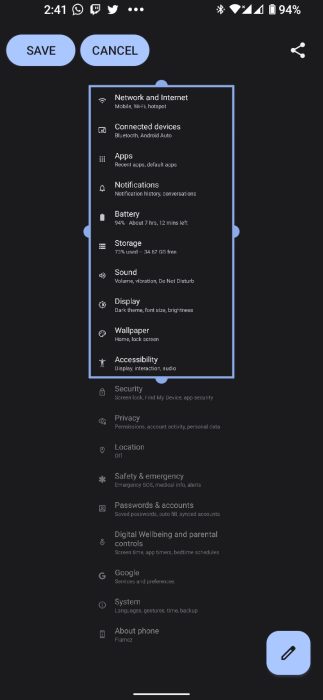
All modern Android phones give you the ability to take a single scrolling screenshot of whatever content you want to save and/or share. For instance, a long document, a long text on a website, or a chain of pictures you saw on a social media app. Of course, this long screenshot capturing has its limits, it does not have an infinite length of all the things it can capture. The available maximum length should be able to capture the long text/page you need to save.
How to take scrolling screenshots on any Android smartphone
If you have Android 12 or later installed and running on whatever Android smartphone you own, you already have access to this feature. It does not matter whether it is a low-end device or a flagship device, the same steps apply. If you do not have Android 12 installed, and your device is compatible with it, get it installed.
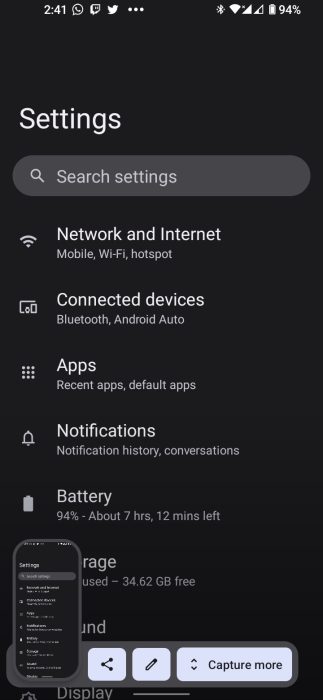
When you take a screenshot, it will appear at the lower end of your device’s screen for you to review. Beside this picture are the options to “Share” and “Edit” as well as one more that says “Capture more”. This feature is what you need to select to take a scrolling screenshot. Let’s take a more detailed look at how to go about this;
•To take the initial screenshot, tap the “Power” and “Volume down” buttons.
•You will then see a little preview of the screenshot. A little bar with the words “Capture More” next to the thumbnail of the screenshot you captured.
•Tap on it to open a page in which you’ll see a cropping tool with which you can lengthen the amount of content you want to save and share.
•Adjust the portion of the page you want to include in the screenshot. The Capture More feature lets you add both contents above and below the page you screenshot.
•When this is done you can now select Save to save the screenshot.
•When you have done all of this, you can then save the scrolling screenshot and use it for whatever you have planned.
How to take scrolling screenshots on a Samsung smartphone
Different Android devices have different methods of taking scrolling screenshots. As for the case of Samsung devices, it is not much different from the steps mentioned.
•Take the screenshot using the combination of the “Power button and Volume down”.
•A bar at the bottom of your screen with multiple options. Select the option with two downward arrows to capture a scrolling screenshot.
•The content on your screen will start to scroll down. Tap and hold the double-arrow icon till you reach the required point. let go of your hold on the icon and it is done.
•When this is done, you can now access it in your gallery/images.
How to take scrolling screenshots on a OnePlus/Oppo device.
•Take the screenshot using the combination of the “Power button and Volume down”.
•When the screenshot is taken you will see a preview of the screenshot as well as an icon that says “Scroll”. You have to tap on it to go to a new page in which you’ll see the content scrolling down.
•You can either tap on the screen to manually scroll the content or select “Done” to save the content captured.
Every Android device falls under any one of these steps or has largely similar instructions. Follow them and you will easily be able to capture whatever content you need.
- Don’t miss our mobile phone reviews .
- Join our WhatsApp Group , to be notified of the most important articles and deals,
- Follow us on Instagram , Facebook , Twitter , and YouTube .
Author:Flamez
Flamez loves basketball, art, gadgets and cars.
Add MobilityArena as a preferred source on Google
You may have heard of the term, “kosher phone” and wondered what it was. The first time I heard it, I wondered what it meant, too. Thankfully, I quickly found out that it wasn’t anything I didn’t already know of. You probably already know what a kosher phone is; you only know it by a different name.
If you have some knowledge of Jewish language and culture, the word. “kosher”, might not be new to you. This Hebrew word means fit or proper. For example, food that is kosher is food that meets the Jewish dietary regulations.
- What are kosher phones?
- Who wants kosher phones?
- Enter the Kosher Smartphone: What is it?
What are kosher phones?
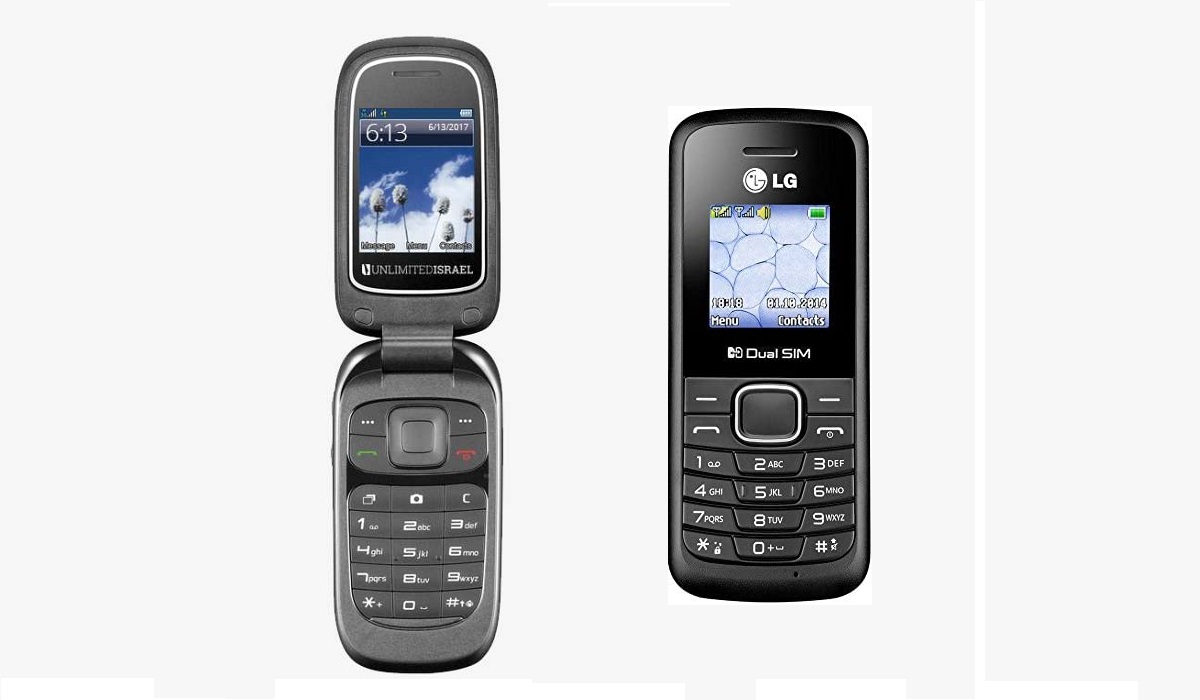
A kosher phone is a mobile phone whose capabilities are limited to voice calls and SMS only. No Internet (2G, 3G, 4G, or 5G), no location services, no Wi-Fi, and in some cases, no Bluetooth. The idea behind kosher phones is that it allows the user to stay away from the distractions of the digital world.
Americans call this type of phone a dumb phone. The name is a play on the contrast with smartphones, as they exist on opposing ends of the mobile phone spectrum. A smartphone is designed to connect the user to digital services in every way possible – Web, email, IM, social media, downloads, media streaming, location services – while a kosher phone is designed to keep the user away from all of these.
Besides the connectivity angle, kosher phones also differ from smartphone in terms of input capabilities. Modern smartphones have full-screen touchscreens through which you and I can enter text by way of a virtual keyboard and also interact with different menus. Kosher phones come with an old-school alphanumeric keypad.
Who wants kosher phones?
For example, because these phones do not connect to the Internet, they have extremely long battery life. This makes them ideal for calls and SMS in emergency situations.
Enter the Kosher Smartphone: What is it?
There are people who want to stay disconnected from social media, audio and video streaming, instant messaging, and the link, but are a little bit more liberal and so want to be able to shop online or carry out banking and investment transactions. Their solution is what is called a kosher smartphone. What is that, you may ask? A Kosher smartphone is an Android-powered smartphone that has been heavily modified to block out all the unwanted apps that cause “distractions”. Shopping, financial, and navigation apps are allowed on the phones.
In a country like the United States, kosher phones and plans are increasingly difficult to find, as carriers have shut down their 2G and 3G networks. Most kosher or dumb phones run on these older mobile technologies. A kosher smartphone connecting to 4G and 5G networks then becomes a viable alternative in such a situation.
Author:Mister Mobility
Digital Skills and Communication Coach | Mobile Phone Connoisseur since 2001 | Tech Blogging since 2004
