Add MobilityArena as a preferred source on Google
Yondr is an American company launched in 2014 by Graham Dugoni. Yondr makes pouches which are used in some schools, concerts, and shows where the use of cell phones is frowned upon. What exactly is Yondr Pouch? It is a magnetic pouch used to lock phones away to avoid distractions. Because of its unique feature and value proposition, Yondr pouches or cases are used in some schools to allow teachers to teach students without any disruptions. The pouch is also used by some artists/entertainers who want to encourage their fans to focus during their shows.
Apart from the distraction-free angle, there is also the angle of respect for the privacy of other people. Too often at events, there are people pulling out their phones to take photos of, or record videos of, others and later sharing those recordings online, thereby violating their privacy. Yondr cases are a great way to make sure nobody is recording anything, thus preventing violations of personal privacy from happening at events and locations.

A Yondr Pouch resting on an unlocking base.
- Yondr Pouch: How does it work?
- Where to purchase a Yondr pouch?
Yondr Pouch: How does it work?
The Yondr pouch or case is a fabric pouch equipped with a magnetic lock that activates once inside a designated cell phone free space. Let’s say participants arrive at a concert venue that the organizers have designated as a phone-free event. Each guest is handed a Yondr pouch in which they must keep their phone. Once the cell phone is placed in the Yondr Pouch and the pouch closed, it is firmly locked magnetically and cannot be opened without a special magnetic disc or unlocking base.
Each guest keeps their phone on them, but they cannot use it, as the only way to unlock the pouch is to go to a designated spot to where a magnetic disc or unlocking base is made available for that purpose. When the guest wants to return to the venue of activities, they are required to put their cell phones back in the pouch, again locking them firmly, so they cannot be used again. At the end of the concert, guests can unlock their pouch at the exit.
The concept is brilliant and the use cases are clear. Besides schools and concerts, I can imagine that these pouches will come in handy at more discreet events and activities, where photos, video recording, and audio recording of proceedings are forbidden. The deployment of Yondr pouches is a means of enforcing compliance.
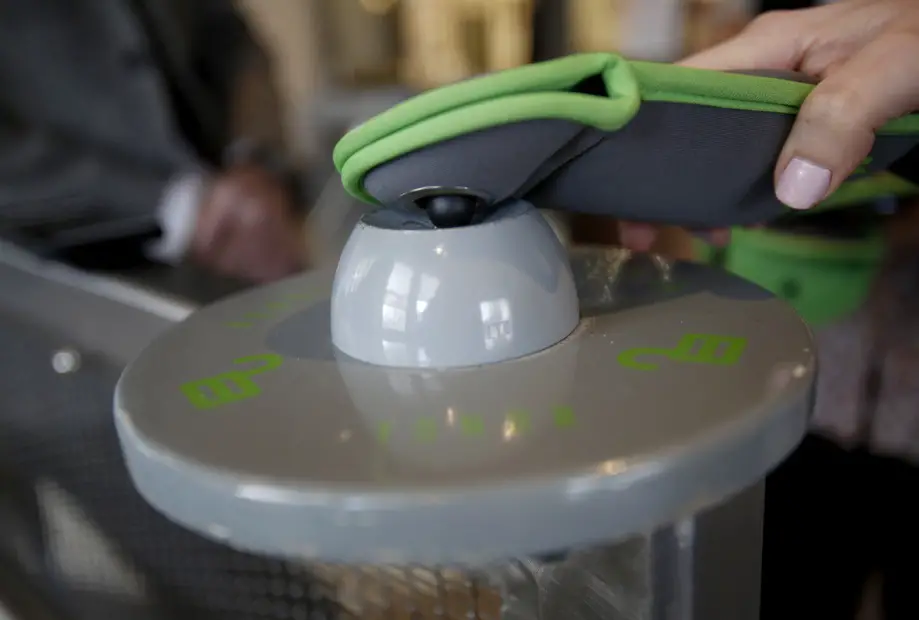
Tapping a Yondr pouch on a magnetic unlocking base to unlock it.
Where to purchase a Yondr pouch?
Yondr pouches can be purchased on the manufacturer’s official website, Woire.com, for $15 a piece. In addition to purchasing the pouches, organizations that want to use these cases at their events also have to invest in the magnetic discs that unlock the cases. The costs will add up to a tidy sum. For example, an event with 100 participants expected means you will spend at least $1500, ut then the pouches are reusable and can be deployed for more events down the orad.
Author:Dun
Dun enjoys reading and writing, and is always on her smartphone. She currently uses a Google Pixel 3.
Add MobilityArena as a preferred source on Google
If you have been wondering how to make Redmi 10 2022 run faster, that is no surprise. This is a budget Xiaomi smartphone aimed at users who do not want to spend a fortune on much more expensive models. As such, it is not the most powerful or the fastest gun on the block.
The Redmi 10 2022 was released as the…well… 2022 variant of the Redmi 10 that was released back in 2021. The device has a 6.5″ FHD+ display. It has a 50, 8, 2, and 2 MP main camera setup, an 8 MP selfie camera, a 5000mAh battery, and a 90hz refresh rate. Below are some of the key specifications.
Redmi 10 2022 Specs
- Redmi 10 2022 specs at a glance:
- Body:162 x 75.5 x 8.9 mm, 181g.
- Display: 6.43″ FHD+, 1080x2400px resolution, 20:9 aspect ratio, 405 ppi density.
- Chipset: Mediatek Helio G88.
- CPU: Octa-core (2×2.0 GHz Cortex-A75 & 6×1.8 GHz Cortex-A55); Mali G-52 MC2.
- Memory: 128GB, 4/6GB RAM,
- OS/Software: Android 11, MIUI 12.5.
- Rear camera: 50MP (f/1.8) wide, 8 MP (f/2.2) Ultrawide, 2 MP (f/2.4) depth, 2 MP (f/2.4) macro.
- Front camera: 8 MP (f/2.0) wide
- Video capture: Rear camera: 1080p@30fps; Front camera: 1080p@30fps.
- Battery: 5000mAh; Fast charging 18W.
- Misc: Fingerprint reader (side-mounted).
If, for some time, you have been looking to make your Redmi 10 run faster and smoother than it has, or you are having problems with your device lagging, here are some easy steps you can follow to make that possible.

Make Redmi 10 2022 run faster: Delete Unused apps
Any smartphone user would love to have all their desired apps installed. This might lead to large amounts of apps piling up on the device, over time. It is important to form a habit of uninstalling unused apps and games. Having lots of these apps will hinder and slow down the performance of your Redmi 10.
Especially when you have some of them running in the background. They also become so many and have so much data on each one of them, that there is barely any storage space left for your device to run as smoothly as you may have liked.
Make Redmi 10 2022 run faster: Clear App Cache
Cleaning the cache of the app on your Redmi 10 is important in terms of sending up your phone. Clearing the cache of an app can make that particular app run faster and smoother than it did before, and reduce possible lag. Clearing cache is also very important for entry-level devices too to help them improve their performance. As they are not as powerful as high-end devices. You can clear the cache of any app by long-pressing the app icon, selecting App info , and then Storage . There will be an option to Clear the cache . Select that and you’re good to go.
Make Redmi 10 2022 run faster: Run Software Updates
It is important to keep your Redmi 10 2022 up to date. This is because, with every new update, there might be security enhancements (which are crucial) but there might also be performance improvements added to the update that can make your overall experience, and device speed, better.
Make Redmi 10 2022 run faster: Restarting your Device
It is well known that any device can perform faster and better simply off of a restart. The same holds for the Redmi 10. Doing this should address most of the performance issues, as it deletes temporary files to speed up the phone and clears the phone’s memory.
Make Redmi 10 2022 run faster: Use the Lite Version applications
Lite versions of apps are the shortened versions of these said apps. Apps Tit Tok, Facebook, e.t.c. The lite versions are usually limited in comparison to the actual applications and don’t offer as many features. These lightweight apps, which do not work your device as hard as the main ones, are designed for entry-level smartphones and designed for users who want to keep their apps simple or use something simple. They help boost the performance of your device and lower your data and charges.
Make Redmi 10 2022 run faster: Hard Reset
If you are looking for a simple method that will help you to make your Redmi 10 run faster, it may be the most effective. If you do a hard reset on your Redmi 10, then all the phone data will be deleted, and the phone’s storage will be clean. At the same time, the random-access memory of your Redmi 10 will start working like new again. However, you need to back up all the data before performing a hard reset.
- Don’t miss our mobile phone reviews .
- Follow our news on Google News .
- Join our WhatsApp Group , to be notified of the most important articles and deals,
- Follow us on Instagram , Facebook , Twitter , and YouTube .
Author:Flamez
Flamez loves basketball, art, gadgets and cars.
