Add MobilityArena as a preferred source on Google
You hear some things in 2019 and you almost go into shock at the absurd nature of the statements. One of them is the statement by popular pastor, John Suleman of Omega Fire Ministries International, that reading the Bible from a phone – or any other mobile device – in church shows lack of respect to God.
This is really very odd, because you know, the Bible didn’t even start out as a printed book. The bible was originally a collection of hand-written parchments and scrolls. It wasn’t originally a book. And those parchments were painstakingly scripted by “holy” men who had separated themselves from the world. The scripts themselves were considered holy.
But technological advancement showed up. The invention of the printing press was technological innovation in its time, and the bible eventually took that form. Digital technology is the innovation of our time. And so the bible has taken on this form too – an app on our mobile devices.

We were reading the Bible from a phone in church as far back as 2008
While John Suleman knocks his members for reading the Bible from a mobile device in church, his fellow pastors and preachers are actually teaching and preaching from one on the pulpit. Irreverent too?
I never thought I would ever hear a preacher say something as darned as this in 2019. Because you know, I know pastors who were preaching from their smartphones as far back as 2008. And their church members were encouraged to use their phones instead of carrying around a physical bible.
For example, OliveTree Bible Reader was already available for Palm OS handhelds, Pocket PCs, as well as Symbian and Windows Mobile smartphones in 2008. This is OliveTree app on a Pocket PC from that era:
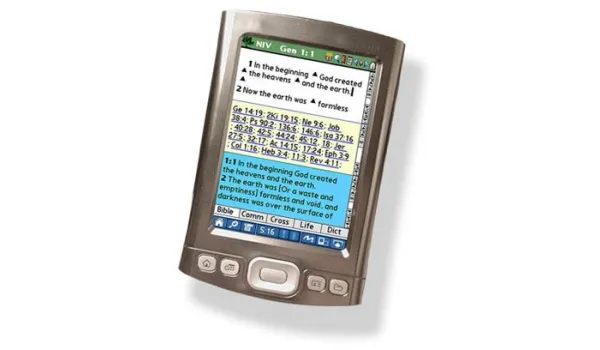
I know because I remember that I was reading the Bible from a phone in church using OliveTree Bible Reader app on my Symbian phones back then. As a matter of fact, The first version of OliveTree was released in 1998 for Palm OS.
This is 21 years down the road and we are still on this matter? This is one apostle that needs to get out of the dark ages.
Reverence is of the heart and reflects in your attitude. You either have it in there or you do not. It has nothing to do with whether you carry a physical Bible or an e-Bible. Reading the Bible from a phone in Church is as reverent as reading a physical Bible if your heart is right
Wait! Am I preaching? Oh, snap. Oh; and this story is not hearsay, by the way. Watch the video and hear the “divine” instructions yourself:
“Don’t bring phone or tablet to Church” – Pastor Suleiman AKA OTOBO JOCKEY 🏇 The reason he doesn’t want you to bring your device to church is Bcos he doesn’t want you to Fact-check his BS in Real-time. It’s all about control. pic.twitter.com/4q2mraFYUr — Wale Gates 🇳🇬🇬🇧 (@walegates) January 29, 2019
It is one of the silliest things I have heard this year of our Lord 2019.
Pulpit Punch Lines
Here are a few punch lines from John Suleman:
“The Bible says ‘Search the Scriptures, not punch the Scriptures’.
“God sees the end from the beginning. He knew there would technology before He said, ‘This book of the law’.”
Jokes. They almost sound like rap lines from a hit track. But let’s keep the same logic and look at a few other things.
The Bible does not say to drive or fly either, but the good pastor has no problem with those. God knew there would be technological advancement but mentioned only donkeys and horses in the Bible.
The early Church met in homes and the bible contains no instructions about church meetings outside of homes. The Bible says nothing about church buildings, though God knew the end from the beginning. But those aren’t issues to him. Suddenly, reading the Bible from a phone in church is a problem.
As someone has said, this sounds more like an attempt to retain control, similar to how the Church in the dark ages was heavy-handed and sought to keep people from accessing the bible through the technology of the day.
But I really do not care how his members and followers respond to this sermon of his. My only interest in the matter is the digital technology aspect, and I find it intensely amusing.
The good pastor is fighting a battle that he cannot win. Remember how the Church persecuted and killed those who insisted that the earth was not flat and those who insisted that the earth was not the centre of the universe?
The Church also once persecuted and killed people for owning and reading the printed Bible, but look where we are today – a pastor is insisting that it is only the printed Bible is valid in church meetings. Jokes.
Reading the bible from a phone in church will become even more widespread. It will gain ground till the next disruptive technology arrives. There is absolutely nothing that John Suleman or anyone else can do about it. Not even the Pope can halt the advancement of digital technology.
Is this the point where someone shows up to say. “Touch not mine anointed?” The only things I have touched this morning in the typing of this article are my smartphone and laptop. Keep your heads screwed on, people. Some years down the road, he will definitely change his mind about this.
- Don’t miss our reviews .
- Join our WhatsApp Group , to be notified of the most important articles and deals,
- Follow us on Instagram , Facebook , Twitter , and YouTube .
Author:Mister Mobility
Digital Skills and Communication Coach | Mobile Phone Connoisseur since 2001 | Tech Blogging since 2004
Add MobilityArena as a preferred source on Google
If you play action-packed PSP games like God of War, Dragon Ball Z, Pro Evolution Soccer , and others, then you use a PSP emulator. During game play, you may have run into an error that says Unfortunately PPSSPP Has Stopped after which the game crashes.
The error is fairly common on phones with low-end hardware. We explain what is behind the problem and then walk you through the steps to take to solve it. It is fairly easy to follow.
- Unfortunately PPSSPP Has Stopped: Understanding The Problem
- Solution One for Unfortunately PPSSPP has stopped error
- Solution Two for Unfortunately PPSSPP has stopped error
- Fine-tune For Your Device
Unfortunately PPSSPP Has Stopped: Understanding The Problem
Games that uses the PPSSPP emulator are often highly intensive. As such, the Unfortunately PPSSPP has stopped error happens when a device has limited resources (e.g. processor and storage) to handle the demands of the game.
In other words, it is all about the performance capabilities of your phone: how powerful the processor and graphics unit are, how much space it has to devote to the game. This is why the error happens more on low-end mobile devices. More powerful, more capable phones, can handle things more smoothly.
There are two main ways to make your phone handle things better, namely:
- make more resources available to the game;
- modify the settings of the emulator to reduce resource demand on the phone during game play.
Come with us as we walk you through both solutions in the instructions below.
Solution One forUnfortunately PPSSPP has stoppederror
Delete as many stored files as possible to create more space on your phone.
Your phone should have a file manager built in. Even if it does not, you can easily download one from Google Play Store. Open the file manager and browse around to delete as many heavy files as you can discard.
Usually, videos, images, and APK installation files are the heaviest files you will find on a phone. Delete as many as you no longer need. This will free up more space on your phone. Try to see if you can free up at least 5 GB of storage space.
Solution Two forUnfortunately PPSSPP has stoppederror
This time, we are going to tweak or tune the PPSSPP emulator to be less demanding on your smartphone. Don’t get scared. The steps are easy to carry out.
- Open the PPSSPP emulator app, go to Options -> Settings -> Graphics -> Backend , and select Vulkan .
- Go back to Graphics, select Frameskipping , and uncheck Auto Frameskip .
- Check Prevent FPS from exceeding 60 .
- For Alternative Speed , enter “0” .
- Up next, select Post processing shader , and toggle it off. Uncheck Fullscreen . Remember that your device is low on resources and you are trying to turn off anything that will place an extra demand on it.
- Tap Rendering resolution , and set it to 1x Rendering resolution .
- Check the following: Vertex cache , Lazy texture caching (speedup) , and Disable slower effects (speedup) .
- Look for Upscale level and turn it off.
- Go to the Hack Settings menu and disable the following: Timer Hack ; Disable alpha test .
- Tap on Lower resolution for effects (reduces artifacts) , and toggle it off.
At this point, you have disabled most of the demanding features of the app and you should be able to play your favourite games without the dreaded Unfortunately PPSSPP has stopped error popping up again.
Fine-tune For Your Device
Because there is a wide range of smartphones and configurations out there, you might encounter one or two glitches after implementing the above settings. As such, your phone might require one or two features above set differently.
What to do is toggle back one feature at a time and testing to see if things run smoothly after doing so.
Note that you may need to combine the two solutions we spelled out above. You may need to free up space on your Android phone and tweak the PPSSPP emulator settings.
That is it! Now you know how to get rid of the Unfortunately PPSSPP has stopped error and enjoy your favourite games on your smartphone.
