Add MobilityArena as a preferred source on Google
| Lava Z61 Pro |
|---|
| OS: Android. Release date: July 2020. Network Type: 2G/3G/4G Display: 5.45-inch, 1440 x 720 pixels Processor: 1.6 GHz Octa-core CPU Selfie Camera: 5 MP Rear camera: 8 MP RAM: 2 GB ROM: 16 GB Battery: 3100 mAh. Phone Status: Official. |
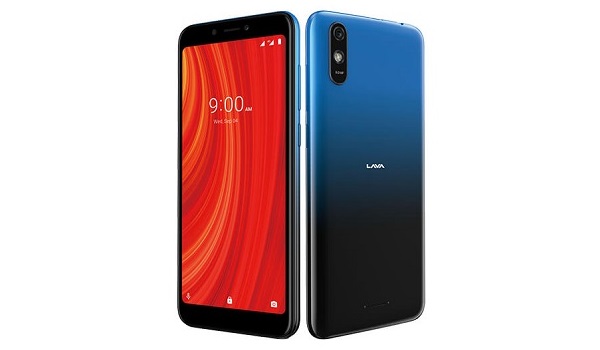
Lava Z61 Pro joins the ‘Z series’ from the Indian smartphone brand. It is a budget dual-SIM smartphone with an unspecified version of the Android mobile operating system. For security, it has Face Unlock. There is no fingerprint scanner on this model. Keeping the lights on is a decent 3100mAh battery. Lava Z61 Pro is made in India.
Lava Z61 Pro Full Specs, Specs, Features, Images
Mobile Wireless Network and Software
- 2G mobile network bands : GSM, GPRS, EDGE 850 / 900 / 1800 / 1900 MHz.
- 3G mobile network bands : UMTS, WCDMA, HSDPA 850 / 900 / 2100 MHz
- 4G mobile network bands : LTE, VoLTE 1(2100) / 3(1800) / 5(850) / 8(900) / 38(2600) / 40(2300) / 41(2500)
- 5G mobile network bands : No.
- SIM Type : Nano-SIM, Dual SIM
- Software / OS : Android
Design, Form Factor, Appearance
- Dimensions : mm
- Weight : g
- Display : 5.45 inches, 1440 x 720 pixels) HD+ 2.5D curved glass display
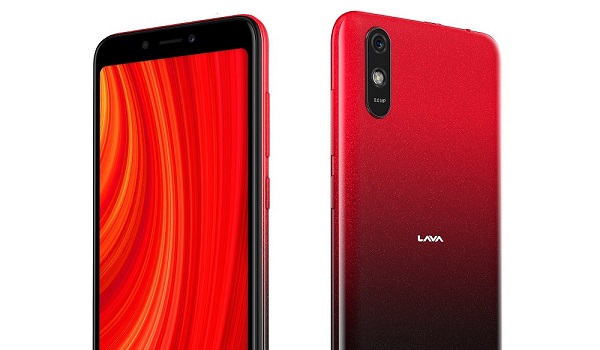
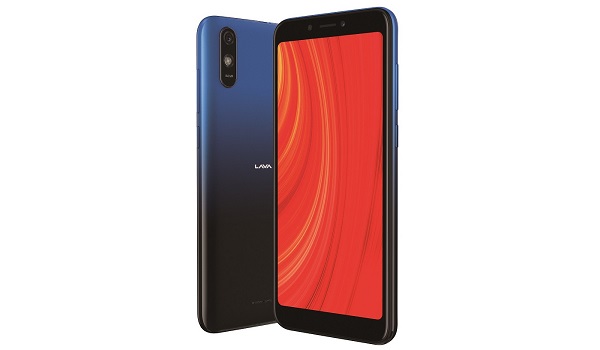
- Colours : Midnight Blue. Amber Red.
- Physical Build : Plastic
Internal Hardware Specs
- Processor Type : 64-bit, 1.6 GHz Octa-core, Cortex-A53
- Processor Name :
- Graphics Processor :
- RAM : 2 GB
- Internal Storage : 16 GB
- External Storage : microSD, up to 128 GB
Photography, Video Recording
- Rear Camera : 8 MP camera, LED flash, 1080p@30fps video recording
- Front-facing Camera : 5 MP, Face Recognition, 1080p@30fps video capture.
Audio, Video Playback
- Music Support : PCM, AAC / AAC + / eAAC + / MP3 / AMR – NB / WB / APE
- Audio : 3.5 mm audio jack
- Loudspeaker : Mono speaker
- Video Support : H.264/MP4/MPEG4 player
- FM Radio : .
Phone Sensors
- Digital Compass : No.
- Accelerometer : Yes.
- Proximity Sensor : Yes.
- Ambient Light Sensor : No.
- Barometer : No.
- Pedometer : No.
- Heart Rate Monitor : No.
- Gyroscope (G-Sensor) : No.
- Fingerprint Scanner : No.
- Face Unlock : Yes.
- Iris Scanner : No.
- Motion Sensing / Gesture Control : No.
- Voice Control : No.
- Intelligent Digital Assistant : Yes; Google Assistant.
- Infra-red Sensor : No.
Connectivity Options
- Bluetooth : v4.2, A2DP
- WiFi : Wi-Fi 802.11 b/g/n, hotspot
- GPS : Yes, A-GPS
- USB : microUSB v2.0.
- NFC : No.
Miscellaneous Specs and Features
- Battery Type and Capacity : Non-Removable Lithium-Ion 3100 mAh
- Battery Charging : 5W standard charging
- Wireless Charging : No.
- Reverse Charging : No.
- Model Version/Number : N/A.
Lava Z61 Pro Price and Launch Date
- Announced : July 2020
- Release Date : July 2020
- Country Availability : India. Bangladesh. Pakistan.
- Price : $75.
- Lava Z61 Pro Price In India : INR 5,774. You can buy iit online from Flipkart or Amazon India.
Questions and Answers about Lava Z61 Pro
Here are answers to some of the most commonly asked questions about Lava Z61 Pro.
Is Lava Z61 Pro a 4G phone?
Yes; the Z61 Pro is a 4G LTE phone.
Does Lava Z61 Pro have a fingerprint scanner?
No; the Z61 Pro does not have a fingerprint reader. There is Face Unlock for security though
Does Lava Z61 Pro have Gorilla Glass?
No; the Z61 Pro does not have Gorilla Glass protection on its screen.
Does Lava Z61 Pro have quick charging?
No; the Z61 Pro does not have quick charging technology.
Will Lava Z61 Pro work in USA?
Lava Z61 Pro has limited network support across various US carriers like AT&T, Verizon, Metro PCS, Sprint, T-Mobile, Virgin Mobile, Cricket, Boost Mobile, H2O Wireless, Ting, US Cellular, Lyca Mobile, PureTalk, Consumer Cellular, Ultra Mobile, Straight Talk, Red Pocket Mobile, Jolt, Airvoice Wireless, and Google Fi. What this means that some bands are supported, while others are not. You will have to make enquiries from your carrier to know what bands/frequencies are supported on them.
What is the price of Lava Z61 Pro? How much does it sell for?
MobilityArena Buyer’s Guide Verdict
Not available.
Our Buyer’s Guide Verdict is recommendation that we make based on our evaluation the specs of the device. It is a general guide designed to help you understand how much value a smartphone offers for its price. It is not a stamp of quality assessment or an endorsement of the device or of the manufacturers. Be sure to ask questions and use your judgement when buying any device, as MobilityArena may not be held responsible for your buying decisions .
Phone Review Rating
We are yet to review the Lava Z61 Pro and so do not have a review rating for it yet. This section will be updated with our review rating and a link to the review page, as soon as we have a review ready.
Author:InfoDesk
Add MobilityArena as a preferred source on Google
Why would you want to know how to change region on Samsung phones and smart TVs? Smartphones and smart TVs are similar in many ways. One of the similarities is that they have app stores and some of those apps are region-dependent. In other words, people in North America have exclusive access to some apps, video, music, etc. Users in other regions will not have access to such apps.
A quick and simple switch from your current region to another can give you access to more apps than are currently available on your smart device. This tutorial provides a quick guide as to how to do that. The steps are simple, so do not fret. Note that there are two areas that you might need to change country or region, depending on your needs – Samsung account, and Google account.
- How to change country on your Samsung account on your Galaxy phone
- Steps to Change Region in Your Google Account on Samsung Phones
- How to Change Region on Samsung Smart TVs
How to change country on your Samsung account on your Galaxy phone
We have bad news for you on this one, and it is all Samsung’s fault. Your Samsung account is registered to the country where you initially set it up, and there is no way to seamlessly switch country or region for that account. Shocking. To change the country of your Samsung account, you have to first delete your Samsung account. Then, you must remove the old Samsung account from your device. After that, you can set up a new Samsung account on your device with the new region that you want.
If you wish to delete your Samsung Account, please follow these steps:
Go to “Settings”, then tap “Accounts and backup” or “Cloud and accounts”.
Tap “Accounts”.
Choose the account you would like to remove.
Tap “Personal info”.
Tap the More options icon. Tap “Remove account”, then tap “Remove”.
Enter your Samsung Account password, then tap “Done” to remove the account from your device.
Your chosen account will now be removed.
You can now create a new account with the new region that you want. It is plain stupidity, if you ask us. Why does a user have to lose all their existing data and information because they moved to a new region? It is almost unbelievable that this is the reality. This information is from a Samsung Specialist ( source ).
Steps to Change Region in Your Google Account on Samsung Phones
- Open the Play Store app.
- Tap the menu icon. This will appear as three lines in the top left corner.
- Tap Account .
- Tap Country and profiles.
- Select your new country , then follow the instructions to update your payment method.
Once done, your smartphone will need to reboot. It is as simple as that to change region on Samsung phones. Once your phone has restarted, you can install the apps you want, as well as order for whatever items you desire from the new region.
Next, we look at how to change region on Samsung Smart TVs. As already mentioned, smart TVs are similar to smartphones in many ways. As a matter of facts, more and more smartphone manufacturers are making smart TVs now . Unsurprisingly, Samsung is one of the pioneers.
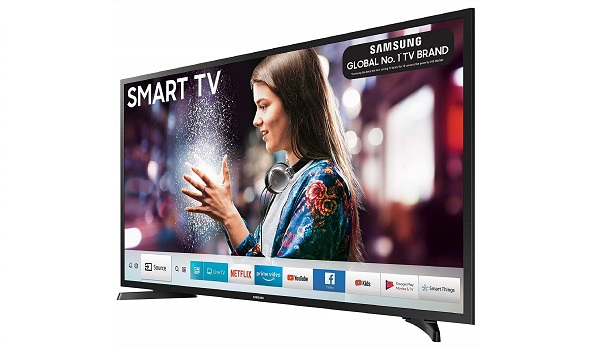
How to Change Region on Samsung Smart TVs
Perhaps you reside in a region that does not have some of the most popular apps available. Countries like the USA, Canada, UK, Mexico, and Brazil tend to have the most popular apps. If you want access to those apps, a quick fix is to change the region of your Samsung Smart TV.
The following steps will guide you through how to do that:
- On your Smart TV remote control, press the Smart Hub button to launch Smart Hub.
- When Smart Hub app has loaded then press », 2, 8, 9, « (fast forward, 2, 8, 9, rewind).
- Under Internet service location select the country you wish to use. Selecting either , Finland, Norway, Sweden or Denmark will give you access to the most popular apps. You can only have apps from one region installed at any given time. In other words you can’t have American and British apps installed at the same time.
- Once you have selected the country you wish to use, press Next .
- Agree to terms of service.
- Update of Smart Hub will be initiated. Allow it to complete.
- Default apps for the new region will be installed and old apps deleted
Once done, the Smart Hub will reboot. You should now be able to install apps from the new region.
Now you know how to change region on your Samsung smartphone and smart TV. Feel free to use it to gain access to the apps and media that you love and enjoy. Happy viewing!
PS : Note that some apps are locked down to serial numbers of the smart TV model and so it may not be able to get rid of them or get access to them by switching region. In such a case, switching region won’t give you access to such apps.
