Add MobilityArena as a preferred source on Google
Did you love the era of the Play Station Portable, if yes then the Lenovo Legion Play will sure tickle your fancy. In the world of laptops there are a lot of brands and lineups to pick from based on your needs, certain lineups are just made to please a particular group of people. One group of people that are greatly considered by these brands are the gamers and the Legion lineup from Lenovo is one of such laptops in that niche.
Talk of crazy specs on a laptop, the Legion lineup got you covered, talk of a rugged yet outspoken design (“stylish outside, savage inside”), the Legion lineup got you covered, everything a true gamer might want in a Laptop comes into consideration with the Legion lineup. The entire idea of gaming laptops made perfect sense to me, how you might ask. The simple reason is portability, personally I want to game anywhere I want to and not just when I am with the gaming console, with gaming laptop you have the option to game anywhere, it is easy to move. But, the Lenovo Legion Play is not a laptop.
What Is The Lenovo Legion Play.

Lenovo Legion Play.
Before we talk about the Lenovo Legion Play let us take a quick look at the Legion Duel. The Legion Duel is Lenovo’s gaming phone lineup, so far we have seen two launches from this lineup the Legion Duel and the Legion Duel 2 .
Both of the devices mentioned are very speced so as to enable gamers to run through games smoothly without any hassle. They also come with a few features that regular devices do not necessarily need, such as adaptive shoulder buttons, cooling fans, more charging abilities (bypass charging) and extra gaming menus.
The RAM on this devices if I an not wrong is higher than that which you will find on your regular laptop with both devices starting off at 12GB of RAM and signing off with a maximum of 16GB of RAM (Lenovo took things forward in the Legion 2 pro with 18GB of RAM). This devices (especially the Legion Duel 2) are some of the best gaming devices out there in the market right now, so when Lenovo says it wants to launch a device in it’s Legion lineup it is something that should be covered, plus this time it is something entirely new.
The Lenovo Legion Play is a handheld gaming console very similar to the Play Station Portable (PSP) but running Android Operating system. A few months back a company “Valve” launched a device called the Steam Deck which was a cloud gaming console, the Lenovo Legion Play has the same idea in a better form factor as we can see in the image below.
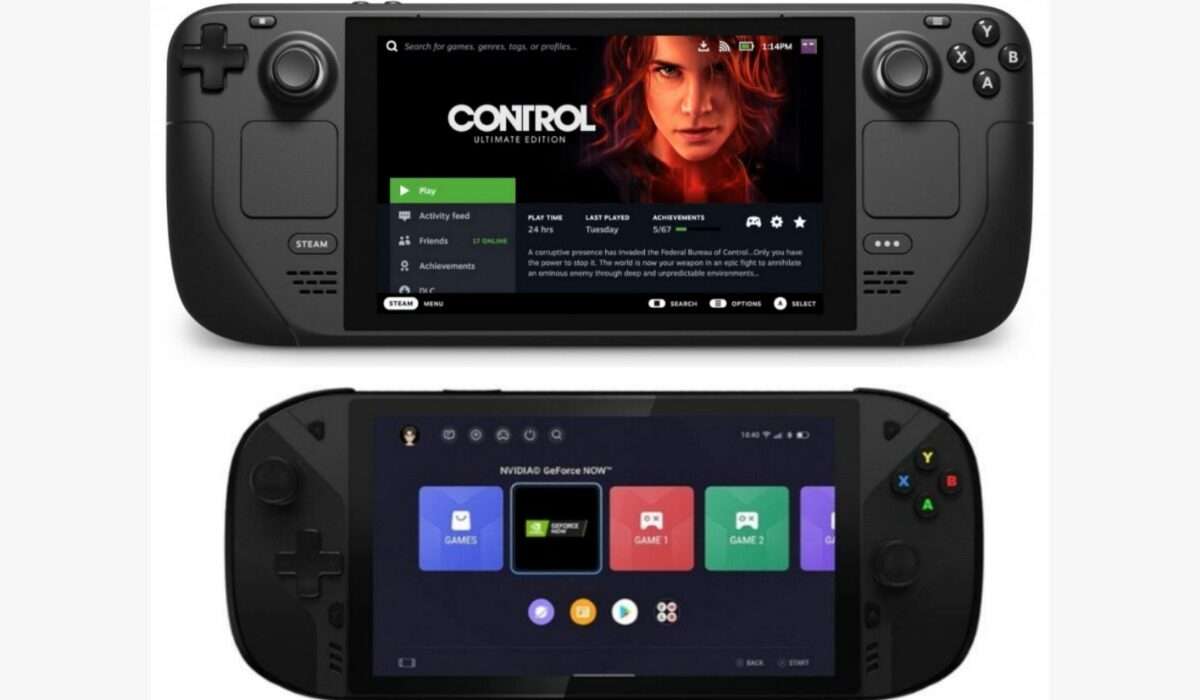
For some time now Lenovo has been working on a gaming console , this might just be it, with the name Lenovo has already gathered in the gaming field this device might just be received with open arms by the gamers out there. For now, here is what we know about this device:
- Battery: 7000 mAh
- OS: Android (modified version for gaming)
- Screen size: 7″ inches
Will The Lenovo Legion Play Support Cloud Gaming?

Nvidia GeForce Now running on the Lenovo Legion Play.
Yes it will, from the leaked images we can see the presence of the Nvidia GeForce Now, which is a cloud gaming platform available on Windows, MAC, Android, etc. But the Lenovo Legion Play is an Android device so therefore it will have access to PlayStore and users will be able to download and play their favourite games on the console.
How about Stadia ? Stadia should run smoothly on this console since it will be powered by Android and Stadia is Google’s ever growing approach to the cloud gaming community. Check out our article on Cloud Gaming here .
Personally I will love to see this device enter the mainstream market and also see how well it will perform or be accepted by gamers out there.
Author:KittysTech
Tech analyst, Collins Eshiet, writes about technology. Follow me on Twitter @KittysTech.
Add MobilityArena as a preferred source on Google
A mobile app will succeed or fail based on the quality of its user experience, so this is something you need to take seriously.
Lots of factors come together to determine how the UX performs, so here are just a few of the areas to take into account if you plan to make optimizations.

Image Source:Pixabay
Streamline the underlying database
It is likely that your app relies on some form of database to function, and if this element is poorly maintained then end users will definitely notice.
Thankfully with modern monitoring tools and troubleshooting strategies, app databases can be kept in check. For example, dealing with index fragmentation in the way described on SentryOne.com will keep queries snappy and stop apps from chugging.
Embrace native interface features
While you might feel like you have a fresh approach to app interactivity which works better than the standards used by modern mobile operating systems , following your instincts and breaking the mould with your UI is not ideal.
In fact, it can create an unnecessary learning curve which will put off newcomers, even if it is theoretically more user-friendly and efficient.
Instead, embrace the specific, native interface quirks of the platforms on which your app runs so that using it feels like second nature to those already familiar with the OS.
Create a cohesive look and feel throughout
Even if your app is made up of many sections and moving parts, there needs to be a consistent through-line of design that connects these together.
If not, it may feel fragmented and might even leave users confused; they could think they have inadvertently launched a separate app if different aspects are very dissimilar.
Usually it is the core interface that remains the same, but you can go a step further by ensuring that your branding and your corporate colors are also present at all times.
Take a tiered approach to revealing functions
This is most useful if your app has deep, varied and potentially complex capabilities, and the idea is that you can avoid intimidating new users if the full range of functions are hidden at first.
Carefully managing the onboarding process is key to retaining users and enhancing the experience in the first minutes and hours of use.
So rather than offering up everything at once, do not be shy about blocking off certain abilities until later.
Avoid clutter
Tying into the idea of keeping functionality lean at first, it also pays to present your app in a way that does not overwhelm the user.
The best apps are those which can give users what they need at a glance, and not require them to spend longer scouring the screen to find the relevant piece of information or menu item they require.
De-cluttering the UI will usually improve the user experience, but be sure to test any changes you make thoroughly before rolling them out. Putting your app through its paces and fixing the issues you find is better than settling for second best.
Author:MobileChic
That motivated, gadget-loving geeky chic who tries to stay on top of things. Unapologetic iFan.
