Add MobilityArena as a preferred source on Google
LG G6 was one of the first smartphones to be announced in 2017, with the announcement taking place at Mobile World Congress in February. LG moved away from the modular experiment that the G5 was. Modular isn’t ready for prime-time yet .
This time, the manufacturer came to the fight with what was more in line with expectations in 2017: edge-to-edge (bezel-less) design, dual camera, water and dust resistance, NFC, fingerprint scanner, and the like. Before we dive into the review proper, starting with the major pros and cons of this device.

LG G6 Review: Quick Pros And Cons
| Key Features | Cons |
|---|---|
| Beautiful edge-to-edge design and solid, premium build with water and dust resistance | Back of the phone is a fingerprint magnet |
| 4G LTE support, including 700 MHz band | Does not let you peg Network Mode to 4G only |
| Large, bright, sharp 5.7-inch OLED display in a handy size | |
| Very solid cameras, both front and rear | |
| QuickCharge 3.0 + Very good battery life |
LG G6 Review: Hardware/Design
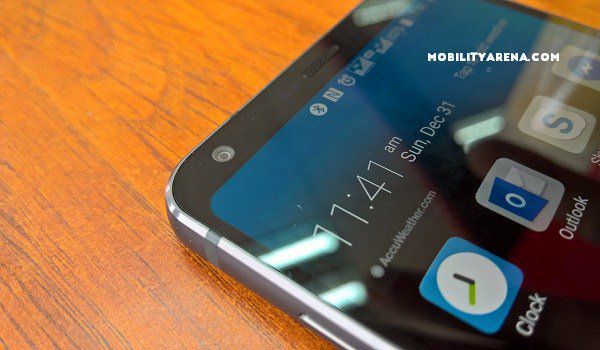
The LG G6’s design is a well thought out job. The big, 5.7-inch edge-to-edge screen surrounded my a tasteful aluminum frame. It isn’t only the screen that has Gorilla Glass 5 protection. So does the back of the phone too.
LG says the phone is IP68 water and dust resistant, as well as built to meet tough military standards of ruggedness. No; I didn’t test these features out, and I have no intention of testing them. I do know that I have picked up the phone with wet hands. If other situations arise in which these features are needed e.g. using the G6 inside the rain (like I did with the Samsung Galaxy A5 2017 ), I will.
The fingerprint sensor is located at the back of the phone, as there is no room for it in front because of the bezel-less frame. The sensor has been 100% accurate and responds very fast. You can appropriate the fingerprint scanner for not just unlocking the phone, but locking galleries, memos and apps.
Update : The fingerprint scanner of our unit gave up months down the road. read all about it here: An LG G6 fingerprint scanner issue is bad news
One interesting design choice is that the sensor houses the phone’s power button. Yes; it does. Push the sensor down as you would any other power button to turn on/off the display. Press and hold for a list of options to shut down or restart. It works well, but took some getting used to.
LG G6 Review: Software
LG G6 runs Android 7 Nougat out of the box with LG’s custom user interface, now called LG UX, laid on top. The UI is simple and light… I have always adjudged LG’s UI to be one of the better ones in the Android ecosystem. I found it easy to use on the LG L90 Dual reviewed years back in 2014 . It has evolved over the years to become better and in my opinion is still one of the finest.
It does not depart greatly from stock Android, save in the Settings menu. The entire interface reminds me of Xiaomi’s IMUI when I reviewed the Xiaomi Mi 4 . LG UX does away with the app drawer too.
One nice touch to the UI is that LG has replaced its hardware SIM switcher button with an onscreen one, and you can adjust its position to suit your preference.
Will the G6 get updated to Android 8 Oreo? Yes; it will. As a matter of fact, the update is already being tested as at the time of writing this review and should roll out soon.
LG G6 Review: Network, Telephony
LG G6 supports 4 GSM bands, 4 3G bands, and 14 4G bands (including the new, rare 700 MHz band ).
If you dive into the phone’s Settings and fish out the Network Mode menu, you will find that you can peg to phone to 2G only, 34G only. but not 4G only. To use 4G, you have to make do with Auto mode – in whch the phone is free to cycle between 2G, 3G and 4G depending on various factors. Bummer.
But the good news is that in the two weeks or so that I have had the phone with me and using it daily in multiple locations in Lagos, I have had a 4G connection between 90 and 95% of the time. There were those odd minutes that the phone would switch to 2G or 3G. In all, not a bad experience.

The G6 holds on to a network signal well. Being a dual SIM phone (two nano SIMs), one can use the SIM Switcher button at the bottom of the screen to conveniently switch active SIMS to make calls on SIM 1 or 2 as one wishes. The SIM switcher button is a great usability hack.
Phone calls on the LG G6 are clear and crisp, except when network is crappy. In-call audio is deep and of great quality.
LG G6 Review: Display and Multimedia
The G6’s OLED display is superb. It is clear, sharp and bright. Auto brightness helps adjust the brightness to available lighting. Sunlight legibility is very good – one of the better ones I have seen. If I wanted to nitpick, I would gripe about how LG could have used an AMOLED display instead of IPS LCD, but that would be nitpicking. As smartphone displays go, this one is really good.
We are looking at 2,880 x 1,440 pixels in resolution here. Plus, it has Always-On display feature that shows you the time, date and notifications without having to wake up the display from sleep.
Audio reproduction via the built-in loudspeakers is superb. Coupled with the bright, clear, sharp, high resolution display, watching a video or movie on the LG G6 is a delightful experience.
LG G6 Review: Photography
Lets start with the LG G6’s selfie camera. It is a 5 megapixel snapper, and it is the finest front-facing camera I have reviewed yet. Here is a sample photo outdoor photo in excellent lighting:

This is the first time I am really digging a selfie camera and so use it without thinking twice or worrying about how pictures will turn out. They turn out great.
LG G6 Rear Dual Cameras

Now, on to the dual camera at the back of the phone. It comprises of two 13 megapixel lens and a dual LED flash.


Those photos have good resolution, sharpness and colour reproduction, in my opinion.
The LG G6’s camera is a very good one and ranks among the best in the market now. You can have a look at our Lumia 950 vs LG G6 Camera head to head for more samples that demonstrate what the camera is capable of.
For video recording, you get super crisp video of 2160p at 30 frames per second, plus stereo audio recording.
LG G6 Review: Multitasking/Performance
The G6 is a flagship. One expects no less than top dog performance from it, and it delivers cleanly. With a Snapdragon 821 processor clocked at 2.35GHz and 4GB RAM, everything runs smooth. I have 46 apps installed and often have up to 10 of them running at the same time. There is no lag while in use under any condition.
If you are interested in benchmark results, here are the scores the LG returns:
- AnTuTu : 147,572
- Geekbench : 1,702 Single-Core Score / 3,698 Multi-Core Score
- 3DMark : 1287 Sling Shot Extreme OpenGL ES 3.1 / 890 Sling Shot Extreme Vulkan
LG G6 Review: Battery Life
Despite my initial fears that the 3300mAh battery would be inadequate given the 5.7 inches display, I am relieved to say that power management on the G6 is very good. On a regular day, I have no need to worry about topping up the battery during the day. It easily sees me through a full work day. And that is with an active 4G LTE connection, two always-on email accounts, social media, web browsing and other activities.
However, when put under much more demanding pressure, I do need to charge it at least once during the day, depending on how much I push it.
In all, I have found no cause to be worried about the battery except when pushing the phone hard. The G6 also has fast battery charging, specifically Quick Charge 3.0) built in. My experience with it was more like QuickCharge 2.0, getting to 50% in about 30 minutes. Average charging time from almost zero to 100% is about one hour 30 minutes.
LG G6 Review: Final Words

The LG G6 has a beautiful, large screen in a nicely-crafted, handy body, looks great, fits smug in the hand, runs smoothly, shoots great pictures and videos, and has good battery life, among others. Perhaps the only thing that irks me is that one is unable to peg Network Mode to 4G Only. I am not a huge fan of the fingerprint-attracting back either. But those are not big issues.
The G6 is highly recommended. This is one of the best smartphones of 2017, and LG did well to back away from last year’s experiment with modularity in the G5. And for about N150,000, it gives you virtually everything the Apple iPhone X or Samsung Galaxy S8 has to offer for much less. The LG G6 is great value for money.
- Don’t miss our mobile phone reviews .
- Join our WhatsApp Group , to be notified of the most important articles and deals,
- Follow us on Instagram , Facebook , Twitter , and YouTube .
Author:Mister Mobility
Digital Skills and Communication Coach | Mobile Phone Connoisseur since 2001 | Tech Blogging since 2004
Add MobilityArena as a preferred source on Google
Smart devices are the future, they are gradually taking over our homes and introducing cutting edge technology to every room in our homes. It wasn’t long ago that the notion of a voice-controlled lighting system seemed like pure science fiction. Now however, such a setup is trivially easy to install. Not only this, but now that smartphones are ubiquitous, with even the most basic devices offering capabilities that were unthinkable not long ago, and the potential for us to control our surroundings from our armchairs has increased exponentially.
Maintaining the perfect temperature in your home used to be a case of manually adjusting a thermostat throughout the day. Using timers allows you to have the thermostat automatically adjust itself at different times of day, but it is still not a fully dynamic solution. By using a smart temperature monitor, you can receive real-time alerts when the temperature or humidity in your home changes and then make temperature adjustments accordingly.
Here we take a look at three of the very best smartphone-enabled temperature monitors available. All of these devices will connect with your smartphone or tablet, allowing you to monitor your home’s temperature in real time.
- Temp Stick
- SensorPush
- iGrill3
Temp Stick
The Temp Stick, from Ideal Sciences, is an easy to use wireless sensor which monitors both temperature (between -40 F to 125 F) and humidity (0 – 100%). By connecting the device to a Wi-Fi network, either in your home or your place of business. You can set the Temp Stick to automatically send alerts to your tablet or phone when conditions in your home change.
The accompanying app is free to install on both Android and iOS devices. From within the app you can see more detailed information as well as a graph showing how the temperature and humidity has changed throughout the day. In addition to the app, there is also a web browser interface, allowing the user to access the device remotely from anywhere with an internet connection.
The Temp Stick is fantastic for monitoring the temperature in your home, but it also has a wide range of potential uses. It can be used to monitor the temperature in rooms where sensitive items, such as instruments, are stored. It can also be used in greenhouses, or anywhere where temperature must be carefully controlled.
SensorPush
The SensorPush is another versatile temperature monitoring device. It boasts an impressive broadcast range and, because it is battery powered, it can be placed inside refrigerators, guitar cases, attics, basements, or anywhere else where temperature control is important to the user. The compact design of SensorPush gives it the edge in situations where portability is an important consideration.
iGrill3
Weber’s iGrill3 is a more specialized device, designed specifically for use with barbecues. By using the accompanying probe, iGrill can monitor the temperature of different meats on the grill. The app can track up to four different probes and users can then monitor the progress of their meat cooking from their smartphone or tablet. The professional grade probes that are used are resilient to heat and wear and tear, giving the product a very long lifespan.
All of these temperature monitors serve their respective purposes fantastically. Both Temp Stick and SensorPush can be used in a variety of situations and are highly portable. iGrill, on the other hand, is designed for a more specific purpose, but it is unbeatable as a barbecuing gadget. You can also see more options here if none of these devices are right for you.
