Add MobilityArena as a preferred source on Google
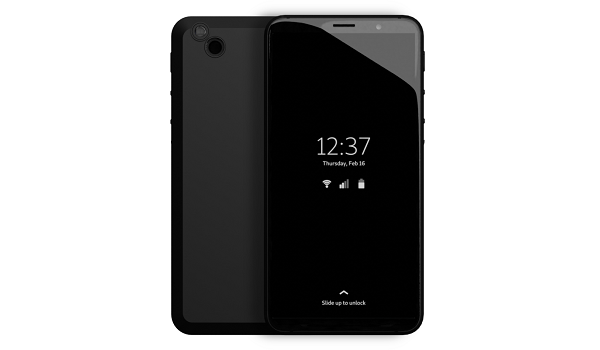
Like its predecessor, the Librem 5 , Liberty Phone runs PureOS. Its specs also include a 5.71-inch display, NXP i.MX 8M chipset, 8 MP selfie camera, 13 MP rear camera, and a 4500 mAh battery. However, it now has 4 GB RAM and 128 GB internal memory, and charging has been bumped up to 18W.
Again, like its predecessor, it is equipped with three (3) hardware kill switches (for cellular modem, WiFi/Bluetooth, camera/microphone). If all three switches are turned off at the same time, then GNSS and all sensors are also turned off. The specially designed hardware enables the user stay in control of the flow of information.
Liberty Phone
- Specs and Features Wireless Network and Software Design, Form Factor, Appearance Internal Hardware Specs Photography, Video Recording Audio, Video Playback Sensors Connectivity Options Miscellaneous Specs and Features
- Price and Availability
- Frequently Asked Questions What operating system does Liberty Phone run? Is PureOS based on Android? What kind of apps does the Liberty Phone run? Where is Liberty Phone made and where to buy it?
- Why is Liberty Phone so expensive? Will Liberty Phone work on Verizon?
- Liberty Phone works on AweSIM
- MobilityArena Buyer’s Guide Verdict
Specs and Features
Wireless Network and Software
- 2G mobile network bands : GSM, GPRS, EDGE 900 / 1800 / 1900 MHz.
- 3G mobile network bands : UMTS, WCDMA, HSDPA 900 / 2100 MHz
- 4G mobile network bands : LTE VoLTE 1(2100) / 2(1900) / 3(1800) / 5(850) / 7(2600) / 8(900) / 20(800) / 25(1900) / 26(850) / 28(700) / 38(2600) / 40(2300) / 41(2500) – differs across variants
- 5G mobile network bands : No.
- SIM Type : Nano-SIM
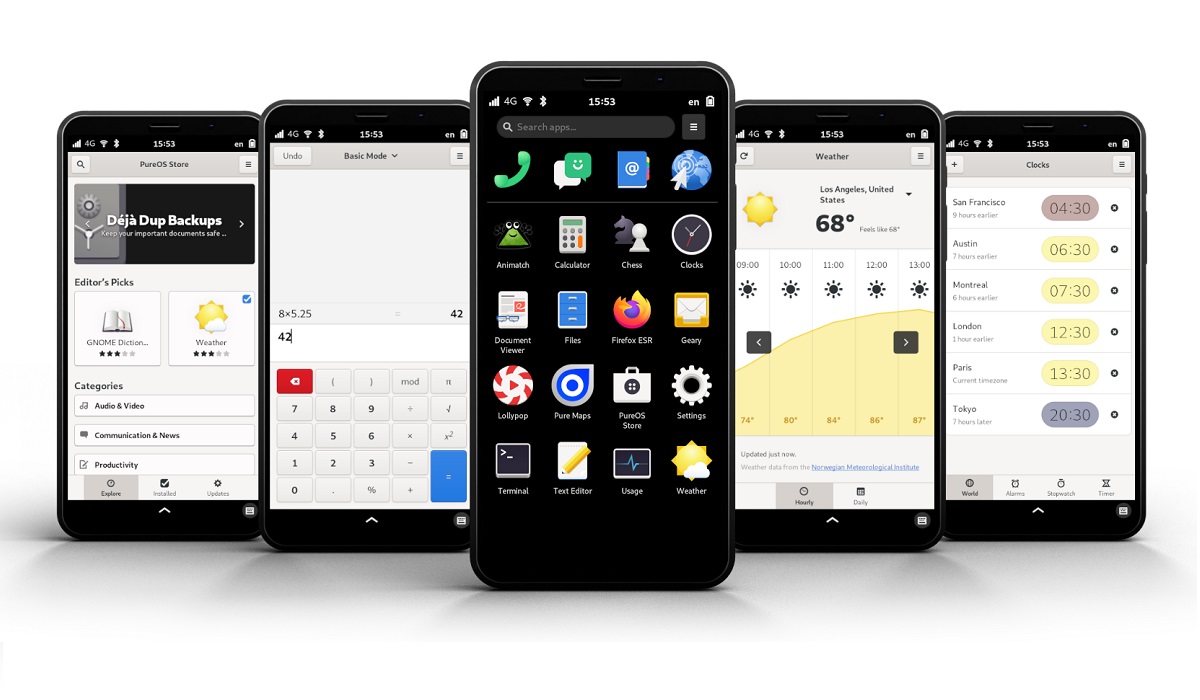
- Software / OS : PureOS
Design, Form Factor, Appearance
- Dimensions : 150 x 75 x 15.5 mm
- Weight : g
- Display : 5.7″, 720×1440 pixels, IPS TFT screen.
- Colours : Dark Grey.
- Physical Build :
Internal Hardware Specs
- Processor Type : 64-bit 1.5GHz Quad-Core, Cortex-A53.
- Processor Name : NXP® i.MX 8M
- Graphics Processor : Vivante GC7000Lite
- RAM : 4 GB
- Internal Storage : 128 GB
- External Storage : microSD storage expansion
Photography, Video Recording
- Rear Camera : 13 MP camera, f1.9 Aperture, LED flash, 1080p@30fps video recording
- Front-facing Camera : 8 MP, f2.0 Aperture, 1080p@30fps video capture.
Audio, Video Playback
- Music Support : PCM, AAC / AAC + / eAAC + / MP3 / AMR – NB / WB / APE
- Audio : 3.5 mm audio jack
- Loudspeaker : Mono speaker
- Video Support : H.264/MP4/MPEG4 player
- FM Radio :
Sensors
- Digital Compass : Yes.
- Accelerometer : Yes.
- Proximity Sensor : Yes
- Ambient Light Sensor : Yes
- Barometer : No.
- Pedometer : No.
- Heart Rate Monitor : No.
- Gyroscope (G-Sensor) : Yes.
- Fingerprint Scanner :
- Face Unlock :
- Iris Scanner : No.
- Motion Sensing / Gesture Control :
- Voice Control : No.
- Intelligent Digital Assistant : No.
- Infra-red Sensor : No.
Connectivity Options
- Bluetooth : v5.3, A2DP
- WiFi : Wi-Fi 802.11 b/g/n, hotspot
- GPS : Yes, Teseo LIV3F GNSS.
- USB : USB 3.0 data, Charging (Dual-Role Port), Video out
- NFC : No.
Miscellaneous Specs and Features
- Battery Type and Capacity : Removable Lithium-Ion 4500 mAh
- Battery Charging : 18W Fast Charging; USB Power Delivery
- Reverse Charging : Yes.
- Announced : July 2023
- Market Availability : 2023
Price and Availability
- Country Availability : USA, Global.
- Price : $2,199.
What operating system does Liberty Phone run?
It runs an operating system called PureOS.
Is PureOS based on Android?
PureOS is a privacy-focused smartphone operating system that is not based on Google’s Android OS. It is based on Linux.
What kind of apps does the Liberty Phone run?
It can run GTK-based apps and Web apps – apps that are built 100% with HTML5 and CSS. Android apps will not work on it.
Where is Liberty Phone made and where to buy it?
The regular variant is designed in the USA and manufactured in China. However, the Liberty Phone is both designed and manufactured (assembled) in the United States. You can buy both from the Purism website.
Why is Liberty Phone so expensive?
Primarily, economies of scale is the first factor. It is not being produced in millions of units, which would have dropped the unit cost.
Secondarily, as a secure, privacy-focused phone, it has extra physical parts and software layers that you won’t find in regular, mush less expensive devices.
Will Liberty Phone work on Verizon?
It supports Verizon’s LTE bands (LTE B2, B4, B13). However, this is no guarantee that it will work, as you can’t activate a new SIM on the carrier without a device on their approved equipment list.
A workaround COULD be to use an already activated Verizon SIM in it to see if it works. If you are getting a new Verizon SIM card, it can only be activated in a recognized/approved device.
Liberty Phone works on AweSIM
It works on Purism’s new AweSIM cellular service in the United States.
MobilityArena Buyer’s Guide Verdict
There are not a lot of secure, privacy-focused smartphones in the market, so if that is something you are looking for, the Liberty Phone offers that. Looking at its mid, dated specs, though, we find it difficult to recommend the Liberty Phone at the $2,200 price tag it carries. You might want to take a look at other secure smartphone options .
Our Buyer’s Guide Verdict is recommendation that we make based on our evaluation the specs of the device. It is a general guide designed to help you understand how much value a smartphone offers for its price. It is not a stamp of quality assessment or an endorsement of the device or of the manufacturers. Be sure to ask questions and use your judgement when buying any device, as MobilityArena may not be held responsible for your buying decisions .
Author:InfoDesk
Add MobilityArena as a preferred source on Google
Threads is the Twitter alternative from Meta, the parent company of Facebook and Instagram. Launched in July 2023, it took off in a blaze of glory, acquiring 100 million users in its first five (5) days of existence. Like Twitter, it is a text-based social networking app, though you can also include images and videos in your Threads posts.
Threads and Instagram
Threads and Instagram are on the opposite ends of the spectrum in terms of focus. Instagram is focused on primarily letting you share media – images and video, while threads is focused on primarily sharing text. What Meta did, though is tie both of these apps together, such that you can login to Threads with your Instagram account. Existing IG users need not create a Threads account; simply login with Instagram and it will create a Threads account with the same username for you.
Also, for now, your accounts on the two platforms are so tied together that if you delete your Threads account, your Instagram account gets deleted, too. Meta has said that this will be addressed soon, such that you can manage the two accounts separately and be able to delete one without affecting the other.

How Threads Works
How does Threads work? It is a clone of Twitter, meaning that it pretty much works the same way. If you already use twitter, you already are familiar with how Threads works. Just sign in and start sewing or threading (which of these two words do you prefer to use?).
Steps To Share Threads Posts On Twitter

Share Threads Posts On Twitter, open the post and tap on theShareicon.
Step 1 : Ensure you are logged in to both Twitter and Threads apps, then launch the Threads app on your iPhone or Android phone.
Step 3 : Tap on the Share icon (that’s the icon circled in red in the screenshot above).
Step 4 : Select the Tweet option (follow the red arrow in the screenshot below) .
<img loading=“lazy” src=“https://mobilityarena.com/wp-content/uploads/2023/07/tweet-from-threads.webp" onerror=“this.onerror=null;this.src=‘https://blogger.googleusercontent.com/img/a/AVvXsEhe7F7TRXHtjiKvHb5vS7DmnxvpHiDyoYyYvm1nHB3Qp2_w3BnM6A2eq4v7FYxCC9bfZt3a9vIMtAYEKUiaDQbHMg-ViyGmRIj39MLp0bGFfgfYw1Dc9q_H-T0wiTm3l0Uq42dETrN9eC8aGJ9_IORZsxST1AcLR7np1koOfcc7tnHa4S8Mwz_xD9d0=s16000';" alt=“Tap the “Tweet” option to share a Threads post to Twitter. - 5”>
After tapping on theShareicon, select Tweet from the options presented to you.
Step 5 : You will be redirected to Twitter with all the contents of the Thread post. Simply tap on Tweet , and it gets posted to your Twitter account.
Sharing a post from Threads to Twitter is as simple as sharing an article from a Web page to Twitter. The processes are identical.
The above steps/process work the same way on both Android and iOS devices. Threads is currently available only as an app for both Android and iOS users. Perhaps at some time in the future, a Web desktop version will be released. In the meantime, enjoy sewing those threads and sharing them to Twitter.
Download Threads For Android and iOS
Author:Mister Mobility
Digital Skills and Communication Coach | Mobile Phone Connoisseur since 2001 | Tech Blogging since 2004

