Add MobilityArena as a preferred source on Google
Microsoft’s Lumia 950 – alongside its bigger brother, the 950XL, is the first smartphone to run Windows 10 Mobile out of the box and is the long awaited upgrade to the Lumia 930 . I have had a unit with me for a little over two weeks now and already did a first impressions post about the 950 . In this Lumia 950 Review, I give you details of what using the Lumia 950 on a daily basis has been like, but don’t forget to go through the detailed Lumia 950 specifications either.
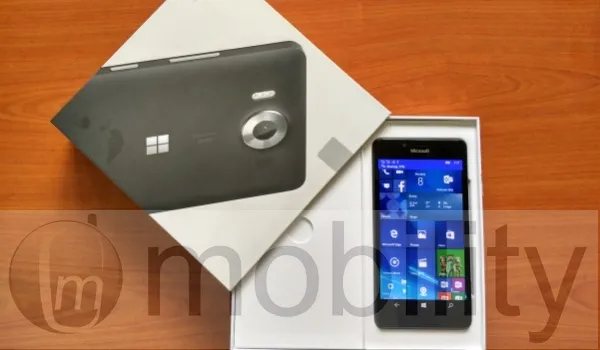
Pros : 1. beautiful, vibrant display. 2. Handy size. 3. Very good camera. 4. Iris recognition is uber cool. 5. Continuum: ability to use your mobile as a PC. 6. Feature-packed calculator. 7. Very comprehensive calendar. 8. Outlook email handles attachments properly.
Cons 1. All-plastic build not exactly premium. 2. Battery life unimpressive. 3. It heats up a lot. 4. Some OS issues with Windows Phone 8 remain unfixed.
Lumia 950 Review: Design
The design of the Lumia 950 is nothing to sing about. What we have here is a black polycarbonate slab. The 950’s predecessor, Lumia 930 , has a much more premium build, which the much cheaper Lumia 650 has taken after. Why Microsoft has left the Lumia 950 looking so plain is beyond me.
Beyond the look, it feels solidly built and is handy (it has a 5.2-inch display) and is lightweight. The polycarbonate rear shell is removable and the battery is removable too. There’s a microSD card slot to augment the 32 GB of built in storage.
Continuum: Your smartphone as a PC
Now, if you have ever dreamed of using your smartphone as a PC, it is a reality today. We hooked up the Microsoft display dock to a monitor, keyboard and mouse, and then connected it to the Lumia 950. What we ended up with was a workable PC. After a brief introductory video, I was able to work on the large screen using the apps on the 950. I had wondered if a smartphone processor would be adequate for working on such a large display. It turned out that I had nothing to worry about. I was able to use Word, browser, file manager, and more via Continuum. Basically, everything that I use my laptop for already.
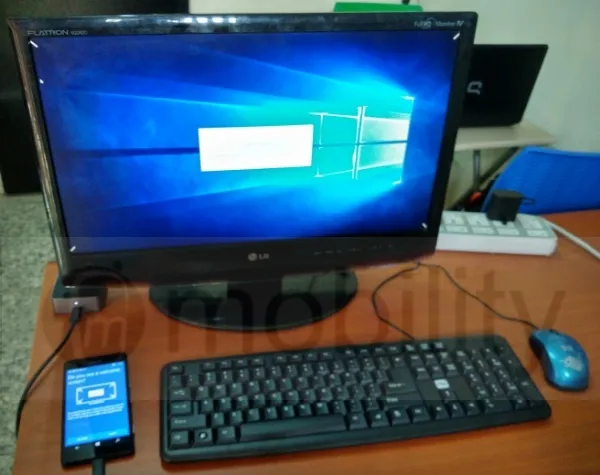
Continuum isn’t perfect yet though. Some apps need optimizing for the big screen. For example, the Facebook app was displayed in the narrow vertical mode that it displays with on the phone. It would have been nice to see it adjust into a wide, split-screen mode on the monitor. But then, it occurred to me that the way I use Facebook on my laptop/PC is in the browser, and I wouldn’t need the app anyway. Microsoft Edge browser works very well via Continuum, rendering desktop views of sites. There is tabbed browsing, just the way you expect it to work on a PC.
Beyond the need for optimization, some apps are also not yet supported. Such apps appear grayed out in the Start Menu. An example is Twitter. Again, the way most people use these services on PC is via the browser, so I do not think that it is much of a big deal. Still, hopefully, such apps will get Continuum support for those who may be interested in using them that way.
Here is a short video clip we recorded during our usage of Continuum:
Lumia 950 Review: Messaging
The 950 has support for Skype messaging built into the Messaging app. Skype messages are handled like SMS right from in there. Of course, there are 3rd party messaging apps available, including WhatsApp, Skype, BBM, Facebook Messenger, Telegram, and WeChat, among others.
Lumia 950 Review: Multimedia
I am disappointed with the audio output of the loudspeaker. While it is loud enough, it lacks the quality that I have been used to on the Lumia 930 and 1520. The sound quality here is tinny, lacking bass. Plugging in an audio or Bluetooth headset redeems the situation a bit, as the audio quality is much better that way.
The new music app, Groove Music, works well, delivering what you would expect from a modern music app. I also like that it has an option that automatically retrieves and updates missing album art and metadata. You get a free 30-day trial of Groove Music Pass, if you’d like to use the service to stream and download music.
Watching video on the gorgeous display is just beautiful. Again, I wish the audio quality was better, but it will do. You can project playing video to a large display, and there is also a built-in video editor.
Lumia 950 Review: Strengths
We have a very sharp and clear display here with Gorilla Glass 3 protection. It is AMOLED, and so we are looking at very deep blacks and vibrant colours.
The Lumia 950 is a very powerful smartphone. This unit returned an AnTuTu score of 61,907, though AnTuTu’s database gives the phone’s best score ever as 70,605 , putting it in 11th place among the top dogs.
Built into the 950 is an eye scanner that has turned out to be a delight to use. Once setup (which was quick and easy), the iris recognition feature works very well. Anytime the display of the 950 is woken up, the scanner starts looking for your eyes to verify their identity and if found, it hollas at you with an onscreen message and unlocks the phone. Iris recognition is so much more convenient than entering a password or using fingerprint recognition. In this case, the failure rate is about 5%, and it may be me, but it appears that the iris recognition gets better and better with use.
Productivity is a strong forte of the Lumia 950. The built-in calculator is superbly feature-packed. It includes a standard calculator by default, but also has options for Scientific, Programmer, and Dae Calculation, as well as Volume, Length, Weight and Mass, Temperature, Energy, Area,, Speed, Time, Power, Data, Pressure and Angle converters.
Outlook Calendar is also very comprehensive and lovely to use. It supports 3rd party services including Google Calendar, Facebook Calendar, as well as Holiday Calendars from scores of countries. And when it comes to creating and editing Office documents, the built-in Excel, Word, and PowerPoint applications work very well.
Last but not the least is Outlook email . Now, I can stop my yearly rant about how Windows smartphones are unable to reply to emails with attachments or send attachments of all file types right from inside the mail app. Outlook email handles attachments perfectly. Not only that, it supports a range of 3rd party services, including Google, Yahoo, iCloud and others. Of course, support for Exchange, Office 365, Live, MSN, and Hotmail is there.
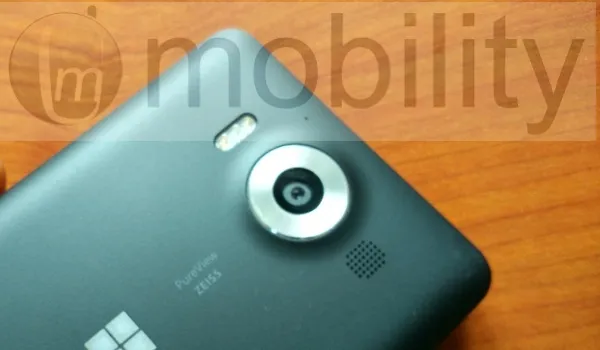
The Lumia 950’s 20 megapixel camera with Carl Zeiss optics and triple LED flash is really, really good. It produces great details and is accurate with colours. I like that it has a dedicated camera button on the side, something that is a rarity these days. There is 4k video recording here as well, and the front-facing 5 megapixel camera takes good shots too. It looks like Microsoft has been able to sustain Nokia’s legacy with camera performance. I have a separate post where I will showcase samples of photographs taken with the Lumia 950. There is a built-in photo editor as well.
Lumia 950 Review: Weak Spots
The Lumia 950’s Achilles’ Heel is its power management. The battery performance is very unimpressive. On an average day, I take the phone off the charger at 100% around 4am, and by 8.30am, it is down to around 30% charge left. I can recall a few times that I went to bed with the battery at around 50% and I woke up to meet the phone switched off and battery empty. Oh; and it heats up badly during use. Sometimes, it is warm even in idle state. I had a hectic week at Social Media Week Lagos, and keeping the phone alive so I could use it was a chore. Bummer.
Other weaknesses involve OS issues with Windows Phone 8 that have remain unfixed. For example, the Store is often a bit sluggish in loading apps and handling updates, 3G Only network mode has been left out, and the grating waits when launching or switching between apps.
Lumia 950 Review: Conclusions
The Lumia 950 is a dual SIM (nano) 4G smartphone. It handles everything that the average modern user expects from a smartphone. People who need specialised apps though may need to look elsewhere, but the everyday smartphone user will not miss any essential apps, so do not let talk of Windows smartphones not having as many apps as Android or iOS throw you if you are an average user.
Continuum extends the frontier of what we can do with a phone and how we can use it. Having used it, I love the concept and could use this daily, but the Lumia 950’s great weakness is just a bit too much to swallow for me. That poor battery performance means that on a hectic day, I am carrying a charging cable around and plugging it in at every opportunity.
If you can live with the battery life, this Windows 10 Mobile flagship is a very capable smartphone in more ways than one. Whether for productivity, messaging, multimedia or social media, it handles things like a champ.
- Don’t miss our reviews .
- Follow us on Instagram , Facebook , Twitter , and YouTube .
Author:Mister Mobility
Digital Skills and Communication Coach | Mobile Phone Connoisseur since 2001 | Tech Blogging since 2004
Add MobilityArena as a preferred source on Google
The Mp3skull web site provides free downloads of all kinds of audio files, including mp3 music. The flip side is that much of the content of the site were unauthorized copies of copyrighted music.
But music labels were not playing any more and illegal download sites and services are now taking a hit here and there. The site wasn’t spared. As a matter of fact, it was the target a massive move to tackle illegal music downloads.
Sony, Warner, Universal and the Recording Industry Association of America, jointly filed legal proceedings against the site, and the court ruled that MP3 Skulls pay the sum of $22 million. The ruling also required that the domain name be handed over.
Yes; the Empire (pun intended) struck back with its full might. You do know the TV series, Empire ; right? Right. Connect the dots.
- A Quick Historical Background of MP3 Skulls
- The legal battle against MP3Skull.com
- The MP3Skull battles are far from over
A Quick Historical Background of MP3 Skulls
The web site was founded in 2010. It was particularly notorious for linking directly to MP3 files on other websites. So it was not only guilty of pushing out music content but of hot-linking while doing so.
Because of this, MP3 Skulls suffered a huge drop in ranking when the search giant took a swipe at pirate sites in 2013. Before then, it was one of the top ranked web sites on the internet. Of course, the site lost a lot of traffic too as a fallout of that. The original MP3Skull.com site finally went offline about three years after. But that was not all there was to the drama.
Aggrieved music companies wanted to send a powerful message to the pirate media download sites, and MP3 Skull was a big target – big enough to create the kind of shock waves needed in the industry. As already stated earlier, a group of some of the leading companies in the industry filed a suit against the operators of the site.
The legal battle against MP3Skull.com
According to Forbes , nobody from the illegal music download site showed up in court once all through the process. So, the original website is gone. Hurrah; right? Not so fast. In its place has risen a handful of alternative domain names that are variants of the original site.
Are these owned by the people behind the original site? Whoever owns them is playing smart, as they have been up and running for months now.
Odd though that the original MP3Skull.com site itself had been unavailable long before the court’s ruling. Was that an attempt by the owner/s to evade detection and apprehension? The battle against piracy and intellectual property violations is a tough one. But it is a battle that is very real.
There is even a Windows Phone app that allows users to play and download music on their phones for free. One wonders how many MP3 Skull clone sites and apps exist out there. A new one shows up every other year.
The MP3Skull battles are far from over
Despite the hit from the legal action by the consortium and the subsequent shutdown of the main site, new sites bearing the same name and using different variations of the domain name keep showing up. All you have to do is run a search for the name and they pop up.
Taking down the various MP3Skull.com mobile apps is clearly the easier part of the battle against MP3 piracy. All that producers have to do is work with Google and Microsoft or any other app store developers.
Getting rid of the multiple websites will be the harder part of this fight. Websites spring up every other month and from the remotest servers around the world. It looks like this fight against illegal music download websites is going to be a long one.
MP3skull.com lives on. Empire needs to buckle up, and may the Force be with us all. Mp3skull and similar sites are attractive for providing easy access to a wide range of music, it is important to respect the rights of content creators and avoid downloading copyrighted material without permission.
Related : How to download YouTube videos . How to download music from YouTube .
- Don’t miss our reviews .
- Follow us on Instagram , Facebook , Twitter , and YouTube .
Author:Mister Mobility
Digital Skills and Communication Coach | Mobile Phone Connoisseur since 2001 | Tech Blogging since 2004
