Add MobilityArena as a preferred source on Google
Released in November 2019 with MIUI 11 based on Android 9, Xiaomi Mi Note 10 Pro went on to receive Android 10 and later MIUI 12 based on Android 11. And now in April 2022, it is receiving MIUI 13.0.1.0RFDMIXM. As exciting as that might sound, it is not based on Android 12, so sorry if you were expecting that.
There are three models in the Mi Note 10 family. They are the Mi Note 10, Mi Note 10 Pro, and the Mi Note 10 Lite. The Lite has already received MIUI 13 Global with Android 12. It is odd that the other two models, which are higher in rank, are not getting Android 12. Still, it is a good thing that the almost 3-year old phone is getting the latest version of Xiaomi’s graphical user interface.
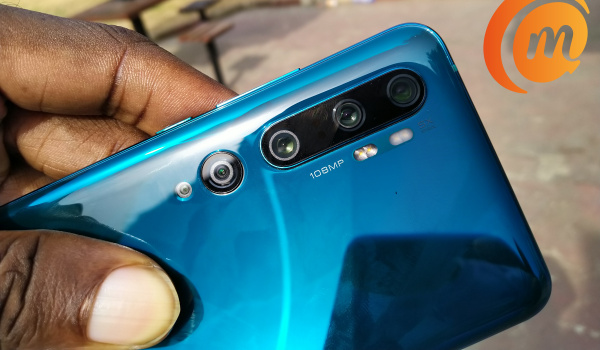
The Mi Note 10 Pro is the big guy with five camera lenses at the back, and what a capable array it is. It includes a 108-megapixel main lens and two telephoto lenses. Yes, two. And how I love the phone. It felt good to wake up to the MIUI 13 update notification this morning.
Having run and installed the update, there are no visual changes to the user interface, as far as I can tell. MIUI 13 looks just like MIUI 12. One addition I quickly spotted was memory extension, which allows you to boost the RAM of the phone with extra 3 GB of extended RAM .
The MIUI 13 update is 545 MB in size and includes the April 2022 security patch. If you haven’t been promoted about the update on your device, it will happen soon enough. OTA updates are often in phases.
Will the Android 12 update come to my darling Xiaomi Mi Note 10 Pro? I doubt it, but it would be a pleasant surprise if it did. If it interests you, check out my Xiaomi Mi Note 10 Pro review and long-term review .
What is new in MIUI 13?
Xiaomi’s MIUI 13 update isn’t as big as its predecessor was, but it brings improvements that make the user experience better. The improvements that MIUI 13 brings to the table include improved performance, better system resource management, new live wallpapers, new widgets, improved multitasking, new privacy and security features, and longer battery life.
Which phones will get MIUI 13?
The Xiaomi smartphones that are eligible for MIUI 13 include:
Xiaomi Mix 4 Xiaomi Mi 11 Xiaomi Mi 11 Ultra Xiaomi Mi 11 Lite 5G Redmi K40 Redmi K40 Pro Redmi K40 Pro+. Redmi K40 Gaming Edition Redmi K30 S Ultra Redmi-Note 10 Pro 5G Xiaomi CVI Xiaomi Mi 10 Xiaomi Mi 10 Pro Xiaomi Mi 10S Xiaomi-Mi 11i Xiaomi Mi 11 Lite Xiaomi Mi 11 Lite 5G Xiaomi Mi 11X Xiaomi Mi 11X Pro Xiaomi Mi 10T Xiaomi Mi 10T Pro Redmi K30 4G Redmi K30 5G Redmi K30i 5G Redmi K30 Pro Redmi K30 Zoom Redmi K30 5G Speed Edition Xiaomi Mi 11T Redmi Mi 11T Pro Little F2 Pro POCO F3 POCO F3 GT POPO X3 Pro POCO X3 GT. Xiaomi 11 Lite 5G NE Xiaomi Mi 10 Lite Xiaomi Mi 10 Lite Zoom Xiaomi Mi 10i Xiaomi Mi 10T Lite; Xiaomi Pad 5 Xiaomi Pad 5 Pro Xiaomi Pad 5 Pro 5G Redmi 10 Redmi 10 Prime Redmi Note 10 Redmi Note 10S Redmi Note 10 5G Redmi-Note 10T Redmi Note 11 Redmi Note 11T Redmi Note 11 JE (Japan) Redmi Note 11 Pro Redmi Note 11 Pro + (China) POCO M4 Pro 5G Redmi K30 Ultra Redmi K20 Redmi K20 Pro Redmi K20 Pro Premium Edition Xiaomi Mi 9 Xiaomi Mi 9 SE Xiaomi Mi 9 Lite Xiaomi Mi 9 Pro 5G Xiaomi Mi 9T Xiaomi Mi 9T Pro Xiaomi-Mi CC 9 Xiaomi Mi CC 9 Pro Xiaomi Mi Note 10 Xiaomi Mi Note Pro Xiaomi Mi Note 10 Lite Redmi Note 8 2021 Redmi-Note 9 4G Redmi Note 9 5G Redmi Note 9 Pro Redmi Note 9 Pro Max Redmi-Note 9T 5G Redmi Note 9S Redmi-Note 10 Pro Redmi Note 10 Pro Max Redmi 9 A Redmi 9AT Redmi 9i Redmi 9A Sport Redmi 9i Sport Redmi 9C Redmi 9C NFC Redmi 9 Redmi 9 Active Redmi 9 Prime Redmi-10X 4G Redmi 9T Redmi 9 Power Redmi-10X 5G Redmi10X Pro Redmi Note 8 Redmi Note 8Т Redmi Note 8 Pro Redmi Note 9 Little X3 Little X3 NFC; POCO M3 POCO M3 Pro POCO M2 POCO M2 Pro POCO M2 Reloaded LITTLE C3 LITTLE C31 Xiaomi MIX FOLD
Author:Mister Mobility
Digital Skills and Communication Coach | Mobile Phone Connoisseur since 2001 | Tech Blogging since 2004
Add MobilityArena as a preferred source on Google
The word “cloning” means to duplicate. As such, SIM cloning is the process in which a legitimate SIM card is duplicated. It means creating another SIM card with the exact same information as the original. When the cloning is completed, the cloned SIM card’s identifying information is transferred onto a separate, secondary SIM card.
- What danger are you in if your SIM card is cloned?
- SIM Cloning: What data is copied to duplicate a SIM card?
- How is SIM Cloning done? SIM Cloning: Can a SIM card be cloned remotely? Is SIM Cloning illegal?
- SIM Cloning: How to prevent your SIM card from being duplicated
- SIM Cloning: How to tell if your SIM card has been cloned
- SIM Cloning: What to do if your SIM card has been duplicated
What danger are you in if your SIM card is cloned?
If your SIM card gets cloned, the hacker has access to all your incoming calls and SMS. They can also make calls and send messages from your number. If you have mobile banking active on that line, they can spend or transfer money from your bank account. They can pretty much pretend to be you (identity theft) in a number of ways that are detrimental to you.
Note that both your original SIM card and the cloned SIM will be active. You would probably be no wiser about what is happening after the duplication has happened.
SIM Cloning: What data is copied to duplicate a SIM card?
These two codes are extracted from the original SIM card and imprinted into a blank SIM to create the duplicate. Because it is these two keys that authenticate the user, the duplicate SIM is then able to connect to the mobile network.
How is SIM Cloning done?
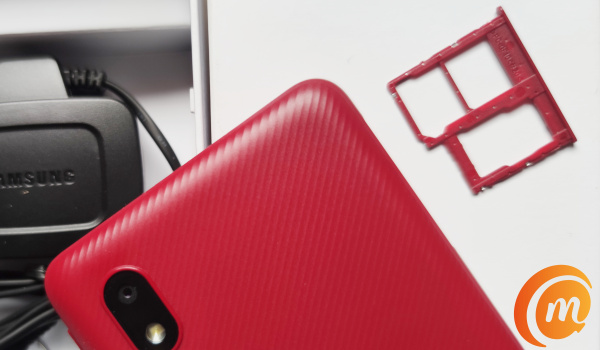
To duplicate or clone a SIM card requires four things – a PC, a clone software, a blank SIM, and a gadget called a SIM card reader. Of course, the original SIM is assumed.
Using a USB cable, the SIM card reader is connected to a PC that has a clone software installed. The authentic SIM is inserted into the card reader and the required data is copied from it to the PC. The duplicate card is then inserted into the reader and the data is then copied to it. Voila, the cloned SIM is ready.
No; it isn’t a straightforward process, and modern SIMs can be difficult to clone, thanks to security features built I to them. Some of those security features are dependent on you using them, as I highlight further down in this article). As such, sometimes, the duplicating process fails. But the above is a good idea of how SIM cloning is done.
SIM Cloning: Can a SIM card be cloned remotely?
Is it possible for someone to clone your SIM card without getting physical access to it? Yes; it is possible for someone to clone your SIM card remotely, but it is not easy or cheap. Which makes it an uncommon occurence. To clone a SIM card remotely requires the most cutting edge of equipment.
Is SIM Cloning illegal?
In many countries, phone cloning is illegal, especially when you consider that it is a form of identity theft and so is used for fraudulent activities. Tampering with a SIM card is illegal in most places.
SIM Cloning: How to prevent your SIM card from being duplicated
For the most part, physical access is key to SIM cloning. That means, that a SIM card can be cloned if you allow a 3rd party to get their hands on your SIM card. Duplicating a SIM card remotely is difficult, costly, and so is not common.
To protect your SIM card from being cloned, don’t let others get their hands on it. For example, if you are sending in your smartphone for repairs, remove your card and keep it away or put it in a spare phone that you can use.
Secondly, enable a PIN on your card. If you have a security PIN active on your card, the process of duplicating it cannot be completed without the hacker entering that PIN. This is different from having a password or PIN on your phone. Your mobile provider allows you to set a PIN on your SIM card. Do it.
SIM Cloning: How to tell if your SIM card has been cloned
There are tell-tale signs that can help you figure out if your SIM has been duplicated and is being used by someone else.
- If you are getting replies to SMS that you didn’t send. The incoming messages read like a continuation of a conversation that you haven’t held. That’s a sure sign.
- If you are getting bank debit/credit alerts for transactions you didn’t initiate. It is possible that someone is using a cloned SIM card to carry out those transactions.
- You get a lot of calls that stop ringing before you can answer them. Someone else might be answering your calls from a duplicate. This is because when a SIM card is cloned, both lines get incoming calls, but only one can answer them.
SIM Cloning: What to do if your SIM card has been duplicated
SIM cloning has been around for years. In the early years of GSM technology, security measures were not so strong. But that is no longer the case. Still, the risk of falling victim is there. To protect yourself from, keep your SIM card away from others, and also have a SIM PIN enabled on it. All the best.
Author:Mister Mobility
Digital Skills and Communication Coach | Mobile Phone Connoisseur since 2001 | Tech Blogging since 2004
