Add MobilityArena as a preferred source on Google
Of course, we all love to see a good movie or series, and Netflix helps to bring it right to our doorstep at very little cost. We talked about a few streaming steps in this article . Despite the fact that movie streaming have been simplified to an ordinary man’s understanding, most people are not still buying into the idea of streaming movies.
When we say “most people”, the greater number of people in this category fall within the African environment. So what has been done to bring its streaming platform closer to Africa?
Free streaming is Netflix’s solution to this issue! When we say free streaming, you might think of ads, but this feature is totally free from ads. At the moment, this free streaming is only accessible to Netflix users in Kenya, and with a few limitations.
Features And Limitations Of Netflix Free Streaming Plan

- Accessibility : At the moment this feature is only accessible to Android device users, so people using an iPhone will not be able to access this feature. This stands as a limitation, but still it doesn’t mean much since the major mobile operating system in Kenya is Android.
- Sustainability : The prospect of this free streaming offered might not last long. Why? This is just a marketing strategy by the company aimed at scooping prospective subscriber’s from the Kenyan market. The Director of Product Innovation of Netflix Cathy Conk clearly said that many people in Kenya haven’t watched Netflix before, so what Netflix sees is just uncultivated grounds!
- Fewer Movies And Shows : The free streaming option will also mean less movies and shows for those using it. This is only natural on the part of Netflix to preserve it’s business and also showcase the Netflix streaming option to the East African viewers.
- No Downloads Or Casting : On this free streaming service you will not be able to download movies or episodes for offline viewing, neither will you be able to cast shows from your phone screen to your TV.

Free Streaming In Kenya.
The African movie entertainment industry is gradually developing to maturity as we have seen a couple of well written movie scripts that not only showcase the African setting but also our life and culture. This means growth not only for Netflix but also the movie industry as more people will be interested in streaming indigenous movies such as Lionheart, Quam’s Money and Namaste Wahala .
Will this free streaming feature debut in other African countries? At this moment we can not tell, but we will certainly drop an update if this feature finds its way elsewhere.
Author:KittysTech
Tech analyst, Collins Eshiet, writes about technology. Follow me on Twitter @KittysTech.
Add MobilityArena as a preferred source on Google
As an iPhone lover and user, I have been excited about iOS 15. Now that it is finally out, I have spent some time looking at the new features it brings to the table, and it has plenty. But I have a few fantastic ones that I think every iPhone user should jump on.
Apart from the new iPhone 13, 13 mini, 13 Pro, and 13 Pro Max , other iOS 15 supported devices include the following:
- iPhone 6s
- iPhone 6s Plus
- iPhone SE (original model)
- iPod Touch (7th-generation)
- iPhone 7
- iPhone 7 Plus
- iPhone 8
- iPhone 8 Plus
- iPhone X
- iPhone XR
- iPhone Xs
- iPhone Xs Max
- iPhone 11
- iPhone 11 Pro
- iPhone 11 Pro Max
- iPhone SE (2020)
- iPhone 12 mini
- iPhone 12
- iPhone 12 Pro
- iPhone 12 Pro Max
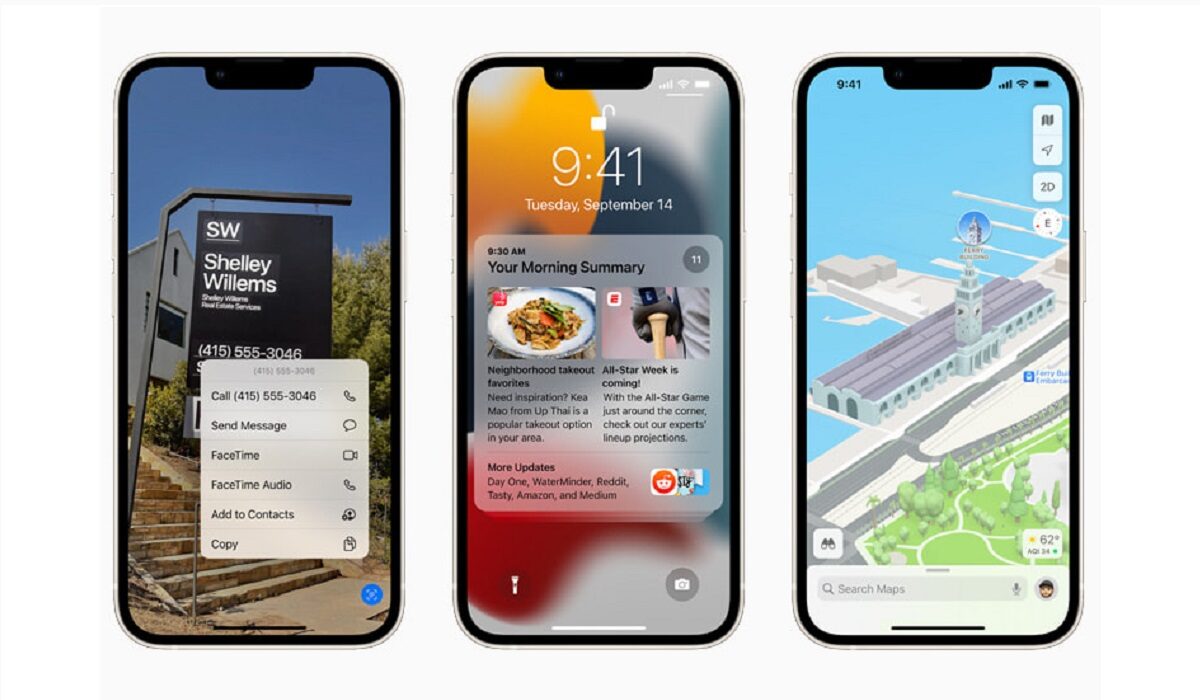
This means that if you own any one of the above models, you can update it to iOS 15 and enjoy the new features. Note that some older models may not get some features, because of their older processors and other hardware.
Mute Call Alert
If you are on a call and mute yourself in error and so proceed with the conversation, iOS 15 will play a sound to alert you that you are muted. Sometimes, it is the little things that make a huge difference, and this is one of them.
Press Phone Numbers To Call
Talk about convenience: you can now long press phone numbers and addresses on images to call and get directions, respectively. Download or take a photo of that banner, and long press to get the information you need.
Copy Text From Images
Similar to the above feature, the Live Text feature lets you take a picture and copy text from it. You can then paste the text where you need to use it. This is similar to Google Lens . and, yes; you can also point your camera at an object to look up information about it. This is a great tool for explorers and inquisitive people.
System-Wide Translate
Translation has been available for iPhones before now, but for the first time, it is now available system-wide, meaning you can use the feature anywhere inside your iPhone. Yes; you can select text from photos to translate too.
Protect Your Email Activity
Block Email Trackers
Still on email security, iOS 15 now lets you block tracking pixels in Mail. That way, senders who are trying to monitor you cannot not know when you have opened their emails. Yes!
System-wide drag and drop
You can now drag and drop elements anywhere in your iPhone running iOS. Think of how drag-and-drop works on your desktop computer. Very convenient.
Web Browser Address Bar Now Easily Accessible
This i something that Mister Mobility has advocated for years . In iOS 15, Apple has moved the address bar down to the bottom of the page. The advantage is that you do not have to reach for the top of your phone when you need to type a Web address or run a search.
Find Your Stolen Phone Even When It Has Been Powered Off
Before now, once your stolen iPhone is turned off, Find My Phone is useless in locating it. That has changed. Now, even if the thief has switched off your iPhone, your phone will remain findable. This is a great bonus for the security of your iPhone.
That is it for now. There are lots more iOS 15 features than what I have highlighted on this page, so look out for them as you use your updated Apple iPhone. If you are yet to have iOS 15 on your supported device, on your device, go to Settings > General > Software Update . Once the update notification appears, go ahead to download and install it. Welcome to all the goodies.
You are reading Mobility Arena .
- Don’t miss our reviews .
- Join our WhatsApp Group , to be notified of the most important articles and deals,
- Follow us on Instagram , Facebook , Twitter , and YouTube .
Author:MobileChic
That motivated, gadget-loving geeky chic who tries to stay on top of things. Unapologetic iFan.
