Add MobilityArena as a preferred source on Google
Social media platform Twitter has included a new feature to its “Lists”, helping users discover new lists and adding them to their feed. Twitter made the announcement through its account, they also tweeted a short clip that shows users what this feature is like and how to use it.
https://twitter.com/Twitter/status/1273727663123898371
Users will also now see a “Show More Recommendations” option in the “Discover new lists” section that will let them search for more lists that they may be interested in. This feature is currently being released to the Android and iOS platforms gradually, with no news yet regarding the Web client version.
The lists would turn up in the search results based on who the user follows, the current lists that the user follows, and the content the user and lists tweet about. Lists have been a part of the platform for a long time, helping users curate the kind of content that they see on their timelines.
Twitter has been making a number of helpful updates of recent, as certain iOS users can now “hear” tweets through the new Voice Tweets feature recently rolled out on the platform. This feature gives users up to 140 seconds of audio time on any individual voice tweet.
References
- Source ;
- Source ;
- Source .
Author:Alfa Baye
Staff Writer
Add MobilityArena as a preferred source on Google
Apple has announced iOS 14, the latest version of its mobile operating system. The new OS introduces a number of new features, most of which have been available to Android and Windows 10 Mobile users for years. What are these new features you will experience when you get iOS 14 on your iPhone?
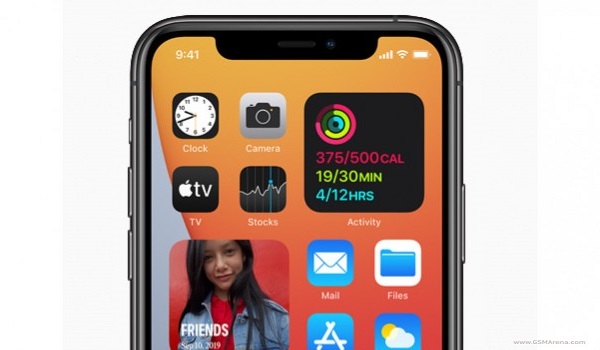
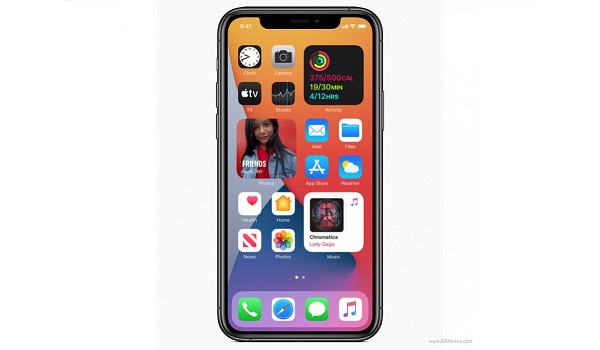
The new features include homescreen widgets , an app drawer called App Library , picture-in-picture mode, App Clips (which allows you to use an app without having to download it to your iPhone), Siri translation , CarPlay (a feature that turns your iPhone into a key for the 2021 BMW 5 Series and other upcoming automobiles), smart home controls , more privacy control, improvements to Maps and Messages , the option to select default browser and email app, as well as a number of other less glamorous features.
Which iPhones will get iOS 14?
iOS is gradually inching closer to the level of functionality and features available on Android smartphones. If you already own an iPhone, or are planning on buying one, you are probably wanting to know which ones will get iOS 14; right? That is a valid concern, and we have the complete list of all Apple iPhones that are eligible to receive the iOS 14 update.
Which phones are getting iOS 14? Will my iPhone get iOS 14 update?
The following iPhone models will get iOS 14 update:
- iPhone 6S
- iPhone 6S Plus
- iPhone SE 2016
- iPhone 7
- iPhone 7 Plus
- iPhone 8
- iPhone 8 Plus
- iPhone X
- iPhone XS
- iPhone XS Max
- iPhone XR
- iPhone 11
- iPhone 11 Pro
- iPhone 11 Pro Max
- iPhone SE 2020
In all, 15 existing iPhone models are eligible for the iOS 14 software update. If you own any iPhone model that is older than iPhone 6s (released in 2015), you are out of luck and stuck on iOS 13 for life. If you want a taste of version 14, you have to buy a newer iPhone model. Feel free to buy any of the above models released between 2015 and now to be able to get iOS 14 and enjoy the new features.
Also, note that iOS 14 will be available on the Apple iPhone 12 series when they are launched and released later in 2020, so if you are shopping for a new iPhone and your pockets allow, you can hold off till the iPhone 12 and its siblings are released and buy one then.

How can I get iOS 14?
iOS 14 Developer Beta is available immediately from today when the new operating system was announced. This is not a recommended release for every day use. It is meant for iOS app developers to get acquantied with the new software and to get their apps working smoothly with it. You will need a developer account to be able to download it. Go to developer.apple.com to download the Developer Beta.
A public beta will be released in July and you can try that out too. Note though that, as with all things beta, you are better off not installing on an iPhone you use every day. It is recommended that normal phone users ignore all betas and wait instead for the public release.
All you have to do to get iOS 14 when it is released to the public is got to Settings > General > Software Update . Your iPhone will initiate a check for an available update and notification you if there is. If an update is available, tap Download and Install .
