Add MobilityArena as a preferred source on Google
Nothing announced its Open Beta OS 4 update on its community platform , highlighting Phone 3a and 3a Pro as the eligible devices, and has started rolling out the Open Beta update. The Beta update is based on Android 16 and promises a refined and refreshing UI visual for Phone 3a and 3a Pro users. The user feedback of the Open Beta will help Nothing determine what changes to make.
Lock Glimpse is coming to your Nothing Phone 3a
The beta update will roll out Lock Glimpse, a major feature that will allow Nothing users to refresh their lock screen with high-quality wallpapers across nine categories. With Lock Glimpse, you will see a new wallpaper on the lock screen each time you press your power button. This wallpaper-refreshing feature is not enabled by default. It has to be toggled on in the Settings by clicking on “Display on lock screen.”

There is also another feature to enhance the lock screen visuals. Enabling the “Left swipe to explore” displays more captivating lock screen content by swiping left on your lock screen.
According to Nothing, there are plans to allow users to use their personal photos for Lock Glimpse to personalise the experience. The company states that personal photos will remain private if users prefer them to the curated wallpapers on Lock Glimpse.
Another feature in the beta update is the plan for cinematic photography. The patch includes a camera update to enhance photos with deep shadows and extended highlights. The company worked with photographer Jordan Hemingway to design this photo preset that produces high-quality pictures.
Nothing also levelled up its AI experience by designing a new dashboard that displays all active models like Gemini Flash, Whisper, and GPT-4o. The company revealed its “Extra Dark” mode that turns dark elements completely black, perfect for night mode lovers.
Author:Obiajulum Ndubuisi
Obiajulum is a tech enthusiast passionate about writing. When she isn’t writing about gadgets, she will probably be playing badminton, watching a movie, or surfing the internet.
Add MobilityArena as a preferred source on Google
If there’s one thing EV navigation apps truly get right, it’s taking the stress out of range anxiety and turning long drives into smoother, smarter adventures. Still, let’s be real — sometimes EV navigation apps can feel like trying to solve a digital puzzle, with endless routes, charging stations, and energy-saving tips flashing at you all at once. It’s a lot! But don’t worry — this guide is here to make sense of it all. We’ll walk you through how to get the most out of your EV navigation apps, from planning the perfect route to maximizing your range without breaking a sweat. So buckle up, stay charged, and get ready to drive smarter — because your EV is about to become your most reliable co-pilot.

- Why EV Navigation Apps Matter
- Step 1: Pick the Right EV Navigation App
- Step 2: Input Your Vehicle Details and Preferences
- Step 3: Plan Your Route with Smart Charging Stops
- Step 4: Monitor Real-Time Traffic and Energy Use
- Step 5: Optimize Driving for Maximum Range
- Step 6: Use Voice Commands and Integrations
- Bonus Tips for EV Navigation Success
- Conclusion
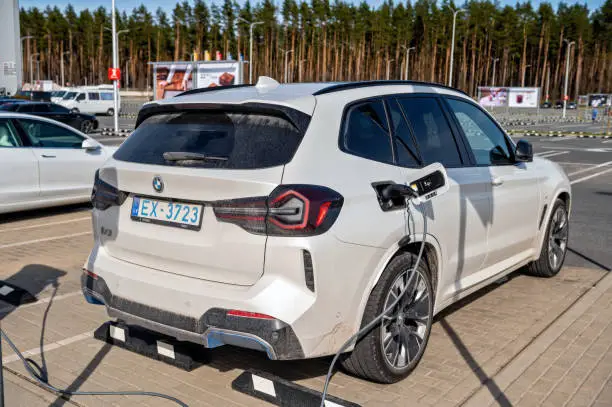
Why EV Navigation Apps Matter
Unlike conventional GPS apps that just get you from point A to point B, EV navigation apps do a lot more: they consider your battery’s current charge, available charging stations , charging speed, elevation changes, and even weather conditions. That means smarter trips with fewer “range anxiety” pit stops and more “wow, that was easy” moments.
Step 1: Pick the Right EV Navigation App
Some apps are built right into your EV’s infotainment system, while others are downloadable. Popular ones include:
- A Better Routeplanner (ABRP): Highly customizable and detailed, it calculates optimal charging stops tailored to your specific EV.
- PlugShare: Great for finding nearby chargers and user reviews, though less focused on detailed route optimization.
- Google Maps: Now integrated with EV charging data and route planning.
- Manufacturer Apps: Tesla, Ford, Hyundai all have built-in smart routing tailored for their vehicles.
Step 2: Input Your Vehicle Details and Preferences
Get precise by entering your EV’s model, battery size, and typical driving habits. Some apps even allow you to set parameters like preferred charging speed or how much reserve battery you want when you reach your destination.
Step 3: Plan Your Route with Smart Charging Stops
The app will calculate optimal charging locations, factoring in distance, charger power levels (fast vs. regular), and your battery status. Pro tip: choose chargers with faster capabilities to minimize your pit stop time — because who wants to wait longer than a coffee break?
Step 4: Monitor Real-Time Traffic and Energy Use
Smart EV apps update charging station availability and traffic conditions live. You can adjust routes on the fly to avoid congested roads or busy chargers, saving you precious time and energy.
Step 5: Optimize Driving for Maximum Range
Many navigation apps give eco-driving tips, suggest the best speeds, and even advise on when to use features like regenerative braking. Follow these, and you might just squeeze out those extra miles you thought were lost forever.
Step 6: Use Voice Commands and Integrations
Stay safe and hands-free by using voice assistants integrated into many EV navigation systems. Tell your car where to charge next or how to optimize your route without lifting a finger — but keep your eyes on the road, of course!
Bonus Tips for EV Navigation Success
- Double-check charger compatibility with your EV model before relying on a stop.
- Keep backup chargers in your plan; stations can be busy or offline.
- Keep your apps updated to benefit from the latest features and maps.
Conclusion
Mastering EV navigation apps can turn a nerve-wracking long drive into a smooth, efficient, and even fun adventure. By leveraging smart route planning and range optimization tools, you’ll lower range anxiety, save time, and enjoy the ride.
