Add MobilityArena as a preferred source on Google
Artificial Intelligence (AI) requires a certain minimum level of processing power. But on-device AI even more so. Cloud-based AI systems have the advantage of having the processing done remotely, which means that users have to deal with the disadvantage of needing an Internet connection to use those. ChatGPT and Copilot are examples of cloud AI systems.
Which is why it isn’t something you see in low-cost devices. The more powerful the processor, the more capable the device is for making AI happen. On-device AI is also known as edge AI or edge computing . Basically, it means that the AI processing is done locally on the device instead of on cloud servers over an Internet connection.
- Why on-device AI is vital
- Example applications of on-device AI systems
- Bringing on-device AI to lower price points
Why on-device AI is vital
The benefits of on-device AI are straightforward. For one, it does not require an Internet connection and so are functional at all times, regardless of the quality of the Internet connection and regardless of whether there is even a connection at all. Because all of the processing happens locally, they also deliver faster processing and response times. This will produce better overall user experience.
Processing tasks locally means that for smartphones and devices to have on-device AI, they need to be equipped with powerful processors that can handle those tasks efficiently and speedily. This is why only more powerful devices have this feature.
Example applications of on-device AI systems
Examples of the applications of on-device AI include the following:
Camera enhancements : Phone brands use AI to enhance photos, improve scene recognition, night mode, and other. For example, Google’s new Pixel Studio image generation app uses on-device AI for certain features.
Real-time language translation : Smartphones are able to carry out real-time translation from one language to another because of on-device AI.
Voice assistants : Siri, Google Assistant, Bixby and others like them, all use on-device AI.
Battery management : AI is often used to optimize battery usage by matching consumption with the usage patterns of the device owner.
There are more applications that cover health monitoring, personalized recommendations, facial recognition, and more.
Bringing on-device AI to lower price points
Powerful chips powering premium flagship smartphones and devices make it possible to provide offline AI systems to those devices. But those chips and hence the devices they power cost a fortune. Lower cost chips are the key to delivering better AI to more people. This will result in offline AI being available on more mid-range smartphones and eventually also entry-level Android phones.

In August 20204, Qualcomm announced its most affordable chipset that supports on-device AI, the Snapdragon 7s Gen 3 , and are marketing it as bringing “remarkable AI experiences to more affordable smartphones”. The “s” segment chipsets from Qualcomm are more budget inclined versions of the regular chipsets. What are its capabilities?
If you are into the technical jargon, Snapdragon 7s Gen 3 supports generative AI capabilities like LLMs like Baichuan-7B, Llama 2 at 1B, and others. The non-technical version is that smartphones using this chipset will be able to process advanced AI tasks offline.
MediaTek’s Dimensity 8200 chipset is comparable to the Snapdragon 7 Gen 3, which the Snapdragon 7s Gen 3 is a budget version of. The 8200 is a bit more powerful than the Snapdragon 7 Gen 3, actually. We will be expecting to see MediaTek announce and launch a chipset that sits below the Dimensity 8200 soon enough.
In the meantime, what price point should you expect to see smartphones with a Snapdragon 7s Gen 3 chip? We can get a fair picture by looking at the current crop of Snapdragon 7 gen 3 devices and making an educated estimate. A current device with the Snapdragon 7 Gen 3 is the Motorola Edge 50 Pro ($460). We can expect smartphones with Snapdragon 7s Gen 3 to cost $400 and lower.
$400 is a great price point to see smartphones with offline generative AI systems. The first Snapdragon 7s Gen 3 smartphone will be from Xiaomi and should hit the market within a month of Qualcomm’s announcement. Other brands like Samsung, Realme, and Sharp will also make use of this chip in upcoming devices.
Author:MobileChic
That motivated, gadget-loving geeky chic who tries to stay on top of things. Unapologetic iFan.
Add MobilityArena as a preferred source on Google
You have probably heard of Incognito mode for Web browsing. It is likely you did not know that this feature exists for Google Maps, too. It does and it allows you to use Google Maps without it saving your search and location history when you use Maps to look for places and to navigate.
When you activate Incognito Mode, certain features are disabled. They include your search queries, as well as your search and location history. All that information stops being stored.
Also, saved locations, recent activities, and notifications, are all turned off.
In the section below, I walk you through how you can activate and use the function.
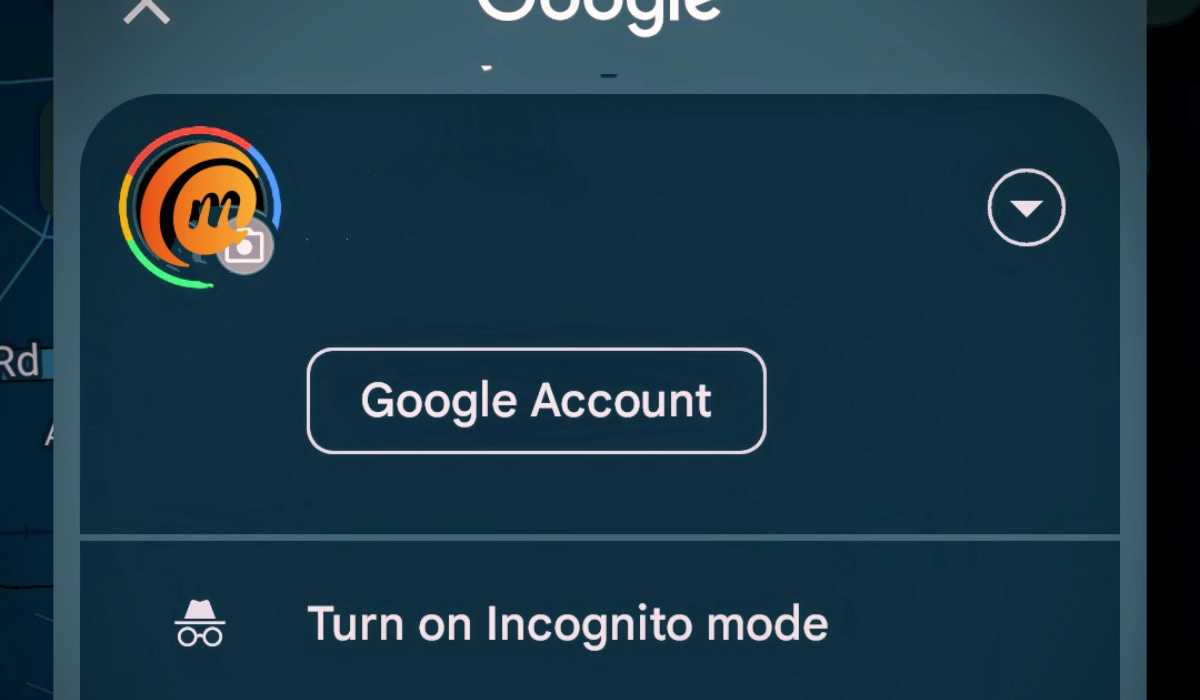
Incognito mode stops Google Maps from saving your usage history.
How to Activate Incognito Mode in Google Maps
To stop Google Maps from saving your history (as described above) while in use, follow the steps below:
- Open Google Maps .
- Tap your profile photo in the top right corner.
- Select the option Turn on incognito mode
- Google Maps will then restart and display a notification saying that Incognito Mode is now active. Close the notification and continue using Maps.
That’s it. From now, Google Maps will not save your search and location history as you use the app to find places and make your way around.
Take note that using incognito mode does not stop Google from tracking your location; it only stops the Maps app from saving or storing that information.
The word “incognito” might be an adverb that means avoiding being recognized, by changing your name or appearance, but in the world of the Internet, that doesn’t quite hold true. While using Incognito Mode, Google still recognises who you are. Your ISP does, too.
Don’t forget it: using Incognito mode only stops Google Maps from saving your search and location history; it doesn’t hide your identity or what you are searching for or where you are visiting. The keyword is “saving”. The app does not save the information.
If you really do not want to be tracked, you should stay away completely from modern smartphones, be they Android or iOS devices. Better still, go all the way and stay away completely from cell phones and anything connected to the Internet.
Author:MobileChic
That motivated, gadget-loving geeky chic who tries to stay on top of things. Unapologetic iFan.
