Add MobilityArena as a preferred source on Google
Popular mobile game developers, KONAMI, have released PES 2019 mobile and made it available for download from the Play Store. This is the mobile version of the extremely popular Pro Evolution Soccer game.
This high adrenaline football game is an online game, meaning that you play single games against other individual users or even better you can assemble a group of users to start and play a tournament.
The game is free to download and play, but there are in-app purchases to unlock features and levels. This mobile game is packed full of new features and improvements that make it a delight to play.
A new Live Update feature built into the game means that your copy of PES 2019 Mobile will always be in sync with the real world. In other words, you will have weekly up-to-date information on the most recent player transfers and individual player performance from real-life matches. That is so cool. What a way to make a football game even better and more in tune with reality.
In addition, with PES 2019 Mobile, you get the usual list of exclusive legend players like Beckham, Zico, Romario, along with other legends like Cruyff, Nedved, Gullit, Maldini, and Kahn. Even more legends will be added throughout the season.

Pro Evolution Soccer 2019
It is recommended that you have a fast and stable internet connection to play the game.
- Tips and tricks to succeed at playing PES 2019 Mobile
- Download PES 2019 Mobile for Android and iOS
Tips and tricks to succeed at playing PES 2019 Mobile
Here are a few tips to help you improve your game-play in Pro Evolution Soccer on your Android smartphone or iPhone.
- Don’t overuse the Sprint button. Use short passes and dribbles more. This means you really have to improve your skills. Guess what – the better your skills, the more you win.
- The sliding tackle, too. In my early days of playing the game, the sliding tackle was my go-to move for intercepting opponents. I used it at every opportunity, But eventually, if your playing skills improve, you realize that overusing the slide tackle move is a learner’s thing.
- When in tight spaces, use Finesse Dribbling.
- To pull off a change of direction when receiving a pass, use R2 + direction combination.
- For better chances of scoring outside the box, try low shots. To do that, double-tap the shoot button.
Download PES 2019 Mobile for Android and iOS
The size of the Play Store file is a whopping 1.4GB, so you are better off downloading it over a Wi-Fi connection. For Android smartphones and tablets, download PES 2019 game from Google Play Store . Download for iOS device from the Apple Store .
- Don’t miss our mobile phone reviews .
- Follow our news on Google News .
- Join our WhatsApp Group , to be notified of the most important articles and deals,
- Follow us on Instagram , Facebook , Twitter , and YouTube .
Author:Anna Makama
Gadget lover making my way through life one day at a time.
Add MobilityArena as a preferred source on Google
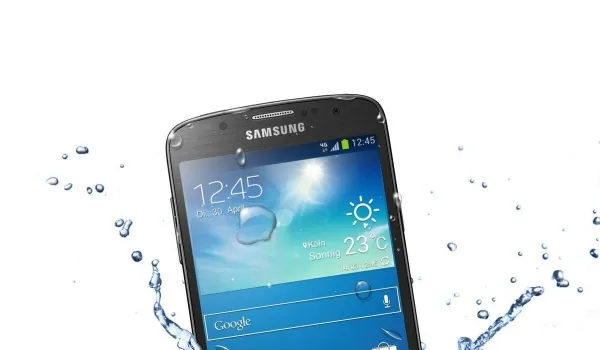
You might be hearing it for the first time, but Samsung phones have a Liquid Indicator built into them. It is also called a water damage indicator . What is the job of the Samsung Water Damage Indicator? To tell you if water got into your phone, so you can have it fixed before massive damage is done.
Water or liquid damage is one of the most common problems that smartphone users dread. One minute, you are having fun around the pool or at the beach. The next, your beloved smartphone drops and takes a dunk in the water.
Of course, you freak out and fish it out as fast as possible. How do you determine the extent of the damage, if any? Aha! That is where the built-in indicator comes in. After your Samsung phone gets wet, all you have to do is check the indicator to see whether water got into it.
- How to Check Your Phone for Liquid Damage, using the Samsung Water Damage Indicator
- How to locate the Samsung Water Damage Indicator
- Samsung tablets too
- If your phone gets water damaged
How to Check Your Phone for Liquid Damage, using the Samsung Water Damage Indicator
The indicator is a white strip under normal circumstances. If it has turned pink or red, that is a sign that water got into your phone.
As a rule, the Samsung water damage indicator is located inside your phone in a spot where water and other liquids should not normally get to. So, it isn’t visible from the outside. Let’s explore where it is located.
How to locate the Samsung Water Damage Indicator
Newer Samsung smartphones have the liquid indicator located as a sticker underneath the SIM card tray. So, to inspect it, you have to eject the tray and then look inside the tray slot to see the sticker. You might need a flashlight for this.
Shine your flashlight into the SIM/MicroSD slot. If your smartphone has been exposed to moisture, the indicator will be pink, purple, or red.
If it has not been exposed to moisture, the indicator will be solid white or solid white with pink or purple Xs.
On older Samsung smartphones with removable batteries, should you still own one of those dinosaurs, the sticker is located on the battery. Remove the battery to check.
Samsung tablets too
Samsung water damage indicators can also be found in Samsung tablets as well, and all of the above information and instructions apply the same way.
If your phone gets water damaged
Lastly, should your phone get wet , here are 5 things not to do by way of first aid before sending it to an authorized service centre.
Whatever you do, make sure that only authorised personnel open up your Samsung smartphone or tablet, especially if it is still under warranty. Having non-certified or non-authorised persons up it up can void your device’s warranty.
