Add MobilityArena as a preferred source on Google
Pixel binning and oversampling are two techniques that are used to produce lower resolution images from higher resolution sensors. They have different advantages and disadvantages depending on the situation and the desired output quality.
- What is Pixel Binning?
- What is Oversampling?
- Pixel Binning vs Oversampling, explained
- History of Oversampling in mobile phones
- How does Pixel Oversampling make photography better?
- How does Pixel Binning make photography better?
- Pixel binning and Oversampling in modern cell phones
- Pixel Binning vs OverSampling: Verdict
What is Pixel Binning?
Pixel binning combines adjacent pixels on the sensor into larger pixels, which reduces the resolution but increases the signal-to-noise ratio and the dynamic range. Pixel binning can be done either on the sensor level or on the image processor level. Pixel binning is simpler and faster than oversampling, but it can also introduce some artifacts such as loss of detail, color moire, and aliasing. Pixel binning is often used in low-light situations, where noise reduction is more important than resolution. Pixel binning is also used in some video modes, where high frame rates are required.
What is Oversampling?
Oversampling captures the full resolution of the sensor and then downsamples it to a lower resolution using a sophisticated algorithm. Oversampling preserves more detail and sharpness than pixel binning, and also reduces noise and moire. Oversampling is more computationally intensive and slower than pixel binning, but it can produce higher quality images. Oversampling is often used in situations where resolution is not the main priority, but image quality is. Oversampling is also used in some video modes, where high dynamic range and color accuracy are required.
Pixel Binning vs Oversampling, explained
To reiterate, pixel binning and oversampling are both ways of reducing the resolution of a high-resolution sensor, but they have different effects on the image quality. Pixel binning is faster and simpler, but it can degrade the image quality in some aspects. Oversampling is slower and more complex, but it can enhance the image quality in some aspects. The choice of which technique to use depends on the trade-off between speed, resolution, and quality.
History of Oversampling in mobile phones
Oversampling is a photography process that has been around since the Nokia 808 PureView, which used its 41-megapixel camera to combine several sensor pixels into 5-megapixel photos. That was the first implementation of oversampling in a mobile phone camera. The Nokia 808 was released in 2012. The technique was called pixel oversampling back then.
The Nokia 808 PureView went on to become a legend among camera phones, leaving every competitor in the dust, and continued to be the best cameraphone for years after its release.
Today in 2021, oversampling has gone mainstream and is being implemented in smartphones on all sides. Every time you see a smartphone camera with a huge megapixel figure, e.g. 64 megapixels, 108 megapixels, 200 megapixels, you are likely looking at a camera using image oversampling. Most of them produce photos of no more than 12 to 27 megapixels in size. That happens by combining three or four pixels together.
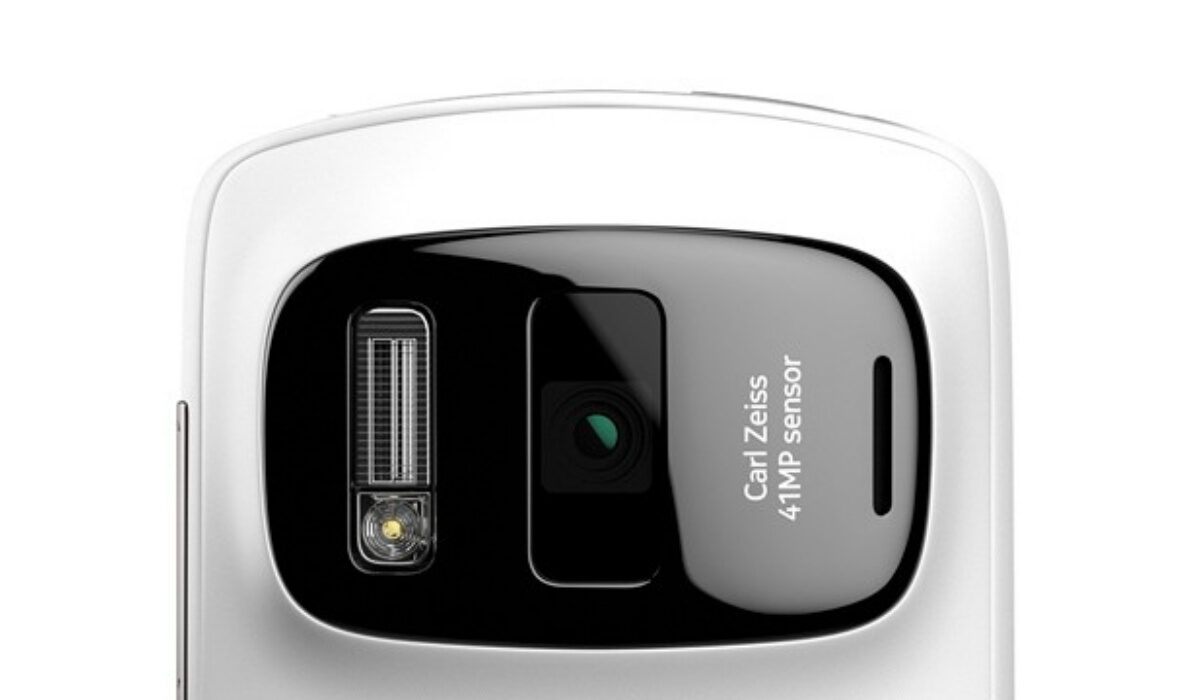
Oversampling first appeared in the Nokia 808 PureView’s camera in 2012
To reiterate, pixel oversampling technology takes a higher resolution sensor and combines multiple pixels to produce fewer super pixels, for better photo quality. As already mentioned, the Nokia 808 PureView was the forerunner of the current crop of Android smartphones using the technology. I owned one. But I have also owned and reviewed a few other modern smartphones that use the technique. My Xiaomi Mi Note 10 Pro, itself another sterling camera phone, uses pixel oversampling. It has a 108-megapixel camera that produces 27 MP photos. TECNO Camon 18 Premier has a 64-megapixel camera that produces 16-megapixel photos by default.
Samsung Galaxy S22 Ultra’s 108-megapixel camera produces 12-megapixel photos, also thanks to pixel oversampling. The technique is quite widely used now.
How does Pixel Oversampling make photography better?
By processing a large number of pixels into smaller pixels in an image, a phone camera can collect more light from the scene. Light is the life and soul of photography. Every photographer knows this. The more light a camera – any camera – can squeeze out of a scene, the better the photos it will produce, all other things being equal.
For this reason, pixel oversampling makes for better, less noisy, photography, especially low-light photography. Most phones that have pixel oversampling can also take photos in full resolution. That means, you can take 108-megapixel photos with the Galaxy S22 Ultra. However, you will get overall better photo quality when you use the camera in its default oversampling mode and shoot 12 MP images.
How does Pixel Binning make photography better?
In pixel binning, the camera combines information from adjacent pixels on an image sensor to create a single “superpixel.” This results in better low-light images, reduced image noise, enhanced dynamic range, and better color accuracy.
Pixel binning and Oversampling in modern cell phones
There are scores of phones, mostly premium flagships and upper mid-range models, that use pixel binning or oversampling in their cameras. You are not likely to see these technologies used in entry-level and budget phones, perhaps not until they trickles down, as almost all advanced technologies do.
We will see more and more cameraphones process pixels differently. It isn’t about the megapixels; it is about what those cameras are doing with them, and image oversampling and pixel binning are a key part of that equation. Just so there is no mixup, there are other factors that determine photo quality. The megapixel count and image processing are not the only factors. But they do count.
Apple’s iPhone 13 , for example, has a 12-megapixel camera; there is no pixel binning or oversampling technology involved. But while the lens has fewer pixels, each pixel is large, allowing for the lens to collect large amounts of light. In other words, Apple has achieved the same results without using image oversampling or binning. And if what we have seen from reviews is anything to go by, the iPhone 13 camera does a better job than the Galaxy S22 Ultra ‘s. I shared this bit to illustrate the point about the megapixel count not being the holy grail.
Yet, the following year, the iPhone 14 Pro and 14 Pro Max both showed up with larger megapixel cameras that use pixel binning. And this has continued. As mentioned earlier, once you see fairly larger megapixel counts, chances are that pixel binning or oversampling is involved.
Pixel Binning vs OverSampling: Verdict
When it comes to these two related camera technologies, oversampling is the better one; it produces much better image quality. However, pixel binning is the more commonly used technology.
- Don’t miss our reviews .
- Follow us on Instagram , Facebook , Twitter , and YouTube .
Author:Mister Mobility
Digital Skills and Communication Coach | Mobile Phone Connoisseur since 2001 | Tech Blogging since 2004
Add MobilityArena as a preferred source on Google
Genshin Impact is a multiplayer action role-playing game developed and published by miHoYo, a Chinese video game developer based in Shanghai, China. It is available for multiple platforms, including Microsoft Windows, PlayStation 4, iOS, Android, and PlayStation 5. A Nintendo Switch version is in the works.
The game has grown to be extremely popular, thanks to its great story line, large library of memorable characters, and great graphics. Simply put, it is a great game to play.

- Is Genshin Impact free?
- What is the point of Genshin Impact?
- Is Genshin Impact kid friendly?
- Is Genshin Impact a gambling game?
- How much internet does Genshin Impact use per hour?
- How do I get higher FPS in Genshin Impact?
- What are the minimum specs for playing Genshin Impact on an Android phone?
Is Genshin Impact free?
It is a feee-to-pkay (F2P) game, so you can download and play it for free. Note that there are in-game micro-transactions, those are optional and you can play the whole game without spending any money.
What is the point of Genshin Impact?
It is an open-world action role-playing game that allows the player to control one of four interchangeable characters in a party. Switching between characters can be done quickly during combat, allowing the player to use several different combinations of skills and attacks.
Is Genshin Impact kid friendly?
This game is targeted at teenagers and young adults. It features some violence but no blood, gore, or corpses. The entities simply turn into dust when killed.
Is Genshin Impact a gambling game?
Genshin Impact involves some gambling on characters, and can mean spending hundreds of dollars.
How much internet does Genshin Impact use per hour?
The average data usage during gameplay is around 20-30 MB per hour. Your data burn rate may vary, though, depending on updates to the game.
How do I get higher FPS in Genshin Impact?
If Genshin Impact isn’t running smoothly on your phone, you can tweak in-game settings and close other running apps to increase performance.
When playing the game on a smartphone, you can also increase the FPS by going to the Paimon Menu. Select Settings in the game. Select Graphics , then tweak the graphics settings to match the maximum performance of your smartphone’s graphics processor.
What are the minimum specs for playing Genshin Impact on an Android phone?
Your phone has to have Android 7 or newer, at least 4 GB of RAM, and 8 GB free storage memory. Also, a flagship processor is recommended. A higher-end midrange Android phone might work just fine too. But entry-level and lower budget smartphones will definitely struggle to play the game.
Download Genshin Impact for iPhone and Android OS
The game is available for Android 7 and newer, as well as iOS 9 and never. On either platform, you will need 8GB of free space for the game, so make sure you have that sorted before you start downloading the game.
The game itself is lightweight, but after installing it, the game then needs to download and install resources, which is a massive and time-consuming download. Make sure you have a fast, wifi hotspot connection for that.
Author:Anna Makama
Gadget lover making my way through life one day at a time.
