Add MobilityArena as a preferred source on Google
T-Mobile is one of the leading wireless carriers in the United States, known for its reliable network coverage and innovative services. They offer a wide range of prepaid phone options, allowing customers to enjoy the benefits of a T-Mobile plan without needing a long-term contract. Whether you’re a student or a budget-conscious individual, T-Mobile has some of the best deals available.
There are several prepaid T-Mobile phones that are incredible deals you won’t want to miss, and I will share a number of them here. From budget-friendly plans to the latest smartphone models, T-Mobile has you covered.
What Are the Best PrepaidT-MobilePhones Available?
Nowadays, having a reliable phone and service is essential, and you don’t have to spend a fortune to get the latest Apple or Samsung models. Major carriers like T-Mobile always have great deals on new phones, as well as savings on phone plans to help you save on your monthly bill. To make things easier for you, I’ve gathered below some of the best phone and plan deals currently available at T-Mobile.
T-Mobile Prepaid iPhone Deals
Being on a prepaid plan doesn’t mean you have to miss out on some of the latest and best Apple devices. T-Mobile has got you covered with a wide range of iPhones available at full price, just like their postpaid plans. Now is the perfect opportunity to get your hands on the Apple device you’ve been eyeing at an amazing discount on prepaid iPhones. Here are some of them:
iPhone 14
T-Mobile is offering a special deal on prepaid iPhone 14 models. Depending on the specific model you choose, you can save different amounts of money:
- iPhone 14: You can save $66 off the regular price.
- iPhone 14 Plus: You can save $74 off the regular price.
- iPhone 14 Pro: You can save $80 off the regular price.
- iPhone 14 Pro Max: You can save $88 off the regular price.
To qualify for the discount, you’ll need to activate your phone on a T-Mobile prepaid plan with a minimum monthly cost of $40, before taxes and fees. Also, T-Mobile offers various prepaid plans for the iPhone 14, with different data options. For example:
Simply Prepaid with 10GB LTE Data: This plan includes 10GB of full-speed data and 10GB of mobile hotspot data. It costs $45 per month with an upfront payment of $739.99 for the iPhone 14 128GB model.
Essentials Savings: With this plan, you’ll get unlimited data and unlimited talk and text. It costs $50 per month with an upfront payment of $729.99 for the iPhone 14.
iPhone 13
The iPhone 13 is currently available at discounted prices since the release of the iPhone 14. This means you can get a premium iPhone at a fantastic deal. Simply choose any model from the iPhone 13 lineup (whether it’s the base 13, 13 mini, 13 Pro, or 13 Pro Max) and activate it on a T-Mobile prepaid plan with a minimum monthly cost of $40.
Now, let’s talk about the savings you can enjoy based on the model you choose:
- iPhone 13 Pro Max: You can save $80 off the regular price.
- iPhone 13 Pro: You can save $72 off the regular price.
- iPhone 13: You can save $58 off the regular price.
- iPhone 13 mini: You can save $50 off the regular price.
In addition to these savings, T-Mobile offers the Simply Prepaid plan with 10GB of LTE data. The total price for this plan is $45 per month with an upfront payment of $639.99. Also if you bring an eligible phone, port in your number, and switch from select carriers, you can receive up to $800 via a virtual prepaid MasterCard.
iPhone 12
The prepaid iPhone deal is perfect for those who have their eyes set on the popular iPhone 12 and 12 Pro models. These Apple phones have gained a reputation for their impressive performance and reasonable price. Now, with the T-Mobile Prepaid offer, you can get an iPhone 12 at a discounted price of up to $50.
T-Mobile Prepaid Android Deals
T-Mobile has some fantastic prepaid deals on Android phones, including popular models like Samsung Galaxy, Google Pixel, and Motorola. These phones come at discounted prices, giving customers a wide range of options to choose from. Take a look at these amazing Android prepaid deals available right now.
Samsung Galaxy A54 5G
T-Mobile has a great deal on the Samsung Galaxy A54 5G. When you buy it through T-Mobile prepaid and activate it with a plan that costs $40 or more, you’ll save $30 off the original price.
T-Mobile also has different prepaid plans available for the Galaxy A54 5G, for instance:
T-MobileConnect by TMO Talk&Text 1000 w/ 1GB Data: This plan includes 1GB of data and 1GB of mobile hotspot data. It costs $10+ with an upfront payment of $489.99 for the Galaxy A54 5G.
T-MobileConnect by TMO UNL Talk & Text w/ 3.5GB Data: This plan offers 3.5GB of data and 3.5GB of mobile hotspot data. It costs $15+ with an upfront payment of $489.99 for the Galaxy A54 5G.
Remember, these plans also come with the opportunity to get up to $800 via a virtual prepaid MasterCard when you bring an eligible phone, port in your number, and switch from select carriers.
Google Pixel 6 or 6 Pro
If you’re looking to get a Pixel 6 or 6 Pro at a discounted price, you can consider the prepaid deal offered by T-Mobile. To qualify for this deal, you’ll need to choose a T-Mobile prepaid plan that costs at least $40 and pay for the Pixel phone upfront.
For example, T-Mobile offers the Simply Prepaid plan with 10GB of LTE data. It’s a prepaid plan that lasts for one month and costs $45 per month. On top of that, you’ll need to make an upfront payment of $609.99 for the Pixel phone.
Additionally, suppose you’re looking for even more savings. In that case, T-Mobile has an amazing offer where you can get up to $800 via a virtual prepaid MasterCard when you bring an eligible phone, switch from select carriers, and port in your number.
Motorola Edge
T-Mobile also has a fantastic prepaid deal on the Motorola Edge. This cutting-edge smartphone from Motorola can be yours for $30 off when you choose a qualifying prepaid plan of at least $40.
One option is the T-Mobile Simply Prepaid plan with 10GB of LTE data. With this plan, you’ll get the Motorola Edge (2022) 128GB and enjoy 10GB of full-speed data. The total price for this plan is $45 per month with an upfront payment of $508.
Also, if you bring an eligible phone, port in your number, and switch from select carriers, you can receive up to $800 via a virtual prepaid MasterCard.
To sum up, prepaid T-Mobile phones offer some of the best deals available in the market. With discounted prices and special offers on popular devices like the iPhone, Motorola, Samsung, and Google Pixel phones, you can enjoy a great deal. T-Mobile offers a wide range of options to suit different preferences and budgets.
Whether you’re an iPhone enthusiast or an Android lover, there are plenty of discounted options available for you to choose from. If you’d like more useful recommendations, be sure to check out this category .
Author:Joan Agie
Add MobilityArena as a preferred source on Google
I do not like the way the new WhatsApp Channels feature complicates the user interface of the status Updates tab of the app. Personally, I like WhatsApp for its simplicity as a messaging app. That’s the primary reason why I use it – instant messaging. But the guys at WhatsApp added the new Channels feature and when it arrived on my phone, the WhatsApp Updates tab became a nightmare to use. I really, really do dislike the new WhatsApp Channels user interface.
Since it arrived, I have interacted less with my contacts’ status updates because it is so much more difficult to use now. I dislike that. I want to keep in touch with my family and friends. Nothing should mess with that.
- The WhatsApp Channels feature has its uses
- How to disable the new WhatsApp Channels View
The WhatsApp Channels feature has its uses
Channels are a one-way broadcast tool for WhatsApp users to send text, photos, videos, stickers, and polls. It is a great way for publishing information to your community. If you are a member of a community or love a brand, following that brand’s channel is a great way to keep in touch with what they are doing. I see its merits and will recommend it to you if it meets your needs. However, it introduces a complicated interface or layout to your WhatsApp Updates tab.
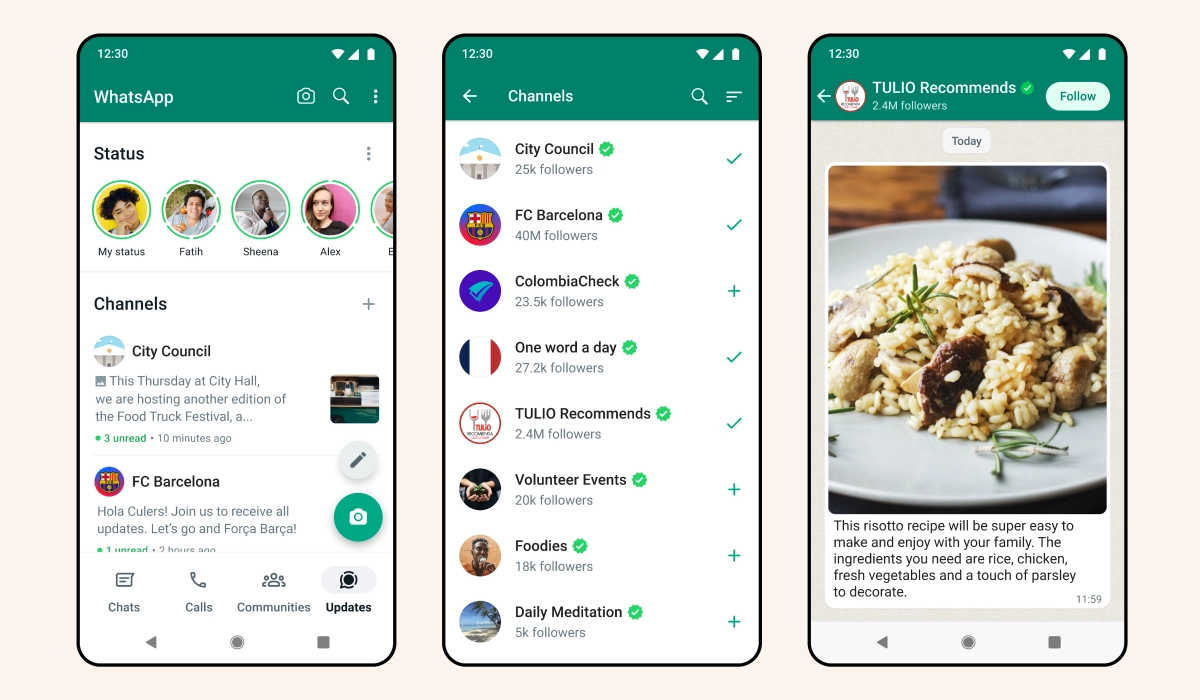
What happened to the easy and straightforward interface that allowed me to view the status updates of my contacts with ease? Who thought this jumbled up mish-mash of status updates and channels was a good idea?
Anyway, there is an easy way to get rid of the new WhatsApp Channels interface and revert your Updates tab to the simple interface that you love.
Apparently, the new WhatsApp Channels is an all-on or all-out thing. You either want Channels and endure the new horrible Updates layout or you get rid of the new layout and forgo Channels completely.
How to disable the new WhatsApp Channels View
The only way (that I know right now) to get rid of the new Updates layout that shows channels is to unfollow every channel you have followed and delete any channels you have created. Like I said before, you are either all-in or all-out. Bummer. But it works.
For me, it was an easy decision: I got out. I am all-out. I have consistently said that I am not interested in any new social media platforms after Facebook, Twitter, Instagram, and LinkedIn. I am tired of jumping on the next one, along with the information overload and constant vying for my attention. The new WhatsApp Channels feels more like another social media platform and so I am glad to discard it and keep my precious sanity.
If you are like me and simplicity is important to you but your WhatsApp has been updated to display the new Channels interface in the Updates tab, here is your get-out-of-jail card: unfollow all channels and delete any channels you created. And poof! Your old WhatsApp Updates user interface is back. Simple. Easy. Blissful. May the Force be with you.
Actually, the WhatsApp Channels feature does not quite disappear. Instead, it is pushed to the bottom of the Updates interface (screenshot below). That works for me. It can stay down there where it doesn’t mess with the status updates I am trying to view.
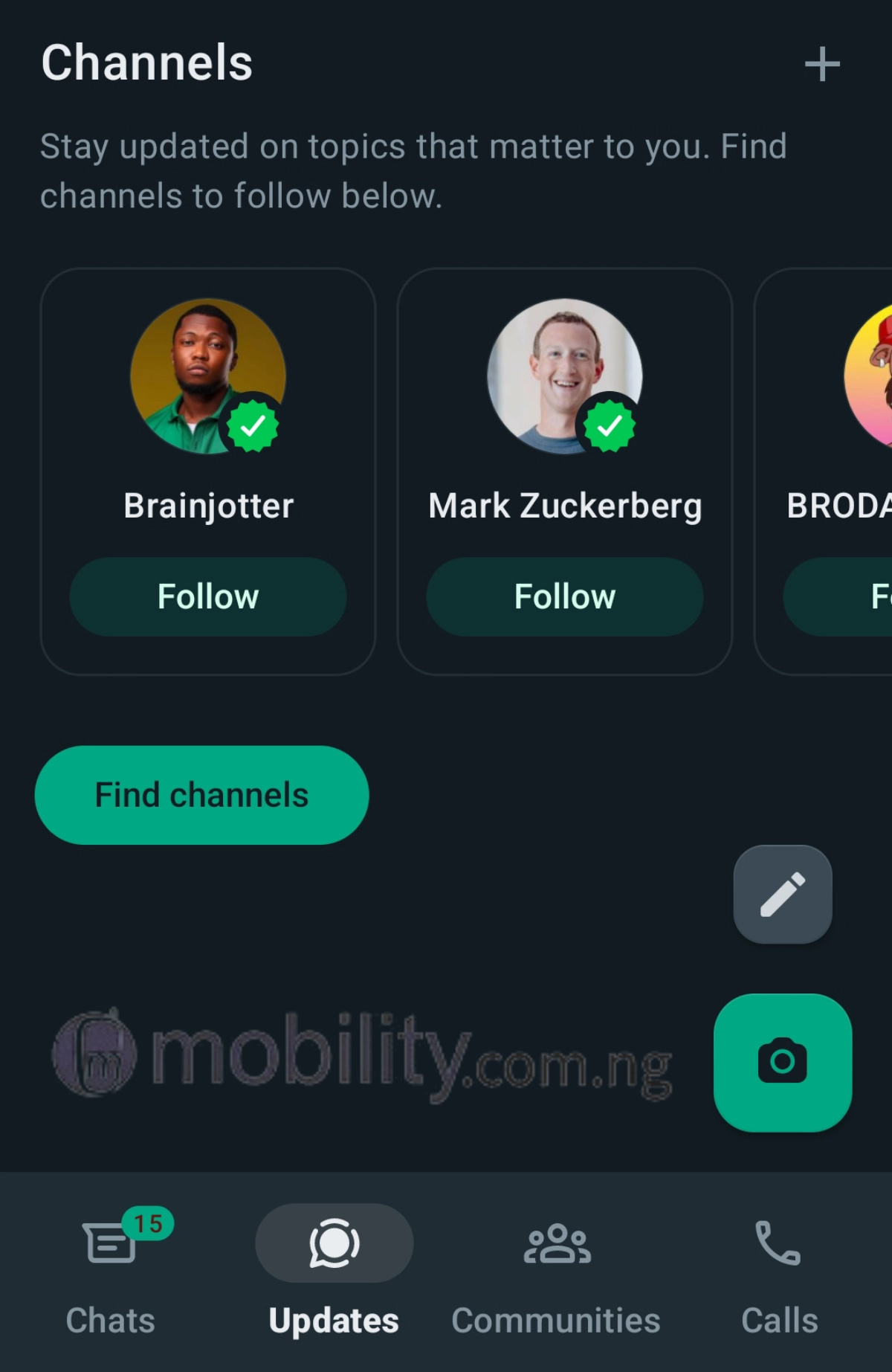
I have the old Updates user interface back and now enjoying WhatsApp again. Perhaps if WhatsApp redesigns how the new channels feature is integrated, I just might have a look at it again. I just might.
PS: If you like the new user interface, that is great. Just keep using it. Variety is what makes the world go round.
Author:Mister Mobility
Digital Skills and Communication Coach | Mobile Phone Connoisseur since 2001 | Tech Blogging since 2004
