Add MobilityArena as a preferred source on Google
Turbochargers and superchargers perform the same function: they compress and push air into the engine. This generates pressure, thus allowing more fuel to be used. This in turn makes the engine produce more power. The whole process is called “forced induction”. However, turbochargers and superchargers perform this process differently. Therefore, it would be wrong to use both words interchangeably to describe either of them.
Here’s the difference between the two systems. The turbocharger uses the pressure from exhaust gases to spin the turbine which is connected to the compressor to compress air. The supercharger uses a belt to the crankshaft of the engine. This is the power source of the compressor as it compresses the air. Now, here are some advantages of using turbochargers and superchargers in vehicles:
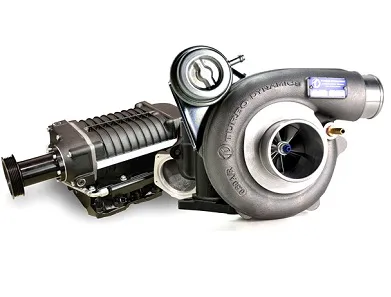
Left: SuperchargerRight: Turbocharger
ADVANTAGES OF TURBOCHARGERS
- Turbochargers offer a significant boost to the engine : With these, even small engines can produce enough power for the car, which is why turbo engines can be installed in even the smallest cars.
- It helps in maintaining good fuel economy : Turbocharged small engines use less fuel to idle. This means that the rational and reciprocating mass is reduced, which is great for fuel economy.
- More efficient engines : Turbochargers use energy that is normally lost by being aspirated or supercharged. With this energy, the overall performance of the engine is improved.
DISADVANTAGES OF TURBOCHARGERS
- It takes time to provide enough boost : Due to turbo lag, the car does not immediately speed up. This is a disadvantage to vehicles with big turbochargers.
- Reduced vehicle stability : Reaching the required amount of boost can lead to a power surge. This can cause the tires to lose traction, thus potentially causing an accident.
- Numerous engine oil refills : Owing to the fact that turbochargers get very hot, they tey to get some of the engine’s oil. This means that you have to have a large supply of engine oil at hand at all times. This is quite expensive to maintain.
- Threshold for boost : Turbos are set for a certain range when the exhaust gas required is enough to offer more boost to the engine. However, they do not have a wide range as compared to superchargers.
- Finally, due to the amount of power they produce, turbochargers can easily damage the car engine.
ADVANTAGES OF SUPERCHARGERS
- More horsepower : This is because superchargers are driven by the crankshaft, and thus delivers immediate results.
- Easy to install : There is not much work involved in installing a supercharger. I is also easier to maintain since it does not need intercoolers, unlike in turbochargers.
- It saves engine oil : Since superchargers do not have to heat compressed air, they do not heat up. Hence they do not tap into the engine’s oil supply.
DISADVANTAGES OF SUPERCHARGERS
Low efficiency : Superchargers are not as efficient as turbochargers, because they are not independent. However, since a supercharger generates as much as 46 percent additional horsepower while consuming 20 percent of the engine’s power output, a lot of people consider it worth the effort.
They are more expensive to install and maintain : Engines need to be larger and more durable to handle the explosive boosts that superchargers bring. This increases the overall price of the vehicle.
Don’t miss our mobile phone reviews .
Follow our news on Google News .
Join our WhatsApp Group , to be notified of the most important articles and deals,
Follow us on Instagram , Facebook , Twitter , and YouTube .
Author:EmmyCN
Add MobilityArena as a preferred source on Google
Google Drive is a great place to back up your files. There are a lot of amazing features of the service, and some of them are not quite known by many. Here are some features of Google Drive that could prove helpful to you.
- REMOVE PHOTOS OUT OF RECENT VIEW
- TURN ON QUICK ACCESS
- FILTER YOUR SEARCHES
- SEND LINKS TO FILES INSTEAD OF ATTACHMENTS
- QUICKLY CLEAR FORMATTING
- ONE-TAP PHONE BACKUP
REMOVE PHOTOS OUT OF RECENT VIEW
If you back up a lot of photos on Google Drive, they tend to clog up the Recent view, which makes looking for other files tedious. To solve this problem, type “-jpg” in the search field. All your photos will be filtered out, letting you browse other recent files you saved to the Drive.
TURN ON QUICK ACCESS
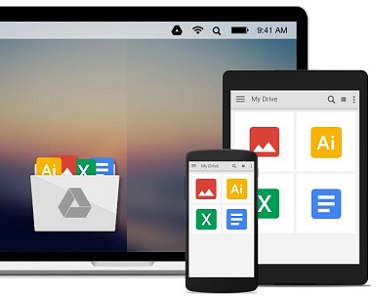
This feature turns on a belt of thumbnails across the top of the My Drive view. This gives you quick access to recently modified files, and it does not include photos. To set it up, go to the Settings section, and click the box for Make Relevant Files Handy when you need them. After that, refresh the page.
FILTER YOUR SEARCHES
In the search box at the top of Google Drive, there is a downward-pointing arrow along the right edge. Click it and you will get a panel of search options to filter your search results. If you have a large library of files, these search options will prove useful in narrowing your results. You can filter by file name, type, date modified and owner.
SEND LINKS TO FILES INSTEAD OF ATTACHMENTS
There is a little Drive icon at the bottom of Gmail’s compose window. It lets you attach files you stored in the Drive or simply send a link. For Google Drivw formats – Docs, Sheets, Slides, etc., your only option is to send a link to the file. For other types – PDFs, Word documents, images, you can either send them as attachments or send a Drive link. This lets you share files larger than Gmail’s 25GB size limit for attachments.
QUICKLY CLEAR FORMATTING
There are a few options available for clearing the formatting for text you paste into Docs. You can highlight the text and select Normal text from the toolbar at the top. Or you can go to Format > Clear Formatting. You could also avoid clearing the formatting by holding Shift when you paste text.
ONE-TAP PHONE BACKUP
You can back up important data to Drive from your mobile phone. Simply go to Settings > Backup, and choose what you want to back up. When you are done, tap Start Backup. This might take a while, so you might want to plug your phone to a power source, connect to WiFi and go to bed.
