Add MobilityArena as a preferred source on Google
Have you ever handed your smartphone to an acquaintance or colleague so they can make a quick call and found later that they had gone ahead to snoop through other areas of your phone? You have? I can guess too that you found it annoying that they would do that. If you often have to give your phone to someone but need to restrict their access, there’s an app for that. actually, there are many privacy apps out there, but Hexlock does it best.
Here is a list of what Hexlock lets you do:
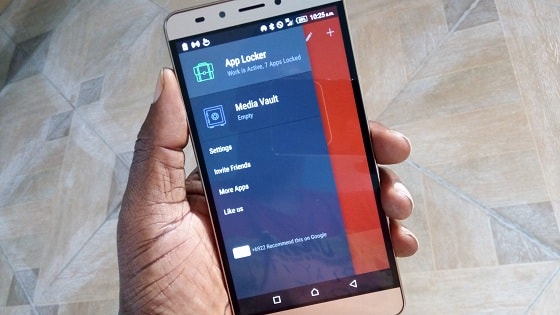
- lock individual apps with a password/PIN/pattern or fingerprint so others cannot access those locked apps
- lock up videos and photos of your choice in a Media Vault.
- your locked files and apps cannot be accidentally or deliberately deleted. This is really useful for parents who have had their kids accidentally delete stuff off their phones while fiddling with it
- you can create up to 6 separate profiles for a device that is shared between multiple people. For example, this is great for a tablet shared between members of a family.
- You can setup your device to lock automatically when you are connected to a specific network or at a specific location
- Again, if you are a parent, Hexlock puts the Parental control back in your hands. You can set it up so it prevents your children from making in-app purchases or changing your personal settings when they play games on your device. Mrs. Mo certainly needs this app. The Mo kids are forever messing up things on her phone.
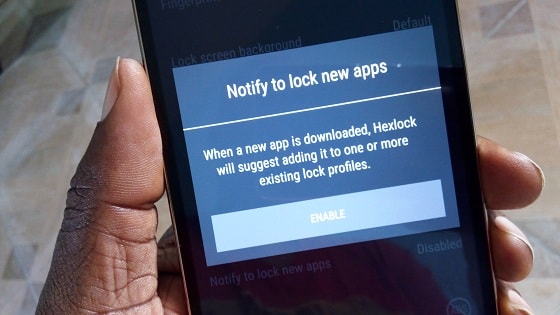
- you can also configure the app such that anytime you install a new app, it reminds you to lock it.
- Using Hexlock
- How Hexlock Helps Keep My Work Safe On The Go
- Download Hexlock
Using Hexlock
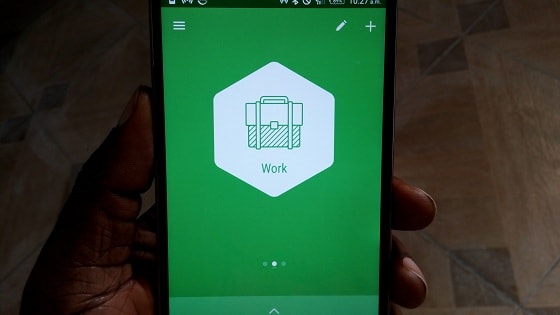
Hexlock Work profile
When you launch the app for the first time, it asks you to set a PIN or pattern lock. I noticed that I was unable to take screenshots of the app during this initial setup period and during other critical phases of configuring the app. This is good.
Because Hexlock secures both apps and media files, it is made up of two major sections – App locker and Media Vault . The former locks apps, while the latter locks files. You can switch between the two using the menu button in the top left corner of the app.
How Hexlock Helps Keep My Work Safe On The Go
For example, my smartphone is my mobile office. I am able to run Mobility Arena on it wherever I am as long as I have an internet connection. I am talking about tasks that include backend administration, posting, editing, financial transactions, and more. Anyone who gets access to those apps on my phone can do major damage to MobilityArena.com . With Hexlock, I am able to lock up away those business-critical apps away from unauthorised eyes and hands. Priceless.
Download Hexlock
Whether you are a parent looking to stay in control of what your children can access on your phone or shared family device, or you are an individual just wanting to keep your chats, messages and media files away from pesky snoops, or a business/technical person who uses their smartphone for mission-critical work, Hexlock is an app that you should give a try.
Download Hexlock for Android OS
Author:Mister Mobility
Digital Skills and Communication Coach | Mobile Phone Connoisseur since 2001 | Tech Blogging since 2004
Add MobilityArena as a preferred source on Google
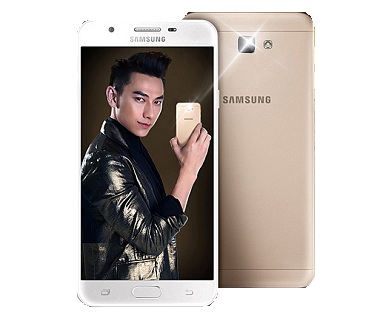
The Samsung Galaxy J7 Prime is now officially available. The J7 Prime is a 5.5-inch mid-ranger with a metal shell and a front fingerprint scanner.
The internal hardware is very much in line with what to expect from a J-series smartphone: an Octa-core 1.6GHz Exynos processor, 3GB RAM, options of 16GB and 32GB internal storage, and a 3300mAh battery to keep everything alive.
Samsung Galaxy J7 Prime Specs
Network and Software
- GSM : GSM 850 / 900 / 1800 / 1900
- 3G : HSDPA 900 /1900/ 2100
- 4G : LTE-FDD 1(2100) / 3(1800) / 5(850) / 7(2600) / 8(900) / 28(700) / 38(2600) / 40(2300)
- SIM Type : Dual Nano-SIM
- OS : Android 6.0 Marshmallow + TouchWiz
Design
- Dimensions : 151.7 x 75 x 8.1 mm
- Weight : 167 g
- Display : 5.5-inch, 2.5D Super AMOLED curved display with Gorilla Glass 4
- Sensors: Fingerprint, Accelerometer, Proximity and Compass
- Build : Metal
- Colours : Black. Stylish Gold.
Hardware
- Processor Type : Octa-core 1.6 GHz Cortex A-53
- Processor Name : Exynos 7870
- Graphics Processor : Mali-T830MP2
- RAM : 3 GB
- Internal Storage : 16 GB / 32 GB
- External Storage : microSD up to 256 GB (dedicated slot)
Camera
- Rear : 13 megapixels, f/1.9, autofocus, LED flash
- Video recording : Yes, 1080p@30fps
- Front-facing : 8 megapixels, f/1.9
Multimedia
- Music Support : AAC, AMR, MP2, MP3, M4A, MKA,
- Loudspeaker : Yes
- Video Support : MP4/MPEG4/H.263/H.264 player
- FM Radio : Yes
Connectivity
- Bluetooth : v4.1
- WiFi : Wi-Fi 802.11 b/g/n, dual band, Wi-Fi Direct, hotspot
- GPS : Yes
- USB : microUSB v2.0; USB On-The-Go
Miscellaneous
Charging : Regular
Battery : Non-removable Li-Ion 3,300 mAh
Announced : September 2016
Availability : September 2016
Price : $280
Don’t miss our reviews .
Join our WhatsApp Group , to be notified of the most important articles and deals,
Follow us on Instagram , Facebook , Twitter , and YouTube .
