Add MobilityArena as a preferred source on Google
I have been reviewing mobile phones since 2004, and in those 15 years till date, I have reviewed hundreds of them, from the lowliest basic phones to world acclaimed flagships. I have reviewed Palm phones, Symbian phones, BlackBerry phones, Windows phones, Ubuntu phones, iPhones, and more. But this is the most fun smartphone I have ever reviewed till date.
And there is only one reason for that – the fact that the phone seems unbreakable. Trust me, I know that nothing is unbreakable. Even Captain America’s Adamantium shield got broken in EndGame. And Thor’s hammer got smashed by Hela in Ragnarok.
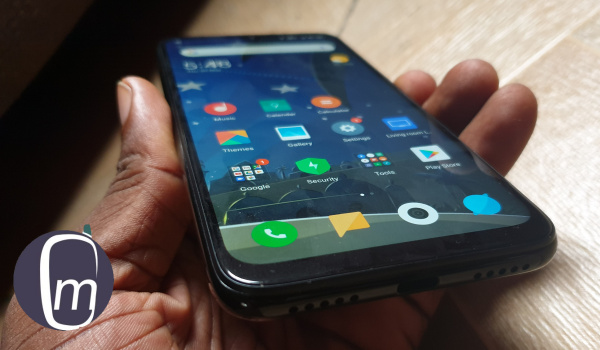
This is the most fun smartphone I have ever reviewed.
Even Hulk got smashed by Thanos like he was nothing. Nothing is really unbreakable. But the Redmi Note 7 has been smashed against hard surfaces and it survived. It has been dropped from the fringes of Outer Space down to the earth and survived. You don’t believe that? Watch this:
See what I mean?
Let me proceed. It has been dropped to the hard floor and it came off none the worse. If anything, this affordable mid-range smartphone has earned the right to be called “unbreakable”.
At the office, we were preparing for our drop test and everyone came around to see how strong it is. Someone took it and hit it on the desk a few times without any consequence. Shock. Disbelief. He would never do that to his phone. I would never do that to my Galaxy S9 Plus either. We all laughed.
People kept walking in to see the phone that could be hit or dropped without damaging it. It was loads of fun. The phone has practically become a meme. I have two friends who have already purchased one for their personal use.
Last night, the family was chilling in the living room when my son mentioned how cool the Redmi Note 7 looks. I had left it lying on a table and he had taken a good look at it. So, I replied with something about how cooler it is that the phone can be dropped without fear of breakage. He jumped up! “What? Are you serious?!”, he almost yelled.
There was only one way to do this. I handed him the phone and turned on my camera to capture the moment in video. You will enjoy his outbursts:
Hilarious! We had fun doing that. I have had fun every step of the way.
Mrs Mo is convinced that this is the phone she needs. She has dropped a few of her phones in the past and paid for it in hard cash. She has a point. She should get the Redmi Note 7. I am sure that if I were to drop Thor’s hammer on it, it would finally break or shatter. But like most people, what Mrs. Mo fears the most is her smartphone dropping to the floor. And the Redmi Note 7 is not afraid of the floor.
Before we recorded our drop test video, our unit had dropped to the floor twice by accident. It had gotten hit on a desk. And then it got dropped repeatedly in the making of our video. Last night it was dropped repeatedly by my son. And it still does not have a scratch, much less a crack on its glass body.
I took it out into daylight this morning and examined it carefully. There is still not a scratch on it after all of that. Amazing.
Update: Based on a request, we added a concrete drop test. Did the Redmi Note 7 crack this time? You can see for yourself here:
https://youtube.com/watch?v=KKxw8m1uU_Q%3Ffeature%3Doembed
After this last drop test, we noticed one tiny little scuff mark on the left bottom edge…
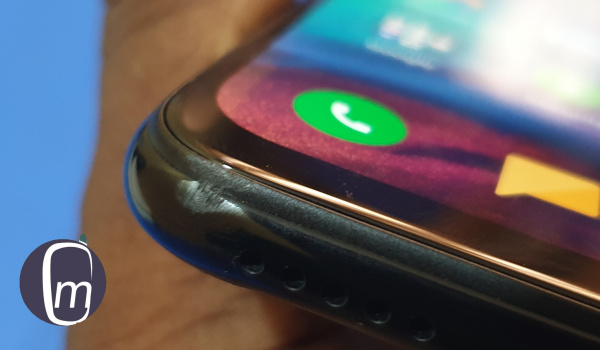
A tiny scuff mark on the Redmi Note 7 after all the dropping and hitting we have put it thorugh.
Not bad at all.
But toughness aside, there is one more thing about the Redmi Note 7 that I want to mention: Both cameras on the phone are very good. They do have one weakness, however: colour accuracy. Pictures produced often tend to be sightly off the mark in terms of the shades and tones of the subjects. By way of comparison, my Galaxy S9 Plus has much better colour accuracy. The S9 is a much more expensive phone after all.
But by all that is good and holy, the Redmi Note 7’s camera gives me less hassles in taking pictures – especially portrait pictures. AND..its portraits just come out looking better. Which is interesting, because the reason they come out looking better is that mild light blue-ish tone that makes the photos less accurate in terms of colours.
So, we have less acurate tones but better looking photos. See, I am getting old and I prefer the camera that gives me less hassles and makes me look better. Or…cough…younger.

Portrait selfie shot on Redmi Note 7
I have been inches away from switching my SIM cards to the Redmi and selling off my S9 Plus. One thing alone held me back: the Redmi’s lack of Glo 4G support. Glo 4G is my personal Internet service. Sigh. Nobody gets it all; right? But the Redmi Note gets a lot of things right.
The last two weeks of reviewing the Redmi Note 7 have been tons of fun. I wonder what the next person who sees it with me is going to want to do to it. Have you seen my review ?
Author:Mister Mobility
Digital Skills and Communication Coach | Mobile Phone Connoisseur since 2001 | Tech Blogging since 2004
Add MobilityArena as a preferred source on Google
If you want to buy a Bluetooth device, you need to know what it can and cannot do. Can it playback stereo audio? Does it have audio and playback controls? Bluetooth profiles and protocols provide us with that information. So, before you buy that next Bluetooth headset or speaker, here is a list of Bluetooth profiles and protocols for you, as well as explanations of each of them, so you know what to look for on the box.
But first, what is Bluetooth, and how does it work? Bluetooth is a wireless technology standard that is used to communicate between two or more devices over short distances, without the need for a cable. It is suitable for transmitting small amounts of data and consumes very little power, when compared to other forms of wireless communication.
When we say that Bluetooth transmits data, we do not mean Internet data. Bluetooth does not use an Internet connection in any way. By data, we mean, bits and pieces of information. Now, let’s go on to define what a Bluetooth profile is, and examine how many of them there are, and what they do.
- What is a Bluetooth Profile?
- List of Bluetooth Profiles
- HSP Bluetooth Profile
- What is A2DP Bluetooth Profile?
- What is AVRCP Bluetooth Profile?
- What is HFP Bluetooth Profile?
- Other Common Bluetooth Profiles List
- Understanding Bluetooth Versions 4.0, 4.1, 4.2, 5.0, 5.2
- What is Bluetooth Low Energy or BLE? Does Bluetooth drain batteries? Why Is It Called Bluetooth?
- Conclusion
What is a Bluetooth Profile?
A Bluetooth profile defines the functionality that a device supports and can execute when it connects with another by Bluetooth. If both devices support the same profiles, then you are able to use and enjoy the features or functionalities that profile specifies.
Where only one device supports a particular profile, you will be unable to use the associated functionalities, because the other device is unable to communicate at that level.
List of Bluetooth Profiles
There are more than twenty (20) Bluetooth profiles in existence. Of the total count, there are four major Bluetooth profiles, as follows:
- HSP (Handset Profile),
- HFP (Hands Free Profile),
- A2DP (Advanced Audio Distribution Profile), and
- AVRCP (Audio/Video Remote Control Profile).
Some other less common profiles are mentioned further down this article. HSP and HFP Bluetooth profiles are those required for typical, mono Bluetooth headset operations; A2DP and AVRCP are important for stereo headsets. Note that there are other Bluetooth profiles beyond these four (and those others are mentioned further down in the article), but for these are the most common because they are used in wireless headsets and earbuds. The next section provides more detailed explanations and information.
The Four Most Common Bluetooth Profiles List
HSPBluetooth Profile
HSP (Headset Profile) is one of the most common Bluetooth protocols and makes two-way audio communication between a headset and a phone possible. This is the default profile that Bluetooth headsets use.
Note though that it enables only mono audio on headsets. It does not support stereo audio. A Bluetooth wireless headset that supports only HSP is good for basic telephone calls and nothing else. It can’t play music from your smartphone and can’t be used to control audio volume.
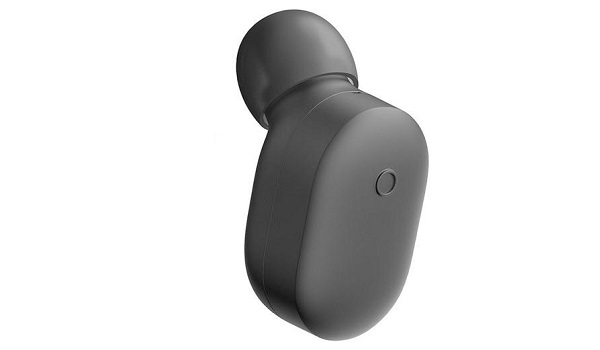
HSP is the Bluetooth profile supported by the most basic and the cheapest Bluetooth headsets around. All you can do with them is take and receive telephone calls.
What is A2DPBluetooth Profile?
A2DP (Advanced Audio Distribution Profile) is a Bluetooth protocol that enables a headset to stream high quality stereo audio wirelessly from a smartphone or other compatible device. The quality of the audio is much better, both for calls and for music playback.
If you want to buy a Bluetooth headset for listening to music from your phone, make sure that your devices specifications lists A2DP as a supported Bluetooth profile.
What is AVRCPBluetooth Profile?
AVRCP (Audio/Video Remote Control Profile) is the Bluetooth profile that enables remote control functionality. By way of example, it lets a Bluetooth headset control media playback on your smartphone. Those Bluetooth headsets and loudspeakers that let you pause and resume music playback support AVRCP.
What is HFPBluetooth Profile?
HFP (Hands Free Protocol) is a Bluetooth profile that enables a two-way wireless speaker-phone to be used with a Bluetooth phone, and is usually found in Bluetooth hands-free car kits. This is like a twin sister to HSP Bluetooth protocol and on its own supports mono audio.
As a matter of fact, both HSP and HFP are the two most common Bluetooth protocols and you probably do not have to worry much about a headset supporting them. As such, when shopping, depending on your needs, the profiles to watch out for are A2DP and AVRCP.
Do not forget: if your Bluetooth accessory does not support a particular profile, even if your smartphone does, you will not be able to enjoy the features of that profile on the accessory in question. For example, if a headset does not support A2DP, you will be unable to listen to music from your smartphone on it. You will only be able to take and make telephone calls on it.
Other Common Bluetooth Profiles List
As said before, there are more than twenty (20) Bluetooth profiles in existence. Besides the four most popular ones already mentioned and explained above, here are some more commonly used profiles.
- Basic Imaging Profile (BIP) : This Bluetooth profile defines the ability to transfer and print images, as well as remotely control an imaging device.
- Basic Printing Profile (BPP) : If you need the ability to print text and documents over a Bluetooth connection, this profile makes that possible.
- File Transfer Profile (FTP) : Transferring files is one thing, being able to browse folders and locations on the connected device is another. This profile enables the ability to browse folders and locate files between two devices.
- Dial-Up Network Profile (DUN) : If you weren’t aware of it, it is possible to tether via Bluetooth, and this capability has been around for years. This Bluetooth profile is behind that functionality.
- Human Interface Device Profile (HID) : This is the Bluetooth profile that enables the use of wireless mice, keyboards, and other such devices.
- Personal Area Networking Profile (PAN) : This profile allows for the creation of a wireless area network over a Bluetooth connection.
- Video Distribution Profile (VDP) : This is the Bluetooth profile that makes it possible to stream video over a Bluetooth connection.
- Serial Port Profile (SPP) : Provides a virtual serial port over Bluetooth, allowing devices to communicate using a serial connection.
- Object Push Profile (OPP) : Used for sending contact cards, calendar items, and other types of objects between Bluetooth devices.
Understanding Bluetooth Versions 4.0, 4.1, 4.2, 5.0, 5.2
Simply put, the higher the Bluetooth number, the faster data can be transferred, the more secure it is, and the less power your device consumes to maintain a connection. So two Bluetooth 5.0 devices can create a more secure connection between one another, transfer data faster, and last longer before needing their batteries recharged.
What is Bluetooth Low Energy or BLE?
Bluetooth Low Energy (BLE) is not a Bluetooth profile. It is a light-weight connection that consumes much less power than regular Bluetooth. It was developed by Nokia and was introduced as part of the Bluetooth 4.0 core specification. It is used for connectivity with wearables and other gadgets that connect and talk to modern smartphones.
As such, BLE is widely applied for health care, sports and fitness, Internet connectivity (you knew that you can share your phone’s mobile data with other devices via Bluetooth ; didn’t you?), proximity sensing, alerts and time profiles, among others. When your smartwatch connects to your iPhone or Android smartphone, Bluetooth Low Energy is the culprit.
Does Bluetooth drain batteries?
Modern Bluetooth standards are highly efficient and thrive on maintaining connections without a huge battery drain. Think of your smartwatch or wireless headset: these devices are able to last for days while being connected to your smartphone. That speaks of how battery efficient Bluetooth is. Bluetooth has minimal impact on your device’s battery life, so you can leave it enabled for as long as you need it.
Why Is It Called Bluetooth?
Bluetooth was invented by a team of scientists working for Ericsson, the Swedish networking company. It is named after Harald Bluetooth, who was the popular king of Denmark in the late 900s.
Conclusion
That is the simple, layman’s explanation of Bluetooth profiles and standards. Where cost permits, always go for devices with all the Bluetooth profiles and with the latest version number.
Copyright Notice : Reproduction of this article on any website, e-book, book, newspaper, magazine or other media without express written permission from MobilityArena is a violation of copyright rules and will result in appropriate action being taken against violators.
Author:Mister Mobility
Digital Skills and Communication Coach | Mobile Phone Connoisseur since 2001 | Tech Blogging since 2004
