Add MobilityArena as a preferred source on Google
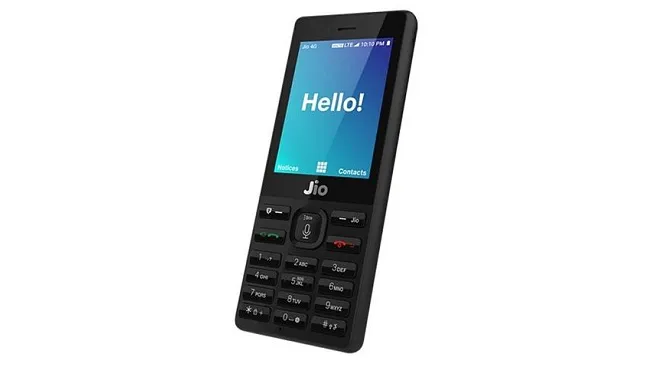
You probably never thought you would ever see a feature phone with 4G LTE and VoLTE. It exists – in India. Reliance, the mobile network operator that has been disrupting mobile data in the country, has introduced a 4G feature phone. The Reliance Jio Phone features an alphanumeric keypad and a 4-way navigation button.
No; this is different from what Nigeria’s Ntel did with the Nova phone – an Android smartphone in a feature phone’s body. The Jio phone is a proper feature phone, yet offers the most advanced LTE technology.
The Jio phone runs KaiOS , a mobile platform forked from the now defunct Firefox OS , and has Reliance Jio’s apps, including the JioCinema app for watching movies, preloaded on it. The mobile phone has support for voice commands, payments via NFC, as well as the ability to cast media.
It sounds like such a package, especially considering that we are talking about a feature phone. The Jio Phone is an example of how feature phones are evolving .
- Reliance Jio Phone Features, Specs and Price Network and Software Design Hardware Camera Multimedia Connectivity Miscellaneous
Reliance Jio Phone Features, Specs and Price
Network and Software
- GSM : No
- 3G : No
- 4G : LTE + 4G VoLTE support
- SIM Type : Single Nano-SIM
- OS : KaiOS
Design
- Dimensions :
- Weight : g
- Display : 2.4 inches, 240 x 320 pixels (166 ppi)
- Sensors:
- Build : Plastic
- Colours : White. Black.
Hardware
- Processor Type : Dual-Core 1.2 GHz
- Processor Name : Spreadtrum 9820A/QC8905
- Graphics Processor : ARM Mali-400 MP2
- RAM : 512 MB
- Internal Storage : 4 GB
- External Storage : Dedicated Micro-SD card up to 128 GB
Camera
- Rear : 2 megapixels
- Video recording : Yes
- Front-facing : 0.3 megapixels
Multimedia
- Music Support : mp3, aac, aac+, eaac+, amr
- Loudspeaker : Mono
- Video Support : mpeg4, h.263, h.264
- Wireless FM Radio :Yes
Connectivity
- Bluetooth : v4.0
- WiFi : Wi-Fi 802.11 b/g/n, Hotspot
- GPS : Yes
- USB : microUSB v2.0. NFC
Miscellaneous
- Charging : Regular
- Battery : Li-Polymer 2000 mAh
- Announcement : July 2015
- Availability : September 2017
- Phone Price : Rs 1500 (about $25)
Author:InfoDesk
Add MobilityArena as a preferred source on Google
In order to keep your online accounts safe, it is a great idea to use a unique password for each site. However, if you have several different accounts on various sites, it could become quite a chore to remember all the passwords. One way to reduce that stress is to use a password manager. Now, there are several password managers out there. All of them store your passwords quite well. However, the best password managers do more than just that.
Basic password managers save your login information for different sites. They also encrypt all your login information, including your address and credit card information. Many password managers also help you generate unique passwords which are difficult to crack. Also, many good password managers offer password ranking, which tells you which of your passwords are weak and which are strong.
- LASTPASS
- DASHLANE
- KEEPASS
Here are some good password managers you can make use of:
LASTPASS
This is one of the best password managers available. It is free for the most part, though there are some features you can only make use of if you pay for the premium version. On Lastpass, once you set up your master password, it allows you to import all of your saved login credentials from Firefox, Chrome, Internet Explorer, Opera and Safari. After that, you can delete all of the information from your computer.
DASHLANE
This password manager has similar features to Lastpass and other password managers. What makes it stand out is the streamlined interface. It is simple and intuitive, and it also has two-factor authentication. Also, it allows you to change passwords for multiple sites with just a few clicks. You can also use the Dashlane software to reset your account password remotely if your account gets hacked.
KEEPASS
This is an open-source password manager software, which stores your encrypted data locally. It does not upload your information online. The software is portable enough to load on a thumb drive and transfer to multiple devices. Also, you can share access among several authorized users. Right now, the official version of the software only supports Windows. However, cross-platform users can use KeePass X for Linux and MacOS, and there are several versions for iOS, Android and Windows Phone.
