Add MobilityArena as a preferred source on Google
| Summary of specs for Rimo8 |
|---|
| Android 9. Announced: 2019 Compatible networks: 2G/3G/4G 7.0-inch, 3040 x 1440 pixels display MediaTek MTK 6595 or MTK6889 5 MP Selfie camera 12 MP camera 12 GB RAM 512 GB ROM 5600 mAh battery |
Rimo8 Specs
Network, Software
- 2G bands : GSM, GPRS, EDGE
- 3G bands : UMTS, WCDMA, HSDPA
- 4G bands : LTE
- 5G bands : No.
- SIM Type : Nano-SIM, Dual SIM
- Software / OS : Android 9
Design
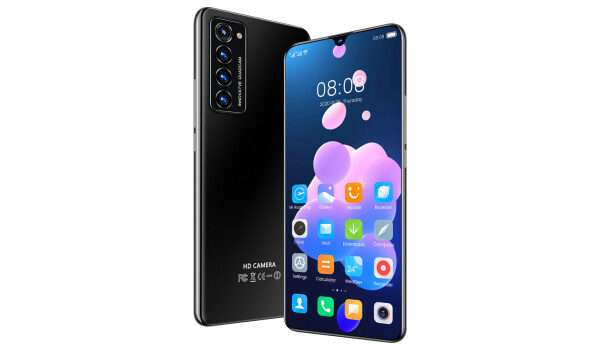
- Dimensions : 165.4 x 76.2 x 8.9 mm
- Weight : 164g
- Display : 7.0 inches, 3040 x 1440 pixels, 19:9 aspect ratio, IPS LCD screen
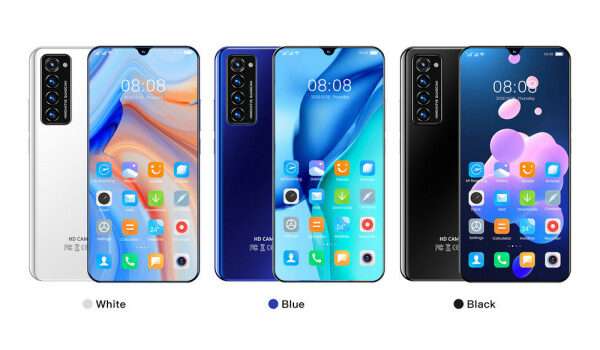
- Colours : Blue Blue. White White. Black Black.
- Physical Build : Plastic.
Internal
- CPU : 1.6 GHz Octa-core
- Chipset : MediaTek MTK6595 or MTK6889
- GPU : ARM
- RAM : 12 GB
- Storage : 512 GB
- Card Slot : microSD, up to 128GB (dedicated slot)
Cameras
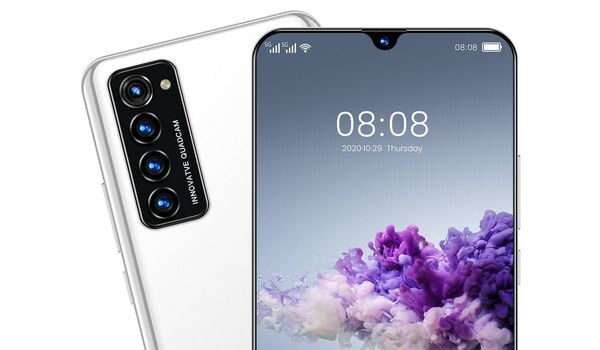
- Main Camera : 12 MP, LED flash, 1080p video recording
- Front Camera : 5 MP, LED flash, Face Recognition, 720p@30fps video capture
Audio, Video Playback
- Music Support : PCM, AAC / AAC + / eAAC + / MP3 / AMR – NB / WB / APE
- Audio : 3.5 mm audio jack
- Loudspeaker : Mono speaker
- Video Support : H.264/MP4/MPEG4 player
- FM Radio : Yes.
Sensors
- Digital Compass : No.
- Accelerometer : Yes.
- Proximity Sensor : No.
- Ambient Light Sensor : No.
- Barometer : No.
- Pedometer : No.
- Heart Rate Monitor : No.
- Gyroscope (G-Sensor) : No.
- Fingerprint Scanner : Yes; in-display.
- Face Unlock : Yes.
- Iris Scanner : No.
- Motion Sensing / Gesture Control : No.
- Voice Control : No.
- Intelligent Digital Assistant : N/A.
- Infra-red Sensor : No.
Connectivity
- Bluetooth : v4.2, A2DP
- WLAN : Wi-Fi 802.11 a/b/g/n/ac, hotspot
- GPS : Yes
- USB : microUSB v2.0.
- NFC : .
Miscellaneous
- Battery : Non-removable 5600 mAh
- Charging : Quick Charge
- Wireless Charging : No.
- Reverse Charging : No.
- Model Version/Number : N/A.
Launch Information
- Announced : 2019
- Released : 2020
- Available : China, Nigeria, Philippines, India, Ghana, Kenya, Pakistan.
MobilityArena Buyer’s Guide Verdict
Rimo8 is one of those phones that leave you more confused. It has conflicting specs and features across different websites. And some of these specs are ridiculous for the price being listed.
For example, on one e-commerce website, it has 12 GB of RAM, but 8 GB on another. The main camera is listed as 8 MP on one and 48 on another. One online store sells it as a 5G Android phone, but the MediaTek chipset on the specs sheet is a 4G LTE model – in fact, it is the first MediaTek chipset with 4G LTE and was announced in 2014.
But another e-commerce store lists it with the MediaTek MTK6889 (Dimensity 1000) chipset, which is a 5G chip.
As for the price, it is the most conflicting thing ever. One store lists it as available for $635. Another 635 SAR, another 6.965 PHP, and yet another says it sells for ₦28,050.
Make of you what you will of the Rimo8, but we cannot honestly recommend it to anyone. We advice that you stay away from the product.
Our Buyer’s Guide Verdict is a recommendation that we make based on our evaluation of the specs of the phone or device. It is a general guide designed to help you understand how much value a smartphone offers for its price. It is not a stamp of quality assessment or an endorsement of either the device or of its manufacturers. Be sure to ask questions and use your judgement when buying any device, as MobilityArena may not be held responsible for your buying decisions .
Rimo8 Phone Review Rating
We are yet to review the Rimo8 and so do not have a review rating for it yet. This section will be updated with our review rating and a link to the review page, as soon as we have a review ready.
Rimo8 Alternatives
It is difficult to recommend alternatives to the Rimo8, as its specs are not clear enough to place it. We would say though that whatever your budget, you are better off spending your money on a phone by a better known brand, including Samsung, Nokia, TECNO, Infinix, itel, OPPO, UMIDIGI, Vivo, Partner, etc.
Author:InfoDesk
Add MobilityArena as a preferred source on Google
My daughter has an entry-level smartphone with only 8GB internal storage. Having used up 7.78GB of that, she began to get an error message saying that she had run out of storage. So she decided to get a microSD card to augment the storage. She would also need to learn how to move apps to the SD card.
She purchased a 32GB card. After installing it, she had to first format it as a portable storage. There is a built-in menu in the phone’s Settings that allows her to do it (See the photo below), and she promptly did that.
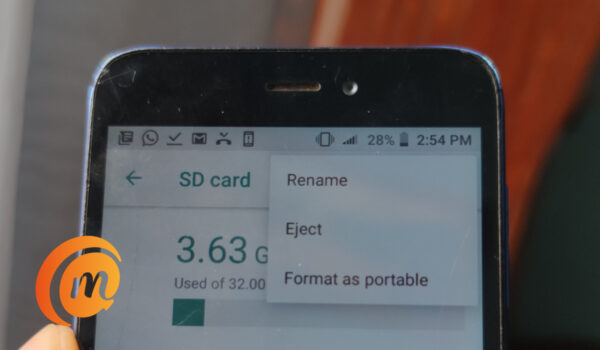
But after selecting the “Format as portable” option shown above and restarting the phone, she was still unable to move her installed apps to the card. And whenever she tried to instal a new app, the phone always showed that it had run out of memory – the very same reason why she needed to get a memory card in the first place.
- How to Convert the SD card into internal memory
- How to move apps to an SD card on Android
How to Convert the SD card into internal memory
As such, she came to me with the problem. What I did was instal a 3rd party app called Activity Launcher from Google Play Store. Of course, since the phone had run out of space, in order to install the app, we had to first free up some space by uninstalling a few apps. We uninstalled WhatsApp, and Instagram.
After uninstalling those apps to free up space, we installed Activity Launcher, and executed the following steps:
- Open Activity Launcher and scroll down to find “ Files ” and tap on it.
- This displays a list of options, look for the one that says “ ViewDownloadsActivity “, and tap on it.
- This takes you to a menu/page labelled “Downloads”.
- Tap on the upper options (three dots) in the top left corner
- Select SD Card;
- Select the three dots in the top right corner
- Pick/tap on “Format the microSD as internal storage”. That’s it.
In our case, we stopped at step 6, because step 7 wasn’t available. But for some reason, it worked. The phone now recognized the memory card as a portable storage.
The next step was to move existing installed apps to the SD card.
How to move apps to an SD card on Android
- Open the Settings app.
- Go into Apps & notifications .
- Tap on the app you want to move to the SD card.
- Tap on Storage .
- If the app supports a move, you will see an option to change where the app is stored. Follow through to change it to the SD card. See images below.
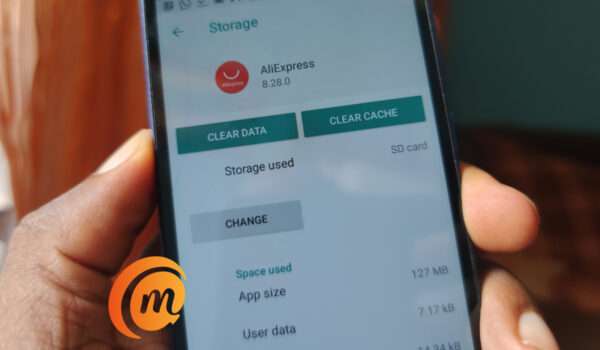
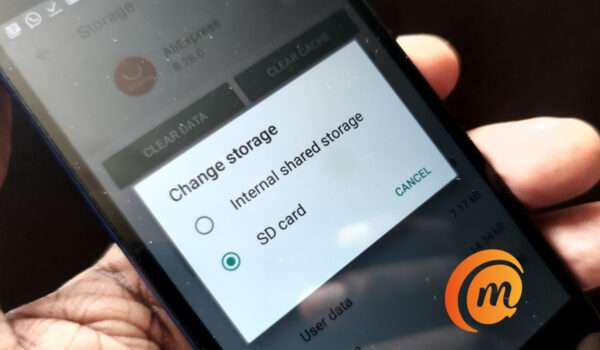
Final step to move apps to an SD card on Android
That is it; you now know how to move apps to an SD card. Once the process is completed, any apps that you download from the Play Store will be automatically installed on the SD card. Not only does your smartphone now have extra storage, but you also will enjoy the convenience of apps installing directly to the card, thereby keeping your phone’s internal storage free.
The phone we did this on is Redmi Go , but the same principles of installing the card as portable storage and moving the apps should hold for most other Android phones, regardless of manufacturer. The same process should work to move apps to an SD card for Android phones by Samsung, Huawei, Nokia, TECNO, Infinix, itel, UMIDIGI, and others.
Author:Mister Mobility
Digital Skills and Communication Coach | Mobile Phone Connoisseur since 2001 | Tech Blogging since 2004
