Add MobilityArena as a preferred source on Google
From the front, they look exactly the same. In terms of physical dimensions, they are exactly the same size too. If you stand them side by side and look at them from the front, you will need super powers to be able to tell which is which. Samsung Galaxy A03 Core and A03 are certainly cut from the same cloth.
These two phones belong in Samsung’s entry-level range of smartphones. When you see the “Core” tag on a Sammy, that’s an entry-level baby with Android Go Edition you are looking at. That also tells us that the A03 is superior to the A03 Core in some way. And we have our comparison table below to make those differences easy to spot.
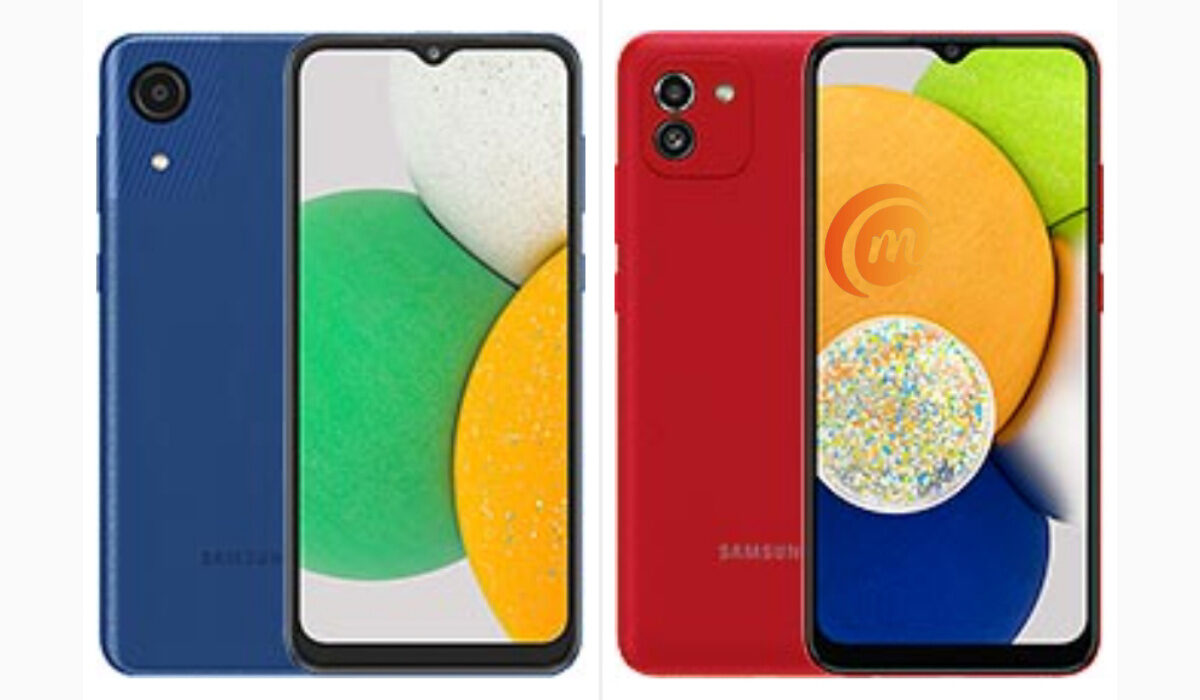
Samsung Galaxy A03 Core vs A03
- Samsung Galaxy A03 Core and A03 comparison table
- Samsung Galaxy A03 Core and A03: Conclusion
Samsung Galaxy A03 Core and A03 comparison table
| Samsung A03 Core | Samsung A03 |
|---|---|
| 6.5 inches, 720×1600 pixels, PLS TFT | 6.5 inches, 720×1600 pixels, PLS TFT |
| Android 11 (Go Edition) | Android 11 |
| Unisoc SC9863A | |
| 2 GB RAM | 3 GB / 4 GB RAM |
| 32 GB storage | 32 GB / 64 GB storage |
| 8 MP rear camera | 48 MP + 2 MP rear camera |
| 5 MP selfie camera | 5 MP selfie camera |
| 2G, 3G, 4G | 2G, 3G, 4G |
| NO fingerprint scanner | NO fingerprint scanner |
| 5000 mAh, non-removable battery | 5000 mAh, non-removable battery |
| 5W charging | 5W charging |
| $103.00 / ₦51,000 | From $200 / ₦61,500 |
The most glaring visual difference between the two devices is the design of the rear camera module. The A03 has two camera lenses there, while the A03 Core has only one. That is the easiest way to tell the two phones apart. Other than that, good luck trying to figure it out.
Away from the outside, let’s talk about other differences. A03 Core uses Android 11 Go Edition, which is a lean version of Android 11 optimised for devices with lower hardware. Remember that I mentioned that the A03 Core is an entry-level smartphone? Go Edition allows Android run smooth on it.
Speaking of which, while the processor used in Samsung A03 Core is public knowledge, for some reason, Sammy has been quiet about the A03’s processor. There is suspicion that it is the exact same one in the Core, but there has also been mention of Exynos 7. There is no way to confirm that now. When we do, I will have this section updated.
The last major difference between these two phones is in the rear cameras. A03 Core has a basic 8 MP single camera, while A03 has a 48 MP main camera and a 2 MP depth sensor to assist with portrait photos.
Both devices have the same battery capacity and charging standard. They are also both 4G smartphones. Neither smartphone has a fingerprint scanner, and I can’t quite wrap my head around it. At the price points of both phones, competitors all have fingerprint scanner. Lastly, when it comes to price, Samsung A03 is the more expensive of these two Android phones, which is expected, seeing that it offers more value than its “Core” sibling.
Samsung Galaxy A03 Core and A03: Conclusion
At the end of the day, while Samsung Galaxy A03 Core and A03 are cut from the same cloth, the latter is superior to the former. The only thing that will make you choose the A03 Core is your budget. Of you can afford it, Samsung Galaxy A03 is the better, more capable device.
Author:Mister Mobility
Digital Skills and Communication Coach | Mobile Phone Connoisseur since 2001 | Tech Blogging since 2004
Add MobilityArena as a preferred source on Google
Why is your phone not showing missed calls? If your phone is not showing missed calls notifications, it is likely that the Contacts and Call logs permissions have been tampered with in some way. Whether it is a Samsung phone, TECNO, Infinix, Xiaomi, OnePlus, or an iPhone, sometimes you find yourself in this situation. A common reason why it happens is that you unknowingly activating the phone’s Do Not Disturb (DND) feature.
The Do Not Disturb feature is designed to block off all notifications – calls, SMS, WhatsApp, Facebook, etc – from distracting or disturbing you. showing you. The idea is that if DND is enabled on your smartphone, it will not display any missed calls notifications. Sometimes, people toggle it on without even being aware that they did. At other times, people enable it for an office or church meeting and then forget to turn it off after. The good news is that fixing that is easy.
Fix missed calls notifications not showing by disabling DND
On your Samsung, Huawei, Xiaomi, TECNO, itel, or any other Android phone, swipe down from the top of your screen to pull down the notification menu, find the Do not disturb option, and see if it is enabled. If it is enabled, turn it off. If it isn’t enabled, then the problem is not DND. That means, our next stop is the phone settings.
On an iPhone, go to Settings > Do Not Disturb > Allow Calls From and select Everyone .
Why is your phone not showing missed calls?
Fix missed calls notifications not showing, by granting notification settings
On your Android smartphone, open the Settings , search for Apps , then find Contacts . Go to Notifications > Allow notifications, and enable Display in status bar/Status bar icon/Banners for silent notifications and sound notifications.
Again, open Settings , search for and access Badge display mode, and toggle on the switch next to Dialer .
On an Apple iPhone, go to Settings > Notifications > Phone , and tap the toggle on the Allow Notifications option.
Last Words
Doing the above should sort you out and your phone should begin to show notifications of missed calls once again.
- Don’t miss our mobile phone reviews .
- Follow our news on Google News .
- Join our WhatsApp Group , to be notified of the most important articles and deals,
- Follow us on Instagram , Facebook , Twitter , and YouTube .
Author:MobileChic
That motivated, gadget-loving geeky chic who tries to stay on top of things. Unapologetic iFan.
