Add MobilityArena as a preferred source on Google
| Samsung Galaxy A13 4G specs in brief |
|---|
| OS: Android 12 Release Date: March 2022 Network Type: 2G/3G/4G Display: 6.6-inch Processor: Exynos 850 Selfie Camera: 8 MP Rear camera: 50 MP quad RAM: 4 GB ROM: 128 GB Battery: 5000 mAh Related: Samsung Galaxy A12 . |
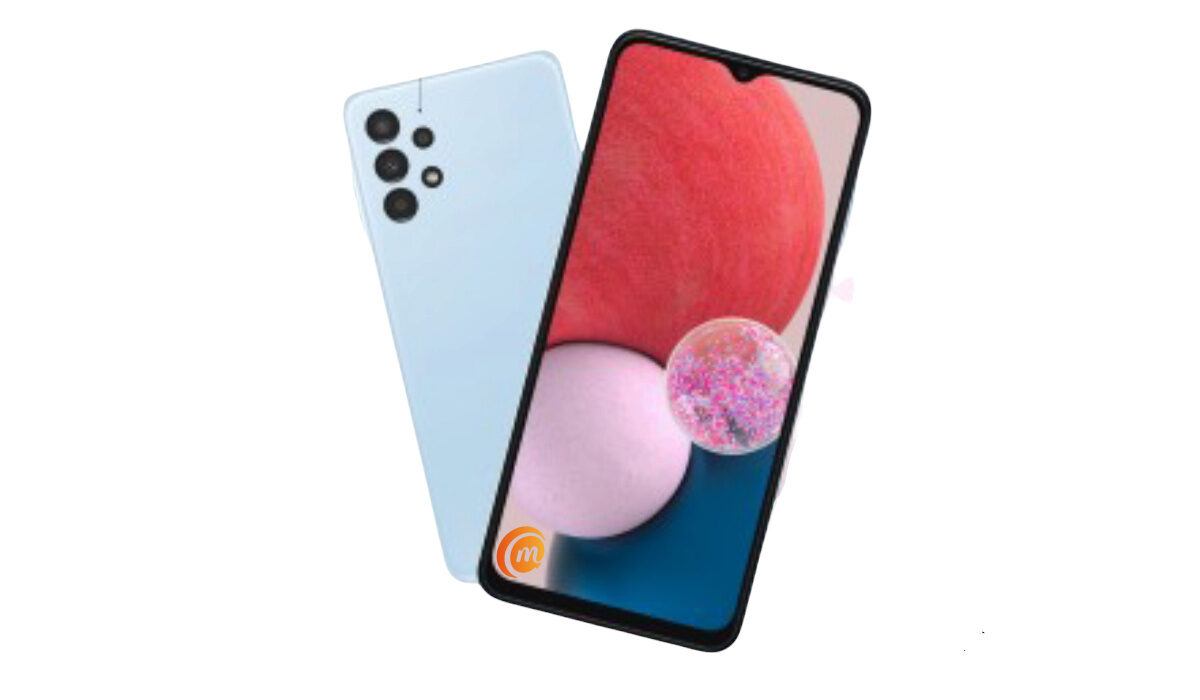
Samsung Galaxy A13 4G specs & features
Mobile Wireless Network and Software
- 2G mobile network bands : GSM, GPRS, EDGE 850 / 900 / 1800 / 1900 MHz.
- 3G mobile network bands : UMTS, WCDMA, HSDPA 850 / 900 / 2100 MHz
- 4G mobile network bands : LTE.
- 5G mobile network bands : No.
- SIM Type : Nano-SIM, Dual SIM
- Software / OS : Android 12 + OneUI 4.1
Design, Form Factor, Appearance
- Dimensions : 165.1 x 76.4 x 8.8 mm
- Weight : 195g
- Display : 6.6 inches (16.76 centimetres), 720 x 1600 pixels, 19.5:9 aspect ratio, 90Hz refresh rate, TFT. Gorilla Glass 5.
- Colours : Black. Red. White. Blue.
- Physical Build : Plastic frame; plastic back
Internal Hardware Specs
- Processor Type : 64-bit, Octa-core Cortex-A55
- Processor Name : Exynos 850
- Graphics Processor : ARM Mali-G52 MP1
- RAM : 3 GB / 4 GB / 6 GB.
- Internal Storage : 32 GB / 64 GB / 128 GB
- External Storage : microSD, up to 512 GB (dedicated slot)
Photography, Video Recording
- Main Camera : 50 MP ISOCELL JN1 wide angle lens + 5 MP f/2.2 UltraWide lens + 2 MP f/2.4 depth sensor, autofocus, LED flash, 1080p@30fps video recording
- Front Camera : 8 MP, Face Recognition, 1080p@30fps video capture
Audio, Video Playback
- Music Support : PCM, AAC / AAC + / eAAC + / MP3 / AMR – NB / WB / APE
- Audio : 3.5 mm audio jack
- Loudspeaker : Mono speaker
- Video Support : H.264/MP4/MPEG4 player
- FM Radio :
Phone Sensors
- Digital Compass : No.
- Accelerometer : Yes.
- Proximity Sensor : Yes.
- Ambient Light Sensor : Yes.
- Barometer : No.
- Pedometer : No.
- Heart Rate Monitor : No.
- Gyroscope (G-Sensor) : Yes.
- Fingerprint Scanner : Yes.
- Face Unlock : Yes.
- Iris Scanner : No.
- Motion Sensing / Gesture Control : No.
- Voice Control : No.
- Intelligent Digital Assistant : Yes; Google Assistant.
- Infra-red Sensor : No.
Connectivity Options
- Bluetooth Version : 5.0
- Bluetooth Profiles : A2DP
- WiFi : Wi-Fi 802.11 a/b/g/n/ac, hotspot
- GPS : Yes, A-GPS, GLONASS, BDS
- USB : microUSB v2.0. Type-C
- NFC :
Miscellaneous Specs and Features
- Battery Type and Capacity : Non-Removable Lithium-Polymer 5000 mAh
- Battery Charging : 25W fast charging
- Wireless Charging : No.
- Reverse Charging : No.
- Model Version/Number : SM-A135F.
Launch/Release Dates and Information
- Announced : March 4, 2022
- Release Date : March 2022
Samsung Galaxy A13 4G Price by Country
- USA : $
- Canada : $
- European Union : €190 (4/64 GB). €210 (4/128 GB).
- Nigeria : ₦95,000 (4/64 GB). ₦105,000 (4/128 GB).
- Egypt : Egyptian Pound
- UAE : AED
- India : Indian Rupee
- Iraq : Iraqi Dinar
- Kenya : Ksh.
- Ghana :
The above prices may change with time from country to country, as market forces and economic policies influence product price movements.
Is Samsung A13 wireless charging?
Samsung A13 does not support wireless charging.
Is samsung A13 NFC compatible?
Yes; it is, but Samsung says this feature is region-dependent. Please, ask your dealer if the model sold in your region has NFC.
Is samsung A13 dual SIM?
The A13 has two variants – one is single SIM, and the other is dual-SIM. When shopping, be sure to look out for which variants you want.
Is Samsung A13 good for gaming?
If you want a smartphone for gaming, we recommend that you consider something else, and be ready to spend more. The Galaxy A13 is an entry-level Android phone, which means it is not equipped for the most demanding games.
Can Samsung A13 run Genshin Impact?
We seriously doubt that the A13 will run Genshin Impact. If it does, it will run at extremely low settings and not provide the best gameplay. This is because the Galaxy A13 uses a low-end processor.
How old is Samsung A13?
Samsung Galaxy A13 was released in March 2022.
Is Samsung A13 waterproof?
This phone is not waterproof, so keep it away from spills and splashes. Definitely keep it away from pools.
Is Samsung A13 a good phone?
The A13 offers decent specifications and features at a decent price. It is not the best value-for-money in it’s price range, though; competitors like Xiaomi and Realme have competing models that offer more at the same price or for less. As such, you should probably look around at options like Redmi Note 11, Realme 8, and others.
Where is Samsung A13’s fingerprint?
The fingerprint scanner is built into the power button on the side of the A13.
Why is Samsung A13 slow?
Entry-level Android phones use low-end processors and also have the least amount of RAM. These limited system resources mean that such phones are not fast and will often be slow while in use.
Will Samsung A13 get Android 13?
Going by past experience with previous models, the A13 will likely get updated to Android 13. For example, Samsung A12 launched with Android 11 and got the Android 12 update. Samsung has been pretty good with rolling out Android updates to their devices, in recent times.
Does Samsung Galaxy A13 4G have Google Play Store?
It supports Google Services and software applications, including Play Store and Maps, Gmail, YouTube, and others.
Will Samsung Galaxy A13 4G work in the USA?
This is a GSM phone and is supported on US GSM carriers like AT&T and T-Mobile and other networks riding on their networks. It does not support CDMA networks. Do make enquiries from your carrier to know what bands/frequencies are supported on their service.
MobilityArena Buyer’s Guide Verdict
Not available.
Our Buyer’s Guide Verdict is a recommendation based on the specs of the device and a general guide to help you understand how much value a device offers for its price. It is not an endorsement of the device. Ask questions and use your judgement when buying any device; MobilityArena takes no responsibility for your buying decisions .
Samsung Galaxy A13 4G Phone Review Rating
Not available.
- Don’t miss our reviews .
- Join our WhatsApp Group , to be notified of the most important articles and deals,
- Follow us on Instagram , Facebook , Twitter , and YouTube .
Author:InfoDesk
Add MobilityArena as a preferred source on Google
Why am I writing an article about how to block notifications from Twitter trolls? Let me tell you the story. A week or so ago, I tweeted on a subject that apparently triggered a number of people, who then went on to mob me. The interesting thing is that I was not aware of it until an associate mentioned it. All of that bile and none of it got to me. You see, I had configured my account earlier to mute or block notifications from Twitter trolls, and it worked excellently in this storm.
Besides being told by friends that I was being mobbed, it was just another peaceful day on Twitter for me. It was akin to being in a soundproof safe house while a mob chanted and ranted outside. My Twitter notifications setup proved effective.
While being rude, and being violent appears to be the norm on social media today, some of us optimise for peace and calm. We’d rather not be a part of that madness and ignore those who derive joy in being nasty and uncouth. It is not that we are incapable of engaging, but we choose to not waste our previous energy on mobs. If you are reading this article, you are likely one of us and want to know how to keep the mob away and secure your peace.

Stop or block notifications from Twitter trolls with just a few steps
In this article, I am sharing the simple steps you have to take to achieve that kind of Zen status for your Twitter account and shield yourself from angry mobs when they come calling, as they will from time to time. Let’s go.
Stop or block notifications from Twitter trolls with these few steps
Go to your Twitter notifications tab, and tap on the gear wheel at the top right corner. That will present you with the Notifications menu. Tap on the item that says, Filters (see screenshot below).
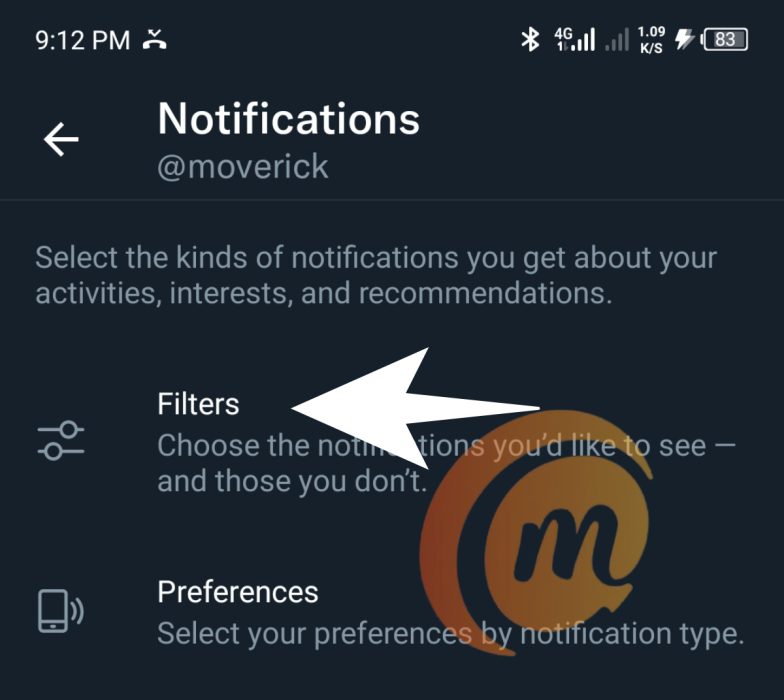
Tap on Filters
That will open the Filters menu, and you will see a number of options. The one you are looking for is Muted notifications (Screenshot below). Tap on that.
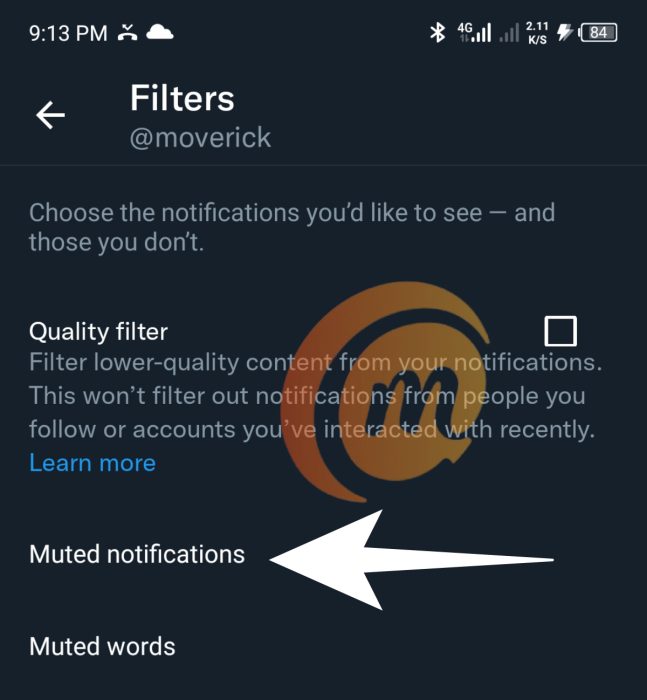
Tap on Muted notifications
In the Muted notifications menu that opens, tick all the boxes that I have ticked in the screenshot below.
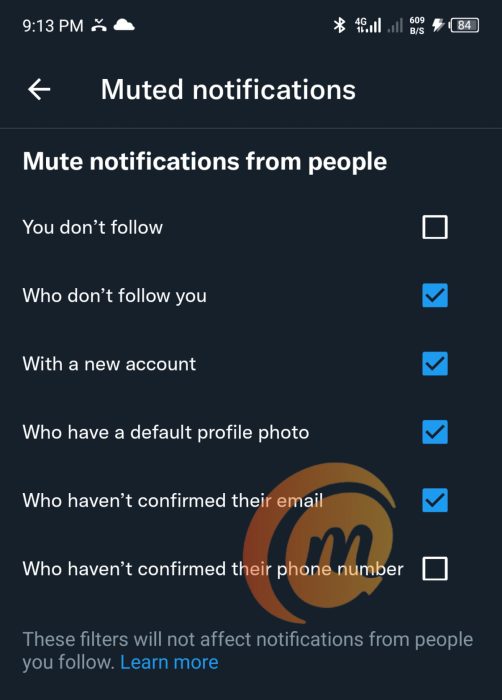
Check those checked boxes
Let me explain the rationale behind these choices. Most of the time, trolls are people who don’t follow you and so do not know you or know who you are. They are the ones who will most likely misinterpret your tweets and go on a tangent with it, and then turn on you with snide remarks. This category largely makes up mobs.
Mobs, by nature, are made up of irrationally angry people who often have not stopped to think properly about the matter they are responding to. I know you value communication, but effective communication requires thinking people at the other end. The mob does not think and so are not communicating, though it may suppose it is. You won’t be missing anything not getting notifications from the mob.
Oh, and if someone who follows you joins a mob in harassing you, in which case you will get a notification of that person’s action, there are two recommended responses: use the Mute button or the Block button, depending on how nice you are. Either way, they disappear from your mentions. Zen.
A lot of trolls and spammers too are new accounts, and also often have no profile photo. You will not be missing anything good in blocking notifications from these type of accounts.
Trolls and spammers are also likely to be not have confirmed their email accounts with Twitter. Useless. You won’t be missing anything not hearing from them.
Once you are done ticking those boxes, your Twitter account is now optimised for peace even through a nuclear war. Angry mobs can come at you and you won’t hear a sound. You have effectively muted, stopped, and blocked notifications from Twitter trolls and mobs. Welcome to the Zen experience. Buy me a bottle of rum.
- Don’t miss our reviews .
- Join our WhatsApp Group , to be notified of the most important articles and deals,
- Follow us on Instagram , Facebook , Twitter , and YouTube .
Author:Mister Mobility
Digital Skills and Communication Coach | Mobile Phone Connoisseur since 2001 | Tech Blogging since 2004
