Add MobilityArena as a preferred source on Google
Samsung Galaxy A2 Core Quick Specs : Android 8 Oreo smartphone features a 5-inch display, Exynos 7870 chipset, 5 MP selfie camera, 5 MP rear camera, 1 GB RAM, 16 GB internal memory, and a 2600 mAh battery.
Samsung Galaxy A2 Core Specs and Features
Wireless Network and Software
- 2G mobile network bands : GSM, GPRS, EDGE 850 / 900 / 1800 / 1900 MHz.
- 3G mobile network bands : UMTS, WCDMA, HSDPA 850 / 900 / 2100 MHz
- 4G mobile network bands : LTE, VoLTE 1(2100) / 3(1800) / 5(850) / 40(2300) / 41(2500)
- 5G mobile network bands : No.
- SIM Type : Nano-SIM, Dual SIM
- Software / OS : Android 9 Pie (Go Edition)
Design, Form Factor, Appearance
- Dimensions : 141.6 x 71 x 9.1 mm
- Weight : 142 g
- Display : 5 inches, 540 x 960 pixels,19:9 aspect ratio, TFT screen
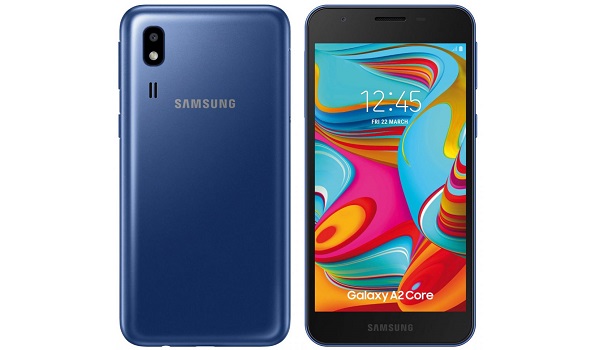
- Colours : Black. Blue.
- Physical Build : Plastic.
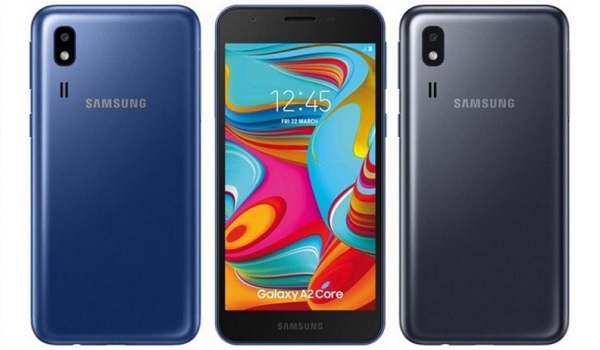
Samsung Galaxy A2 Core specs and features
Internal Hardware Specs
- Processor Type : 64-bit, 1.6 GHz Octa-core, Cortex-A53
- Processor Name : EXYNOS 7870
- Graphics Processor : Mali-T830 MP1.
- RAM : 1 GB
- Internal Storage : 16 GB
- External Storage : microSD, up to 256 GB (dedicated slot)
Photography, Video Recording
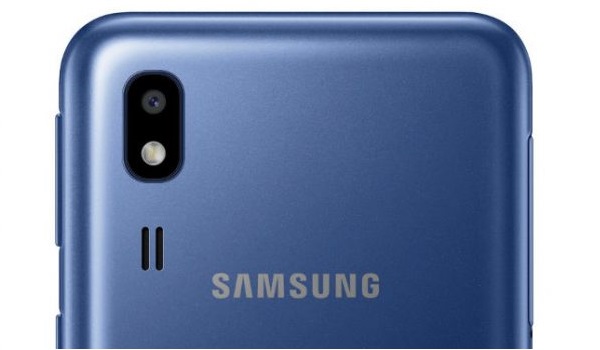
- Rear Camera : 5 MP camera, f1.8 Aperture, auto focus, LED flash, 1080p@30fps video recording
- Front-facing Camera : 5 MP, f2.0 Aperture, Face Recognition, 1080p@30fps video capture.
Audio, Video Playback
- Music Support : PCM, AAC / AAC + / eAAC + / MP3 / AMR – NB / WB / APE
- Audio : 3.5 mm audio jack
- Loudspeaker : Mono speakers
- Video Support : H.264/MP4/MPEG4 player
- FM Radio : Yes.
Sensors
- Digital Compass : No.
- Accelerometer : Yes.
- Proximity Sensor : Yes.
- Ambient Light Sensor : No.
- Barometer : No.
- Pedometer : No.
- Heart Rate Monitor : No.
- Gyroscope (G-Sensor) : No.
- Fingerprint Scanner : No.
- Face Unlock : No.
- Iris Scanner : No.
- Motion Sensing / Gesture Control : No.
- Voice Control : Yes.
- Intelligent Digital Assistant : Yes; Google Assistant.
- Infra-red Senor : No.
Connectivity Options
- Bluetooth : v4.2, A2DP
- WiFi : Wi-Fi 802.11 b/g/n, hotspot
- GPS : Yes, A-GPS, GLONASS, BDS.
- USB : microUSB v2.0; USB-OTG
- NFC : No.
Miscellaneous Specs and Features
- Battery Type and Capacity : Non-Removable Lithium-Ion 2600 mAh
- Battery Charging : 5V/1A Regular Charging
- Reverse Charging : No.
- Announced : April 2019
- Market Availability : April 2019
Samsung Galaxy A2 Core Price and Availability
- Country Availability : India.
- Price : INR 5,290 in India, which is about $75.
Samsung Galaxy A2 Core Review Rating
We are yet to review the Samsung Galaxy A2 Core and so do not have a review rating for it yet. This section will be updated with our review rating and a link to the review page, as soon as we have a review ready.
MobilityArena Buyer’s Guide Verdict
Not available.
Samsung Galaxy A2 Core News & Updates
The successor to the A2 Core, Samsung Galaxy A3 Core , was announced in August 2020.
Our Buyer’s Guide Verdict is a recommendation that we make based on our evaluation of the specs of the device. It is a general guide designed to help you understand how much value a smartphone offers for its price. It is not a stamp of quality assessment or an endorsement of the device or of the manufacturers. Be sure to ask questions and use your judgement when buying any device, as MobilityArena may not be held responsible for your buying decisions.
- Don’t miss our reviews .
- Join our WhatsApp Group , to be notified of the most important articles and deals,
- Follow us on Instagram , Facebook , Twitter , and YouTube .
Author:InfoDesk
Add MobilityArena as a preferred source on Google
Having the ability to share your mobile internet connection via Wi-Fi is a nifty feature, but once you have shared your connection with a device, that device can connect to it anytime it is active. So you will be interested in knowing how to block a specific device from your mobile Wi-Fi.
Thankfully, modern Android smartphones have the feature to do this built in, and it isn’t difficult to use.
- How To Allow Only Specific Devices to Connect to the Hotspot
- To Allow Only Specific Devices to Connect to the Hotspot
- To block a specific device from your mobile WiFi
- On non-Samsung phones
- Summary
How To Allow Only Specific Devices to Connect to the Hotspot
To block a specific device from your mobile WiFi, you need to use the provided settings to allow only specific devices to connect to the hotspot. I shall use the settings on Samsung’s new One UI to walk you through, but note that the procedure is similar across many Android phones.
Go to the Settings of your phone. You can pull down the drop-down menu and tap the gear icon in the top right corner to do that. See the yellow arrow in the screenshot below:
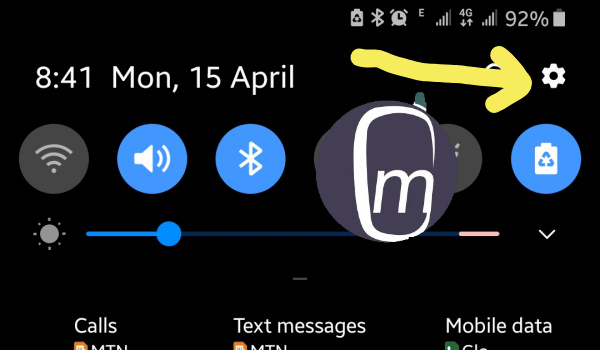
Once in the Settings menu, tap on Connections , and scroll down till you see Mobile Hotspot and Tethering . Tap that too.

On the next page, tap the text that says, Mobile Hotspot (see above screenshot), then tap the 3 vertical dots in the top right corner of the next page. Select Allowed devices , and you will arrive on a page that provides you with options to set your phont to give Allowed devices only to connect to your WiFi hotspot.
This is what the Allowed devices page looks like on Samsung One UI.

Enable Allowed devices only toggle. This is what gives you the power to allow or block devices from connecting even if they already have your WiFi password. In other words, only devices that you add here will be able to connect to your WiFi hotspot.
To Allow Only Specific Devices to Connect to the Hotspot
Go all the way to the Allowed devices page, tap Add in the top right corner, and add the device you want to give continuous access to your hotspot.
To block a specific device from your mobile WiFi
Again, make sure you are on the Allowed devices page, tap Delete in the top right corner, and it will offer you the option to select multiple devices whose access you want to revoke. Select the device you want to block and delete it from the list of allowed devices. That device will no longer be able to connect to your mobile Wi-Fi.
Now that you know how to block a specific device from your mobile WiFi. This information is vital if you share your mobile data bundle with children or other friends and family and need to exercise control to keep abusive use of your data in check.
On non-Samsung phones
In stock Android phones, when you get into the Wi-Fi hotpsot settings page, you will see options that allow you block users as well as manually whitelist a device.
The labels will differ slightly on smartphones with their own custom user interfaces, but once you understand the principle behind blocking and allowing, you will be able to find your way around. The place to always look is in your mobile phone’s Settings menu.
Summary
Simply enable your Android phone to allow only specific devices to connect to the hotspot, and then add/delete authorized devices as you please. Should any device you give access to begin to use your data indiscriminately, simply block that specific device from your mobile Wi-Fi by deleting it from your list of allowed devices.
