Add MobilityArena as a preferred source on Google
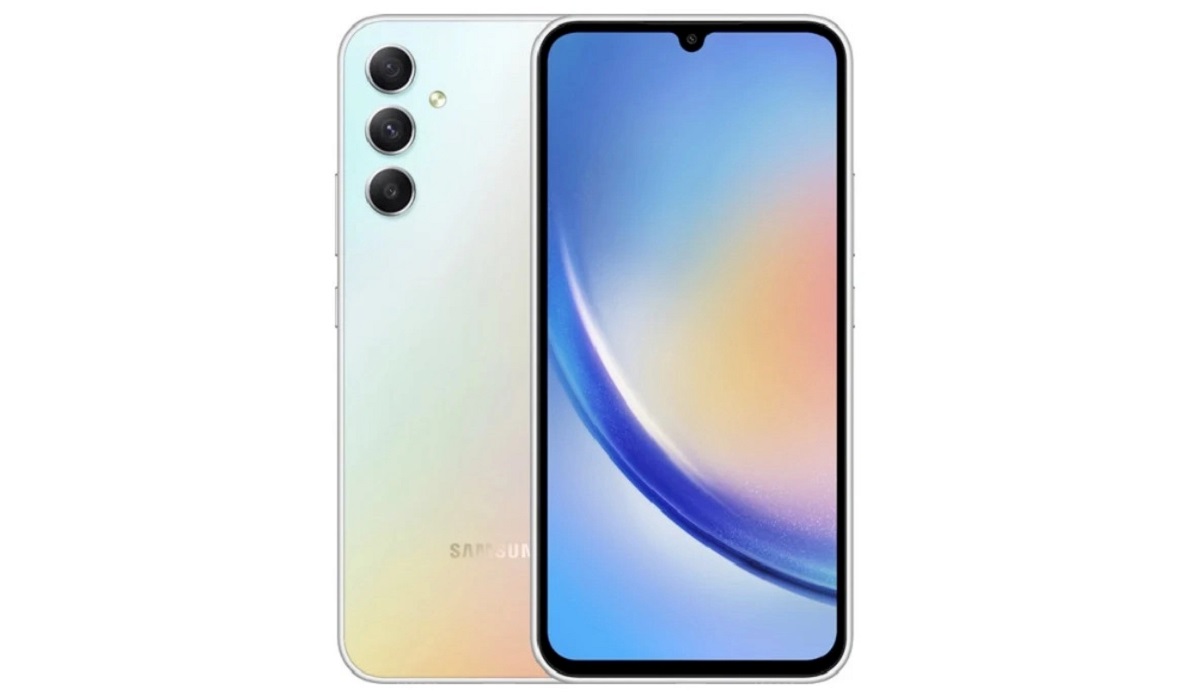
Samsung Galaxy A34 is a mid-range 5G smartphone that features a 6.6-inch FHD+ Super AMOLED display with a 120Hz refresh rate, a triple rear camera setup with a 48MP main sensor and OIS, and a 5000mAh battery with 25W fast charging.
It runs on Android 13 with One UI 6 and is powered by a MediaTek Dimensity 1080 chipset with 6GB or 8GB of RAM and 128GB or 256GB of internal storage.
- aptX HD and aptX Adaptive Bluetooth Codecs
- IR Blaster
- Wireless Charging
- FM Radio
- IP Rating
- Design
- Hardware
- Camera
- Connectivity
- Other features
- Availability and Price in the United States
- Samsung Galaxy A34 5G Alternatives
aptX HD and aptX Adaptive Bluetooth Codecs
Samsung Galaxy A34 5G supports aptX and aptX HD Bluetooth codecs, which offer high-quality wireless audio streaming with low latency and minimal distortion. However, it does not support aptX Adaptive, which is a newer codec that dynamically adjusts the bit rate and latency according to the network conditions and the content type.
IR Blaster
Samsung Galaxy A34 5G does not have an IR blaster, which is a device that can emit infrared signals to control other devices such as TVs, air conditioners, DVD players, etc. However, you can use an external IR blaster that plugs into the audio jack or the USB port of your phone, as long as your phone supports USB OTG (On-The-Go).
Wireless Charging
Samsung Galaxy A34 5G does not support wireless charging, which is a feature that allows you to charge your phone without using a cable, by placing it on a compatible wireless charger. You can use a wired charger that supports 25W fast charging, which can charge your phone from 0% to 50% in about 30 minutes.
FM Radio
Samsung Galaxy A34 5G does not have a built-in FM radio tuner, which is a feature that allows you to listen to live-broadcasted FM radio stations without using the internet. However, you can use a third-party app or a streaming service to listen to online radio stations, as long as you have a stable internet connection.
IP Rating
Samsung Galaxy A34 5G has an IP rating of 67, which means it is dustproof and waterproof. It can withstand being submerged in up to 1 meter of freshwater for up to 30 minutes. However, it is not advised to use it in beach, pool, or soapy water, as the water and dust resistance of the device may diminish over time.
Design
The Samsung Galaxy A34 5G has a simple and sleek design with a glastic finish and a rectangular camera module on the back. It comes in four colors: Lime, Graphite, Violet, and Silver. It has a fingerprint sensor under the display and a 13MP selfie camera in a centered punch-hole cutout. It measures 161.3 x 78.1 x 8.2 mm and weighs 199 grams.
Hardware
The Samsung Galaxy A34 5G is equipped with a MediaTek Dimensity 1080 chipset, which is a 6nm octa-core processor with two Cortex-A78 cores clocked at 2.6GHz and six Cortex-A55 cores clocked at 2.0GHz. It also has a Mali-G68 MC4 GPU for graphics performance. It has two memory options: 6GB of RAM with 128GB of storage or 8GB of RAM with 256GB of storage. It also supports a microSD card slot for up to 1TB of additional storage.
Software
The Samsung Galaxy A34 5G runs on Android 13 with One UI 6, which is Samsung’s custom skin that offers various features and optimizations. Some of the features include Photo Remaster, Object Eraser, Fun Mode with Snapchat filters, and Samsung Scalable Codec. It also supports Samsung Knox, Samsung Pay, and Samsung DeX.
Camera
The Samsung Galaxy A34 5G has a triple rear camera setup that consists of a 48MP main camera with f/1.8 aperture, PDAF, and OIS, an 8MP ultra-wide camera with f/2.2 aperture and 123-degree field of view, and a 5MP macro camera with f/2.4 aperture. It can record 4K videos at 30fps, 1080p videos at 30/60fps, and 720p videos at 480fps. It also has LED flash, panorama, and HDR modes. The front camera is a 13MP sensor with f/2.2 aperture that can also record 4K videos at 30fps and 1080p videos at 30fps.
Connectivity
The Samsung Galaxy A34 5G supports 5G, 4G LTE, Wi-Fi 802.11 a/b/g/n/ac, Bluetooth 5.3, GPS, GLONASS, GALILEO, BDS, NFC, and USB Type-C 2.0. It also has a 3.5mm headphone jack, a dual SIM slot, and OTG support.
Other features
The Samsung Galaxy A34 5G has a 5000mAh battery that supports 25W fast charging. It also has a stereo speaker, a virtual proximity sensor, and a fingerprint sensor under the display. It does not have wireless charging or an IR blaster. It supports aptX, aptX HD, and LDAC Bluetooth codecs.
Availability and Price in the United States
The Samsung Galaxy A34 5G is not officially available in the United States, but it can be purchased from some online retailers or imported from other regions. The price may vary depending on the seller, the model, and the shipping costs. The average price of the Samsung Galaxy A34 5G is around $245 for the 6GB/128GB model and around $275 for the 8GB/256GB model.
Samsung Galaxy A34 5GAlternatives
Some of the alternatives to the Samsung Galaxy A34 5G are:
Samsung Galaxy A54 5G : This is a similar device to the Galaxy A34, but with a slightly larger 6.7-inch display, a quad rear camera setup with a 64MP main sensor, and a 16MP front camera. It also has an IP67 rating and supports wireless charging. It is available in the United States for $399 from Samsung.com and other retailers.
OnePlus Nord CE 5G : This is another mid-range 5G smartphone that features a 6.43-inch AMOLED display with a 90Hz refresh rate, a triple rear camera setup with a 64MP main sensor, and a 4500mAh battery with 30W fast charging. It runs on Android 11 with OxygenOS 11 and is powered by a Snapdragon 750G chipset with 6GB or 8GB of RAM and 128GB or 256GB of storage.
It is not officially available in the United States, but it can be imported from other regions. The price may vary depending on the seller, the model, and the shipping costs. The average price of the OnePlus Nord CE 5G is around $300 for the 6GB/128GB model and around $350 for the 8GB/256GB model.
Author:InfoDesk
Add MobilityArena as a preferred source on Google
A phone trade-in allows you to hand over a phone that you currently own to pick up a brand new one that you are interested in. Trading in your phone is a convenient way to purchase a new phone without having to pay the full cost. The phone you are trading in is valued by the retailer and all you have to do is pay the outstanding amount to complete the price of the new phone you want.
Many telecom operators and carriers around the world have a phone trade-in service. From Verizon , T-Mobile, and AT&T in the United States, to Tesco, Vodafone, and Three in the UK, you can trade in your smartphone, tablet, or smartwatch and receive cash or credit toward your next device. In addition to telecom operators, some phone brands (e.g. Apple, Samsung ) and independent stores also let you trade-in your phone.

How Phone Trade-in Works
Trade-in services evaluate your existing phone and assign a monetary value to it, usually a fraction of the cost of a brand new unit. This value is deducted from the selling price of the new phone that you want to buy. All you have to do is pay the balance and you walk out of the store with your brand new phone.
When you do a trade in, your old phone is collected from you. Some trade-in programs allow you to mail in your existing phone, so you do not have to leave your house. The new phone is also delivered to you. This depends on the telecom operator or retailer.
What to do before trading in your phone
Because you will be handing over your phone during a trade-in transaction, you want to be sure that you do not leave your private information or other sensitive data on the phone when turning it over. Here are the things you need to do before trading in your phone.
- Back up your device : This includes backing up your personal information, photos, audio, videos, documents, contacts, calendars, apps, settings, etc. You can do an offline backup to your PC or via expandable memory. Or you can do an online backup via iCloud for iPhone, iPad, and iPod, or via Google for Android phones. You will need this backup so you can restore your data on the new phone.
- Factory Reset your device : A factory reset wipes your smartphone or other device clean. It removes everything – contacts, media, documents, apps, settings, etc.
- Remove the SIM card : You will need your SIM card for your new phone, so do not forget it in the phone you are trading in. Remove it
- Remove your SD card : If your current smartphone supports memory cards and you have one in it, do not forget to remove it before trading the phone in.
- Factory Reset a second time : When you factory reset your device the first time, the data is not irretrievable. Any malicious actor with the right tools can retrieve data from a device that has been wiped once. Wiping it a second time makes it more difficult, if not impossible, for any data to be extracted from your phone by a malicious actor. So, do the factory reset thing again. It will only take a few moments this time. Read more about how to permanently delete data from your Android phone .
Who is eligible to trade in a device?
When should you trade in your mobile phone?
From personal experience, it is a waste of time and money trying to trade in a new phone (one that is only a few weeks or months old). You will not get a good value for it. As a matter of fact, the value offered might feel downright insulting. As such, I recommend that you do not attempt to trade in a device that you have used for less than 9 months. As a rule, the older your current smartphone (especially if you have kept it in excellent condition), the better the trade-in value you will get.
- Don’t miss our mobile phone reviews .
- Follow us on Instagram , Facebook , Twitter , and YouTube .
Author:Mister Mobility
Digital Skills and Communication Coach | Mobile Phone Connoisseur since 2001 | Tech Blogging since 2004
