Add MobilityArena as a preferred source on Google
We have the Samsung Galaxy A5 2017 in the house here at MobilityArena. It has a 5.2-inch display with Gorilla Glass protection, an IP68 water and dust resistant body, and a 3000 mAh battery with fast charging. Internal storage is 32 GB, and it is powered by an Exynos 7880 Octa-core 1.9 GHz Cortex-A53 processor and 3 GB of RAM.
Samsung Galaxy A5 2017 Unboxing Photos
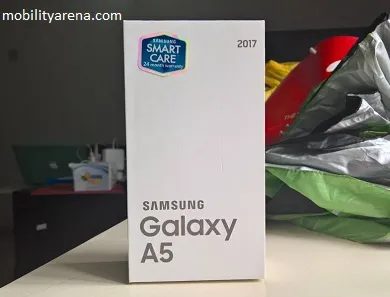
Of course, if you have followed us for a while now, you already know that we are great fans of compact packaging. The Galaxy A5 2017 comes in a nice, compact packaging that we like. Samsung tells you right on the pack that you get a 24-month warranty on the device. We like that too.
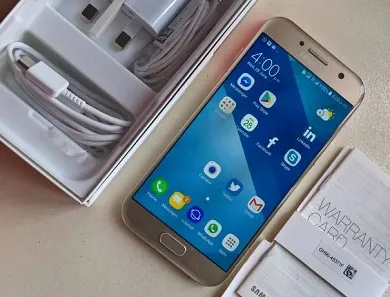
Inside the pack, you will find the phone, wall plug, USB Type-C cable (Yay!), headset and documentation:
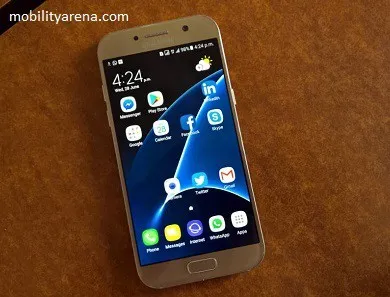
The Galaxy A5 2017 itself is a beautiful smartphone made of a metal frame and glass:
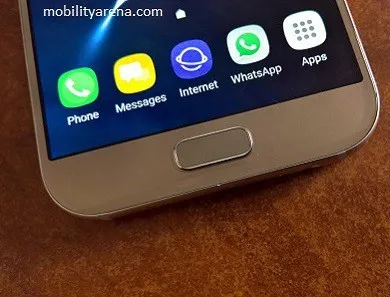
There is a central hardware home button below the 5.2 display, and it houses a fingerprint scanner. While not visible, two other capacitive buttons are there, the menu button on the left and the back button on the right. They do light up when you touch them.
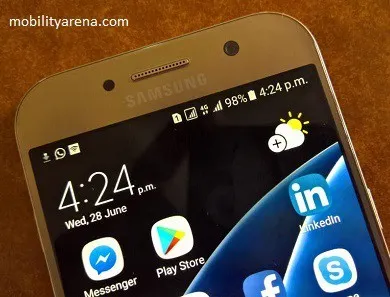
The unit we have here is the dual-SIM version of the Samsung Galaxy A5 2017. It has two nano-SIM card slots and both support GSM, 3G and 4G, though only one can be used for 4G at a time. There is also a dedicated micro-SD card slot, so you can use two SIM cards and a memory card at the same time. There is a 16 megapixels selfie camera above the display:
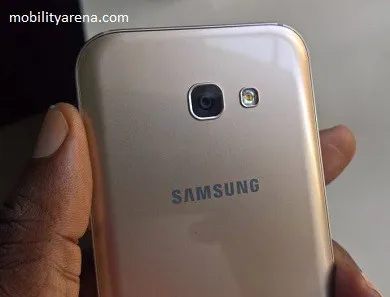
The back of the A5 2017 is made of 3D glass and has the 16 megapixel camera with LED flash located there.
Samsung Galaxy A5 2017 First Impressions
What we think of the Galaxy A5 2017? When I put that question to members of the MobilityArena team, I got positive feedback all the way. Someone summarized it this way: “I want”. Which is exactly how everyone here feels about it. It feels like a flagship smartphone packaged to cost less.
But how does it perform in everyday use? We will have more resource articles ready for you. Of course, in our full review, we shall give our verdict on this beautiful, handy powerhouse. You can check out the Samsung Galaxy A5 2017 specifications and price .
- Don’t miss our reviews .
- Follow our news on Google News .
- Join our WhatsApp Group , to be notified of the most important articles and deals,
- Follow us on Instagram , Facebook , Twitter , and YouTube .
Author:Mister Mobility
Digital Skills and Communication Coach | Mobile Phone Connoisseur since 2001 | Tech Blogging since 2004
Add MobilityArena as a preferred source on Google
If you enjoy pulling pranks on your friends, then you might want to check this out. There are pranks you can pull on your friends using their smartphones. The possibilities are endless. However, remember that every good prank comes with retribution. Also, note that these phone pranks can be played on you too. Here are a few phone pranks you can pull on your friends:
TALKBACK PRANK
This is one of the most annoying phone pranks, and it is quite hilarious to watch if you are not the victim. Android has some options to help people with disabilities in the Accessibility settings section. When you activate TalkBack, anytime you touch something on the screen, a voice will narrate it. to do this, go to Settings > Accessibility, then tap on TalkBack. Activate it by toggling the switch on. Then tap OK on the popup screen. Now, you can return the phone to its owner and watch them get confused at their talking phone.
CRACKED SCREEN PRANK
A cracked smartphone screen is a heartbreaking sign to some people. Therefore, this makes for a brilliant prank. Note that you do not have to crack your friend’s screen – just download the app called Crack Your Screen Prank. Then, open the app and check the box next to Touch to Crack. Now, go back to the home screen and lock the device. The next time your friend picks up the device, they will see a cracked display. Alternately, you can set this app on your phone to make your friend think they damaged your screen, then watch them awkwardly try to explain themselves.
FAKE BATTERY CHARGING APPS PRANK
Here’s a prank that will work on someone that is easy to trick. The prank is all about making the target believe that you can charge your phone by setting it in the sun or by shaking it. If the device is low on battery, tell the person about this cool new app that allows you to charge your phone with sunlight or by shaking it. If they ask you to show them, go to the Google Play Store and download either Android Solar Charger or Shake to Charge.
Now, these apps work in different ways. Android Solar Charger detects when your phone is out in sunlight. After installing it, return the phone to the target and watch them try to charge their phone with sunlight. Of course this would not work. The Shake to Charge app will show you how much battery available. Give the phone to the owner and tell them to shake it. Once they start shaking the phone, the battery will animate to show that it is charging. Now watch them tire out and then check their battery percentage to find out that it has not changed at all.
