Add MobilityArena as a preferred source on Google
| Samsung Galaxy M12 Quick Specs |
|---|
| OS: Android 11 Release Date: February 2021 Network Type: 2G/3G/4G Display: 6.5-inch PLS TFT Infinity-V Processor: EXYNOS 850 Selfie Camera: 8 MP Rear camera: 48 MP quad sensors RAM: up to 6 GB ROM: up to 128 GB Battery: up to 6000mAh |
- Samsung Galaxy M12 Specs Does Samsung M12 have a fingerprint reader? Is Samsung Galaxy M12 a dual SIM phone? Does Samsung M12 support fast charging? Is Samsung M12’s display/screen Super AMOLED? Is Samsung M12 waterproof? Will Samsung Galaxy M12 work in the USA? Where can I buy Samsung Galaxy M12?
Samsung Galaxy M12 Specs
Mobile Wireless Network and Software
- 2G mobile network bands : GSM, GPRS, EDGE 850 / 900 / 1800 / 1900 MHz.
- 3G mobile network bands : UMTS, WCDMA, HSDPA 850 / 900 / 2100 MHz
- 4G mobile network bands : LTE 1(2100) / 3(1800) / 5(850) / 8(900) / 38(2600) / 40(2300) / 41(2500)
- 5G mobile network bands : No.
- SIM Type : Nano-SIM, Single and Dual SIM options
- Software / OS : Android 10 + One UI 2.0
Design, Form Factor, Appearance
- Dimensions : 164.0 x 75.9 x 9.7 mm
- Weight : 221g
- Display : 6.5 inches, 720×1600 pixels, 20:9 aspect ratio, 90 Hz refresh rate, PLS TFT, Infinity-V display.
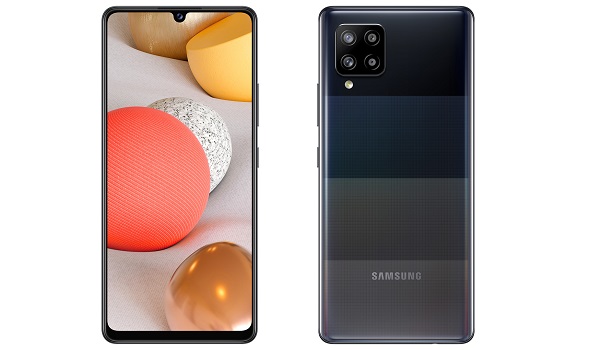
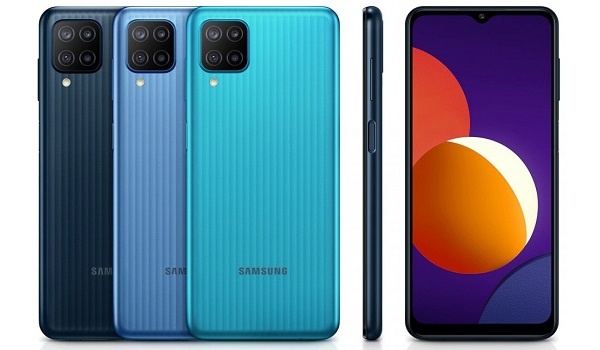
- Colours : Black. Jade. Blue.
- Physical Build : Polycarbonate
Internal Hardware Specs
- Processor Type : 64-bit, 2.0GHz Octa-core, Cortex-A55
- Processor Name : EXYNOS 850
- Graphics Processor : ARM Mali-G52 MP1
- RAM : 3 GB / 4 GB / 6 GB
- Internal Storage : 32 GB / 64 GB / 128 GB
- External Storage : microSD, up to 1 TB (dedicated slot)
Photography, Video Recording
- Rear Quad Camera : 48 MP main sensor + 5 MP ultrawide lens + 2 MP macro sensor + 2 MP depth sensor, LED flash, 1080p@30fps video recording
- Front Camera : 8 MP, Face Recognition, 1080p video capture.
Audio, Video Playback
- Music Support : PCM, AAC / AAC + / eAAC + / MP3 / AMR – NB / WB / APE
- Audio : 3.5 mm audio jack; Dolby Atmos* 360˚ surround sound
- Loudspeaker : Mono speaker
- Video Support : H.264/MP4/MPEG4 player
- FM Radio : Yes.
Phone Sensors
- Digital Compass : N/A.
- Accelerometer : Yes.
- Proximity Sensor : Yes.
- Ambient Light Sensor : N/A.
- Barometer : No.
- Pedometer : No.
- Heart Rate Monitor : No.
- Gyroscope (G-Sensor) : N/A.
- Fingerprint Scanner : Yes; side-mounted.
- Face Unlock : Yes.
- Iris Scanner : No.
- Motion Sensing / Gesture Control : No.
- Voice Control : No.
- Intelligent Digital Assistant : Yes; Google Assistant.
- Infra-red Sensor : No.
Connectivity Options
- Bluetooth : v5.0, A2DP
- Wi-Fi : Wi-Fi 802.11 b/g/n, hotspot
- GPS : Yes, A-GPS, GLONASS, BDS
- USB : microUSB v2.0.
- NFC : No.
Miscellaneous Specs and Features
- Battery Type and Capacity : Non-Removable Lithium-Ion 6000 mAh (in India) or 5000 mAh (in UK and EU)
- Battery Charging : 15W quick charging
- Wireless Charging : No.
- Reverse Charging : No.
- Model Number : SM-A025. SM-A025F.
Samsung Galaxy M12 Launch Details
- Announced : February 5, 2021
- Release Date : February 2021 in India. April 30 in the United Kingdom (UK).
Price of Samsung M12
- Vietnam :
- India : INR10,999 for the 4/64 GB variant, and INR13,499 for the 6/128 GB ($185/€155)
- United Kingdom (UK) : £159 for the 4/64 GB variant
- European Union (EU) :
Does Samsung M12 have a fingerprint reader?
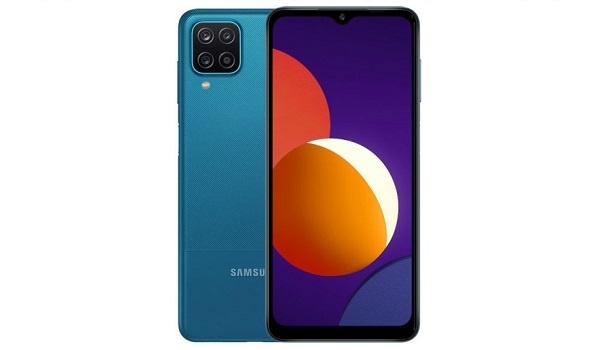
Yes; Samsung Galaxy M12 has a fingerprint scanner located at the back. Face Unlock is also available.
Is Samsung Galaxy M12 a dual SIM phone?
Samsung M12 has both single and dual SIM options available for buyers to pick from.
Does Samsung M12 support fast charging?
Samsung Galaxy M12 has fast charging.
Is Samsung M12’s display/screen Super AMOLED?
No; the display of the Samsung Galaxy M12 is not Super AMOLED. It uses an IPS LCD screen.
Is Samsung M12 waterproof?
No; Samsung M12 is not water or dust proof.
Will Samsung Galaxy M12 work in the USA?
Samsung M12 has network support across various US carriers like AT&T, Verizon, Metro PCS, Sprint, T-Mobile, Virgin Mobile, Boost Mobile, H2O Wireless, Ting, US Cellular, and Google Project Fi. What this means that some bands are supported, while others are not. You will have to make enquiries from your carrier to know what bands/frequencies are supported on them.
Where can I buy Samsung Galaxy M12?
MobilityArena Buyer’s Guide Verdict
Not available.
Our Buyer’s Guide Verdict is a recommendation that we make based on our evaluation of the specs of the device. It is a general guide designed to help you understand how much value a smartphone offers for its price. It is not a stamp of quality assessment or an endorsement of the device or of the manufacturers. Be sure to ask questions and use your judgement when buying any device, as MobilityArena may not be held responsible for your buying decisions .
Samsung Galaxy M12 Review Rating
We are yet to review the Samsung Galaxy M12 and so do not have a review rating for it yet. This section will be updated with our review rating and a link to the review page, as soon as we have a review ready.
Author:InfoDesk
Add MobilityArena as a preferred source on Google
| Samsung Galaxy M12 Quick Specs |
|---|
| OS: Android 11 Release Date: February 2021 Network Type: 2G/3G/4G Display: 6.5-inch PLS TFT Infinity-V Processor: EXYNOS 850 Selfie Camera: 8 MP Rear camera: 48 MP quad sensors RAM: up to 6 GB ROM: up to 128 GB Battery: up to 6000mAh |
- Samsung Galaxy M12 Specs Does Samsung M12 have a fingerprint reader? Is Samsung Galaxy M12 a dual SIM phone? Does Samsung M12 support fast charging? Is Samsung M12’s display/screen Super AMOLED? Is Samsung M12 waterproof? Will Samsung Galaxy M12 work in the USA? Where can I buy Samsung Galaxy M12?
Samsung Galaxy M12 Specs
Mobile Wireless Network and Software
- 2G mobile network bands : GSM, GPRS, EDGE 850 / 900 / 1800 / 1900 MHz.
- 3G mobile network bands : UMTS, WCDMA, HSDPA 850 / 900 / 2100 MHz
- 4G mobile network bands : LTE 1(2100) / 3(1800) / 5(850) / 8(900) / 38(2600) / 40(2300) / 41(2500)
- 5G mobile network bands : No.
- SIM Type : Nano-SIM, Single and Dual SIM options
- Software / OS : Android 10 + One UI 2.0
Design, Form Factor, Appearance
- Dimensions : 164.0 x 75.9 x 9.7 mm
- Weight : 221g
- Display : 6.5 inches, 720×1600 pixels, 20:9 aspect ratio, 90 Hz refresh rate, PLS TFT, Infinity-V display.
- Colours : Black. Jade. Blue.
- Physical Build : Polycarbonate
Internal Hardware Specs
- Processor Type : 64-bit, 2.0GHz Octa-core, Cortex-A55
- Processor Name : EXYNOS 850
- Graphics Processor : ARM Mali-G52 MP1
- RAM : 3 GB / 4 GB / 6 GB
- Internal Storage : 32 GB / 64 GB / 128 GB
- External Storage : microSD, up to 1 TB (dedicated slot)
Photography, Video Recording
- Rear Quad Camera : 48 MP main sensor + 5 MP ultrawide lens + 2 MP macro sensor + 2 MP depth sensor, LED flash, 1080p@30fps video recording
- Front Camera : 8 MP, Face Recognition, 1080p video capture.
Audio, Video Playback
- Music Support : PCM, AAC / AAC + / eAAC + / MP3 / AMR – NB / WB / APE
- Audio : 3.5 mm audio jack; Dolby Atmos* 360˚ surround sound
- Loudspeaker : Mono speaker
- Video Support : H.264/MP4/MPEG4 player
- FM Radio : Yes.
Phone Sensors
- Digital Compass : N/A.
- Accelerometer : Yes.
- Proximity Sensor : Yes.
- Ambient Light Sensor : N/A.
- Barometer : No.
- Pedometer : No.
- Heart Rate Monitor : No.
- Gyroscope (G-Sensor) : N/A.
- Fingerprint Scanner : Yes; side-mounted.
- Face Unlock : Yes.
- Iris Scanner : No.
- Motion Sensing / Gesture Control : No.
- Voice Control : No.
- Intelligent Digital Assistant : Yes; Google Assistant.
- Infra-red Sensor : No.
Connectivity Options
- Bluetooth : v5.0, A2DP
- Wi-Fi : Wi-Fi 802.11 b/g/n, hotspot
- GPS : Yes, A-GPS, GLONASS, BDS
- USB : microUSB v2.0.
- NFC : No.
Miscellaneous Specs and Features
- Battery Type and Capacity : Non-Removable Lithium-Ion 6000 mAh (in India) or 5000 mAh (in UK and EU)
- Battery Charging : 15W quick charging
- Wireless Charging : No.
- Reverse Charging : No.
- Model Number : SM-A025. SM-A025F.
Samsung Galaxy M12 Launch Details
- Announced : February 5, 2021
- Release Date : February 2021 in India. April 30 in the United Kingdom (UK).
Price of Samsung M12
- Vietnam :
- India : INR10,999 for the 4/64 GB variant, and INR13,499 for the 6/128 GB ($185/€155)
- United Kingdom (UK) : £159 for the 4/64 GB variant
- European Union (EU) :
Does Samsung M12 have a fingerprint reader?
Yes; Samsung Galaxy M12 has a fingerprint scanner located at the back. Face Unlock is also available.
Is Samsung Galaxy M12 a dual SIM phone?
Samsung M12 has both single and dual SIM options available for buyers to pick from.
Does Samsung M12 support fast charging?
Samsung Galaxy M12 has fast charging.
Is Samsung M12’s display/screen Super AMOLED?
No; the display of the Samsung Galaxy M12 is not Super AMOLED. It uses an IPS LCD screen.
Is Samsung M12 waterproof?
No; Samsung M12 is not water or dust proof.
Will Samsung Galaxy M12 work in the USA?
Samsung M12 has network support across various US carriers like AT&T, Verizon, Metro PCS, Sprint, T-Mobile, Virgin Mobile, Boost Mobile, H2O Wireless, Ting, US Cellular, and Google Project Fi. What this means that some bands are supported, while others are not. You will have to make enquiries from your carrier to know what bands/frequencies are supported on them.
Where can I buy Samsung Galaxy M12?
MobilityArena Buyer’s Guide Verdict
Not available.
Our Buyer’s Guide Verdict is a recommendation that we make based on our evaluation of the specs of the device. It is a general guide designed to help you understand how much value a smartphone offers for its price. It is not a stamp of quality assessment or an endorsement of the device or of the manufacturers. Be sure to ask questions and use your judgement when buying any device, as MobilityArena may not be held responsible for your buying decisions .
Samsung Galaxy M12 Review Rating
We are yet to review the Samsung Galaxy M12 and so do not have a review rating for it yet. This section will be updated with our review rating and a link to the review page, as soon as we have a review ready.
Author:InfoDesk
Add MobilityArena as a preferred source on Google
Repairit online is a video repair tool that repairs corrupted files with multiple file-formats like MOV, M4V, MP4, MTS, and many more. It’s the best video repair software that ensures the recovery of files effectively and efficiently regardless of the file quality or size and devices. With many advanced features, it recovers your data with preview functionality and all technical information displayed on the screen.
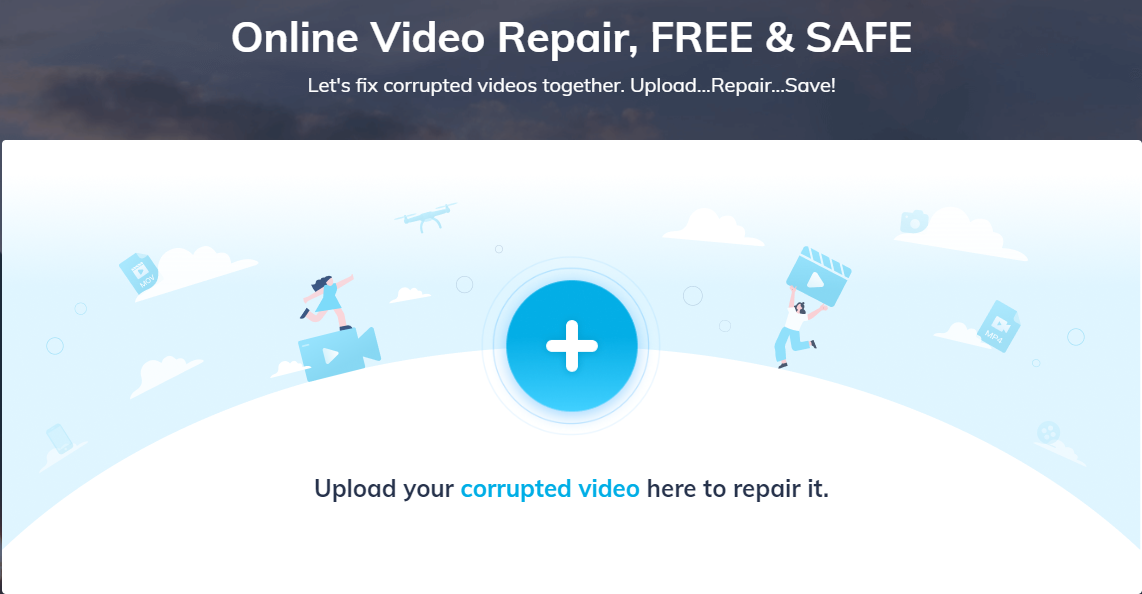
You can repair corrupted video for free with RepairIt
- Introduction
- How to repair corrupted videos for free?
- Three Steps to Perform Video Repair
- Step 1: Add Video
- Step 2: Repair Video
- Step 3: Save Video
- Advanced Repair
- All Video Playback Issues
- Component Damage
- Quality Issues
- Error Codes
- Repair Videos from Any File Formats from Any Camera
- Conclusion
Introduction
There could be a lot of reasons to lose a video that is, sudden shut down of your device, internet connectivity issue, virus attack, loss during the transfer of files, and many others. But, with this video repair tool , you can repair them without any damage keeping the quality as before.
Repairit online is the video repair software that supports all the playback issues like component damage, quality issues, and error codes.
Moreover, if you find any difficulty or have any doubts about the video repair features of repairit online, you can check windows video repair with the advanced features. And if you are a videogame player and love to record them while playing, but due to some reason the recording get lost, its video game repair feature helps you to recover it.
In this article, we will discuss the methods to repair corrupted files with advanced features, playback issues, and how you can recover files of any format from any device.
How to repair corrupted videos for free?
A video that is close to your heart and has memories associated with it, some essential work that you can’t even imagine losing, but while playing it, you receive an error message to access it. An error message that says Access denied or asks the user to repair it. But you are not aware of the tools and techniques to fix such errors. Don’t worry!
You are at the right place where you do not only get tools and software that can help you to overcome this issue but also provide you the guidelines to use it. So keep on reading!
Videos are widely using for several purposes in different forms. But as their use is becoming more and more common, problems associating with them are also rising. There are a lot of reasons due to which you can lose your data. And you can’t bear the loss if the file has so many essential things or concerns.
There are countless video repair Software but, repairit online is the tool that allows you to recover corrupted files with different sizes, formats, and devices with the preview option.
Video repair with this online software tool is reliable, versatile, safe, and fast. You can get back your files in a secure way without any damage to the original quality. Apart from these features, this data repair tool supports different devices including, a computer, mobile phone, media player, USB Flash Drive, camera, and memory card.
You can recover the corrupted SD card with Repairit Online or desktop version no matter to what extent it got corrupted. With its advanced repair mode, you can get back your extensively damaged files for free and can perform multiple tasks simultaneously.
Three Steps to Perform Video Repair
There are several reasons due to which a file can get corrupted. It might be some logical issue, storage problem, internet connectivity issues, or some issue in the source file. But Repairit , with its advanced features, repairs videos on windows and mac in just three simple ways.
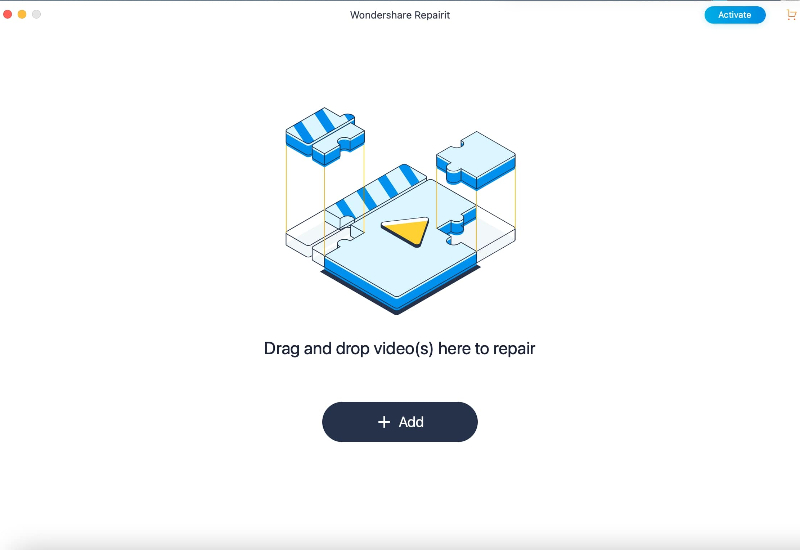
Step 1: Add Video
First of all, you need to add the file that got corrupted to the Repairit Online or Repairit Desk tool. By clicking the Add Button, a new browser window will open, and you have to select the location where the corrupted file is kept.
Step 2: Repair Video
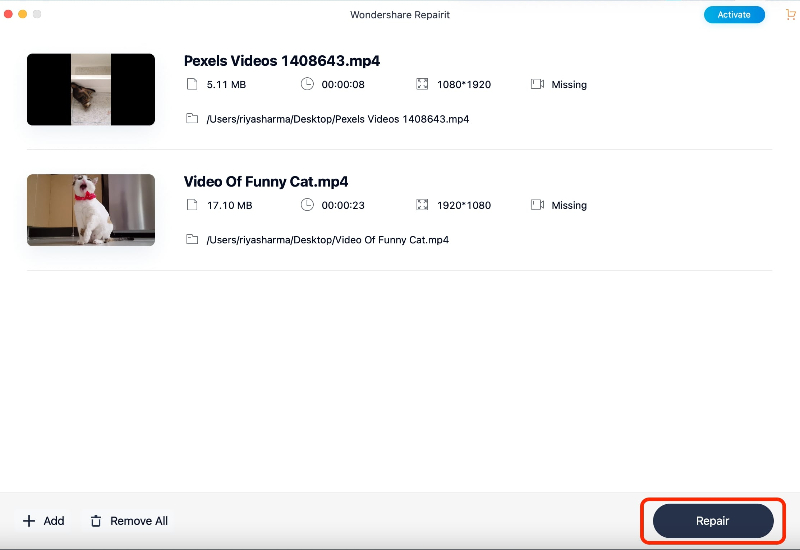
While the Repairit Video Repair is fixing the corrupted files that you have loaded, the progress is showing on the screen. Wait until the files get repaired.
Step 3: Save Video
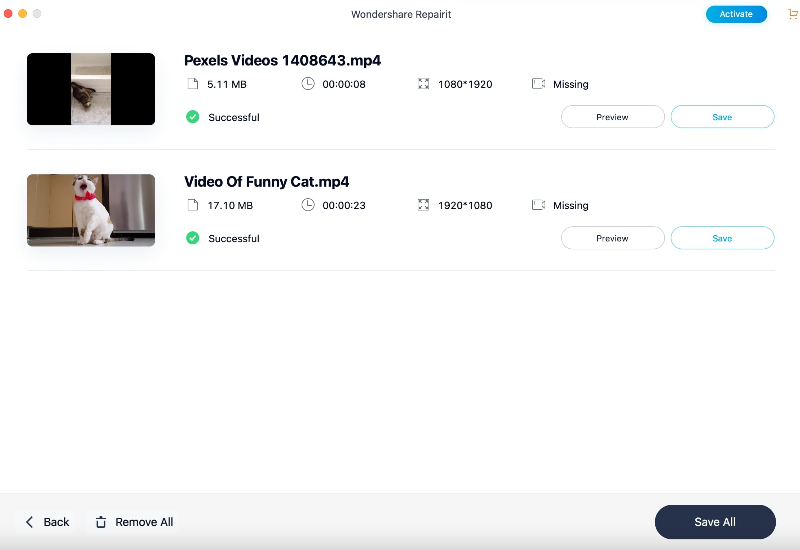
Once the repairing process gets completed, you can preview the repaired files before storing them. After reviewing the files, you can save them to the desired location.
Advanced Repair
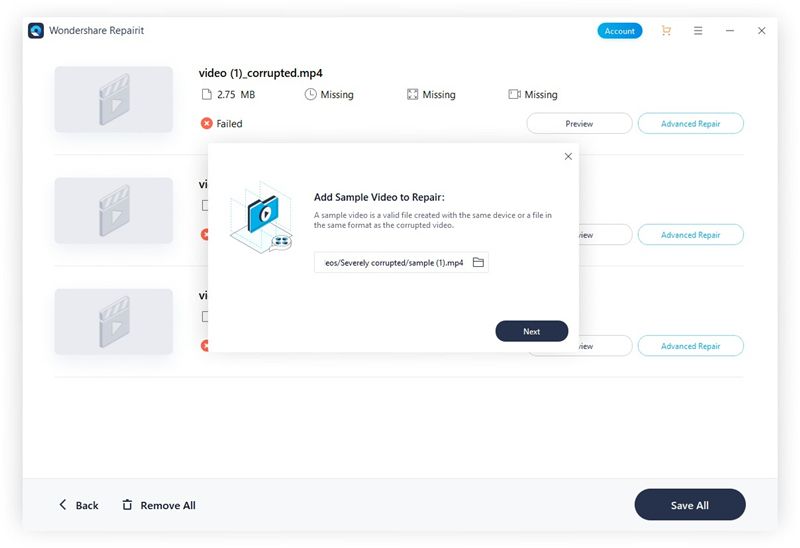
Repairit comes with advanced features that allow you to repair severely damaged and corrupted files. By clicking on the “Advanced Repair” option you can add a sample video whose format is similar to the corrupted video that needs to restore and also shot on the same device. Further, you can proceed the same way, first repair the file and then save it after the preview.
All Video Playback Issues
There are a lot of factors that influence video playback. Problems associated with the playback arise due to many reasons. These could be component damage, quality issues, sudden interruption during the transfer of files, internet connectivity issues while downloading, or error codes. In this article, we’ll have a look at some of the playback issues.
Component Damage
It is one of the most common playback errors that mostly happen when the file gets corrupted. Components damage can result in losing metadata, low quality, no sound, black screen, corrupt header, dropped frames, and many more.
Video header and metadata are things that contain the information about the file, and losing these mean losing the whole file. So take a reliable tool to fix such issues. Repairit Online is the tool that is available to resolve such playback issues with advanced repairing features.
Quality Issues
Video playback quality is dependent on internet speed or the device’s processing speed. Apart from these, quality issues can also arise due to problems like minor compression and pixelation in the source file. These include a black screen while playing video, issues in audio-video synchronization, freezing, blurring, and flickering. The lag in the playback is the most common issue where the audio and video are not syncing well. Such errors can resolve using Repairit online.
Error Codes
Mostly media players show errors in playing a video file because the system doesn’t support the right codec. Most of the errors occur due to the absence of the required codec. The solution is to download these codecs on your device.
As media players do not support all codecs, and if it does not support a file codec, it will give an error. There are a lot of error codes such as 0xc00d36c4, 0x10100aa, 0xc00d3e8c, error 224003, 224002 and many more. Repairit online software can help you to fix these errors.
Repair Videos from Any File Formats from Any Camera
Repairit restores a wide variety of video file formats which includes, MOV, MP4, M2TS, MKV, MTS, 3GP, AVI, FLV, and M4V, and many more. It even supports the latest INSV video format. It does not just support different file formats but also different sizes, storage devices, and cameras.
Storage devices like hard drives, USB, memory cards, microSD cards, and pen drives are available for video repair.
Moreover, its advanced features support Digital cameras, GoPro, Drone cameras, Camcorder, and many other devices.
Conclusion
In this article, we have discussed multiple video related problems and then the steps to recover them regardless of the severity. With the advanced features of repairit online and windows video repair, you can repair the corrupted files in an easy and fast way.
Also, we have discussed some of the playback issues, the reason behind them, and how you can overcome those problems. Fixing a corrupted video file is no more a problem. All you have to do is using Repairit Online Software that supports multiple video formats, size, and provides secure and reliable ways to fix corrupted files.
