Add MobilityArena as a preferred source on Google
Samsung Galaxy S23 Ultra is the top device in Samsung’s 2023 premium flagship line of phones. It launches with One UI 5.1 based on Android 13 and is powered by a Snapdragon 8 Gen 2 chipset. It is available in four memory variants – 8/128GB, 12/256GB, 12/512GB, and 12/1TB.
Welcome to our complete guide to the Samsung Galaxy S23 Ultra. On this page, we cover everything you need to know about this highly anticipated 2023 smartphone, including its specifications, price, release date, and more.
Samsung Galaxy S23 Ultra: brief information
- OS: Android 13
- Release Date: 2023
- Network Type: 2G/3G/4G/5G
- Display: 6.8-inch, 1440 x 3088 pixels resolution
- Processor: Qualcomm Snapdragon 8 Gen 2
- Selfie Camera: 40 MP
- Rear camera: 200 MP
- RAM: 12 GB
- ROM: 1 TB
- Battery: 5000 mAh
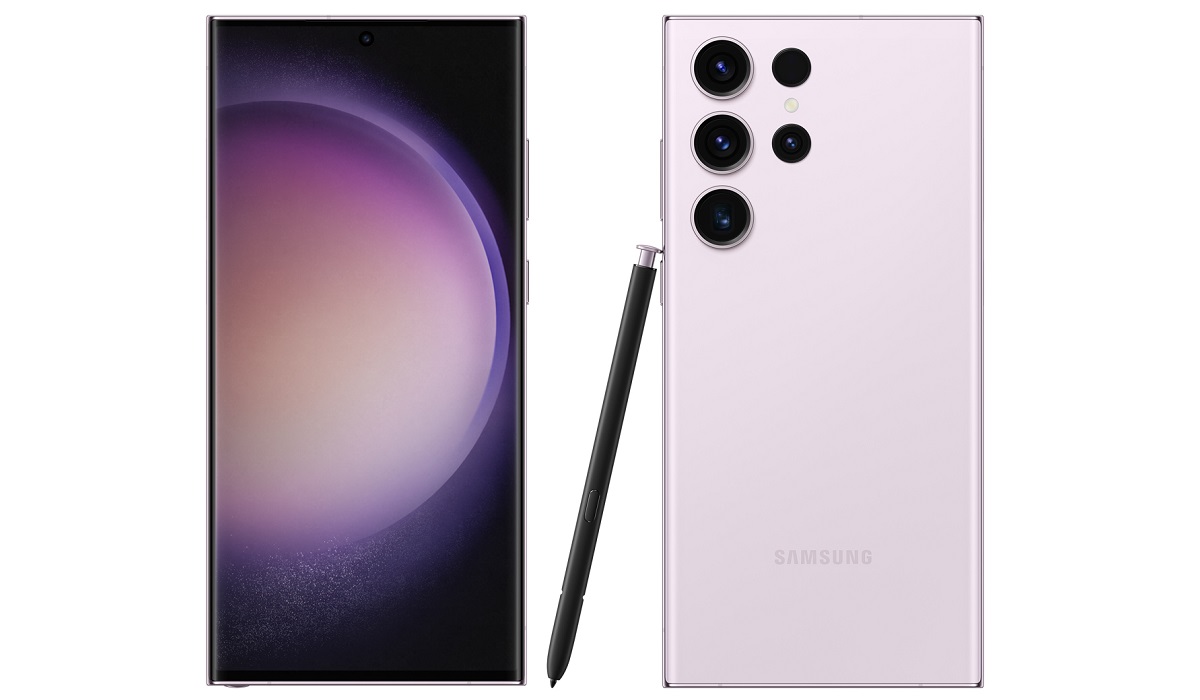
Samsung Galaxy S23 Ultra
- Specs
- Launch/Release Dates
- Price: How much is Samsung Galaxy S23 Ultra in the US, UK, EU, others? Does Samsung Galaxy S23 Ultra have aptX HD? Does Samsung Galaxy S23 Ultra have aptX Adaptive? Does Samsung Galaxy S23 Ultra have Google Play Store? Will Samsung Galaxy S23 Ultra work in the USA?
Specs
Mobile Wireless Network and Software
- 2G mobile network bands : GSM, GPRS, EDGE 850 / 900 / 1800 / 1900 MHz. CDMA 800 / 1900 & TD-SCDMA
- 3G mobile network bands : UMTS, WCDMA, HSDPA 850 / 900 / 1700(AWS) / 2100 MHz. CDMA2000 1xEV-DO
- 4G mobile network bands : LTE.
- 5G mobile network bands : NSA/SA/Sub6/mmWave
- SIM Type : Nano-SIM, Dual SIM
- Software / OS : One UI 5 based on Android 13
Design, Form Factor, Appearance
- Dimensions : 163.4 x 78.1 x 8.9 mm
- Weight : 233g
- Display : 6.8 inches, 1440 x 3088 pixels, 120 Hz refresh rate, 20:9 aspect ratio, Dynamic AMOLED 2X. Gorilla Glass Victus
- Colours : Phantom Black, Cotton Flower, Botanic Green and Misty Lilac.
- Physical Build : Aluminium frame. IP68 dust/water resistant (up to 1.5metres for 30 minutes)
Internal Hardware Specs
- CPU/ Processor : 64-bit, 3.3 GHz Octa-core
- Chipset : Qualcomm Snapdragon 8 Gen 2
- GPU/ Graphics Processing Unit : Adreno 740
- RAM : 8 GB / 12 GB
- Extended/Virtual RAM :
- Internal Storage : 128 GB / 256 GB / 512 GB / 1 TB
- External Storage : No
Photography, Video Recording
- Main Camera : 200MP ISOCELL HP2 main sensor, autofocus, LED flash, 8k video, 4k video, 1080p@30fps video recording
- Front Camera : 40 MP, fixed focus, Face Recognition, 4k video, 1080p@30fps video capture
Audio, Video Playback
- Music Support : PCM, AAC / AAC + / eAAC + / MP3 / AMR – NB / WB / APE
- Audio : No 3.5 mm audio jack
- Loudspeaker : Stereo speaker
- Video Support : H.264/MP4/MPEG4 player
- FM Radio : .
Phone Sensors
- Digital Compass : Yes.
- Accelerometer : Yes.
- Proximity Sensor : Yes.
- Ambient Light Sensor : Yes.
- Barometer : Yes.
- Pedometer : No.
- Heart Rate Monitor : No.
- Gyroscope (G-Sensor) : Yes.
- Fingerprint Scanner : Yes; under-display.
- Face Unlock : Yes.
- Iris Scanner : No.
- Motion Sensing / Gesture Control : No.
- Voice Control : No.
- Intelligent Digital Assistant : Yes; Google Assistant, Bixby
- Infra-red Blaster : No.
Connectivity Options
- Bluetooth Version : 5.3
- Bluetooth Profiles : A2DP
- WiFi : Wi-Fi 802.11 a/b/g/n/ac/6e, hotspot
- GPS : Yes, A-GPS, GLONASS, BDS, Galileo
- USB : microUSB v3.2 Type-C. USB-OTG.
- NFC : Yes.
Miscellaneous Specs
- Battery Type and Capacity : Non-Removable Lithium-Polymer 5000 mAh
- Battery Charging : 45W fast charging
- Wireless Charging : 15W fast wireless charging.
- Reverse Charging : 4.5W.
- Model Version/Number : SM-S918B, SM-S918B/DS, SM-S918U, SM-S918U1, SM-S918W, SM-S918N, SM-S9180, SM-S918E, SM-S918E/DS
Launch/Release Dates
- Announced : February 1, 2023
- Release Date : February 2023
Price: How much is Samsung Galaxy S23 Ultra in the US, UK, EU, others?
- United States of America (USA) : $1,199 (8/256GB). $1,380 (8/512GB).
- Canada : C$1,650 (12/513GB). C$2,210 (12GB/1TB).
- United Kingdom (UK) : £1,250 (8/256GB). £1,400 (12/512GB).
- Germany : €1,400 (8/256GB). €1,580 (12/512GB). €1,820 (12GB/1TB).
- Switzerland : CHF
- Australia : AU$1,950 (8/256GB). A$2,250 (12/512GB). A$2,650 (12GB/1TB).
The above prices may change with time from country to country, as market forces and economic policies influence product price movements.
Does Samsung Galaxy S23 Ultra have aptX HD?
Unfortunately, Samsung Galaxy S23 Ultra does not support the aptX HD audio codec. What it has is classic aptX.
Does Samsung Galaxy S23 Ultra have aptX Adaptive?
Unfortunately, Samsung Galaxy S23 Ultra does not support the aptX Adaptive audio codec . What it supports is classic aptX.
Does Samsung Galaxy S23 Ultra have Google Play Store?
It supports Google Services and software applications, including Play Store and Maps, Gmail, YouTube, and others.
Will Samsung Galaxy S23 Ultra work in the USA?
This is a GSM phone and is supported on US GSM carriers like AT&T and T-Mobile and other networks riding on their networks. It does not support CDMA networks. Do make enquiries from your carrier to know what bands/frequencies are supported on their service.
MobilityArena Buyer’s Guide Verdict
This is the most capable and the biggest Samsung Galaxy smartphone of the year 2023. The cameras are excellent, performance is top notch, and there is S Pen (stylus) support. Charging is slower than what you will find from most competitors, though. There are interesting omissions too. It has no heart rate monitor . Lastly, Samsung has left out support for the following advanced codecs: Bluetooth Low Energy Audio (LE Audio), aptX Adaptive , aptx HD, and aptX Lossless Bluetooth.
Our Buyer’s Guide Verdict is a recommendation based on the specifications of the device and a general guide to help you understand how much value a device offers for its price. It is not an endorsement of the device. Ask questions and use your judgement when buying any device; MobilityArena takes no responsibility for your buying decisions .
Samsung Galaxy S23 Ultra Phone Review Rating
Not available.
Author:InfoDesk
Add MobilityArena as a preferred source on Google
A recent study found that the average person spends more than 3-4 hours daily on their mobile device – that’s a lot of time spent looking at a computer screen! Naturally, one can get carried away with spending time on social media, watching videos, talking to friends and family, or playing video games. The time you spend using your smartphone and other online apps may therefore need to be monitored and managed.
Fortunately, both iPhones and Android devices now include tools to help you take control of your digital wellbeing and track your daily smartphone usage. In fact, you can set up daily app usage limits on both platforms to limit your smartphone usage on a daily basis.
If you’re having trouble controlling your smartphone usage and wondering how to stop yourself from endlessly scrolling through social media feeds, keep reading to find out how to set up daily app usage limits on both Android and iOS.
- What is the Function of the Daily App Usage Limit?
- How to Set Up Daily App Usage Limits on Android Using Digital Wellbeing
- How to Set Up Daily App Usage Limits on iOS Using Screen Time
What is the Function of the Daily App Usage Limit?
The primary purpose of this feature, as the name implies, is to limit the amount of time you spend on a specific app. When you set up daily app usage limits on your phone, it will notify you when you’ve spent the amount of time you want to spend on any app for the day. You’ll also have the option to change or cancel the reminder at any time.
So, if you believe you’ve been spending too much time on any app, the steps in the next two sections will help you set up daily app usage limits.
How to Set Up Daily App Usage Limits on Android Using Digital Wellbeing
If you use a Samsung, Motorola, Nokia, or Google Pixel, you are an Android user. Android OS has a Digital Wellbeing feature built in, to set timers for apps on your phone. Digital Wellbeing options can be found on your phone’s Settings page, or they may come pre-installed.
In any case, here’s how to use Digital Wellbeing to set up daily app usage limits on Android:
- Open your smartphone’s Settings app.
- Scroll to the bottom and select Digital Wellbeing and Parental Control settings.
- The statistics for your app usage will be displayed in the next window. The statistics will show how long you have unlocked your smartphone, how long you have used an app, and how many notifications you have received from each app.
- Tap on the app name you want to set a daily usage limit from the stats.
- Click App Timer
- Set the timer to the desired duration and press OK
- Repeat these steps to set usage reminders for additional apps.
How to Set Up Daily App Usage Limits on iOS Using Screen Time
From iOS 12, Apple added the Screen Time Apple feature to keep tabs on how much time is spent on screens while using your phone. Screen Time , similar to Digital Wellbeing on Android, can be used to set up daily app usage limits on your iPhone. Here’s how to do it:
- Open the iPhone Settings app.
- Navigate to Screen Time > Enable Screen Time .
- Click on the screen time after enabling it
- In the next window, you’ll be able to see how much time you’ve spent on your phone. The See All Activity options will display detailed statistics based on per-app usage.
- Click on App Limits
- Select Add Limit
- Choose a category to find the app you want to set a daily usage limit. You can also select multiple apps from the list.
- After you’ve decided on the apps, click Next
- Tap Add after setting the timer for the desired duration.
Please note that you can use apps normally after the timer has been set. If you launch an app after you’ve used it for the specified time, you’ll receive an instant message informing you that you’ve reached the app’s limit. You can then tap Yes or snooze the timer by selecting a file and Ignore Limit to choose if you absolutely need to use that app in an emergency.
In summary , it’s very exciting that you can now set daily app usage limits on Android and iOS. If you follow the steps outlined above, you will find it to be a simple and straightforward process.
