Add MobilityArena as a preferred source on Google
Samsung Galaxy Tab S6 Lite (2022) is a 10.4-inch Android tablet with 4G and Wi-Fi network support, so you can put a SIM card in it for use for calls, text, and cell phone data, as well as connect to Wi-Fi hotspots where available.
Samsung Galaxy Tab S6 Lite (2022) in brief
- OS: Android 12
- Release Date: 2022
- Network Type: 2G/3G/4G
- Display: 10.4-inch, 1200 x 2000 pixels resolution
- Processor: Snapdragon 720G
- Selfie Camera: 5 MP
- Rear camera: 8 MP
- RAM: 4 GB
- ROM: 128 GB
- Battery: 7040 mAh
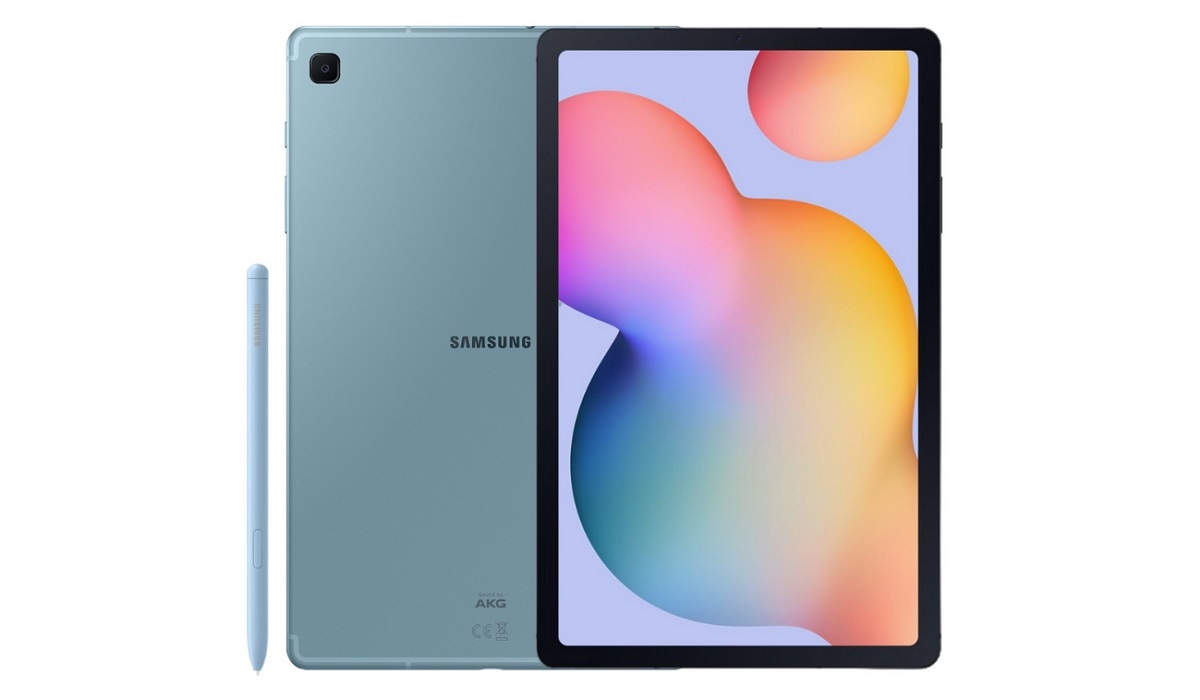
Samsung Galaxy Tab S6 Lite (2022) Android tablet
- Samsung Galaxy Tab S6 Lite 2022 Specs
- Samsung Galaxy Tab S6 Lite 2022: Prices by Country
- Does Samsung Tab S6 Lite have IR blaster?
- Does Samsung Galaxy Tab S6 Lite 2022 have Google Play Store?
- Can you get cell phone service on Samsung S6 Lite tablet?
- Samsung Galaxy Tab S6 Lite Phone Review Rating
Samsung Galaxy Tab S6 Lite 2022 Specs
Mobile Wireless Network and Software
- 2G mobile network bands : GSM, GPRS, EDGE 850 / 900 / 1800 / 1900 MHz.
- 3G mobile network bands : UMTS, WCDMA, HSDPA 850 / 900 / 2100 MHz
- 4G mobile network bands : LTE.
- 5G mobile network bands : No
- SIM Type : Nano-SIM, Single SIM
- Software / OS : One UI 4 based on Android 12
Design, Form Factor, Appearance
- Dimensions : 244.5 x 154.3 x 7 mm
- Weight : 469g
- Display : 10.4 inches, 1200 x 2000 pixels, 60 Hz refresh rate, 5:3 aspect ratio, TFT LCD screen
- Colours : Chiffon Pink, Angora Blue, Oxford Gray.
- Physical Build : Glass front, aluminum back, aluminum frame
Internal Hardware Specs
- CPU/ Processor : 64-bit, 2.3 GHz Octa-core
- Chipset : Qualcomm SM7125 Snapdragon 720G (8 nm)
- GPU/ Graphics Processing Unit : Adreno 618
- RAM : 4 GB
- Extended/Virtual RAM :
- Internal Storage : 64 GB / 128 GB
- External Storage : microSD (dedicated slot)
Photography, Video Recording
- Main Camera : 8 MP single camera, autofocus, dual LED flash, 1080p@30fps video recording
- Front Camera : 5 MP, fixed focus, Face Recognition, 1080p@30fps video capture
Audio, Video Playback
- Music Support : PCM, AAC / AAC + / eAAC + / MP3 / AMR – NB / WB / APE
- Audio : 3.5 mm audio jack
- Loudspeaker : Mono speaker
- Video Support : H.264/MP4/MPEG4 player
- FM Radio : No.
Phone Sensors
- Digital Compass : Yes.
- Accelerometer : Yes.
- Proximity Sensor : Yes.
- Ambient Light Sensor : Yes.
- Barometer : No.
- Pedometer : No.
- Heart Rate Monitor : No.
- Gyroscope (G-Sensor) : Yes.
- Fingerprint Scanner : No.
- Face Unlock : Yes.
- Iris Scanner : No.
- Motion Sensing / Gesture Control : No.
- Voice Control : No.
- Intelligent Digital Assistant : Yes; Google Assistant.
- Infra-red Blaster : No.
Connectivity Options
- Bluetooth Version : 5.2
- Bluetooth Profiles : A2DP
- WiFi : Wi-Fi 802.11 a/b/g/n/ac, hotspot
- GPS : Yes, A-GPS, GLONASS, BDS, Galileo
- USB : microUSB v2.0. Type-C. USB-OTG.
- NFC : No.
Miscellaneous Specs and Features
- Battery Type and Capacity : Non-Removable Lithium-Polymer 7040 mAh
- Battery Charging : 15W fast charging
- Wireless Charging : No.
- Reverse Charging : No.
- Model Version/Number :
Launch/Release Dates and Information
- Announced : May 2022
- Release Date : May 2022
Samsung Galaxy Tab S6 Lite2022:Prices by Country
- USA : $419
- United Kingdom (UK) : £335
- Germany : € 400
- Switzerland : CHF
- Australia : AU$ 578
- South Africa : ZAR 8000
- Nigeria : ₦235,000
- Egypt : EGP 11,800
- UAE (Dubai) : AED 1800
- India : ₹ 24999
- Kenya : Ksh. 50,000
- Ghana : GH₵ 4200
The above prices may change with time from country to country, as market forces and economic policies influence product price movements.
Does Samsung Tab S6 Lite have IR blaster?
Samsung Tab S6 Lite does not have an IR blaster (infrared sensor).
Does Samsung Galaxy Tab S6 Lite 2022 have Google Play Store?
It supports Google Services and software applications, including Play Store and Maps, Gmail, YouTube, and others.
Can you get cell phone service on Samsung S6 Lite tablet?
Samsung Galaxy Tab S6 Lite (2022) has a nano-SIM card slot for GSM network connectivity, so you will have cell phone service if your carrier or mobile network is compatible. In the US, GSM carriers like AT&T and T-Mobile and other networks riding on their networks, are compatible and should work. It does not support CDMA networks. Do make inquiries from your carrier to know what bands/frequencies are supported on their service.
MobilityArena Buyer’s Guide Verdict
Not available.
Our Buyer’s Guide Verdict is a recommendation based on the specifications of the device and a general guide to help you understand how much value a device offers for its price. It is not an endorsement of the device. Ask questions and use your judgement when buying any device; MobilityArena takes no responsibility for your buying decisions .
Samsung Galaxy Tab S6 Lite Phone Review Rating
Not available.
Author:InfoDesk
Add MobilityArena as a preferred source on Google
When people think of dating apps, very rarely do they think of more mature individuals. Usually, the focus is on young people in their 20s and 30s. But there are single seniors, too, who are in search of a partner. OurTime is a dating site for persons who are 50 years and older.

OurTime requires that account owners upload a photo to their profile, otherwise their account will remain in invisible mode.You can upload your photos directly from iPhone, iPad, an Android phone, and Android tablet. Of course, you can also upload photos from your Mac or Windows computer.
How to add a photo to OurTime from your mobile device or PC
- Login to your OurTime account on the website
- Click your Settings in the upper right-hand corner, and then click My Photos .
- Click Browse .
- Select a photo from your computer, and then click Upload .
- That photo is immediately uploaded to your account and you can use it as a profile photo.
How to add a photo to OurTime from Facebook
- Login to your OurTime account on the website
- Click or tap your Settings in the upper right-hand corner, and then click My Photos.
- Click or tap the Import from Facebook button, and then log in to your Facebook account.
- Grant the necessary permissions that allow us to access your photos.
- Select the album and click the photo(s) you wish to import.
- To remove a photo, click it again and the border will disappear.
- To add photos from a different album, click Back to albums .
- Once you have finished making your selections, click Import Photos .
- Those photos are immediately uploaded to your account
- Don’t miss our mobile phone reviews .
- Follow our news on Google News .
- Join our WhatsApp Group , to be notified of the most important articles and deals,
- Follow us on Instagram , Facebook , Twitter , and YouTube .
Author:Mister Mobility
Digital Skills and Communication Coach | Mobile Phone Connoisseur since 2001 | Tech Blogging since 2004
