Add MobilityArena as a preferred source on Google
A lot of people like to use their smartphones late at night, or when it is dark. The thing is, prolonged exposure to the bright lights of your phone screen is bad for your health. For one thing, it disrupts your sleep cycle, which is a dangerous thing. One way to reduce the effect of the bright screen on your eyes is to reduce the brightness. However, some smartphones have really bright screens, so even the lowest brightness setting is too bright. Dim it further with these two apps, Night Mode and Dimly:
- Night Mode: This app reduces the brightness of your screen further than the default Android setting. All you need to do is download and install the app. then launch it, and you will be presented with an option to set your screen brightness. Push the slide backwards till it reaches your desired brightness level, then press Start. It automatically dims your screen.
- Dimly: This app works similar to Night Mode. Once you install the app, anytime you launch it, you will see the dialogue box on your Hone screen. You can change the setting by tapping on the down-pointing arrow on the app’s home screen, then tapping on the gear icon. Note that you can adjust the brightness directly from the Home screen.
- Don’t miss our reviews .
- Join our WhatsApp Group , to be notified of the most important articles and deals,
- Follow us on Instagram , Facebook , Twitter , and YouTube .
Author:EmmyCN
Add MobilityArena as a preferred source on Google
Despite looking very much like a replica of the Moto C , the Motorola Moto C Plus is significantly more capable. It has a better display, more powerful processor, more RAM (optional), better rear camera and a bigger battery. Like the Moto C, it comes in two variants and will be officially available in Latin America, Europe, and the Asian Pacific. We have the Moto C Plus specifications for you.
Motorola Moto C Plus Specs & Phone Price
Network and Software
- GSM : GSM 850 / 900 / 1800 / 1900
- 3G : HSDPA 850 / 900 / 1900 / 2100
- 4G : Optional LTE 1(2100) / 3(1800) / 5(850) / 7(2600) / 8(900) / 20(800) / 38(2600) / 40(2300)
- SIM Type : Single and Dual Nano-SIM options
- OS : Android 7 Nougat
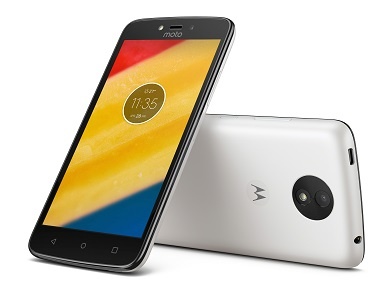
Design
- Dimensions : 144 x 72.3 x 10 mm
- Weight : 162 g
- Display : 5-inch, 720 x 1280 pixels (294 PPI), TFT LCD Capacitive touchscreen
- Sensors: Accelerometer, Gyro, Proximity
- Build : Plastic
- Colours : Metallic Cherry. Pearl White. Fine Gold. Starry Black
Hardware
- Processor Type : 64-bit Quad-core 1.3 GHz Cortex-A53
- Processor Name : MediaTek’s MT6737
- Graphics Processor : MALI T720 MPI
- RAM : 1 GB / 2 GB
- Internal Storage : 16 GB
- External Storage : microSD, up to 32 GB
Cameras
- Rear : 8 megapixel, f/2.2, autofocus, LED flash
- Video recording : 720p
- Front-facing : 2 megapixel, fixed focus, LED flash
Multimedia
- Music Support : MP3/WAV/eAAC+ player
- Loudspeaker : Yes
- Video Support : MP4/MPEG4/H.263/H.264 player
- FM Radio : Yes
Connectivity
- Bluetooth : v4.0
- WiFi : Wi-Fi 802.11 b/g/n, hotspot
- GPS : Yes
- USB : microUSB v2.0
Miscellaneous
Battery : Non-removable Li-Polymer 4000 mAh
Announced : May 2017
Availability : June 2017
Phone Price : €119 / NGN 36,000 (1 GB RAM model). NGN43,000 (2 GB RAM model)
Don’t miss our reviews .
Follow our news on Google News .
Join our WhatsApp Group , to be notified of the most important articles and deals,
Follow us on Instagram , Facebook , Twitter , and YouTube .
