Add MobilityArena as a preferred source on Google
Paper shuffling and antiquated techniques are still very much how work gets done in many places. If we are being totally honest, we are the Flintstones in a generation of Tony Starks. Things however are slowly changing as millennial are assimilated into the workforce. These cutting edge youngsters bring with them the force of the app age and are gradually influencing the way work is done – for better or for worse. Let’s look at a number of available small business apps you can use to take your business digital.

The world over, small and medium-sized businesses (SMBs) are constantly looking to new technologies to create a more productive, more efficient and more innovative workforce. In addition, the rising trend of remote work and co-working spaces has led to an increase in on-demand data – data that is accessible at any time and anywhere. Here and some free and affordable apps and software many small businesses can deploy to help increase productivity and improve the efficiency of their team.
Small Business Apps for Email

Recommendation : Gmail for Business (GfB). Gmail for Business allows you to host your customized business email account with Google and provide access to Google’s entire business suite that boasts of robust functionalities. In addition, there are a ton of useful plugins you can download to enable functions such as:
Mailmerge : It allows you input contact information such as name, email address and anything else you’d like into a spread-sheet. You can then send an email to all the addresses at the same time, complete with personalization.
Read/open function : This lets you know if the recipient of your email has opened your mail and is great for marketing campaigns. It also lets you know who has opened your email – great if you communicate with a team and need to monitor the responsiveness of team members.
Contact bio : A side bar that shows you the bio of your mail recipient after you type in the email address. Very useful if you deal with a ton of email addresses and cant keep up with people’ designation or titles in various other organizations.
There are other great plugins and tools not available to traditional webmail clients that you get for free (or paid) with Gmail.
Small Business Apps for Accounting and Invoicing
Managing your books effectively may require a full time accountant. Proper account management (and not bank account balance) allows business owners observe how well their business is performing with up to date profit and loss statement.
The digital age (as well as climate change) encourages businesses to go paperless. Printing invoice booklets means higher overheads. There are several apps and software that take care of your business’ accounting. These software show fancy graphs and tables of growth – invaluable information if you ever need to get an investor. Furthermore, some of these software offer additional functionalities like inventory management, daily expenditure, salary record etc.
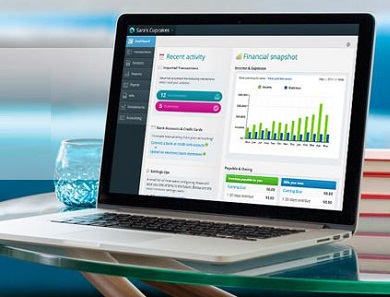
Recommendation : Waveapp (free). Xero (Paid) Both offer similar services with Xero having a more robust functionality and reporting. They have beautiful, professional customizable invoice templates allowing you to send your customer via email an invoice for an order, a receipt after payment has been confirmed, or a payment reminder for pending payment.
Small Business Apps for Inventory
Do you remember those days that inventory management was done on A4 sheets and if a sheet went missing, heads would roll with some staff re-introduced to the long arm of unemployment? There was also the case of your physical records being subject to accidents, from careless handling to fire hazards. These days, inventory can be managed with (mostly) simple cross-platform apps accessible on mobile and PC that are cloud-based. So for example, if you run a fashion outfit, at a glance the software can tell your best or worst performing products. It can also send you email alerts when the stock levels of different items are running low.
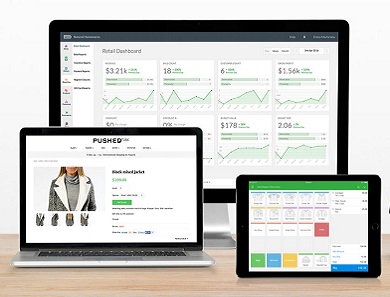
Recommendation : TradeGecko (Paid), Vend (Paid).
*Both recommendations can sync with Xero. However, Vend has the additional advantage of being a multi-store Payment of Sale (POS) option.
Small Business Apps for Building Websites
It is hard to take a business serious if it lacks a website. A website acts a repository of information for potential clients, a means of communication to customers, and/or a medium of sale. For some budding entrepreneurs on a budget, hiring a website developer may be rather expensive, especially if one just needs a landing page describing the services one offers.

Recommendation : Wix (Paid) Wix is by far one of the easiest means of developing a website using a drag-and- drop method. You don’t have to be skilled with codes or html; all you need to do is drag and drop content in preferred location and you have a website. Wix however possesses so much more functionality as you can design even complex e-commerce site with their tool but where it shines is in keeping things simple and easy.
Small Business Apps for Note, Word Processing/Presentation Programming
While Microsoft Office pretty much rules in this category, there are many other free solutions that are cross platform and compatible with Word document extension.

Recommendation : Microsoft Office (PAID), WPS Office (Free with Ads/Paid), Libre Office, Open Office (Free)
If however you work with documents and files that require accessibility to multiple users, then you are much better using an online option. To illustrate how effective an online solution is, Nonye Adiba runs a juice bar and depends solely on Google Sheet to manage her orders.
Her customer representative populates the sheet with orders as they come adding delivery time, her production team based in a different location immediately starts preparing and bagging the order while her delivery agent prints out the order detail, codes the order to ‘dispatched’ and heads out for delivery. After successful delivery, dispatch tags the order ‘closed’. Nonye only ever has to look at the sheet to know what her staff is up to at any point. Seamless; right?

Recommendation : Google Sheet/Doc (free), Evernote (Paid for more than 2 users)
Small Business Apps for Storage
Cloud storage provides a unique convenience to productivity that one has to wonder how we managed when the industry standard was diskettes. Documents and files can be remotely accessed anywhere in the world on a mobile device or a PC. Multiple providers offer different cloud storage plans.
Recommendation : Google Drive (Free/Paid) Dropbox (Free/Paid), Microsoft (One drive). Google and Microsoft offers free storage of up 15GB for a free account. These services have the added advantage of seamless sync to each service providers other products like Gmail, Google doc (for Google), and One Note, Words, Flickr (for Microsoft).
Small Business Apps for Communication
As a business owner, you need to keep in touch with your team wherever they are and be able to communicate seamlessly without much fuss. Depending on the nature of your business or the team you need to get in touch with, there are various communication solutions you can adapt to fit your business for example, if you need to keep in touch with a remote team that is constantly on the move then a mobile-friendly or mobile-first software would be ideal.

Recommendation: Skype (PC/Mobile), Slack (PC/Mobile), Whatsapp.
Small Business Apps for Payments
If your business is service/product based, chances are that you have experienced hiccups at some point with receiving payment online from your customers. In the past, payment gateways were pretty much unavailable and then the ecosystem matured to being unreliable but these days, we have local players that have vastly improved online transactions making it as stress free and seamless as possible for both merchant (service providers) and paying customers. Unfortunately none of these options are free as a deductible service fee is attached to each. Most payment gateway providers offer simple means to collecting cash payment in the form of unique url which you include in your electronic invoice or integration to your website.
Recommendation : Paystack (Paid), VoguePay, Paga. Square .
Wrap Up
So there you have it. This list and its categories are by no means exhaustive, as we were largely focused on core business functions while only selecting affordable app and software solutions. In some cases (like Xero), some can double as an inventory/invoicing and accounting software in one.
This year, take your business green. Go paperless. Go digital. Use apps and software. Doing so will help you get rid of duds and create a more effective working environment. It will likely reduce your overheads and boost your bottom line too.
- Don’t miss our reviews .
- Join our WhatsApp Group , to be notified of the most important articles and deals,
- Follow us on Instagram , Facebook , Twitter , and YouTube .
Author:khene
Unlearning everything I have learnt. I share information that you might find interesting and useful.
Add MobilityArena as a preferred source on Google
What is social betting? Rather than relying on sportsbooks to determine all aspects of the often joyless bettor-bookmaker transaction, with social betting, users challenge each other on a wide range of virtual and real-money bets. In other words, social betting gets rid of the Bookie. Social betting also combines wagering elements with interactive features such as live chat and bet sharing. All of these make sports betting more enjoyable, accessible and social. This has led to a new generation of apps called social betting apps. These apps are also called peer-to-peer betting apps.

Peer-to-peer betting presents betters with a clearer and more exciting pathway to profits. It can be argued that social betting apps make betting more profitable. Wagering options, user-friendliness and social features all determine the quality and popularity of peer-to-peer betting apps.
Best Four Social Betting Apps
There is a growing amount of options to choose from. Taking all factors into account, here are the five best social betting apps currently available for download to your smartphone. Most of these apps are available for iOS only, but Android users are not entirely left out.
Puntaa
Puntaa is a social betting app that allows friends to custom bet on just about anything, share and engage around those bets, and get paid through their mobile device. Users deposit funds into their account, add friends and challenge each other to bets on anything from the outcome of a sporting match to an inside joke. The results of wagers can then be shared via all major social media platforms.
The app tracks all bets but puts the onus on users to settle, with the loser required to transfer money manually through a one-touch payment system. Puntaa takes a four per cent cut of net winnings of all bets. Download Puntaa for iPhone .
WantMyBet
WantMyBet debuted its iOS and Android apps it 2016 and has since become renowned as a one-stop destination for football betting. The app is clearly designed to save bettors the hassle of sifting through various websites, tipping services and bookmaker accounts in order to place their wagers. Instead, users can integrate their Ladbrokes and BoyleSports accounts, find and follow the best tipsters around and copy other bets.
Bait
Available to iOS customers in the United States, Bait lets friends challenge each other to the opposite side of a wager, with lines taken from Las Vegas sportsbooks on NFL, NBA, NHL, soccer, tennis, college sports and MMA. There are generally three markets available for each bet – over/under, points spreads and head-to-head. As with Puntaa, Bait tracks bets and sends a notification once a match is finished, with the onus on users to settle up through online payment service Venmo.
A user rating system is implemented to encourage losing bettors to pay up, while an in-app chat feature lets friends interact as bets unfold. Bait also syncs with users’ iPhones to identify which of their contacts have the app. Download Bait for iPhone .
GoodBookey
Goodbookey is the first social betting app to implement the concept of charitable betting. Available for free on iOS and Android, the app allows friends to simultaneously wager against one another and donate money to a wide range of small to medium-sized charities. Like Bait, users select a wager and challenge their friends to take on the opposing side.
The twist, however, is that before the bet is finalized, both betters select a charity, with the loser then able to make a tax-deductible donation accordingly. Payment is not obligatory; users are simply encouraged to donate upon losing a bet. At this stage, the bets can only be placed on major US sporting competitions, including NBA, NHL, NFL and MLB. Download GoodBookey for Android and GoodBookey for iPhone .
- Don’t miss our reviews .
- Join our WhatsApp Group , to be notified of the most important articles and deals,
- Follow us on Instagram , Facebook , Twitter , and YouTube .
Author:MobileChic
That motivated, gadget-loving geeky chic who tries to stay on top of things. Unapologetic iFan.
