Add MobilityArena as a preferred source on Google
These are exciting times. In my lifetime, I have gone from dreaming about commercial space travel to witnessing the first of such flights happen. Though, none of the advanced propulsion systems that I read about as a teenager are in use yet, if I live long enough, perhaps I shall become a space tourist myself one day.
In the early years, it was a mad race between the United States’ NASA (National Aeronautics and Space Administration) and the Soviet Union’s space programme. And for a while, the Soviets kicked American butts badly, though the U.S. later turned the tables.
- The evolution of space travel
- Modern space travel: A tale of 3 billionaires
- Milestones in space travel
- The race for commercial space travel is hinged on one thing: Reusable Launch Vehicles
- Who is winning the race for commercial space travel?
The evolution of space travel
I am now in my way 50s and still find space travel fascinating. The players have changed a lot since the 1980s, though. Space travel has gone from being a competition between government agencies to a competition between private companies. The three leading (most visible) space travel companies today are SpaceX, Blue Origin, and Virgin Galactic. Let me tell you a bit about them.
Modern space travel: A tale of 3 billionaires
When you think of space travel, Blue Origins is likely not the first name that comes to mind. A name like NASA or SpaceX might come to mind first. While NASA was a true pioneer from as far back as the 1970s, they are a government agency. Today’s space race is now largely on the hands of private organisations.
SpaceX was founded in 2002 by American billionaire CEO of Tesla, Elon Musk.
Virgin Galactic was founded in 2004 by British billionaire, Richard Branson, who became the first billionaire to fly to space.
You might ask, Why are these three leading space travel companies owned by billionaires? Well, space exploration is highly capital intensive. In other words, it is extremely expensive and requires a certain amount of financial buffer that only billionaires (and governments) possess to pull off.
Milestones in space travel
Here is a quick timeline of how the dash for space has been till date.
On October 4, 1957, the Soviet Union made the first space flight when they launched the earth’s first artificial satellite, Sputnik I. It was unmanned.
In 1959, once again, the Soviets beat the U.S. to putting the first man-made object on the moon. This was an unmanned flight, as well.
And on April 12, 1961, Yuri Gagarin from the Soviet Union became the first human in space. His vehicle, Vostok 1 circled Earth at a speed of 27,400 kilometers per hour and completing one orbit around Earth in 108 minutes.
On July 20, 1969, American astronaut, Neil Armstrong, became the first human to set foot on the moon. The U.S. was in the lead, for the first time, in the race for space domination. They have kept that lead since then till date.
On April 28, 2001, Dennis Tito became the first space tourist after paying a whopping $20 million. He made a successful seven-day trip to the International Space Station (ISS). The original trip was supposed to be to the Soviet space station, Mir, but that station crashed to earth. The Soviets then flew him to the ISS instead, causing not a little discomfort internationally.
On June 21, 2004, a company called Scaled Composites, funded by Paul Allen, achieved the first entirely privately funded crewed flight to space. It can be argued that it was at this point that private commercial space travel was born. Scaled Composites and Virgin Galactic had a joint venture that the latter eventually bought out. Scaled Composites has been acquired by Northrop Grumman.
On the 11th of July 2021, billionaire Richard Branson made a successful sub-orbital spaceflight as member of the Virgin Galactic Unity 22 flight.
And on the 20th of July, 2021, billionaire Jeff Bezos made a successful sub-orbital spaceflight on Blue Origin’s NS-16. 2021 was the year of the billionaires in space, except that Elon Musk didn’t complete the list.
The race for commercial space travel is hinged on one thing: Reusable Launch Vehicles
Early space rockets were not reusable. During launch, the flight itself, and then re-entry to the atmosphere, huge parts of these vehicles burnt out because of the tremendous heat involved and so were discarded. In order for space travel to become much more affordable, space ships had to become like aeroplanes. They had to become reusable.
As the term suggests, a reusable launch vehicle (or reusable spaceship) is a space-going vessel that can be recovered and reused for another flight, thereby reducing the cost of space travel. NASA pioneered this with the Space Shuttle, a plane-like spaceship that could land back on earth after each trip and then be used again for subsequent space trips.

The Space Shuttle sits on top of a regular airplane for take-off
The Space Shuttle was retired by NASA in 2011. As a side note, I have visited the NASA space museum in Houston, Texas and seen the early space rockets as well as the Space Shuttle. Fabulous works of engineering they are. I have included below, photos of the different types of reusable space vehicles used by the three contenders for commercial space travel.
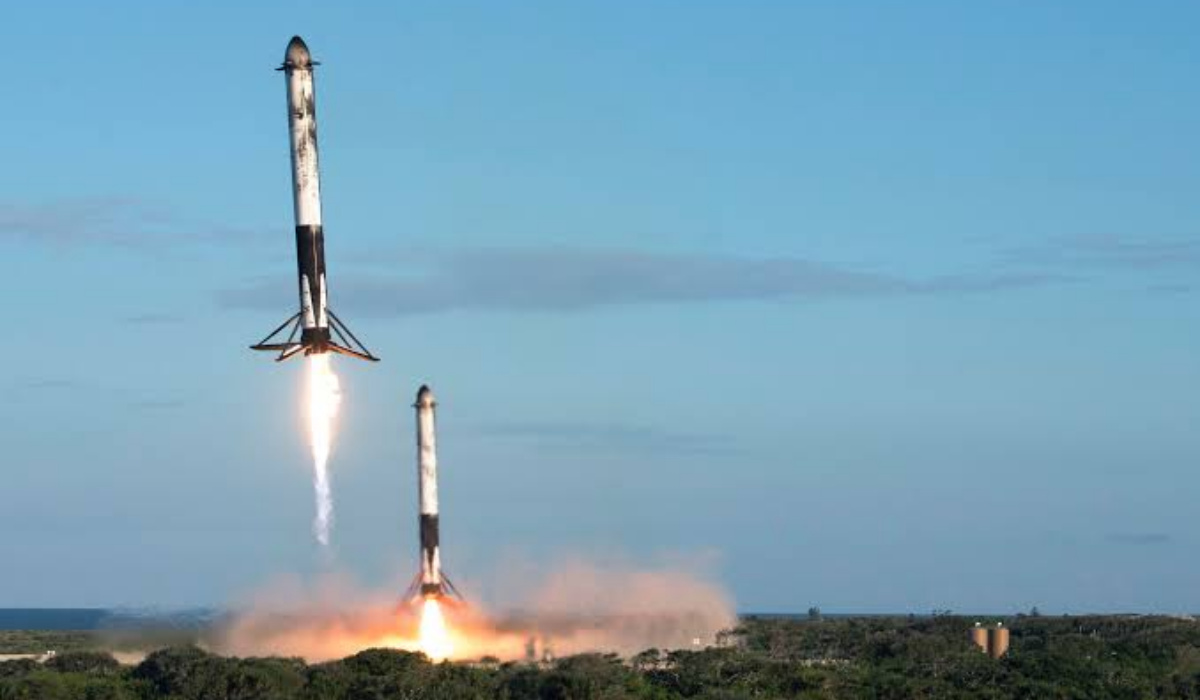
SpaceX’s Dragon Falcon rockets during a landing

Virgin Galactic’s SpaceShipTwo
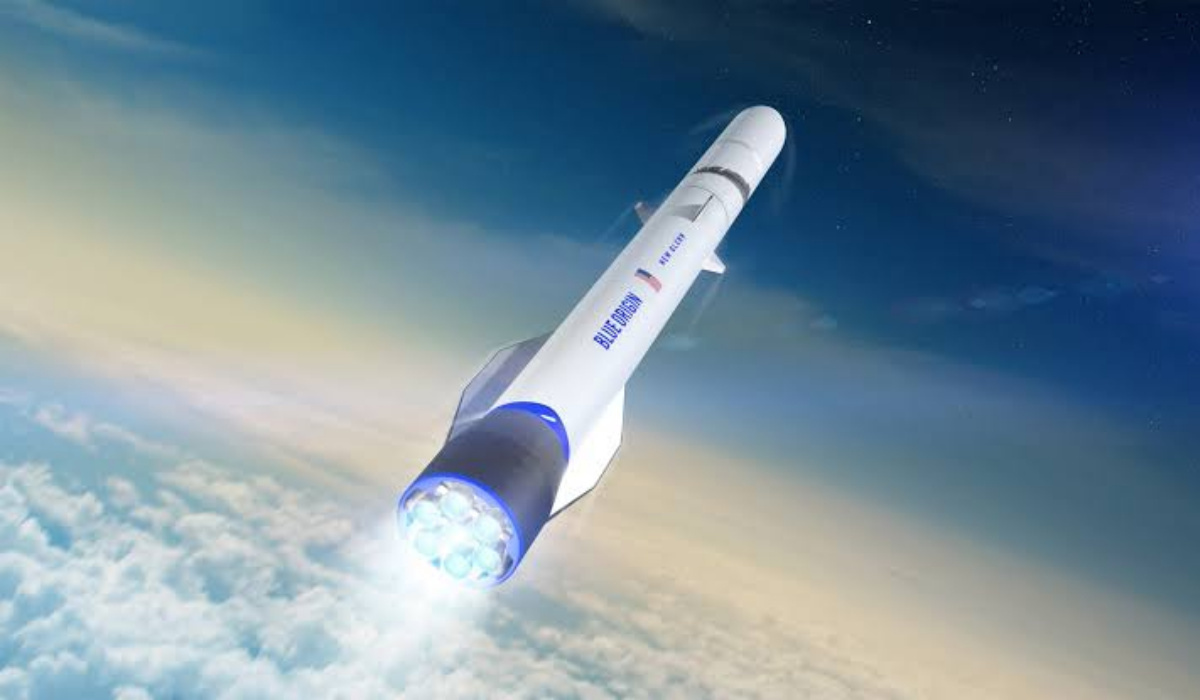
Blue Origin’s Shepard rocket
My favourite reusable rocket ship model at the moment is the one in use by Virgin Galactic. It is based on the Space Shuttle model, which means it consists of two separate vehicles – a carrier aircraft taking off from a regular runway with the smaller space-ship piggybacking on it before being released at high altitude to boost out to space. Both vehicles land like regular aircraft.
Who is winning the race for commercial space travel?
While Blue Origin and Virgin Galactic have taken civilians up into orbit below 100 km above planet Earth, SpaceX has flown civilians all the way to the International Space Station orbiting the earth at about 400 kilometres and even beyond that.
SpaceX has also flown more space missions than any of the other two. As a matter of fact, half of the thousands of satellites on orbit around the Earth were launched by SpaceX [1].
As it stands, SpaceX is leading the race for commercial space travel. How much does a seat in a space flight cost now? A trip with SpaceX cost $55,000,000 the last time I checked. In contrast, Virgin Galactic is offering its low orbit trips for much less – $450,000. Over 800 people have paid for a ticket. Virgin’s low orbit space trips are less exciting than what SpaceX offers, but price is a huge factor, and being so much more affordable means more space tourists will turn to Virgin first.
However it plays out, the age of commercial space travel is here, and it will only get more affordable and more exciting from this point. I can’t wait till an orbit around the Earth costs as little as an air ticket from California to London costs. Perhaps I might be able to fulfill my teenage dream of experiencing space flight. I have a few more decades ahead of me, after all. To infinity and beyond!
References
- Science News
Author:Mister Mobility
Digital Skills and Communication Coach | Mobile Phone Connoisseur since 2001 | Tech Blogging since 2004
Add MobilityArena as a preferred source on Google
As a developer, I’ve always been excited about new tools that can help me improve my projects, and ML Kit is no exception. ML Kit is a powerful mobile SDK provided by Google, designed to help developers integrate machine learning (ML) capabilities into their mobile applications, both on Android and iOS platforms. This powerful toolkit offers a variety of pre-built ML models as APIs, as well as allowing developers to create custom models tailored to specific needs.
One of the most exciting aspects of ML Kit is its ability to integrate seamlessly with other Google products, like Firebase, to provide even more robust features. Developers can utilize the ML Kit in numerous ways, such as image labeling, text recognition, face detection, and augmented reality experiences. Additionally, ML Kit features both on-device and cloud-based machine learning, giving developers the flexibility to choose the right balance between performance and cost for their applications.

So, how can developers like me get started with ML Kit? It’s quite simple – ML Kit’s pre-trained models can be easily added to an app with just a few lines of code. For those looking to create custom models, Google provides an AutoML Vision Edge platform that generates tailored models based on the developer’s specific dataset. Once the models are ready, they can be easily imported into the app, providing unique and powerful features right at the user’s fingertips.
- What is ML Kit Relation to Google and Firebase Supported Platforms: Android and iOS Key Features
- Understanding ML Kit’s Capabilities On-device and Cloud APIs Vision API Capabilities Natural Language Processing Smart Reply and Language Identification Custom Models
- How to Implement ML Kit in Your App Setting Up Dependencies and Libraries Text Recognition and Face Detection Barcode Scanning and Image Labeling Object Detection and Tracking Using Custom Models
- Privacy and Security Considerations On-device versus Cloud-based APIs Protection of User Data Managing Network Connections
- Expanding ML Kit’s Functionality Compatibility with TensorFlow, CoreML, and other Frameworks Integration with Firebase Services Community and Developer Resources
What is ML Kit
When I first heard about ML Kit, I was curious to find out what it was and what it could be used for. Basically, it is a software development kit (SDK) designed to make it easy for developers to integrate machine learning features into their applications. ML Kit is a powerful tool for both Android and iOS applications, and it comes with some key features that make it stand out.
Relation to Google and Firebase
One thing that I like about ML Kit is that it is developed and maintained by Google. This means that it is backed by a reputable company with significant resources and expertise in the field of machine learning. Furthermore, ML Kit is seamlessly integrated with Firebase, which is a popular platform for building and managing web and mobile applications. This integration helps me leverage both platforms to create more intricate and intelligent applications.
Supported Platforms: Android and iOS
As a developer, the fact that ML Kit supports both Android and iOS platforms is a big plus. This allows me to bring machine learning capabilities to a wider audience and improve the user experience for both platforms. In addition, ML Kit provides native APIs for both platforms, which means I can use familiar programming languages and tools that I am comfortable with.
Key Features
ML Kit has several key features that make it an attractive choice for developers, including:
- Pre-built machine learning models : As a developer, I don’t have to be an expert in machine learning to use ML Kit. It provides me with pre-trained models for tasks such as image labeling, text recognition, and barcode scanning, among others.
- Custom model capabilities : If I need to use a custom model, ML Kit allows me to do so by supporting TensorFlow Lite models. This enables me to harness the power of machine learning for more specific tasks that the pre-built models don’t cover.
- On-device processing : ML Kit can perform most tasks on the device itself, which means my app’s users won’t have to rely on a stable internet connection or worry about data privacy.
- Easy integration : Since ML Kit works seamlessly with Firebase, integrating it with my app is simple and straightforward.
With these features, ML Kit is a powerful and versatile tool that can greatly enhance my mobile and web applications by introducing various machine learning capabilities.
Understanding ML Kit’s Capabilities
On-device and Cloud APIs
In my experience with ML Kit, it offers both on-device and cloud-based APIs for various machine learning tasks. On-device APIs are faster and work offline, while cloud APIs provide higher accuracy and more functionality. On-device APIs use TensorFlow Lite, a version of TensorFlow optimized for mobile devices.
Vision API Capabilities
As an ML Kit user, I find its Vision API capabilities very helpful. This includes tasks like text recognition, barcode scanning, face detection, and image labeling. These features work on both on-device and cloud-based APIs, allowing me to choose based on my app’s requirements and user preferences.
Natural Language Processing
ML Kit’s Natural Language Processing capabilities are also impressive. With it, I can easily access language translation, entity extraction, and sentiment analysis. These tasks are cloud-based, utilizing the powerful neural network provided by Google Cloud.
Smart Reply and Language Identification
Smart Reply and Language Identification are two unique features of ML Kit. With Smart Reply, my app can generate contextually relevant suggestions based on the input text. On the other hand, Language Identification helps me to quickly detect the language of a given text, making it a useful tool for multi-language apps.
Custom Models
One of the most flexible aspects of ML Kit is its capacity to support custom models. I can create my own TensorFlow Lite models or borrow pre-trained ones to address more specific use cases not covered by the built-in capabilities. By utilizing ML Kit’s custom model support, I can expand my app’s functionality even further.
How to Implement ML Kit in Your App
As a developer, I find ML Kit to be an essential tool that allows me to easily incorporate machine learning capabilities into my mobile applications. In this section, I will share how you can use ML Kit in your app for tasks such as text recognition, face detection, barcode scanning, image labeling, object detection and tracking, and using custom models.
Setting Up Dependencies and Libraries
First, I’ll need to set up the dependencies and libraries. For Android apps, I can add the required ML Kit libraries to my project’s build.gradle file. For iOS apps, I can use CocoaPods to add the necessary ML Kit libraries. After setting up the required dependencies, it’s essential to initialize the APIs needed for each specific task.
Text Recognition and Face Detection
To use ML Kit’s text recognition feature, I can create an instance of the TextRecognizer class and use it to process an image. The recognizer will return a collection of recognized text elements, which I can then use or display in my app.
For face detection, I can create an instance of the FaceDetector class and configure its options, such as whether to detect facial landmarks or whether to classify facial expressions. I can then use the detector to process an image, which will give me a list of detected faces with their corresponding landmarks and classifications.
Barcode Scanning and Image Labeling
For barcode scanning, I need to create an instance of the BarcodeScanner class and use it to process an image. The scanner will return a list of detected barcodes with their associated data.
The process of image labeling is similar. I have to create an instance of the ImageLabeler class and use it to process an image. The labeler will provide me with a list of detected objects in the image, along with their associated labels and confidence scores.
Object Detection and Tracking
To implement object detection and tracking in my app, I can use ML Kit’s ObjectDetector class. First, I create an instance of the class and configure its options, such as whether to enable object classification or to set a custom detector model. Then, I use the detector to process an image, receiving a list of detected objects with their associated bounding boxes, labels, and tracking IDs.
Using Custom Models
If I need to use a custom machine learning model, ML Kit provides APIs for integrating TensorFlow Lite models into my app. I can create an instance of the CustomRemoteModel class and specify its configuration, such as the model’s location and size. After downloading the model, I use the TensorFlow Lite Interpreter to perform inference and receive the model’s output.
By following these steps and utilizing the ML Kit APIs, you can effectively integrate machine learning capabilities into your mobile applications, making them more powerful and engaging for users.
Privacy and Security Considerations
When working with ML Kit, it’s essential to consider privacy and security aspects for your applications. In this section, I’ll discuss the differences between on-device versus cloud-based APIs, protection of user data, and managing network connections in the context of ML Kit.
On-device versus Cloud-based APIs
ML Kit offers both on-device and cloud-based APIs. As a developer, choosing the appropriate API depends on the specific needs of my application. On-device APIs allow me to process data directly on the user’s device without an internet connection, providing increased privacy for the user’s data. Cloud-based APIs, on the other hand, require an active internet connection and typically offer more advanced features and better accuracy. However, data is processed on Google’s servers, which may raise privacy concerns for some users.
Protection of User Data
Ensuring the protection of user data is crucial when utilizing ML Kit in my applications. When using on-device APIs, the user’s data never leaves their device, which offers a higher level of privacy. For example, by using com.google.mlkit packages like vision and language processing, I ensure that sensitive information stays on the user’s device.
In contrast, cloud-based APIs require data to be sent to Google’s servers for processing. It’s important to inform users about this data transfer and follow best practices to protect their data. Implementing secure network connections and adhering to Google’s privacy policies are essential steps to take when using com.google.firebase APIs.
Managing Network Connections
When using cloud-based APIs, I need to manage my application’s network connections effectively to ensure the privacy and security of user data. Utilizing HTTPS and securely authenticating the requests to the Firebase services safeguards user data during transit.
Additionally, monitoring the network status and handling possible connection errors gracefully in my applications improves the overall user experience. By using com.google.mlkit on-device APIs when the internet connection is unstable or unavailable, I can maintain functionality and prevent potential data leaks.
In summary, privacy and security are critical considerations when using ML Kit. Choosing between on-device or cloud-based APIs, protecting user data, and effectively managing network connections contribute to a more responsible and secure usage of this powerful set of machine learning tools.
Expanding ML Kit’s Functionality
Compatibility with TensorFlow, CoreML, and other Frameworks
In my experience, one of the most appealing aspects of ML Kit is its compatibility with multiple machine learning frameworks. I have developed models using TensorFlow and CoreML, and I can easily integrate them into my ML Kit projects. This flexibility allows me to work faster when developing artificial intelligence applications for both Android and iOS platforms.
For instance, I can use TensorFlow Lite – a lighter version of TensorFlow specifically designed for mobile and embedded devices – to run ML models on Android, while leveraging CoreML for iOS projects. Additionally, Android Neural Network API and Android P are accessible through ML Kit, further enhancing its compatibility with different platforms.
Integration with Firebase Services
Another benefit of using ML Kit is its seamless integration with various Firebase services, such as Google Cloud Platform. Through this integration, I can store trained models and easily access them from my applications using Firebase Storage. The remote config feature allows me to conveniently update or modify my models without having to release a new app version.
One aspect that I find extremely helpful for fine-tuning my applications is A/B testing. With ML Kit’s integration into Firebase services, I can set up A/B tests to experiment with different configurations for my models and use the gained insights to optimize my app’s performance.
Community and Developer Resources
When it comes to learning and improving my understanding of ML Kit, the community and developer resources available are exceptional. Through forums, blogs, and educational resources, I gain access to insights and experiences of other developers in the field. This support ecosystem bolsters my knowledge and helps me with troubleshooting issues, discovering new techniques, and staying current in the ever-changing landscape of artificial intelligence.
In summary, ML Kit offers impressive functionality through its compatibility with a wide range of frameworks and platforms, integration with Firebase services, and robust community resources, making it a valuable asset for enterprise-level AI projects across various sectors.
Author:Dev Mo
Coffee-drinking, budding mobile app developer.
