Add MobilityArena as a preferred source on Google
The terms “video blogging” and “YouTube blogging” are self-explanatory. They refer to the use of video as a content type. With the former, your video content is published on any platform, while the latter refers to creating video content specifically for YouTube. If you want to start out right now with a low budget, I have a few important tips for you.
Why Video Blogging?
There are a number of reasons why you should give video blogging a shot. For one, we live in a multimedia world now and video is hot cake. That does not mean that traditional text-and-image blogging is dead or going away. You are reading this on a traditional blog after-all.
However, video blogging offers a different type of experience and has its strengths. It is great for demonstrations. It is great if you have good looks and a great voice to show off. Yes; that is vain, but the majority of people on the planet love vanity, so use it to your advantage. Even if you do not have a great body or voice, a touch of make-up can transform any ugly duckling into a princess. Have you seen Bobrisky ?
YouTube Blogging, in particular, is the rave these days. YouTube bloggers are some of the most high profile bloggers around. If you are nursing a dream of getting in on the action, now is a good time.

What You Need To Get Started With Video Blogging On A Budget
If you are on a budget and wish to start, here are some key resources that you will find handy to keep your expenses low while starting.
- A budget smartphone
- A basic make-up kit
- A 3.5mm microphone and app
- A tripod stand
- Internet connection
- A script
- A video editing app
- An online video storage service
In the next section, I shed more light on each of the above items.
A Smartphone
You probably already own one and since you are soon a budget, you can start with that right away. It may not have a great camera, but I assure you that you can record really good videos with it if you put in the work.
For starters, always record in good lighting. If what you have is a budget smartphone, then outdoors is your best bet. Go to a park for your recordings. Or use a section of your wall at home as your backdrop. As a rule, if you want to be seen clearly, always face the sun. If you want to play around with effects, you can try other orientations.
If you are using a budget smartphone, you will need a memory card for your video recording. This is because memory is always a scarce resource on budget devices.
A Basic Make-up Kit
Video is primarily about visuals, so you need to put some effort into looking good. Which is why your video blogging career should not start without some form of beauty treatment. Do not get scared, if you are a guy. Something as simple as brown powder can make you look much better in video. I own a basic powder puff kit that looks like this:
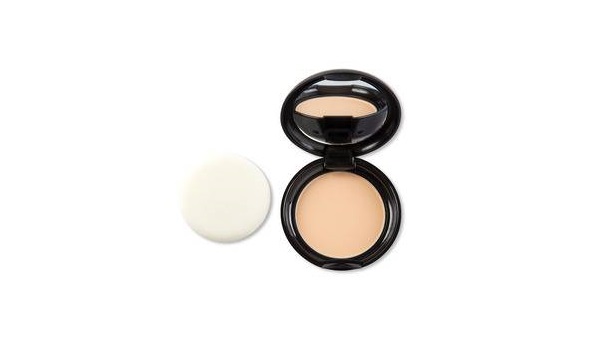
It isn’t a full make-up kit, but it makes a difference. If you are a lady, chances are that you already own a make-up kit and know how to put it to elegant use. In any case, there are tons of YouTube videos that teach how to make up. Feel free to put them to use.
3.5mm Microphone and Compatible App
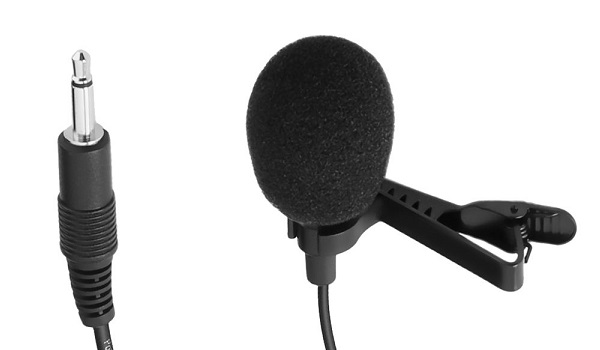
Read this quick guide on how to use a 3.5mm microphone for video recording on your smartphone.
Tripod Stand
Internet Connection
It goes without saying that you need internet access for video/YouTube blogging; right? Right. Invest in a 4G service, if available in your area. If that is not available, a 3G connection will do, but works best when everyone else is asleep in your area. So, you can do your uploads between the hours of 1am and 6am.
A Script
Yes; you will need a script if you want to practice serious vlogging. Your script can be a simple itemised list of things you want to talk about. Even better if you make it a more extensive outline of what you want to say. Take time to memorize your script. You can also be creative and find ways to stick it on a wall in front of you, like a crude teleprompter.
Whatever you do, unless you belong to the niche class of geniuses who can do a video recording without the need for a script, you should sit down ahead of time and write out your script. Run a search for sample scripts if you need further help.
Video Editing App
If you want to create captivating videos, you will need to do some form of video editing. You can save money by doing the most basic editing by yourself for starters, then later hire a video editor to handle it. Using a video editing app right on your smartphone is a good first step. Such an app lets you stitch two videos together, cut/trim/resize/compress videos, and more.
There are scores of video editing apps available in Google Play Store, so check in there and download as many as catch your fancy to see which one you are most comfortable using. You will require some practice to get the hang of the app though, so get to it now: record something and try editing it. The better you get at using it, the greater the chances of developing a great video blogging career.
An Online Video Storage Service
After recording your video, you need to upload it somewhere for all to see. There are a number of platforms available for this.
If you already run a WordPress blog, you can use VideoPress, WordPress’ video storage service, if you take up a Premium or Business subscription with them on WordPress.com.
Alternative platforms include YouTube, Vimeo, Instagram, Facebook, Flickr, and Wistia, among others. In the next section, I talk about using YouTube for video blogging.
For YouTube Blogging
YouTube is the largest video platform on the Web, so it is natural that you will want to put your video content there. All you need is a Google account. If you already have a Gmail account, you are good to go. Browse to YouTube.com and sign into it with your Gmail account, customize it and you are ready to start uploading your videos.
YouTube has an app, so you can easily upload your videos directly from your smartphone. This makes YouTube blogging particularly easy to do. Plus it is free and so perfect for vlogging on a budget.
Last Words
Video blogging is an exciting terrain. It is particularly more resource-intensive than text-and-image blogging. That means you need to spend more to get going. But with the above tips, you can get started almost right away without breaking the bank. You can always upgrade your equipment as more resources become available to you.
If you have any questions, I will be glad to answer. Use the comment box below to submit your questions and contributions. Happy video blogging.
Author:Mister Mobility
Digital Skills and Communication Coach | Mobile Phone Connoisseur since 2001 | Tech Blogging since 2004
Add MobilityArena as a preferred source on Google
I have been using a ZMI 10,000mAh quick charge power bank for over a year now. It arrived with my LG G6 in December 2017. And now, it has reached the end of its life and has to be replaced. Of course, once you’ve gone fast charge, everything else is slow.
It is easy to forget how slow regular charging is , but I have overcome that ease. There is no way I am picking up a regular power bank after the delicious experience that I have had with the ZMI. If you haven’t yet, you can read up my review of the ZMI 10,000mAh high-speed power bank . Reading it, it is very easy to see why going forward, I am sticking with phones and power banks with fast charge support.
What is a quick charge power bank?
In simple terms, it is a power bank that charges your phone faster than the regular, depending on its fast charging rating. You might want to read up on our fast charging guide to understand how quick chargers are rated.
My ZMI power bank supports QuickCharge 2.0 and has served me will charging up smartphones like the Lumia 950, LG G6, Nokia 7 Plus, and Samsung Galaxy S9+ real fast. In 30 minutes, those phones get as much as 50% charge.
And with a 10,000mAh capacity, I can charge top up my phones multiple times. Even better, it is so slim that I can carry it in a trouser pocket without a big bulge.
So, you already have an idea what I need as a replacement – a slim, pocketable, high capacity, quick charge power bank . But first, let me tell you the story of what happened to my current power bank. Actually, it still works well. But I do not consider it safe to use any more. Here are two pictures:
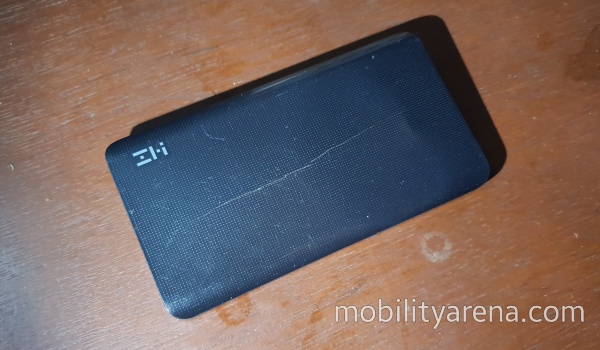
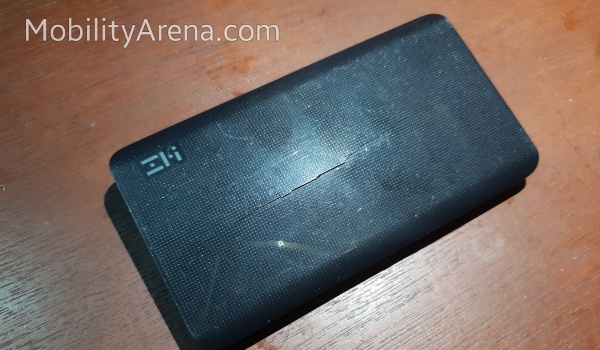
I began to notice the bulge some weeks ago, and then the bulge became so pronounced that the case cracked. Anyone who is familiar with batteries knows that a bulge in a battery is bad news. That battery is damaged and is potentially dangerous. It could burst and leak out harmful chemicals. It could combust or even explode, depending on the circumstances.
Lithium batteries are safer than most, which is probably why the battery in my power bank has not split open and spilled its guts or burst into flames. As a rule, if the battery in your device (power bank, smartphone, laptop, radio, etc) gets swollen, do not plug it in to charge. Do not charge the device.
Whichever way you want to look at it, a swollen battery means trouble. And so, I consider my ZMI a potential threat at this time. I have stopped plugging it to charge and will discard it.
So, it is clear why I need to replace my power bank now – and with another high capacity, high speed model.
10000mAh Mi Power Bank Pro?
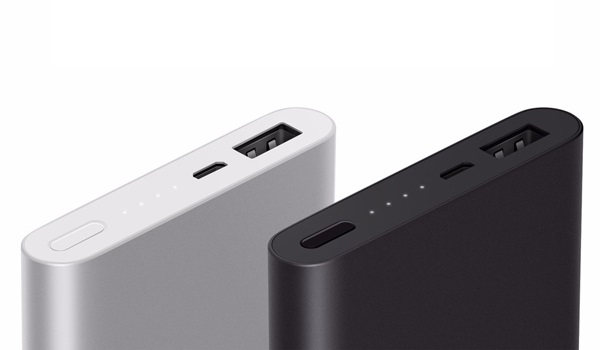
Having looked around a bit, Xiaomi’s 10000mAh Mi Power Bank Pro has caught my attention. It is slim, supports up to 18W QuickCharge, and has a Type-C port. It was love at first sight.
Interesting enough, ZMI is a Xiaomi licensee, so my ZMI power bank is by and large a Xiaomi product. It isn’t a bad idea to continue with a brand that has served me well.
The Mi Power Bank Pro also has device protection built into it to prevent overcharging. And it looks good too:
Author:Mister Mobility
Digital Skills and Communication Coach | Mobile Phone Connoisseur since 2001 | Tech Blogging since 2004
