Add MobilityArena as a preferred source on Google
| TCL 10 Pro |
|---|
| OS: Android 10. Release date: April 2020. Network Type: 2G/3G/4G Display: 6.47-inch, AMOLED Processor: Snapdragon 675 Selfie Camera: 24 MP Rear camera: 64 MP quad RAM: 6 GB ROM: 128 GB Battery: 4500 mAh. Phone Status: Official. |
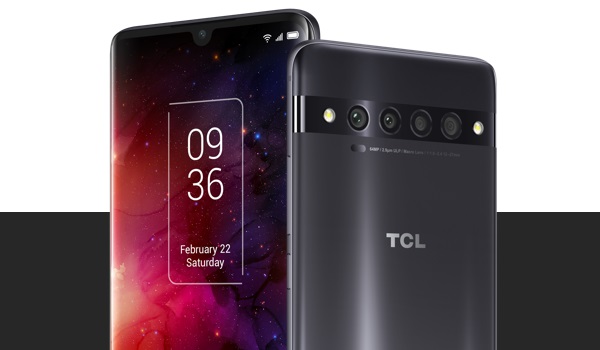
TCL 10 Pro is the first generation of own branded smartphones by TCL. It was announced along with the TCL 10 5G, and 10L . It has a 6.47-inch AMOLED display, 64 megapixel quad camera, a 24-megapixel selfie camera, a 4500 mAh battery coupled with 18W quick charge. The phone runs Android 10 and uses a Qualcomm Snapdragon 675 chipset.
TCL 10 Pro Full Specs and Features
Mobile Wireless Network and Software
- 2G mobile network bands : GSM, GPRS, EDGE 850 / 900 / 1800 / 1900 MHz.
- 3G mobile network bands : UMTS, WCDMA, HSDPA 850 / 900 / 2100 MHz
- 4G mobile network bands : LTE 1(2100) / 2() / 3(1800) / 4() / 5(850) / 7(2600) / 8(900) / 12() / 13() / 17() / 25() / 26() / 28(700) / 38(2600) / 40(2300) / 41(2500) / 66() – varies, depending on model.
- 5G mobile network bands : No.
- SIM Type : Nano-SIM, Single SIM or Dual SIM
- Software / OS : Android 10 + TCL UI
Design, Form Factor, Appearance
- Dimensions : 158.5 x 72.4 x 9.2 mm
- Weight : 177g
- Display : 6.47 inches, 1080 x 2340 pixels, 19.5:9 aspect ratio, HDR, AMOLED, NXTVISION display
- Colours : Gray. Green.
- Physical Build : glass back, aluminum frame

Internal Hardware Specs
- Processor Type : 64-bit, 2.0 GHz Octa-core, Kryo 460
- Processor Name : Qualcomm Snapdragon 675 AI
- Graphics Processor : Adreno 612
- RAM : 6 GB
- Internal Storage : 128 GB UFS 2.1
- External Storage : microSDXC, up to 256 GB (shared slot)
Photography, Video Recording
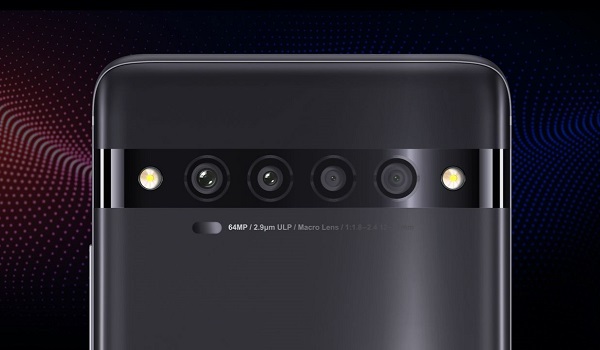
- Rear Quad Camera : 64 MP NXTVISION main sensor, 1/1.7 inch aperture + 1MP super low light sensor + 16MP Super Wide Angle sensor + 5 MP macro lens, dual LED flash, 4K video recording, 1080p@30fps video recording, 960 FPS slow-mo video recording
- Front-facing Camera : 24 MP, Face Recognition, 1080p@30fps video capture
Audio, Video Playback
- Music Support : PCM, AAC / AAC + / eAAC + / MP3 / AMR – NB / WB / APE
- Audio : 3.5 mm audio jack
- Loudspeaker : Mono speakers
- Video Support : H.264/MP4/MPEG4 player
- FM Radio : Yes.
Phone Sensors
- Digital Compass : Yes.
- Accelerometer : Yes.
- Proximity Sensor : Yes.
- Ambient Light Sensor : Yes.
- Barometer : No.
- Pedometer : No.
- Heart Rate Monitor : No.
- Gyroscope (G-Sensor) : Yes.
- Fingerprint Scanner : Yes; in-display.
- Face Unlock : Yes.
- Iris Scanner : No.
- Motion Sensing / Gesture Control : No.
- Voice Control : No.
- Intelligent Digital Assistant : Yes; Google Assistant.
- Infra-red Sensor : No.
Connectivity Options
- Bluetooth : v5.0, A2DP
- WiFi : Wi-Fi 802.11 a/b/g/n/ac, hotspot
- GPS : Yes, A-GPS, GLONASS, GALILEO
- USB : microUSB v2.0.; Type-C reversible connector. OTG reverse charging
- NFC : No.
Miscellaneous Specs and Features
- Battery Type and Capacity : Non-Removable Lithium-Polymer 4500 mAh
- Battery Charging : 18W fast charging (quick charge 3.0)
- Wireless Charging : No.
- Reverse Charging : Yes.
- Model Version/Number : T799B, T799H.
TCL 10 Pro Price and Launch Date
- Announced : April 2020
- Release Date : May 19, 2020
- Country Availability : United States.
- Price : $449.99.
Questions and Answers about TCL 10 Pro
Here are answers to some of the most commonly asked questions about TCL 10 Pro.
Does TCL 10 Pro have Gorilla Glass?
No; the 10 Pro does not have Gorilla Glass protection on its screen, but it has some screen protection feature on it.
Does TCL 10 Pro have quick charging?
Yes; the 10 Pro has 18W quick charging technology.
Will TCL 10 Pro get Android 11?
The company has stated that the 10 Pro will get at least one major Android upgrade, along with security updates every two months for two years. In other words, the phone will get the Android 11 update.
Will TCL 10 Pro work in USA?
TCL 10 Pro has network support across various US carriers like AT&T, Verizon, Metro PCS, Sprint, T-Mobile, Virgin Mobile, Cricket, Boost Mobile, H2O Wireless, Ting, US Cellular, Lyca Mobile, PureTalk, Consumer Cellular, Ultra Mobile, Straight Talk, Red Pocket Mobile, Jolt, Airvoice Wireless, and Google Fi. What this means that some bands are supported, while others are not. You will have to make enquiries from your carrier to know what bands/frequencies are supported on them.
What is the price of TCL 10 Pro? How much does it sell for?
The 10 Pro has a recommended retail price (RRP) of $449.99.
Where can I buy the product?
MobilityArena Buyer’s Guide Verdict
Not available.
Our Buyer’s Guide Verdict is recommendation that we make based on our evaluation the specs of the device. It is a general guide designed to help you understand how much value a smartphone offers for its price. It is not a stamp of quality assessment or an endorsement of the device or of the manufacturers. Be sure to ask questions and use your judgement when buying any device, as MobilityArena may not be held responsible for your buying decisions .
Phone Review Rating
We are yet to review the TCL 10 Pro and so do not have a review rating for it yet. This section will be updated with our review rating and a link to the review page, as soon as we have a review ready.
Get MobilityArena updates on social media
Author:InfoDesk
Add MobilityArena as a preferred source on Google
Apple has announced and released the Golden Master version of iOS 13․5 to developers, soon to be followed by a public release of the software to the general public. The Golden Master is the final version of the software for testing just before its eventual release.
The public beta of the iOS 13․5 was opened in April. The WatchOS 6.2.5 and tvOS 13.4.5 updates were also released alongside the Golden Master build, and the final public release rolls out to devices around the world shortly after.
What is new in iOS 13․5?
In summary, iOS 13.5 brings these key new features to the table: Apple’s Exposure Notification API framework for COVID-19 contact tracing, c hanges to Face ID so you can skip Face ID if you’re wearing a mask, and ch anges to FaceTime, so you can turn off automatic face zooming during Group FaceTime calls.
The Apple iOS 13.5 update introduces a more polished version of the COVID-19 contact tracing app (which is the product of a collaboration between Google and Apple) and also features an improved FaceID feature which now enables users to easily unlock their devices even while putting on protective face masks.
Users also get to enjoy improvements to the Mail App, tweaks to the Group FaceTime calls and a number of other bug fixes. Some of these bug fixes include:
- Fixing the issue where users may see a black screen while trying to stream videos from certain websites.
- Making sure that suggestions and actions now load properly.
A number of concerns from certain quarters worry that the new FaceID feature may potentially weaken phone security, as the new feature does not require the face to be totally exposed to unlock the device.
The more detailed release notes are below.
iOS 13․5 release notes
iOS 13․5 speeds up access to the passcode field on devices with Face ID when you are wearing a face mask and introduces the Exposure Notification API to support COVID-19 contact tracing apps from public health authorities. This update also introduces an option to control automatic prominence of video tiles on Group FaceTime calls and includes bug fixes and other improvements.
Face ID and Passcode
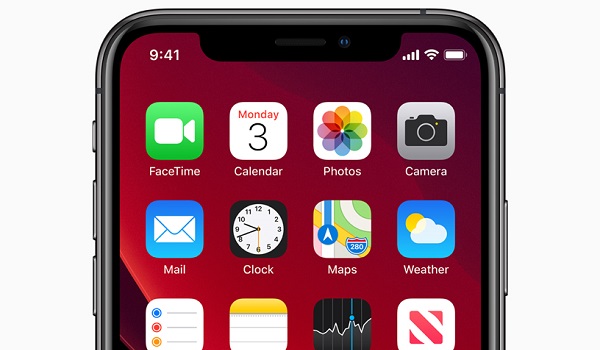
- Simplified unlock process for devices with Face ID when you are wearing a face mask
- Passcode field automatically presented after swiping up from the bottom of the Lock screen when you are wearing a face mask
- Also works when authenticating with the App Store, Apple Books, Apple Pay, iTunes, and other apps that support signing in with Face ID
Exposure Notification
- Exposure Notification API to support COVID-19 contact tracing apps from public health authorities
FaceTime
- Option to control automatic prominence on Group FaceTime calls so video tiles do not change size when a participant speaks
Emergency Services
- Option to automatically share health and other essential information from your Medical ID with emergency services when you place an emergency call (US only)
This update also includes bug fixes and other improvements .
- Fixes an issue where users may see a black screen when trying to play streaming video from some websites
- Addresses an issue in the share sheet where suggestions and actions may not load.
iOS 13․5 Public Release
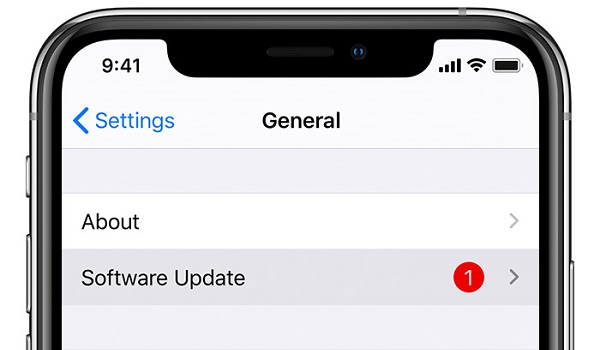
If you own an iPhone, you can update it to iOS 13․5 by going to the Settings menu on your phone, and choosing General, then Software Update. The procedure is the same for checking for iPadOS 13.5 on your iPad tablet. Software updates are often rolled out in batches, so if it has not arrived on your device yet, it will soon. Keep checking.
Get MobilityArena updates on social media
Author:Alfa Baye
Staff Writer
