Add MobilityArena as a preferred source on Google
I cannot be the only person who is tired of passwords. Or to be more specific, I cannot be the only person who is tired of having to remember dozens of unique passwords for dozens of digital estate that I own or manage. Which is why I am convinced that at some point in time, the password must die.
It is made much worse because best practices for password is that each digital platform should have a separate password and each must be not easy to figure out. As such, the more platforms one has to manage, the more tasking it gets.
- The Burden Of Managing Multiple Digital Assets
- Everyday People Are Swamped Already
- The Password Must Die
The Burden Of Managing Multiple Digital Assets
Here are some of the digital assets that I manage:
- Web Host Manager (WHM) – multiple accounts
- Cpanel – multiple accounts
- Microsoft
- Corporate email – multiple accounts
- WordPress – multiple accounts
- Internet/Mobile Banking – multiple accounts
- Online Shopping – multiple accounts
- ISP accounts – multiple accounts
- Ride hailing services – Uber, Lyft, etc
- Smartphone vendor accounts e.g. Samsung, Apple, BlackBerry, MIUI, etc.
- Music streaming platforms – multiple accounts
- Video streaming services – Netflix, Amazon prime Video, etc
There are other services too that I will just lump together under Miscellaneous. It is a mad jungle.
Somehow, I have to remember the passwords for each and every one of these services. And each password has to be secure. It is a jungle out there, friends. It is a miracle that anyone who is fully immersed into digital life is able to stay sane with the multitudes of login details that they have to remember.
Everyday People Are Swamped Already
I was helping someone switch from their old smartphone to a new one, and she could not remember her Gmail account password. This is such a commonplace occurrence when people are switching phones that it no longer surprises me.
Usually, the account that people do not log into on the regular is the one whose password gets forgotten. In her own case, she insisted that she used the same password as one other asset she owns. Yet, she still forgot. This person is not a techie and does not keep more than a few accounts requiring login.
On a personal note, for some reason, there is one particular account whose password I always forget when I need to login. ALWAYS. I have to do a password reset each time I need to do something on there.
The Password Must Die
The digital jungle is constantly growing with new services coming up and requiring that we create an account and login to use them. Even here on MobilityArena.com, we recently implemented a user system that requires a login.
And it is for this reason that the password must die. There has to be a better way to manage all these accounts safely and securely without having to memorise at least 40 complex passwords. It is a miracle that I haven’t run stark raving mad yet. A miracle of heavenly proportions. Verily, verily, I say unto you, the password must die.
No; don’t mention a password manager , as what that means is that once that account is hacked, all your passwords to every account you manage is exposed. Bad idea. We need to do away with password banks, and we need to do away with passwords entirely.
Can cell phones and/or phone numbers provide an alternative to passwords ? Google already implements something of the sort (see THIS ), and it has made my digital life easier. When I need to login to my Google account on a PC, I get a prompt on my phone and by tapping a code on it, I get logged in automatically. Awesome!
Yahoo mail also has a similar system for logging in without a password. See: You can now login to Yahoo mail without a password . A few online forums already offer an option to login without a password.
There is also the emoji password experiment. Clearly, I am not the only one who thinks that passwords need to die and be consigned to the dustbins of history. I wait excitedly for that day to come, and it cannot happen soon enough.
Author:Mister Mobility
Digital Skills and Communication Coach | Mobile Phone Connoisseur since 2001 | Tech Blogging since 2004
Add MobilityArena as a preferred source on Google
XDA Developers reports that they are “confident that Android P will finally add support for the Bluetooth HID device profile service, which allows for your smartphone to be used as a Bluetooth keyboard or mouse.”
Some weeks ago, I wrote about the smartphone-powered laptop by Razer. In that article, I also mentioned Microsoft’s Continuum and Samsung’s DeX, which allow supported Lumia and Galaxy smartphones respectively to be used as a trackpad.
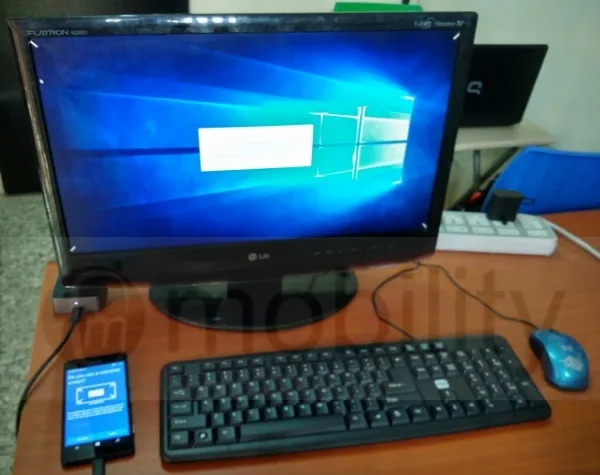
Think of what Microsoft did with Continuum using cables, replace the cables with Bluetooth, and that is what we are looking at. What will make that possible is a Bluetooth profile called Human Interface Device (HID).
- What is Bluetooth HID Device Profile?
- How to Enable Bluetooth HID Device Profile
- Extending The Capabilities Of Smartphones
What is Bluetooth HID Device Profile?
Bluetooth HID Device Profile is the standard for Bluetooth-enabled user-input devices like mice, keyboards, trackpads, and joysticks.
Before now, this Bluetooth profile did not exist in Android OS. As such, Android app developers cannot create apps that can enable your smartphone to be used as an input device. If Bluetooth HID Device Profile is added to Android P, then any smartphone running Android P can be used as input devices over Bluetooth.
That means, you can pair your smartphone with a smart TV or flatscreen PC and use it as a mouse, trackpad, or keyboard. Android P is the next version of Android OS after Android 8 Oreo (also called Android O).
How to Enable Bluetooth HID Device Profile
If your smartphone has it, it is already enabled. There is nothing for you to do.
Extending The Capabilities Of Smartphones
Clearly, everyone involved in mobile sees the future of smartphones in productivity. Microsoft’s Continuum aside, the company has repeated that it wants to create a new category of mobile devices that focus on productivity. Their successful Surface tablet line is part of this.
Samsung is pushing ahead with DeX. Huawei has developed a PC mode that runs on the same principle. And now, Google takes up the task.
Why are all the big names facing productivity and bigger screen computing? Mobile has conquered the consumer market completely. Now, it is time for it to tackle office/enterprise/productivity. The idea is to rule both mobile and desktop with the same OS, and initiatives of this sort are pointed squarely at that.
There are quite a number of Bluetooth profiles, each enabling a different functionality for devices. Read up more about these Bluetooth profiles .
Source
Author:Mister Mobility
Digital Skills and Communication Coach | Mobile Phone Connoisseur since 2001 | Tech Blogging since 2004
