Add MobilityArena as a preferred source on Google
The rise of AI in everyday life has brought the future we used to dream of where tech does almost everything if not everything for us. Imagine waking up in a world where your coffee brews itself, your calendar automatically adjusts for traffic, and your home knows to adjust just to the right temperature to keep you comfortable. This isn’t the distant future; it’s the reality we’ve found ourselves, with the rise of artificial intelligence (AI) in our everyday lives. AI used to be a buzzword, not anymore; it’s becoming an integral part of how we work, live, and interact with each other.
- A Day in the Life with AI
- AI at Work: Efficiency Meets Innovation
- The Rise of AI in Everyday Life: Home Sweet Smart Home
- Societal Impacts: Balancing Benefits with Ethics
- The Bright Future Ahead
- Conclusion
A Day in the Life with AI

Let’s take a walk through a typical day. Think about you waking up to the gentle sound of your AI-powered alarm clock, which not only wakes you but also provides a brief summary of the day’s weather and your schedule. As you walk down to your kitchen, your smart coffee maker has already brewed your favorite blend, thanks to its ability to learn your morning routine. While you are at your dining table, sipping your coffee, checking your phone, your virtual assistant has already filtered through emails, highlighting urgent messages and summarizing lengthy threads. It even suggests responses based on your previous interactions and data histories. This is just the beginning — The Rise of AI in everyday life is transforming how we manage our time and tasks.
AI at Work: Efficiency Meets Innovation

How about AI at your workplace? As you head to work, AI continues to play a crucial role. In many offices today, AI tools are streamlining processes that once took hours. Take for instance, AI-driven analytics platforms can sift through vast amounts of data in seconds, providing insights that help businesses make informed decisions within a twinkle of an eye. AI is that powerful and helpful. Imagine being in a meeting either on-site or virtual, and you’re somewhat distracted with some other activities, an AI assistant will practically transcribe the discussions in real-time, highlighting key points and action items. This technology not only boosts productivity but also allows teams to focus on creativity and strategy rather than mundane tasks. However, the rise of AI in the workplace isn’t without its challenges. One of the major fears of AI is that of job displacement as machines take over repetitive tasks. But here’s the ice-breaker: while some jobs may disappear, new roles are emerging that require uniquely human skills — creativity, empathy, and critical thinking. The workforce is evolving, and those who adapt will thrive.
The Rise of AI in Everyday Life: Home Sweet Smart Home

Returning home after a long day, perhaps after a very long business meeting, you’re greeted by an AI environment tailored just for you. Your smart thermostat has adjusted based on your preferences and even learned from past behaviors. Your home configured security system uses AI to recognize familiar faces and alert you to any unusual activity. In your kitchen, meal prep becomes effortless with AI-powered appliances that suggest recipes based on what you have at hand. Do you love healthy meals? Just ask your smart assistant for ideas! The convenience and beauty of having technology that understands your lifestyle is reshaping how we approach daily chores and lifestyle
Societal Impacts: Balancing Benefits with Ethics
As we welcome and embrace these advancements, it’s quite important to consider their broader implications. The integration of AI into our society raises important ethical questions: How do we ensure privacy? What happens if biases in algorithms affect decision-making? These are challenges we must address as we navigate this new landscape and horizon. As we welcome and embrace these advancements, it’s quite important to consider their broader implications. The integration of AI into our society raises important ethical questions: How do we ensure privacy? What happens if biases in algorithms affect decision-making? These are challenges we must address as we navigate this new landscape and horizon.
The Bright Future Ahead
Looking at what is ahead of us, the potential for AI is limitless. Talk about revolutionizing healthcare with personalized treatment plans, enhancing education through tailored learning experiences, etc. AI has the power to improve our day to day lives in numerous ways. Imagine a world where students receive real-time feedback on their learning styles or where doctors can predict health issues before they arise. Again, as we welcome and embrace this transformative technology, it’s important to remain vigilant about its ethical implications and ensure that it serves humanity as a whole. If we would foster open conversations about AI’s role in society, we can harness its potential while addressing its challenges as well.
Conclusion
The rise of AI in everyday life is not just about convenience, it is also about enhancing our capabilities and transforming our interactions with technology and each other. As we integrate these Artificial intelligent systems into our daily routines, let’s embrace the opportunities they present while remaining mindful of their impact and implications on our society. The future we dreamed of is here — and it’s smarter than we ever thought!
Author:Ifeoluwa Adeleke
Add MobilityArena as a preferred source on Google
Experiencing performance lag and choppiness on your iPhone 15 Pro can be frustrating, especially when you’re relying on its advanced features and capabilities. Even though the device is equipped with powerful hardware, many users have reported issues such as slow response times, stuttering animations, and unresponsive apps. Beautifully enough, there are effective solutions to enhance your device’s performance and ensure a smoother user experience.
- Common Causes of Performance Lag
- Proven Solutions to Fix Lag and Choppiness Restart Your Device Free Up Storage Space Update Your Software Close Background Apps Disable Background App and Refresh Adjust Motion Settings Check Battery Health Reset All Settings
- Conclusion
Common Causes of Performance Lag
An in depth understanding of the underlying causes of lag and choppiness is the first step towards resolving these issues. Highlighted below are some common factors that may contribute to performance problems on the iPhone 15 Pro:
An in depth understanding of the underlying causes of lag and choppiness is the first step towards resolving these issues. Highlighted below are some common factors that may contribute to performance problems on the iPhone 15 Pro:
- Low Storage Space: The more you use your device, it fills up with apps, photos, and other data, hence, it struggles to operate efficiently. Keeping at least 20-25% of your storage free is essential for optimal performance.
- Outdated Software: Running outdated versions of iOS can lead to compatibility issues with apps and features, resulting in lag. Regular updates are crucial for maintaining performance.
- Background App Activity: Multiple apps running in the background can consume system resources, leading to slowdowns. This is especially true for resource-intensive applications.
- Environmental Factors: Extreme temperatures can affect device performance. If your iPhone overheats or gets too cold, it may throttle performance to protect its hardware.
- Battery Health: A degraded battery can impact overall performance, causing the device to slow down or behave erratically.
Proven Solutions to Fix Lag and Choppiness
<img loading=“lazy” src=“https://mobilityarena.com/wp-content/uploads/2024/09/Performance-3.jpg" onerror=“this.onerror=null;this.src=‘https://blogger.googleusercontent.com/img/a/AVvXsEhe7F7TRXHtjiKvHb5vS7DmnxvpHiDyoYyYvm1nHB3Qp2_w3BnM6A2eq4v7FYxCC9bfZt3a9vIMtAYEKUiaDQbHMg-ViyGmRIj39MLp0bGFfgfYw1Dc9q_H-T0wiTm3l0Uq42dETrN9eC8aGJ9_IORZsxST1AcLR7np1koOfcc7tnHa4S8Mwz_xD9d0=s16000';" alt=“Proven Solutions to Fix Lag and Choppiness
- 5”>
In order to fix the performance lag on your iPhone 15 Pro, consider implementing the following strategies:
Restart Your Device
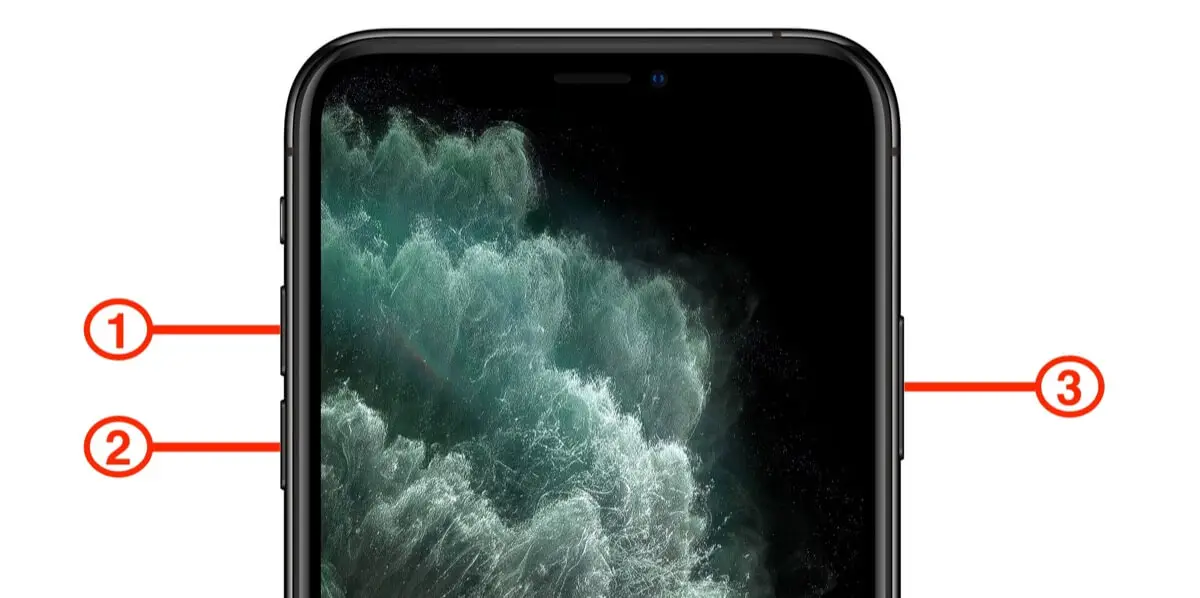
A simple restart can often resolve minor software glitches that contribute to lagging issues. To restart your iPhone 15 Pro, simply do the following:
- Press and hold the Side button along with either Volume button until the power slider appears.
- Slide to power off, then press and hold the Side button again until you see the Apple logo.
Free Up Storage Space
Always check your available storage by going to Settings > General > iPhone Storage. If you’re running low on space, try deleting unused apps or offloading large files like photos and videos.
Update Your Software
Make sure that your device is running the latest version of iOS by checking Settings > General > Software Update. Updates often include bug fixes and performance enhancements.
Close Background Apps
To improve and enhance the performance of your device, close any unnecessary apps running in the background:
- Swipe up from the bottom of the screen to open the App Switcher.
- Swipe left or right to find apps you want to close, then swipe up on their previews.
Disable Background App and Refresh
Limiting and restricting background activity can help reduce lag. Simply follow these fw steps:
- Go to Settings > General > Background App Refresh.
- Select “Off” or limit it to Wi-Fi only for specific apps.
Adjust Motion Settings
Another way to enhance your device performance is by reducing motion effects. You can adjust motion effects by doing the following:
- Navigate to Settings > Accessibility > Motion.
- Enable Reduce Motion to decrease animations that may contribute to lag.
Check Battery Health

Concept depicting new possibilities for the development of ecological battery technologies and green energy storage in the form of a battery-shaped pond located in a lush forest. 3d rendering.
One more thing to check is your device battery health. A declining battery can impact performance. To check your battery health, you can do the following:
- Go to Settings > Battery > Battery Health & Charging.
- If your maximum capacity is significantly below 80%, consider replacing the battery.
Reset All Settings
If performance lag persists, resetting all settings may help without erasing personal data:
- Go to Settings > General > Transfer or Reset iPhone > Reset > Reset All Settings.
- Confirm your choice; this will reset settings like Wi-Fi passwords but keep your data intact.
Conclusion
Experiencing performance lag and choppiness on your iPhone 15 Pro can be frustrating, but an in-depth understanding of the potential causes and implementing these proven solutions, you can enhance your device’s responsiveness and overall user experience. Regular maintenance — such as managing storage space, updating software, and monitoring battery health, will help keep your iPhone running smoothly for years to come. Don’t let lag disrupt your enjoyment of this powerful device; take action today!

