Add MobilityArena as a preferred source on Google
I am a fan of Samsung’s custom user interface, One UI, and I have followed it with keen interest since it first launched in 2018. It has gone through a few iterations since then, and now in October 2022, Samsung has released the 5th version, One UI 5 .
In this article, I walk you through what I believe are the best One UI 5 features you can look forward to if you are buying a Samsung smartphone or if your current Samsung phone is eligible to be updated to this latest version. Come with me.
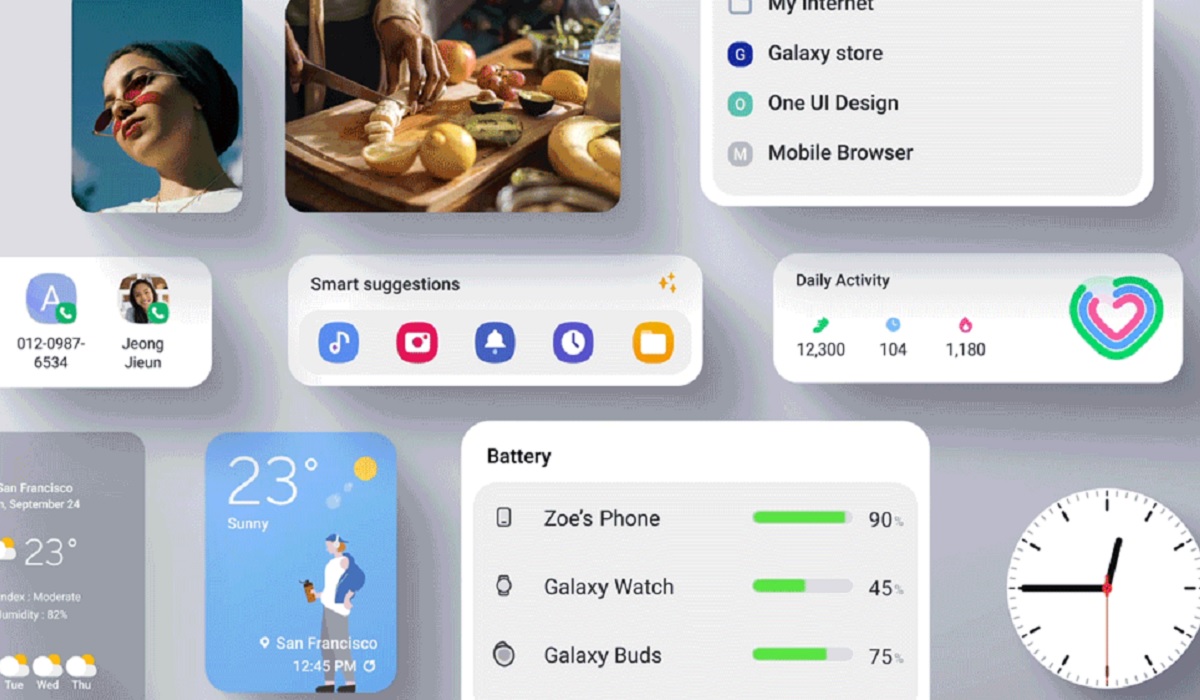
The Best One UI 5 Features
- Extract text from images and paste it into a note . My top favourite One UI feature is the ability to extract text from images for use elsewhere. I have lost count of the number of times I have had to use a 3rd party app for this. What is it useful for? You can take a photo of a business card and extract the text so you can create a new contact or modify an existing one. You can extract text from the label on a bottle or any other packaging, and then paste that text in an article, a note, and email, or any other medium. It is a nifty feature to now have backed into Samsung phones.
- Control all devices connected to your Samsung phone . If you have ever wondered why it wasn’t possible to control all connected accessories from your phone, it is clear that Samsung has been thinking about it for a while, and now they have fixed it. You can now do that. Earbuds, smartwatches, et al, that are connected to your Samsung phone are all now within your power to control right from your phone. This feature is found in the new Connected devices menu.
- Stay focused with One UI 5 Modes . One of the best One UI 5 features is the new Modes , which allows you to create customized settings for different periods of your life. I need my smartphone to prioritize differently when I am driving, when I want to sleep, when I am on my laptop and working, and when I am working out. There are times you want notifications muted, there are times you want them on but not loud, and there are times you want them loud. The new Modes feature lets you customize these and more, so your phone fits perfectly into every aspect of your lifestyle.
- Communicate better in noisy environments with Bixby Text Call . Have you ever needed to take a call in a noisy setting, and the person at the other end is unable to hear you clearly from time to time? The new Bixby Text Call lets you answer phone calls by typing a message. It converts the text to audio and send it to the other person. It also converts what the caller is saying at the other end to text and sends it to you, so you don’t miss a thing either. I will be looking forward to testing how good Bixby Text Call works. If it works as great as it sounds on paper, fantastic.
These are my top One UI 5 features. Of course, there are more features than these four, but I consider these the ones I will find the most useful in regular use. You can read up on the full announcement of what One UI 5 brings to the table from the official Samsung website, here .
- Don’t miss our mobile phone reviews .
- Follow our news on Google News .
- Join our WhatsApp Group , to be notified of the most important articles and deals,
- Follow us on Instagram , Facebook , Twitter , and YouTube .
Author:Mister Mobility
Digital Skills and Communication Coach | Mobile Phone Connoisseur since 2001 | Tech Blogging since 2004
Add MobilityArena as a preferred source on Google
Whatever model of mobile you use, it’s your responsibility to get educated about the security threats you face each day. iPhone owners are definitely better off with a basic understanding of modern risks under their belts. So let’s go over the most important info regarding spyware in particular so that you can steer clear of it where possible, and deal with infections when they do arise.
Spyware is everywhere
The issue of spyware is near universal, extending beyond smartphones to include every type of connected device.
However, since our handsets are so essential to modern life, they’re prime targets for cybercriminal groups who develop malicious software. And that makes them more likely to be targeted and successfully infected as a result.
As such it’s not a question of if your iPhone will encounter spyware, but when. Don’t feel smug just because Android is more frequently attacked in this manner; there are still plenty of underhanded campaigns tailored to Apple fans which you need to be clued up on.
Infections can occur in many ways
Hackers can wangle their way onto your iPhone through multiple avenues, including:
Text message
Malicious links sent via SMS are widely associated with identity theft , since unsuspecting mobile users are easily duped when messages they receive look legitimate.
Scammers can claim to represent a government body, a parcel delivery service, or anything in between to trick people into clicking links which end up downloading spyware onto their phone instead.
In much the same way as malicious texts, a scam email either containing spyware itself or linking to it elsewhere online is another tried and tested strategy.
Apps
Google has had to step in to remove apps for spying on users , and even with tighter measures put in place to prevent exploitation of the Play Store marketplace, there’s still a risk associated with downloading little-known software from legitimate platforms.
This also applies to Apple’s own digital store, so think twice before you download any app that doesn’t have many reviews.
Direct installation
This is another widespread way for spyware to end up on iPhones, and requires that a third party has physical access to your handset in order to install the malicious software of their choice.
As such, leaving your phone on show and unattended in public is always unwise. Even if it doesn’t get stolen, it could end up infected, and can then be used to monitor your every move, steal your data, eavesdrop on your conversations and much more.
Using a custom lock screen which is protected from unauthorized users and is still functional and fun for your own interactions makes sense.
Phishing website
Lastly, if you visit dodgy websites using your iPhone, this could be a backdoor by which spyware infections occur. So stick to well known, secure sites instead.
Checking your iPhone for spyware
Having an iPhone hacked with data-stealing spyware is not the end of the world, but the main obstacle to overcome is detecting the infection in the first place.
There are lots of telltale signs to keep in mind, such as:
Slow performance
An iPhone which isn’t as snappy to respond as usual could be a sign of spyware running in the background and monopolizing system resources without your knowledge.
High data use
Spyware typically relies on sending a lot of data to the cybercriminals that created it, and of course this shows up on your network usage statistics. So if you’ve noticed an inexplicable uptick in data usage, the culprit could be spyware.
Bad battery life
Sure, the average iPhone will see battery life degrade slowly over the years. But if this happens suddenly, and you’ve barely used it, spyware might be responsible. This is because of the aforementioned use of system resources, which of course requires more energy from your battery.
Audio oddities on calls
Keeping your ears open when you’re taking voice calls will let you pick up any aberrations in the audio that could indicate the call is being listened in on by spyware.
Of course even if you don’t detect any of these issues, the best option is to play it safe by assuming your iPhone will face off against spyware at some point. That means having a well regarded security app installed, and running regular scans with it to look for problematic software which is buried from view.
Again, it’s important to be proactive, rather than waiting until your device is infected before you bring security software into the mix.
The fallout from a compromised phone can be significant
So why should you care about spyware, and what makes it worth going to the trouble of changing your habits and using security software frequently?
Well the simple answer is that your private data could end up in the wrong hands, at which point your entire life hangs in the balance.
Data theft from an iPhone or any other device can allow crooks to spoof your identity for everything from taking out bank loans to going on e-commerce shopping sprees.
It’s not just about losing money in the short term, but also the long term impact that this type of fraud might have on things like your credit rating.
This information could also be used for far more nefarious means, such as tracking your location via GPS. And you can imagine what a criminal might choose to do with this data.
The bottom line
Spyware is not a threat iPhone owners can take lightly. It’s a real and present danger whenever and wherever you use your mobile, and so you need to respond proportionally to this threat.
One final thing to note is that Apple does a good job of securing its smartphones at an OS level, so installing the latest updates is another must for security-conscious iPhone fans. That way you won’t be exposing yourself to threats that have already been patched, and will also get the latest features as soon as possible.
- Don’t miss our mobile phone reviews .
- Follow our news on Google News .
- Join our WhatsApp Group , to be notified of the most important articles and deals,
- Follow us on Instagram , Facebook , Twitter , and YouTube .
