Add MobilityArena as a preferred source on Google
If you are looking for the cheapest 8GB RAM phone with 256GB ROM this 2020, Elephone has announced a new flagship device, the U3H which which qualifies for that title. Say hello to the Elephone U3H.
With a $329.99 price tag, the U3H is presently the cheapest smartphone that comes with 256GB storage memory and 8GB RAM. That means it has much memory as some PCs on the market today. This makes the U3H ideal for users who need massive space to store tons of files, especially large videos. Chances are that you will not miss a memory card with this phone.
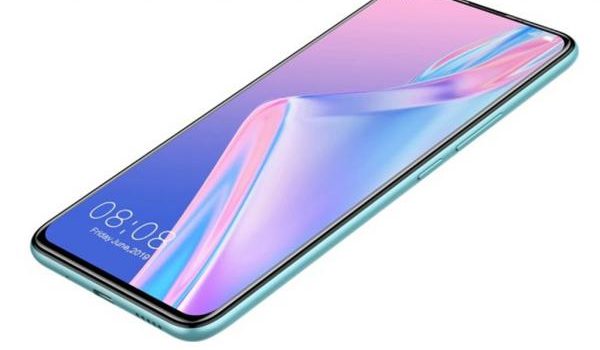
Elephone U3H is the cheapest 8GB RAM phone with 256GB ROM in 2020
The Elephone U3H has a fairly large 6.53-inch FHD+ display with a punch hole and two rear cameras, including one with a Sony the IMX586 48-megapixel sensor. It is powered by a rather average 3,500mAh battery with adaptive fast charging, as well as wireless charging.
On the software front, the device launched with Android 9.0 OS, but there are reports that Android 10 update is on the way for it already.
Where To Buy Elephone U3H
The $329.99 price of the Elephone U3H translates to roughly ₦117,000 in Nigeria.
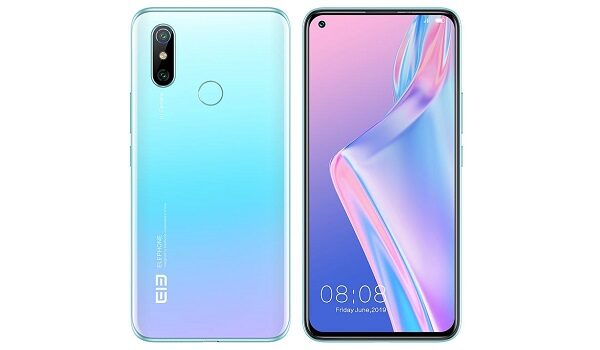
Users looking to cop this device can buy it from Aliexpress . There are fears that certain products from China may not be totally compatible with local mobile networks. So, do check before buying.
Another affordable 8GB RAM phone with 256GB ROM that is available in Nigeria is Xiaomi Mi Note 10 Pro . It also has one of the most amazing cameras on any smartphone in the world. You can buy from Swot Solutions (Call +234 802 289 1860 ) in Ikeja for ₦200,000 only.
Author:Alfa Baye
Staff Writer
Add MobilityArena as a preferred source on Google
Facebook’s 2.4 billion+ active users constitute an attractive target for hackers. While the big, more successful hacks come up in the news, individual accounts get hacked every day and do not make the headlines.
And it isn’t harmless, either. Hackers use a breached Facebook account in many ways. Automatic sign-ins via the network enable cyber-criminals to gain access to a lot of different website accounts as soon as they have got control of your Facebook.
A hacker can collect a lot of personal information about you from your profile, which they can use for stealing your identity. A successful hack also gives spammers access to your followership.
When your Facebook account has been hacked, there are some telltale signs you will notice. Immediately you detect such an unusual activity, you must act immediately to protect your account. Here is how to tell if your Facebook has been hacked and what to do to regain it.
Please Note : Some of these tips work for Twitter as well.
Tell-Tale Signs Showing Your Facebook Account Has Been Hacked
Ways to know your Facebook account is hacked
There’s a simple way to confirm your suspicion. Navigate to the arrow in the upper right corner of your FB page. Then, press it. Click on Settings in the menu. You will now see a new menu, and from there, select Security & Login > Where You’re Logged In .
You should see a list of all the devices your account is signed in to, as well as their locations. Going through the list, if you notice a login you can’t recognize, it is quite possible that you’ve been hacked.
If you come across anything that looks strange, scroll to the right side of the log and press Not You? The next thing is to click Secure Account, and Facebook will run a diagnostic on your account and will now show you how to secure it. Press Get Started .
Are There Any Other Signs to Know You’ve Been Hacked?
Yes, here are some other ways you can tell if your Facebook account has been hacked:
- You notice that someone sent out friend requests to other members you do not know
- You observe that your personal details such as your name, email, date of birth, or password have been changed
- You see posts showing up on your timeline that you did not post
- You observe that messages have been sent from your account, but they were not composed by you
Now that you’ve confirmed your account has been hacked and taken steps to regain control of your Facebook, it is time you considered ways to avoid a reoccurrence of such an incident in the future.
How to Keep Your Facebook Account Safe from Hackers
Here are the steps to keep out hackers from your Facebook
Change Your Password & Setup 2-Factor Authentication
Some of the most effective ways to combat hacking are to create a unique & strong password and activate two-factor authentication on your FB account. It is very easy for an intruder to gain access to your account once they’ve laid their hands on leaked credentials.
As soon as they have acquired such sensitive data, they will now try the email as well as password combinations across other services. You can quash that threat by using different passwords across all your social media accounts. A password manager can be of help here.
Another method to keep your account safe is to enable two-factor authentication, where a second code (or factor) is requested to sign in to your account. With this technique in place, if an attacker manages to get your password, they would equally have to gain control of another device, which is often your smartphone, to access your account.
You can add 2-factor authentication on your Facebook by heading to Settings -> Security & Login -> Two-Factor Authentication . Now, supply your password to confirm you intend making changes. Switch two-factor authentication to “On”.
In this section, you can enable a setting to receive 2nd-factor codes through SMS or via a code-generating app, such as Google Authenticator.
To add two-factor on your Twitter , scroll to Settings & Privacy -> Account . When you see the Security subsection, select Review your login verification methods .
Once you enter your password, you will be taken to a Login verification screen. From there, you can also choose how & where to receive codes, as you did on FB above.
Though using a combination of strong and unique passwords and 2-factor authentication is not 100% safe, for the majority of people, it helps to drastically cut down on the likelihood that their social media accounts will ever get compromised security-wise.
Use Your Device Lockscreen Judiciously
Consider setting every one of your devices (including your smartphone, laptop, etc.) to lock quickly immediately you stop making use of them to safeguard them from physical attacks.
While this tip is mostly suitable to reduce pranks and keep out rogue toddlers, it could also come handy in defending against more extreme targeting.
Additionally, use a strong passcode/biometric for guarding your devices. If you have chosen your date of birth as the unlock code for your smartphone, you will only make it easier for hackers to break in.
Use Remote Control
Facebook has put in place a couple of features to help you keep tabs on anyone that is accessing your account. To use them, start by navigating to Settings -> Security & Login . Here, you will view all the devices on which your FB account is signed in, in addition to their location.
If you notice anything you do not recognize or a device you do not identify, you can check the right-hand icon to access the option to log out remotely. You can take a step further by reporting it as an imposter.
Still on that section, navigate down to Get alerts about unrecognized logins , and set it to “ON”. By doing so, you will be notified through Facebook, Messenger, or email when someone has signed into your account from an unidentified browser.
Since Twitter does not provide a similar feature, this is why it is important to ensure that you add two-factor on your account.
Go through Device Permissions
Another step you can take to prevent getting hacked again is to check the permissions that social services, such as Facebook and Twitter, have on all your computing devices.
It is possible you’ve blocked Facebook from getting information on your location via your phone; however, you might have inadvertently enabled it on your tab due to loss of attention. This data needs to be kept safe on accounts protected by a powerful password as well as 2-factor authentication.
However, if you would not like a service to collect it, you could switch it off.
Here is how to access device permissions for FB and Twitter on your Android: Scroll to Settings -> Apps and hit the menu icon in the upper-right section, and then press App Permissions .
If your phone runs iOS, head to Settings -> Privacy to perform a similar action. Under Settings, navigate down to double-check the permissions that are listed for all the services you’re using.
Be Careful with Allowing Third-Party Permissions
While an attacker would find it difficult taking over one of your social media accounts by using a 3rd-party service with some access, it is still important to check the apps you have granted approval to in a bid to make sure no threat is on the list.
Also, consider getting rid of old plugins that you are not using any longer.
You might have given those plugins permission to collect more data than you expect. Though that is not technically a hack, it is still an invasive action.
On your Facebook, scroll to Settings -> Apps & Websites to take a look at and manage the outside services with some access to your FB.
On your Twitter account, navigate to Settings & Privacy -> Apps to view and edit a similar list.
Wrapping up, Going through the tips above, you will be armed with information on how to tell if your account has been hacked and what to do to regain control of it.
Author:Tijani Mustapha
Deji is a web content developer and tech writer, who is passionate about tech-related topics and issues. A graduate of Physics from the University of Ibadan, he loves writing, conducting research, playing football, and meeting people of diverse backgrounds and interests.
