Add MobilityArena as a preferred source on Google
Time management is one of the main issues of the current generation. Less than 1 out of 5 people have a time management system in place. Thus about 82% of people struggle with time management issues. Students often go through alternate periods of extreme procrastination followed by excessive overwork to make up for the backlog. This severely affects their study cycle and also interferes with their relaxing period.
Students often also overindulge in games and other forms of entertainment that take up a majority of their time. This is where time management apps can be a lifesaver for them. The purpose of these apps is like setting an alarm clock to wake up in the morning as it aims to keep students aware of all the things that they have to do for the day.

These time management apps help students better organize college or school routines, act as a reminder for their exams, and dissertations and also encourage them to pre-plan for their multiple assignments. There is a plethora of such apps all over the internet but some of the most important ones are as follows.
- Google Calendar
- Trello App
- GamStop
- Evernote
- Focus Booster
Google Calendar
Google Calendar is a terrific planning app. It not only automatically adds items to the calendar that it detects in other apps, but also allows students to set reminders and colour-code their tasks and events, and also check class schedules which are automatically shown on the account. This gives the students a good idea of how much of their time they need to dedicate to studies and how much they can use to relax and enjoy.
Google has also created various useful analytical, organizing, and time management apps for more effective planning. The calendar is also very easily accessible. It can always access any web browser o or the Google Calendar app on the mobile device. But the best part is that the app is available for free.
Trello App
Trello is another useful time management app as it not only helps track time but also various projects. Trello helps to easily manage projects and tasks at a glance. It also helps create visual boards for projects and to-do lists which is a great help and motivates students to finish the tasks recorded.
Even the free version is packed with features like unlimited storage, and it even integrates with Evernote, and GitHub, integrates with other tools such as Google Drive and Dropbox, and so on. The app is also Extremely customizable. This is a very crucial feature as the moment the student would be able to customize an app they would feel more invested in using it. Trello was made for collaboration and projects and tasks can be viewed and assigned across teams. The app is widely available on App Store and Google Play
GamStop
Players often find ways to join non GamStop casinos by following the CasinoGap guide to continue playing games. However, we don’t recommend doing so, because gaming will steal your time from studying. Thus, it not only allows overcoming game addiction but also increases productivity by channelling the energy into studies and other activities.
Evernote
Evernote is currently one of the most popular time management apps among students. It’s widely used by students of all ages not only for keeping notes and scheduling events but also for collecting clips, photos, and films. Students can even create multimedia presentations with the help of this app which is one of the reasons for its popularity. It’s particularly useful for those students who study and work simultaneously.
Evernote enhances organizing the education process, by encouraging personal checklists, reminders, and event planning. It is widely available across iOS, Android, Web, Windows, and macOS.
Focus Booster
Focus booster is a free app that again helps students maximize productivity. While studying students often face many distractions Focus Booster helps students take regular breaks to keep their minds fresh and avoid unnecessary distractions later. It encourages them to remove all distractions during the sessions like friends, emails, the internet, and games. At the same time, setting a separate session for socializing and other things. This allows students to maintain focus on the task at hand, finishing it sooner and giving higher quality results.
Students can also track their productivity (and breaks) in timesheets to analyze how the day was spent. This customizable app is highly recommended for overcoming distractions and maintaining balance in a day’s schedule effectively. Focus Booster provides that by using a time management method called the Pomodoro Technique which breaks down work into intervals of concentration time and breaks time. It is widely available on the Web, Windows, macOS, iOS as well as on Android.
Conclusion
This time management app helps students avoid distractions while also helping them make the optimized utilization of their time. A productive day is not one filled with only work and no play. But one where the mind gets adequate periods of work and rest so that they finish all tasks but also not get exhausted only time management apps can inculcate these habits in students who lack such discipline.
Author:Content Partner
Add MobilityArena as a preferred source on Google
Key takeaway : Dialling *#62# on your Android phone or iPhone does not tell you whether or not your device has been hacked. It only lets you know if you have call forwarding active on your line. For more details, read on.
When it comes to smartphone usage, there are different aspects that several users may find quite confusing. A key example is certain short codes and how they work to perform different functions on our devices. One of them is *#62#.
We have observed questions on online forums depicting similar confusion about the *#62# code and what it does. Not to worry though, if you don’t know what this code is, this guide is for you. Here, we’ll describe everything there is to know about the *#62# code and what it does.
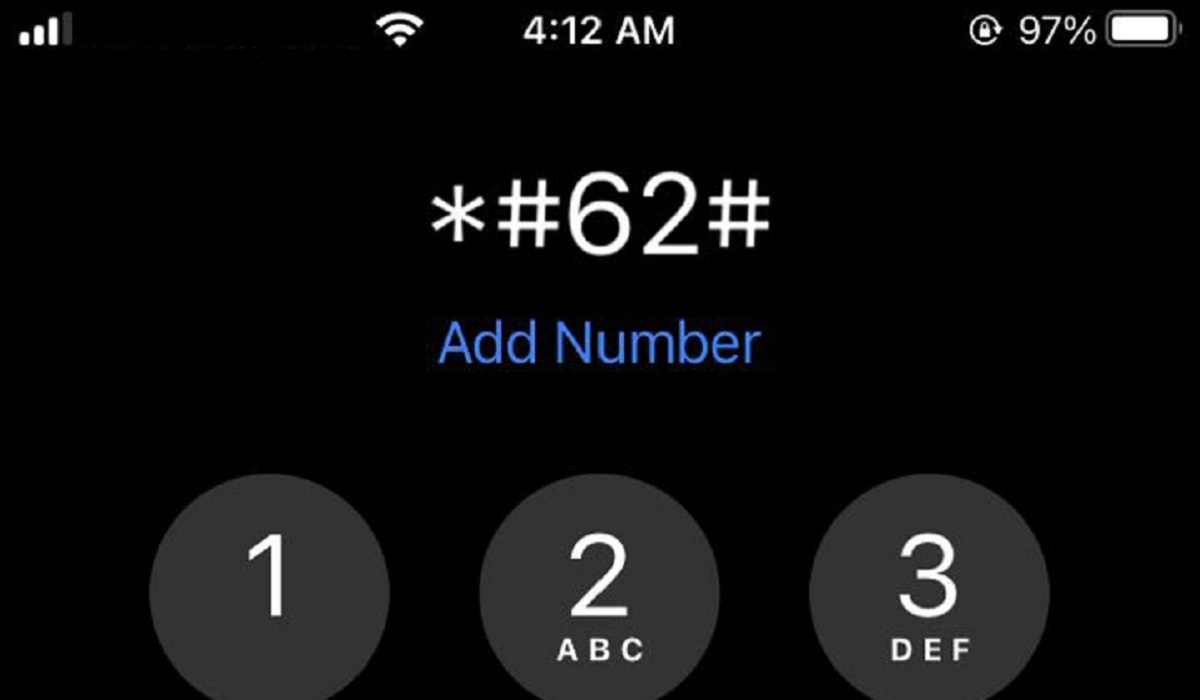
*What is #62# used for?
What is the *#62# Code?
Different people have made different assumptions and conclusions as to what this code does. However, *#62# is a USSD shortcode that lets you know if your calls and messages are being forwarded to another number without your knowledge.
What happens when you dial the *#62# code?
After dialling *#62#, your phone will display a list of forwarding statuses, including voice call forwarding when unreachable, SMS call forwarding when unreachable, among others. The status for each of them is either Enabled or Disabled. If your calls are forwarded without your knowledge, there is a chance that your line has been tapped.
There’s a certain possibility about this code that is worth keeping in mind. In some cases, your calls being redirected in this manner could be a sign that your phone is being tapped. Privacy experts sometimes recommend dialling the *#62# code to verify this.
So, dialing this code can help find out if your calls are being diverted. However, while this could be an indicator that your device has been tapped, it’s not always the case.
Some users have also reported seeing a 10-digit number after dialing the *#62# code. If you encounter this when you dial the *#62# code, the following scenarios could be at play:
At some point you can’t remember, you have personally directed your calls to a different number.
● You receive Missed Call Alert Services from your operator. In this instance, your operator will automatically route your calls to its server number when you can’t be reached, allowing it to record the caller’s phone number and send it to you through SMS later.
How Do I Prevent My Phone from Being Tapped?
If you dial the *#62# code and suspect that your calls are being diverted through no action on your part, there are several steps you can take to remedy the situation and prevent further tapping.
Get rid of suspicious apps
If the hacker has installed some form of app or software on your phone, there are a few ways to stop it from being tracked. You could manually remove any suspicious app from the Apps Manager in Settings if you notice one there that you don’t recall downloading.
Perform a factory reset
You can also do a factory reset or an OS update on your device. If there are no recent OS updates or if you can’t find the spy app, a factory reset is the best option.
Disable Bluetooth visibility and activate Airplane mode
Turning off Bluetooth visibility or briefly activating Airplane mode is something else to try. Your phone will become invisible to all other devices as a precaution.
Use your phone’s privacy settings
You can also use the additional operating system options on your smartphone. You should be able to turn off tracking for all apps on the majority of new Apple iPhone s (or individual apps). Similar functionality is provided by the Privacy Sandbox on Android, which stops monitoring behaviors from accumulating across apps.
Consult a professional
Of course, depending on the strategies being employed against you, these techniques might not be adequate.
If you have cause to believe that your phone is being tapped after dialing the *#62# shortcode, you might want to think about talking to a professional to check it out. They can accurately determine whether your phone is being tracked and act promptly to restore your privacy.
In summary , we hope you now have all your answers to what the *#62# code is used for. Also, take note of our helpful suggestions on what to do if you think your phone is being tapped.
