Add MobilityArena as a preferred source on Google
Having poor vision makes several aspects of living quite the challenge, including using a mobile phone. However, some cell phones offer a number of features that make them usable for those with visual impairments.
In this guide, we’ll show you which options are the best cell phones for the visually impaired. These phones simplify operations for visually impaired people through some unique features. So, if you’ve been on the lookout for the best cell phones for the visually impaired, pay attention to our recommendations in this guide.
- What are the Best Cell Phones for the Visually Impaired? MiniVision2+ Synapptic Smartphone Solution
What are the Best Cell Phones for the Visually Impaired?
When it comes to the best cell phones for the visually impaired, these are options that can be useful to persons with just about any sort or degree of vision impairment. We’ve described the best cell phones for the visually impaired below, so consider the following.
MiniVision2+
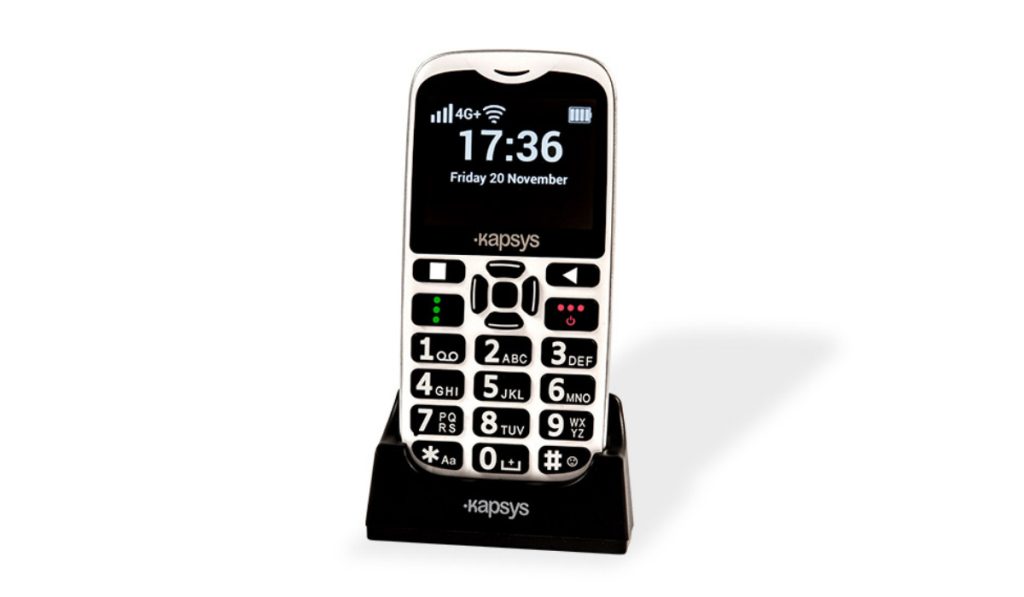
The MiniVision2+ is a straightforward cell phone with sizable tactile buttons, and it is one of the best cell phones for the visually impaired because it is completely accessible to people who are blind.
Everything written and displayed on the screen is typically read aloud by the phone. Although the MiniVision2+ is a simple cell phone, it has many smartphone-like functions. It has other features in addition to call and text capabilities, including a camera, an alarm, FM radio, color identifier, light detector, money identifier, recorder, calculator, flashlight, voice notes, weather, and a “where am I?” feature.
MiniVision2+
Compared to a regular smartphone, the MiniVision2+ is a little smaller. Its rounded corners and strong plastic construction make it feel comfortable in the hand. The keypad features big black buttons and big white lettering, and since the buttons are evenly placed, it’s easy to push the right key. Particularly tactile are the navigation buttons.
The OK button’s surface includes multiple tiny bumps that give it a distinct tactile feel. The OK button is surrounded by elevated navigation buttons. Additionally, the surfaces of the Call and Power buttons each contain three sizable bumps. The keypad of the MiniVision2 is also the most tactile when compared with other cell phones in expert reviews.
The voice guide is one of the features that make the MiniVision2+ completely accessible to the blind. Everything that is displayed on the screen and every button that is pressed is spoken by the voice guide. Additionally, it will voice the letters as the user types them in the reply. It also reports when the user deletes any letter during typing. The MiniVision2+ gives visually impaired people all the information they need to completely and independently use every aspect of the gadget., another reason why it is one of the best cell phones for the visually impaired.
The voice guide not only gives the blind user access to all features but also different kinds of information. It alerts the user when the phone is charging and speaks phone status information such as time, date, and battery life. Voice commands can be used to operate a lot of the MiniVision2fundamental +’s features including making calls, adding new contacts, and many other functions.
In essence, the MiniVision 2+ has a wide range of amazing features, including the ability to connect to 4G LTE networks, and it is safe to say it ranks high among the best cell phones for the visually impaired. The phone is a Aila le unlocked for AT&T, T-Mobile and other compatible GSM providers, such as Metro by T-Mobile, Cricket Wireless, MINT Mobile and Simple Mobile.
Synapptic Smartphone Solution
The Synapptic smartphone solution is a software that can be installed on most Android cell phones and tablets to make them into the best cell phones for the visually impaired. The Synapptic product is offered by RAZ Mobility for the Motorola Moto G Pure smartphone, so you can look at that device first.
The default Android user interface is replaced by Synapptic’s proprietary user interface, which is easier to use for people who are blind. It has a straightforward menu design where each menu screen is displayed as a vertical list. It is possible to expand the text size and make it quite enormous, bigger than on other standard Android devices.
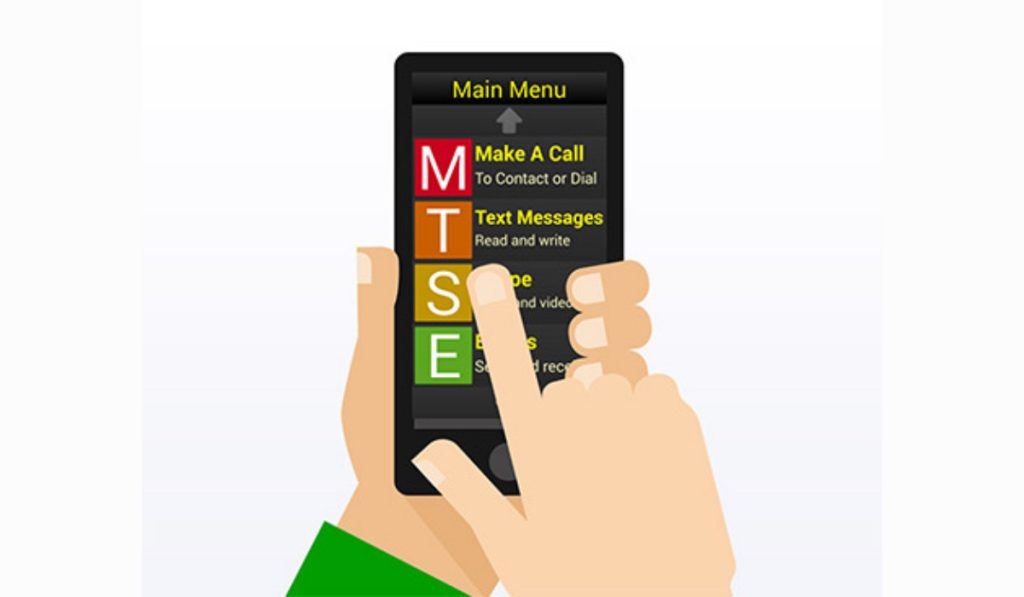
For people with limited vision who prefer to use their own eyes in place of a screen reader, Synapptic is a great choice because it allows you to change the text size and color schemes. There is also a very basic screen reader available for people who cannot use their vision at all, which most people can pick up fast.
The majority of the interface and menus of the device can be controlled by speech thanks to Synapptic. The user can voice-dictate, make calls, ask for different kinds of information, access applications, and manage different device settings. In general, Synapptic’s voice recognition does an excellent job of comprehending the user.
Based on all these features, the Synapptic software can essentially turn any regular Android cell phone into one of the best cell phones for the visually impaired. Both the MiniVision 2+ and Synapptic Smartphone Solution are products of RAZ Mobility, a d are designed from the ground up to make cellphones highly usable by visually-impaired people.
Author:Joan Agie
Add MobilityArena as a preferred source on Google
Someone asked an interesting question that I will provide an answer to in this article. Here is the question: If my cell phone service went down, is there another way to get your phone calls? Your cell phone service is what provides the connectivity for voice and video calls, text messaging (including iMessage and other instant messaging services like Telegram and WhatsApp). Cell phone service is provided by your carrier e.g. T-Mobile, Verizon, ATT, Q Link Wireless , or Dish Phone Service , among others.
How does cell phone service work? When you insert your SIM or activate an eSIM in a phone and then power the phone on, that phone starts searching for a cell phone service. If your carrier has coverage there, your phone connects and you can make calls, do texts, and connect to the Internet (if you have a mobile data subscription). If you move to a location outside of your carrier’s coverage, you will lose cell phone service and be unable to carry out those activities or tasks that require a network connection.
In such a situation, is there another way to get your phone calls? Yes; there is. There are a few, actually, namely: roaming, Wi-Fi, and satellite technology. If any of these are available, you will not be entirely stranded and unable to make calls and manage messages. Come with me as I explain them in detail.
- Roaming When You Have No cell Phone Service
- Use Wi-Fi For Calls When You Have No cell Phone Service
- Use Satellite Communications For Calls When You Have No cell Phone Service
Roaming When You Have No cell Phone Service
Note that I said when you are out of your carrier or mobile operator’s coverage. In the United States and some other countries, sometimes, if your cell phone service goes down or if you are out of your carrier’s coverage, there is service from another carrier. If your carrier has a roaming agreement withe the available carrier, you might be able to take advantage of that. How does roaming work? In roaming, your phone connects to a different network service for voice calls, messaging, and Internet connectivity, and you are billed based on whatever agreement your carrier has with the roaming carrier.
Use Wi-Fi For Calls When You Have No cell Phone Service
If your cell phone service goes down or you find yourself outside of your network operator’s coverage area and you are in a community, one of the things you should consider is to find a public Wi-Fi hotspot, or even a paid Wi-Fi service. With a Wi-Fi connection, you can make and receive voice and video calls over the Internet via FaceTime on iPhone, WhatApp, Telegram, and Google Voice. Google Voice assigns you a phone number for calling, text messaging, and voicemail. This is 2022 after all, and many people already use Internet calls as their default telephony channel. Many more will call you on FaceTime, WhatsApp or Telegram if they can’t reach you via traditional telephony.
Use Satellite Communications For Calls When You Have No cell Phone Service
If your cell phone service goes down or you are outside of coverage area, you can use a satellite telephone for voice calls and text messaging. How does satellite telephony work? There are a number of communications satellite networks orbiting the earth. They are usually low-Earth-orbit satellites. A satellite phone does not use regular cell phone service, but connects to these orbiting communication satellites to work. But chances are that you do not own a satellite phone; right? Don’t worry; there is a way.
You can use satellite communication on your regular Android smartphone. All you have to do is purchase an adaptor and install its mobile app. This will enable your cell phone to connect to a specific satellite network for voice telephony, SMS, and Internet in locations without cell phone service coverage. Thuraya and an adaptor that lets you connect to their satellite cluster. Iridium has one, as well. These adapters are pricey though, with prices starting from $700, but the prices are expected to come down over time. You can find out more about the new generation of satellite phones and how to use satellite connectivity on your cell phone.
If your cell phone service goes down or you find yourself outside of your mobile operator’s coverage area, these are the three possible ways to get your phone calls. Let me know if you have more questions on this topic and I will do my best to provide you with answers.
- Don’t miss our mobile phone reviews .
- Follow our news on Google News .
- Follow us on Instagram , Facebook , Twitter , and YouTube .
Author:Mister Mobility
Digital Skills and Communication Coach | Mobile Phone Connoisseur since 2001 | Tech Blogging since 2004
