Add MobilityArena as a preferred source on Google
iPhones offer their owners a myriad of functions, with fire cameras, awesome internet connectivity that lets them access any social media app, just to name a few. However, one of the less talked about sides to the iPhone is gaming. You see, there are times when you just want to try something different from the whole social media thingy and try your hands at something new. It is at times like this having awesome games on your device can come in handy.
Today, we will take a look at some of the top mobile games for your iPhone and where to get them.
- Meteorfall: Krumit’s tale: One of the top strategy games out there for your device, this game combines turn-based strategy with deck building and RPGs, giving you a game that lets you play in a tiny grid. The objective of this game is to defeat enemies in a 3×3 grid playfield carefully utilizing the right cards. The twist here is, the cards are not dealt to you, but rather are bought with money.
This game is an interesting strategy game with fantastic art, a variety of game modes to pick from, keeping you thinking and calculating to the very end. This game costs $6.99 and you can get it here .
- Jumpgrid: One of the best arcade games for iPhone, this game is one of the more intense twitch arcade games out there. Basically, you need to go through 100 levels (yes, one hundred!) of clockwork obstacles trying to destroy your little vessel.
This game brings top-notch visuals, urgent chiptunes and an amazing pace, you also get infinite retries with each level. It costs $2.99 and can be downloaded through this link .
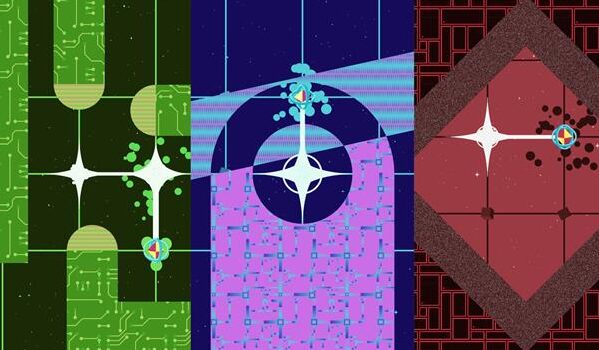
- Power Hover: This is an exciting action game that sees you journey through an amazing world, while you help a village recover its stolen power. In this game, you go through highways, deserts and oceans, defeating bad guys while you avoid getting killed. You can also challenge your friends to see who gets the highest score, while you can collect dropped batteries to unlock new, interesting levels. This game, one of the top mobile games for your iPhone right now, costs $3.99, and you can install it through this link .

GRIS: One of the top mobile games for your iPhone right now, GRIS is an interesting platform game that lets you explore different places and find stuff in a beautiful hand-illustrated world. You also get an amazing soundtrack, top-notch graphics and wonderful gameplay. It costs $4.99 and can be installed through this link .
Street Kart Racing: This racing game deviates from the regular kart racing games on PC and consoles with colorful characters and larger-than-life courses (remember Crash Bandicoot from Naughty Dog?), bringing a more refined racing game with a bit more realism. It has great, responsive controls and offers you different modes, including one where you can play against other humans. Street Kart Racing offers a variety of tracks from professional-looking circuits to under city bridges. It costs $4.99 and is fun for lovers of iPhone games.
Grid Autosport: Another top-quality racing game, this is one of the top mobile games for your iPhone with an intense racing experience akin to what gamers enjoy on the PlayStation 3 or PC. This game can only operate on iPhones SE or 7 and newer, also you’ll need to have at least 6GB of RAM to get this game on your device.
However, this game comes at a rather steep $9.99, which may be a turn off for certain smartphone gamers. If you’d still want it, you can click this link to download this game.
Author:Alfa Baye
Staff Writer
Add MobilityArena as a preferred source on Google
Planner apps are apps that help you get organized and ensure all of your important organizational tools are secured in one place, letting you gain unlimited access to them anytime. These apps are seen as a replacement to the traditional paper and pen planners.
In this piece, we will guide you through some of the best planner apps for your Android device, showing you what they offer and how they can make your day less stressful and more productive.
- Trello: Dubbed the app that takes care of everything, this app is versatile and can be used by individuals or teams. Trello lets you create to-do boards for every and anything. This tool also lets you incorporate Adobe, Kickstarter and a number of other tools, letting you enjoy great functionality and simplicity in one app.
- Any.do: Any.do is a calendar and to-do list rolled in one and is ideal for users who want a tool that can help them organize anything ranging from work presentations to getting birthday presents. This app works like the traditional list where you have to tick off already completed activities.
This app lets you view your month at a glance, while letting you keep tabs on your day-to-day activities. Its home screen widget also means you can get all the important information about your schedule with just a few clicks and swipes. One of the best sides to Any.do is, it is compatible with iCloud, Outlook and Google Calendar.
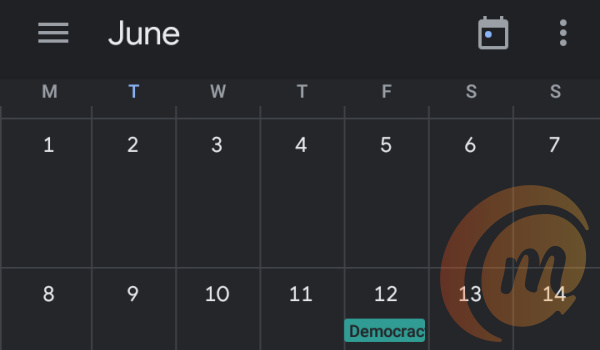
- Google Calendar: One of the tools offered by the Google Suite, Google Calendar offers daily, weekly and monthly views, letting users switch stress-free between these modes. It also comes in handy for the forgetful types (like yours truly) who need reminders at certain times of the month to remember certain events or pre-arranged programs.
One of the best planner apps in the game right now, this app offers a number of extra benefits for Gmail users, as the events section of Gmail automatically synchronizes with the Calendar. It also lets you share your calendar with other users, coming in handy for households and teams.
- ZenDay: One of the best planner apps out there, this app is ideal to help you improve your productivity, as it helps you zero in on your most important tasks and get them completed, while also keeping you updated with your next task.
ZenDay has a 3D display that scrolls as you complete different tasks, it also has a unique interface and a color-coding feature which gives distinct colors to completed and overdue tasks. One interesting feature about ZenDay is, it helps you reschedule tasks you may have missed, while also showing you how well you’ve completed tasks on time.
Author:Alfa Baye
Staff Writer
