Add MobilityArena as a preferred source on Google
Many different types of internal storage for cell phones have been implemented over decades. eMMC (Embedded Multi-Media Card) and UFS (Universal Flash Storage) are two types of phone storage that have become the standard for internal storage due to their speed, efficiency, and reliability. These two types of cell phone storage are similar in some ways, and also different in some ways.
Ther main common ground between the two is that they both utilize NAND flash memory but differ in their architecture and performance. A quick takeaway is that UFS is significantly faster and more efficient than eMMC, and so is preferred in high-end, high-performance devices . That is enough information for most phone users who are not technically inclined. If you are interested in more details. I try my best to present them below in as simple terms as possible.
Which type of phone storage is best?
- NAND Flash Memory
- eMMC (Embedded Multi-Media Card)
- UFS (Universal Flash Storage)
- UFS vs eMMC
- UFS 4.0 vs UFS 3.1 vs UFS 2.2
- UFS vs NVMe
- Older types of cell phone storage
- Key takeaways
NAND Flash Memory
NAND Flash Memory is the underlying technology used in both eMMC and UFS. It is a type of non-volatile memory that stores data in cells. Being non-volatile means that it can store data when power is cut off. NAND was developed in 1987 and has been in use as the most predominant type of mobile phone storage.
eMMC (Embedded Multi-Media Card)
Developed in the late 1990s and built on NAND, eMMC (Embedded Multi-Media Card) arrived relatively early as the default storage type for cell phones, including early smartphones. While it was groundbreaking for its time, the needs and demands of modern smartphones meant that newer, faster storage was needed.
UFS (Universal Flash Storage)
And it is precisely because a faster form of cell phone storage was needed that UFS (Universal Flash Storage) was developed. While also built on NAND, it has a more advanced architecture with a parallel interface, allowing for higher data transfer rates. As such, UFS is significantly faster than eMMC and so is now used in high-end smartphones and devices that require high performance, such as gaming consoles.
UFS vs eMMC
What are the key differences between UFS and eMMC? UFS is significantly faster than eMMC. It is also more efficient. That makes UFS a more advanced phone storage type than eMMC.
In terms of cost, however, eMMC is generally cheaper than UFS. As such, it is commonly used in entry-level, budget, and mid-range smartphones. If you have ever wondered why your cheap smartphone is slower at saving files, eMMC is one of the reasons. It isn’t only because of the processor.
The difference in cost means that UFS has not completely replaced eMMC in modern smartphones. Rather, it has replaced eMMC in higher end smartphones where high performance and more fluid performance is required. Eventually, at some point, eMMC will likely be thrown out and not be used in mobile phones anymore, as the cost drops, thanks to economies of scale.
UFS 4.0 vs UFS 3.1 vs UFS 2.2
Different versions of UFS have been developed over the years. Some of the most recent versions include UFS 2.0, UFS 2.1, UFS 2.2, UFS 3.1, and UFS 4.0. As a rule, the more recent the version, the faster and better the performance or the more efficiency it delivers. Some improvements across versions include power management and security.
UFS 4.0 offers read speeds of 4200MBps and write speeds of 2800MBps and is optimized for power efficiency. This means that UFS 4.0 is better than UFS 3.1, which is better than UFS 2.2, and so on and so forth. When picking a smartphone, pick one with the latest possible version of UFS.
UFS vs NVMe
NVMe (Non-Volatile Memory Express) is a cell phone storage type that Apple uses in its products, including iPhones and iPads. This is in contrast to Android smartphones which use eMMC and UFS storage. NVME is generally more expensive than UFS. It also consumes more power and generates more heat than UFS.
Older types of cell phone storage
Aside from eMMC and UFS, here are a few other, less common, types of cell phone storage:
- SD Cards (Secure Digital Cards): These are removable storage options that can be inserted into a phone’s SD card slot. They’re often used to expand storage capacity for photos, videos, and other files. Types of secure digital cards include SD, SDHC, SDXC, and SDUC, with varying speeds, security, and reliability.
- PCIe (Peripheral Component Interconnect Express): While less common in smartphones, PCIe is a high-speed interface used for connecting components like storage devices. Some high-end smartphones might use PCIe-based storage for faster performance.
- Cloud Storage : This is a remote storage solution where data is stored on servers accessible via the internet. Services like OneDrive, Google Drive, iCloud, and Dropbox offer cloud storage options for smartphones.
Key takeaways
eMMC and UFS are two types of modern cell phone storage. UFS is newer, more efficient, faster, and more expensive. As such, UFS is used in more premium and high-performance smartphones and devices. The slower, less efficient eMMC is used in lower cost devices. Wherever you can, all other things being equal, pick a device that uses UFS phone storage over one that uses eMMC. And pick the latest version possible.
Author:Mister Mobility
Digital Skills and Communication Coach | Mobile Phone Connoisseur since 2001 | Tech Blogging since 2004
Add MobilityArena as a preferred source on Google
I was on my way for an appointment and needed help with finding my way. Because I could not locate my destination in Google Maps, I asked someone at my destination address to share their Live Location with me, and they did. But when I tapped on the link they sent, WhatsApp displayed the following message to me: “Not available: Live location is not available on this device. View location on your primary phone.”
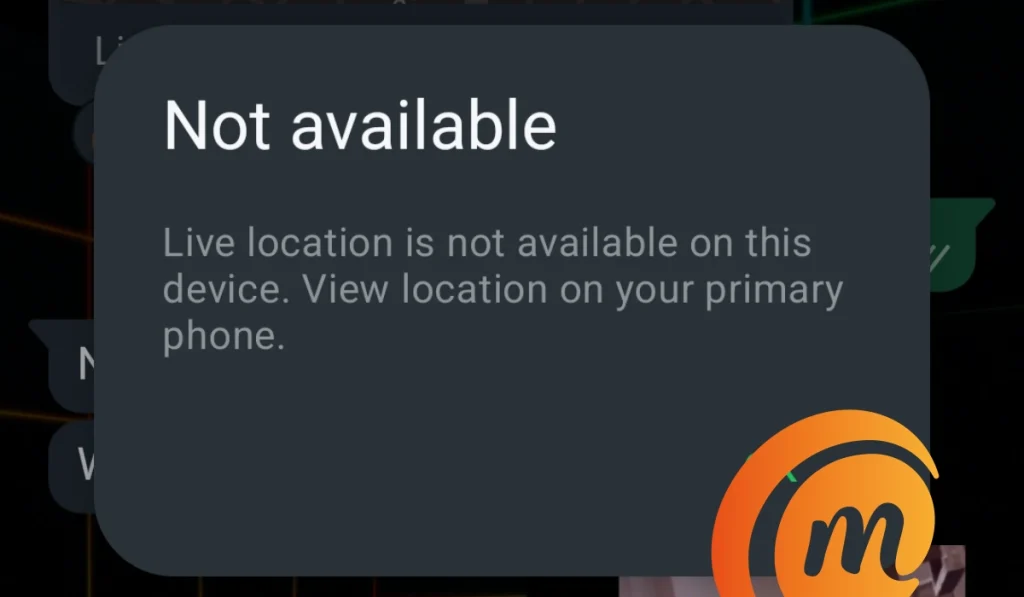
Before this encounter, I had used Live Location on multiple occasions and had never encountered this issue before. Why was this happening now? What triggered this? And what did WhatsApp mean by my primary device? I kept turning the issue around in my head for a while. It wasn’t until after I had found my way to my destination that I was able to figure out what was happening.
I had forgotten that the phone in my hand was a linked device. My WhatsApp account was logged into on another phone and that phone was offline at that time. Apparently, Live Location would not work on a linked device if the primary device was unreachable. I am not sure why this is the case, but it is what it is.
Knowing this now, if you will need to use Live Location via WhatsApp, preferably use your main device. If you have to use a linked device, make sure that the host device has an Internet connection. That would have solved my problem back then.
Author:Mister Mobility
Digital Skills and Communication Coach | Mobile Phone Connoisseur since 2001 | Tech Blogging since 2004
