Add MobilityArena as a preferred source on Google
The Samsung Galaxy Z Fold 6 is one of, if not the top of the best Samsung phones of 2024. It is a remarkable device that combines the functionality of a tablet with the portability of a smartphone. However, even the most advanced device with the best of technology can encounter issues that affect user experience. Stay through as I explore common problems reported by users and provide practical solutions to enhance your Samsung Galaxy Z Fold 6 experience.
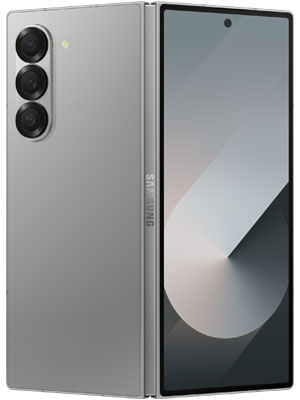
- Broken Display and Hinge Durability of the Samsung Galaxy Z Fold 6
- Delayed Notifications
- Wi-Fi and Bluetooth Connection Problems
- Battery Drain Issues
- Signal Performance Issues
- App Functionality Issues
- Crease Visibility on Display of the Samsung Galaxy Z Fold 6
- Conclusion
Broken Display and Hinge Durability of the Samsung Galaxy Z Fold 6
Many users are scared and have expressed their concerns about the durability of the display and hinge, which are critical components of foldable devices. Do not fret, if you’re reading this and you feel the same, that tells you, you’re not alone. These precautions will help:
- Handle with Care: Always open and close the device gently to avoid putting excessive stress on the hinge.
- Regular Cleaning: Keep the hinge area clean to prevent dirt and debris from causing damage. Use a soft cloth to wipe it down periodically.
- Contact Support: If you notice persistent issues, consult Samsung support for professional assistance or warranty service.
Delayed Notifications

Another glitch that users have reported is that notifications are delayed or it only appears after opening the respective app. This can make one lose important updates. The highlighted solutions below can help:
- Adjust Battery Optimization Settings: Navigate to Settings > Device Care > Battery > Background Usage Limits and ensure affected apps are not set to “Sleeping” or “Deep Sleeping.”
- Clear App Cache: Go to Settings > Apps > [App Name] > Storage and tap on Clear Cache to resolve any temporary glitches.
- Unrestricted Battery Usage: For specific apps, go to Settings > Apps > [App Name] > Battery and select Unrestricted.
Wi-Fi and Bluetooth Connection Problems
Users may experience issues with Wi-Fi connectivity and Bluetooth pairing. If this happens to you, simply do the following:
- Restart Devices: Restart both your Galaxy Z Fold 6 and the Bluetooth device you are trying to connect.
- Reset Bluetooth Connection: Turn off Bluetooth in the Quick Access menu, then turn it back on. Re-pair your devices if necessary.
- Check for Interference: Ensure there are no other devices causing interference and try connecting in a different location.
Battery Drain Issues
Some users have reported unexpected battery drain, which can be frustrating. I will specifically write about optimizing the battery of your Samsung Galaxy Z Fold 6. But in the meantime, you can follow the highlighted steps:
- Close Background Apps: Regularly close apps running in the background to conserve battery life.
- Change Performance Profile: Go to Settings > Device Care > Performance Profile and select “Light” to reduce power consumption.
- Check for App Updates: Ensure all apps are updated as outdated apps can sometimes cause excessive battery drain.
Signal Performance Issues

This is also an issue that users have noted. The Z Fold 6 has weaker signal reception compared to previous models, leading to connectivity issues. Follow these steps to solve the problem:
- Restart Your Device: A simple restart can often resolve temporary connectivity issues.
- Check for Software Updates: Go to Settings > Software Update and ensure your device is running the latest software version.
- Contact Support: If problems persist, reach out to Samsung customer support for further assistance.
App Functionality Issues
Some applications may freeze, crash, or become unresponsive, particularly when multitasking. If you have been experiencing this with your Samsung Galaxy Z Fold 6, follow these steps to handle it:
- Update Apps Regularly: Ensure all your apps are up-to-date from the Google Play Store.
- Clear App Cache/Data: For problematic apps, navigate to their settings in the app menu and clear cache or data as needed.
- Reinstall Apps if Necessary: If an app continues to malfunction, uninstall it and reinstall it from the Play Store.
Crease Visibility on Display of the Samsung Galaxy Z Fold 6
The crease on the foldable display may or will become more noticeable over a period of time. I recommend the following steps to handle this:
- Adjust Screen Brightness: Sometimes adjusting brightness can make the crease less visible. Experiment with different settings.
- Use Dark Mode: Enabling dark mode can help minimize the appearance of the crease against lighter backgrounds.
- Accept as Normal Wear: Understand that some visibility is typical for foldable screens; many users adapt over time.
Conclusion
In conclusion, no doubt the Samsung Galaxy Z Fold 6 offers innovative features and a unique user experience, but it is not without its challenges. By following these practical solutions, users can troubleshoot common problems effectively and enjoy their device to its fullest potential. Whether you’re handling durability concerns or optimizing performance, these tips will help you master your Galaxy Z Fold 6 experience!
Author:Ifeoluwa Adeleke
Add MobilityArena as a preferred source on Google
Have you ever had the thought of the possibilities that Augmented Reality (AR) and Virtual Reality (VR) could give. Imagine stepping into a world where the boundaries between the digital and physical realms blur, where you can explore ancient ruins without leaving your living room or try on clothes without ever stepping foot in a store. That’s the power of AR & VR. I Welcome you to the fascinating universe of Augmented Reality (AR) and Virtual Reality (VR). These technologies are not just futuristic concepts; they are reshaping and renewing the way we interact with the world around us today. Let’s take a journey through this digital frontier, exploring how AR and VR are revolutionizing various industries and enhancing our everyday experiences.

- The Magic of Augmented Reality
- The Immersion of Virtual Reality
- Bridging the Gap Between Learning and Experience
- Gaming Experience
- The Future Ahead with Augmented Reality (AR) and Virtual Reality (VR)
- Conclusion
The Magic of Augmented Reality

Just take a moment think about you being at a museum, and instead of just reading about the artifacts, you point your phone at an ancient statue, and suddenly, a 3D animation brings its history to life. That is exactly the power of AR. By superimposing digital information onto the real world, AR enriches our surroundings with interactive elements that enhance our understanding and engagement. One of the beautiful applications of AR is in retail. Imagine using an app that allows you to visualize how a piece of furniture will look in your home before making a purchase. Companies like IKEA have embraced this technology, enabling customers to see how their products fit into their spaces, making shopping not only easier but also more enjoyable.
The Immersion of Virtual Reality

Now, let’s dive into the world of VR. Unlike AR, which enhances reality, VR immerses you or should I say soaks you completely in a computer-generated environment. With a VR headset, you can explore distant planets, walk through historical landmarks, or even practice surgery in a risk-free environment. For instance, in healthcare, VR is being used for surgical training. Surgeons can practice complex procedures on virtual patients, allowing them to refine and polish their skills without any risk to real patients. This innovative approach not only enhances training but also improves patient outcomes. This is beautiful right?
Bridging the Gap Between Learning and Experience
Both Augmented Reality (AR) and Virtual Reality (VR) are making waves in the education sector as well. Imagine students learning about the solar system by actually “visiting” different planets or exploring human anatomy by walking through a virtual body. These immersive experiences make learning more engaging and effective. A recent study shows that students who experienced lessons through VR retained information better than those who learned through traditional methods. This shift towards experiential learning is transforming classrooms into dynamic environments where students can truly connect with their subjects.
Gaming Experience
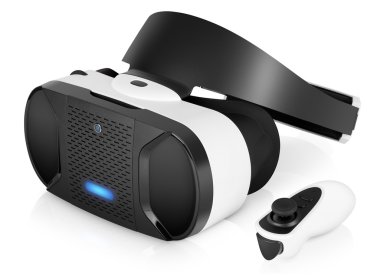
It’s not possible to talk about Augmented Reality (AR) and Virtual Reality (VR) without mentioning gaming. In fact, you will find VR in most gaming houses these days. These technologies have revolutionized how we play. Games like Pokémon GO have shown us how AR can turn our neighborhoods into playgrounds filled with digital creatures waiting to be captured. Meanwhile, VR gaming offers an unparalleled level of immersion that transports players into fantastical worlds where they can interact with their surroundings in ways never before possible. Think of battling dragons or racing cars as if you were there for real — this is not just gaming; it’s an experience that engages all your senses.
The Future Ahead with Augmented Reality (AR) and Virtual Reality (VR)
As these technologies emerge and we look ahead into future, the potential applications for Augmented Reality (AR) and Virtual Reality (VR) seem broad and limitless. From real estate agents offering virtual tours of homes to architects creating immersive walkthroughs of their designs, these technologies are set to redefine industries across the board. More so, as hardware continues to improve and become more accessible, we can expect even broader adoption of Augmented Reality (AR) and Virtual Reality (VR) in everyday life. The question isn’t whether these technologies will become mainstream; it’s how they will shape our future interactions with the world around us.
Conclusion
In conclusion, it’s time to EMBRACE THE CHANGE. Augmented Reality (AR) and Virtual Reality (VR) are not just buzzwords; they are powerful tools that are changing our reality in profound ways. Whether enhancing our shopping experiences or transforming education and healthcare, these technologies invite us to engage with our world like never before. How ready are you to step into this new reality? The future is here, and it’s time to embrace it!
