Add MobilityArena as a preferred source on Google
Forget all the tricks and hacks. If you want to use your Canon camera as a webcam, it is now as simple as downloading a software to your PC and plugging your camera. Here is what to do .
Webcams are extremely popular these days. Unfortunately, webcams built into laptops are not as capable as the standalone digital SLRs and mirrorless cameras available. Yet, many digital camera users would like to be able to use their standalone cameras as webcams.
This is the age of video meetings and you want higher quality video feed for some of those Zoom, Microsoft Teams, Skype and Google Meet events. Using a digital camera from Canon, Fujifilm, Olympus, or Panasonic would be swell. Unfortunately, many of these do not have a direct way of working with laptops and desktops for this functionality.
There are numerous hacks out there for using your digital camera as a webcam. Some of those hacks require you to use terminal commands, something that most PC and Mac users are not familiar, or comfortable with. Chances are that you are unable to go down that route, if you are not a techie person.
Thankfully, if you own a Canon camera, you can now use it as a webcam just by plugging it to your desktop or laptop. All you need is an easy-to-use software, called EOS Webcam Utility, provided by Canon itself.
- Introducing EOS Webcam Utility
- Steps to use your Canon camera as a webcam
- Download and install EOS Webcam Utility software to use your Canon camera as a webcam
Introducing EOS Webcam Utility
EOS Webcam Utility makes the process seamless. Downloading and installing it allows you to connect your compatible Canon DSLR and PowerShot camera to a Mac or PC computer, where it will be recognised as a USB webcam. There is no need for any additional equipment or complicated hacks. The user-friendly software makes it a plug-and-play experience.
Plug your Canon camera in via USB and use it as a webcam for high-quality virtual meetings and video conferencing. Here are a few things to note:
- EOS Webcam Utility software can be downloaded from the Canon website and configured in minutes with your favourite video conferencing application.
- The software is currently supported by Windows and a beta version is already available for MacOS.
- It supports a range of Canon DSLR and PowerShot cameras, namely: EOS DSLR, EOS R, EOS M (EOS M50 or later), PowerShot (G5X MK II, G7X MK III, SX70 only)
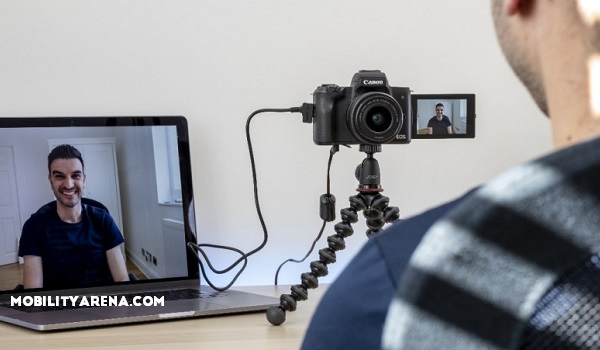
Key features of EOS Webcam Utility software:
- Free software (download from the Canon website)
- Compatible and full support with Windows, with MacOS support to follow
- Improves image quality for virtual calls
- Better low-light performance, improved colour and depth-of-field
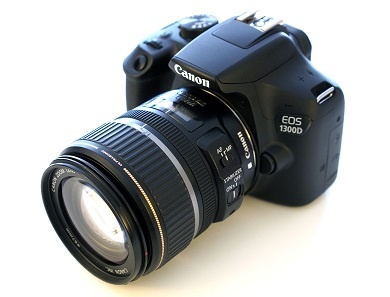
Steps to use your Canon camera as a webcam
- Download and install EOS Webcam Utility software from the Canon website
- Install it on your desktop or laptop
- Plug in your Canon DSLR or PowerShot digital camera; remember that it has to be one of the following: EOS DSLR, EOS R, EOS M (EOS M50 or later), PowerShot (G5X MK II, G7X MK III, SX70 only).
- Open your video chat app and select your digital camera as source.
That is it; you are good to go.
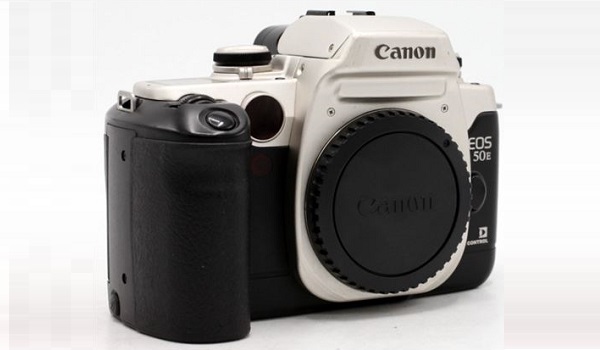
Download and install EOS Webcam Utility software to use your Canon camera as a webcam
The process of downloading and installing is simple. Browser to the Canon EOS Webcam Utility software page HERE .
- Select your model.
- Select the “Drivers & Downloads” tab.
- Select the “Software” tab.
- Select Windows 10 (x64), or 10.15 (Catalina), 10.14 (Mojave), or 10.13 (High Sierra) for Mac, if not already detected, from the Operating System list.
- Find “EOS Webcam Utility Beta” and click the “SELECT” button.
- Click the download button to start downloading.
- Once the download is completed, finish the installation as you would any other software
Once installed, now you can go ahead to use your Canon camera as a webcam every time you have a Google Meet or Zoom meeting or a Skype conference call.
Author:InfoDesk
Add MobilityArena as a preferred source on Google
| Motorola Razr 5G Quick Specs |
|---|
| OS: Android 10. Release date: September 2020. Network Type: 2G/3G/4G/5G Display: 6.2-inch inner display; 2.7″ outer display Processor: Snapdragon 765G Selfie Camera: 20 MP Rear camera: 48 MP RAM: 8 GB ROM: 256 GB Battery: 2,800 mAh. Phone Status: Official. |
Motorola Razr 5G Specs, Specs, Features, Photos
Mobile Wireless Network and Software
- 2G mobile network bands : GSM, GPRS, EDGE 900 / 1800 / 1900 MHz; CDMA 800 / 1900
- 3G mobile network bands : UMTS, WCDMA, HSDPA 850 / 900 / 1700(AWS) / 1900 / 2100 MHz; CDMA2000 1xEV-DO
- 4G mobile network bands : LTE 1 / 2 / 3 / 4 / 5 / 7 / 8 / 13 / 20 / 28 / 38 / 66
- 5G mobile network bands : SA/NSA.
- SIM Type : Nano-SIM, eSIM
- Software / OS : Android 10
Design, Form Factor, Appearance
- Dimensions : 168.5 x 72.5 x 8 mm (opened up)
- Weight : 190g
- Outer Display : 2.7″ gOLED, 800×600 pixels (370 ppi).
- Inner Display: 6.2″ pOLED, 876×2142 pixels (373 ppi)
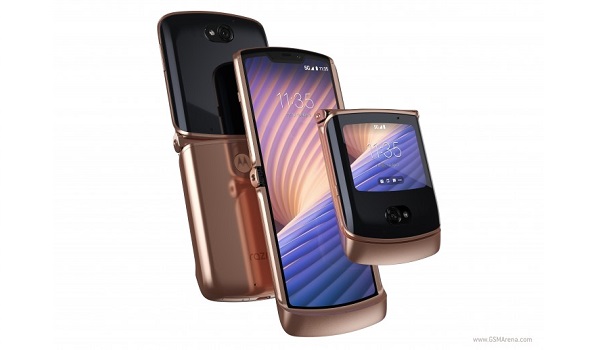
- Colours : Polished Graphite (black/dark gray), Liquid Mercury (silver), Blush Gold.
- Physical Build : water repellant design, foldable, Plastic front, plastic back, aluminum frame
Internal Hardware Specs
- Processor Type : 64-bit, 2.4 GHz Octa-core, Kryo 475 Prime
- Processor Name : Qualcomm Snapdraon 765G (7nm)
- Graphics Processor : Adreno 620
- RAM : 8 GB
- Internal Storage : 256 GB
- External Storage : No.
Photography, Video Recording
- Rear Camera : 48 MP, f/1.7 aperture, OIS, and laser autofocus, 1080p@30fps video recording
- Front-facing Camera : 20 MP, f/2.2 aperture, Face Recognition, 1080p@30fps video capture
Audio, Video Playback
- Music Support : PCM, AAC / AAC + / eAAC + / MP3 / AMR – NB / WB / APE
- Audio : 3.5 mm audio jack
- Loudspeaker : Mono speaker
- Video Support : H.264/MP4/MPEG4 player
- FM Radio : Yes.
Phone Sensors
- Digital Compass : Yes.
- Accelerometer : Yes.
- Proximity Sensor : Yes.
- Ambient Light Sensor : Yes.
- Barometer : No.
- Pedometer : No.
- Heart Rate Monitor : No.
- Gyroscope (G-Sensor) : Yes.
- Fingerprint Scanner : Yes;
- Face Unlock : Yes.
- Iris Scanner : No.
- Motion Sensing / Gesture Control : No.
- Voice Control : No.
- Intelligent Digital Assistant : Yes; Google Assistant.
- Infra-red Sensor : No.
Connectivity Options
- Bluetooth : v5.0, A2DP
- WiFi : Wi-Fi 802.11 a/b/g/n/ac/6, hotspot
- GPS : Yes, A-GPS, GLONASS, BDS
- USB : microUSB v2.0. Type-C reversible connector
- NFC : Yes.
Miscellaneous Specs and Features
- Battery Type and Capacity : Non-Removable Lithium-Polymer 2,800 mAh
- Battery Charging : 15W fast charging
- Wireless Charging : No.
- Reverse Charging : No.
- Model Version/Number : N/A.
Motorola Razr 5G Price and Launch Date
- Announced : September 2020
- Release Date : September 2020
- Country Availability : United States. Canada. United Kingdom. Europe. China. Australia.
- Motorola Razr 5G Price : $1,399 .
Questions and Answers about Motorola Razr 5G
Here are answers to some of the most commonly asked questions about Motorola Razr 5G.
Is Motorola Razr 5G a 5G phone?
Yes; the Moto Razr 5G is a 5G folding phone.
Does Motorola Razr 5G have a fingerprint scanner?
Yes; Motorola Razr 5G has a fingerprint reader.
Does Motorola Razr 5G have Gorilla Glass?
No; the Razr 5G does not have Gorilla Glass protection on its screen.
Does Motorola Razr 5G have quick charging?
No; the Moto Razr 5G does not have quick charging technology.
Will Motorola Razr 5G work in USA?
Motorola Razr 5G has network support across various US carriers like AT&T, Verizon, Metro PCS, Sprint, T-Mobile, Virgin Mobile, Cricket, Boost Mobile, H2O Wireless, Ting, US Cellular, Lyca Mobile, PureTalk, Consumer Cellular, Ultra Mobile, Straight Talk, Red Pocket Mobile, Jolt, Airvoice Wireless, and Google Fi. What this means that some bands are supported, while others are not. You will have to make enquiries from your carrier to know what bands/frequencies are supported on them.
What is the price of Motorola Razr 5G? How much does it sell for?
MobilityArena Buyer’s Guide Verdict
Not available.
Our Buyer’s Guide Verdict is recommendation that we make based on our evaluation the specs of the device. It is a general guide designed to help you understand how much value a smartphone offers for its price. It is not a stamp of quality assessment or an endorsement of the device or of the manufacturers. Be sure to ask questions and use your judgement when buying any device, as MobilityArena may not be held responsible for your buying decisions .
Phone Review Rating
We are yet to review the Motorola Razr 5G and so do not have a review rating for it yet. This section will be updated with our review rating and a link to the review page, as soon as we have a review ready.
