Add MobilityArena as a preferred source on Google
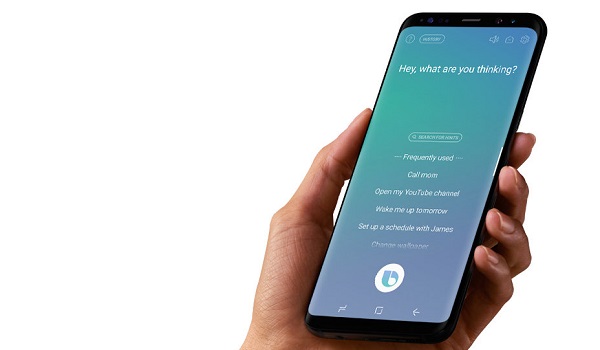
For reasons supposedly tied to advancement, we stopped talking to people, opting to message them instead, and in a quick twist, we have begun to talk to our phones, thanks to virtual assistants. Having been in possession of a Galaxy S9+, I have been using Bixby Voice , a key part of Samsung’s virtual assistant.
Bixby Voice has only one job – to help you get things done more conveniently without you touching your phone. Simply put: interact with your phone differently. Don’t be so touchy.
First Experience Using Bixby Voice
So, how have my conversations with Bixby Voice been so far? Let’s just say that they have been interesting conversations.
Using Bixby For Phone Calls
One time I needed to call my wife. I have her name stored on the phone “ICE Wife” pre-appended to it. ICE stands for “In case of emergency”. You can read up more about it and why you should have a few key contacts on your phone so labelled in this article, Use ICE: In Case of Emergency
The first time I attempted it, Bixby pulled up my wife’s contact card and asked me to select which of her numbers I want to call. But Bixby seemed to figure out over time that I call only her primary line and stopped asking.
Now, when I need to call her, it goes this way.
Mo: Hi Bixby. I want to call ICE Wife.
BV promptly dials her primary line.
Nice going, baby.
Web Browsing With Bixby Voice
Mo: Hi Bixby. Launch web browser.
BV: Actually, it looks like I can’t open the app.
Mo: Hi Bixby. Open Mobilityarena.com.
BV: Looks like we need to download Samsung Internet to continue. We can download it in Galaxy Apps.
But I have Chrome browser active on the phone. Why can’t Bixby recognise that and just use it?
Mo: Hi Bixby. But I want to use the web browser on this phone.
BV: Actually, I’m not able to do that.
Sigh.
Mo: Hi Bixby. Open Chrome browser.
BV: Got it. I went ahead and pulled up the app. [it launches Chrome browser]
Mo: Hi Bixby. Open a new tab in Chrome browser.
BV: Looks like we need to download Samsung Internet to continue. We can download it in Galaxy Apps.
Mo: Hi Bixby. You are becoming very annoying right now.
BV: Let’s take a look at what I found on the web.
I gave up on the web thing.
Sending Email Using Bixby Voice
Mo: Hi Bixby. Send an email to ICE Wife.
BV: Actually, we need to unlock the phone first [phone was locked, so I unlocked it]
BV: Look like we need to download email to continue. We can download it in Galaxy Apps.
Mo: Hi Bixby. Launch the Gmail app and use it to send an email to ICE wife.
BV: Hmm. Looks like I am unable to do that now.
Sigh. Here we go again.
So What About Using Bixby Voice With Twitter?
Mo: Open Twitter.
BV: Sure thing. Here’s the app [it launches the Twitter app]
Mo: Hi Bixby. Tweet, ‘It’s a good morning today’.
BV: Alright, let’s check the post before we tweet it. [opens the Tweet compose menu and inserts the words, “It’s a good morning today”]
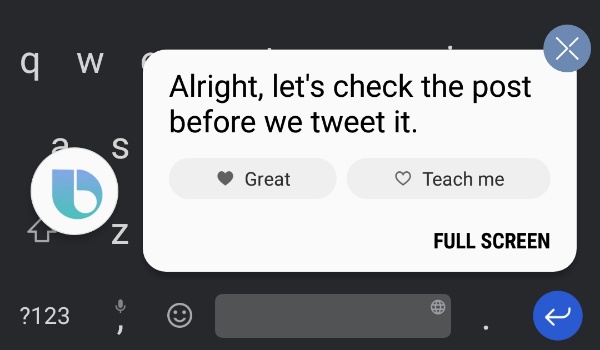
Tweet commands are a hit-and-miss though. After the above, 90% of “Tweet” commands came up with one odd response or the other. None brought up the Twitter compose page again.
My First Impressions Using Bixby Voice
My greatest frustration with Bixby Voice, and the entire Bixby experience, so far is that Samsung is bent on making its virtual assistant recognise and use only Samsung apps and services. Want to send an email? Bixby does not acknowledge the existence of Gmail, where I already have my mails setup and active.
If I want Bixby to play music, I have to specifically say, “Open Samsung Music and play”. For Bixby to be more useful, this pattern has to change. Should I say, “Hi Bixby, play music”, it should be able to detect what music player I use on the phone and launch it. That is true artificial intelligence. Anything else is artificial dumbness, and we have enough dumbness in the world already.
I can imagine that using Bixby will be a more pleasant experience if you are locked into and using Samsung’s apps ecosystem to the full. But those of us who do not want to adjust our lives to suit a virtual assistant will find Bixby Voice a tad annoying.
The good thing is that Bixby keeps learning. Samsung needs to let it loose a bit more, so it behaves like a true assistant should – adapt itself to our choices, including our app preferences, be they Samsung apps or otherwise.
Getting Bixby
If I get what Samsung says right, Bixby is available only on a handful of select smartphones for now. I remember reviewing Galaxy A5 2017 last year, and Bixby wasn’t available for it.
All the top guns – Galaxy S9 series, S8 series, and Note8 – have it. Some Galaxy A and J series devices have it too, though some have limited functionality.
- Don’t miss our mobile phone reviews .
- Follow our news on Google News .
- Join our WhatsApp Group , to be notified of the most important articles and deals,
- Follow us on Instagram , Facebook , Twitter , and YouTube .
Author:Mister Mobility
Digital Skills and Communication Coach | Mobile Phone Connoisseur since 2001 | Tech Blogging since 2004
Add MobilityArena as a preferred source on Google
If you do not have an Apple developer account but would love to try out beta software, here is how to download iOS 12 beta 3 .
Apple just seeded the third beta version of iOS 12 firmware to registered developers. If you do not have a developer account but would love to try it out, here is how to get the iOS 12 beta download on your iPhone, iPad, and iPod touch.
What’s New in iOS 12 Beta 3?
iOS 12 Beta 3 comes with a lot of bug fixes and enhancements but lacks any major new features. Its build number is 16A5318d and weighs 578 MB on the iPhone 8.
If you install this update on your device, you may need to unlock it should you connect it to a Mac, PC, or other USB accessories.
Moreover, if you own an iAP USB accessory such as CarPlay or a charger, you may need to unlock your device in order to recognize it.
Here’s the complete list of major issues that will no longer bug you –
- Weather widget glitch from beta 2 fixed.
- FaceTime fixed.
- Upgrading to iOS 12 beta using iTunes fixed
- Skype/ Taobao/Twitter issues fixed.
- Playback may not stop when one of the AirPods is removed.
- Buggy voicemail notifications.
- “Hey Siri” setup on Chinese, Japanese, and Korean.
- SMS and Phone Call spam classification extensions display a black screen.
Apart from the aforementioned fixes, beta 3 also patches a lot of other bugs. However, some bugs and glitches such as the GPS bug, Fortnite crashing on launch and Netflix quitting while downloading videos are still not fixed. You can check out the full release notes here .
Along with iOS 12, watchOS 5.0, tvOS 12.0, macOS 10.14 Mojave have also received a third beta.
If you are enrolled in Apple’s developer program, the update shall appear in your developer center. As far as non-developers are concerned, you can download and upgrade to the latest beta using the OTA Profile or IPSW firmware file.
- Note – The download links given below will go live within a few minutes.
Download iOS 12 Beta 3
OTA Profile
- Download
iPhone
- iPhone SE, iPhone 5s
- iPhone 6s, iPhone 6
- iPhone 6s Plus, iPhone 6 Plus
- iPhone 8, iPhone 7
- iPhone 8 Plus, iPhone 7 Plus
- iPhone X
iPad
- iPad Air, iPad mini 2
- iPad mini 4, iPad Air 2, iPad mini 3
- iPad (9.7-inch)
- iPad Pro (9.7‑inch)
- iPad Pro (10.5-inch), iPad Pro (12.9-inch) (2nd generation)
iPod
- iPod touch (6th generation)
Should You Get This iOS 12 Beta Download?
iOS 12 beta 3 update comes with a lot of patches and bug fixes. If you are already on iOS 12 Beta 2 or Beta 1, you should download iOS 12 beta 3 and update your device.
For those of you who are still on iOS 11.4, you should stay where you are and wait for Apple to release a stable public version.
Do you like this story?
