Add MobilityArena as a preferred source on Google
If there is an underrated feature on modern smartphones, it is the ability to use a phone as a remote control. I started out with mobile phones in the era when infra-red port was a fairly common feature in phones.
You see, back in the early 2000s, infra-red was the only means to tether your phone wirelessly. If you needed to use your phone’s internet on your PC and didn’t have the cable, your only other option was infra-red.
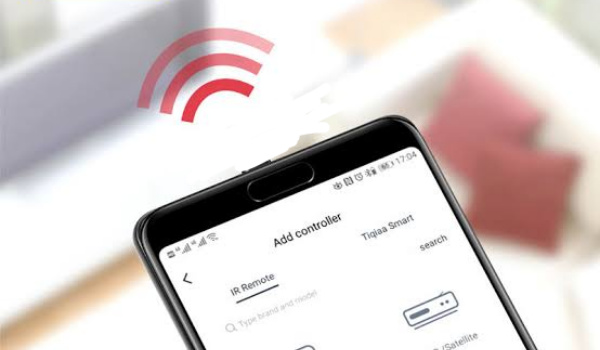
Fast forward to 2021 and infra-red blaster is no longer common on phones. But one smartphone brand has kept the legacy alive – Xiaomi. Pick up any Xiaomi smartphone (that includes Redmi phones) and it has an infra-red port.
What appliances can you use your phone as a remote control for?
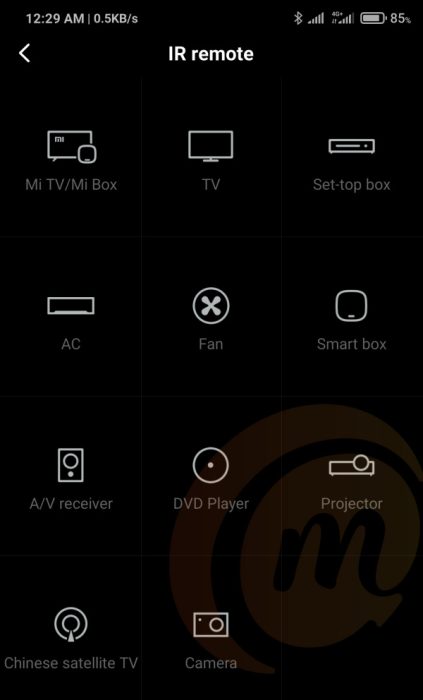
From the above screenshot from my smartphone, you can see a list of appliances that I can use my phone to control.
The list includes regular TV, Android TV, fans, smart box, set-top box, a/c, DVD player, camera, and more.
What is even nicer is that I am able to set it up to work with multiple appliances. For example, living room TV, the TV at dad’s place, the office TV, and even the random hotel room TV when I am travelling.
I am not sure why infra-red blasters are not more common on smartphones, because this is a really cool feature to have.
It is also a great prank tool. I can secretly mute the TV in a room and have everyone else wondering what happened to the TV’s audio.
Not a lot of people are expecting that anyone is able to use their smartphone to control the television set.
As already mentioned earlier, Xiaomi is the only mainstream manufacturer that still puts infra-red blasters in their smartphones by default.
That means if you want to be able to use your phone as a remote, you most likely have to buy a Xiaomi, Redmi, or POCO smartphone.
What of WiFi?
Other than that, the only other way to use your phone as a remote is via WiFi. But in this case, the TV or other appliances you want to control must have WiFi and be connected to the same network as the phone in question.
Techies will love that and have a thrill setting it up ,but I doubt that non-techie people will be thrilled about it. Plus, the available compatible appliances are still pretty limited.
In the case of infra-red, all modern TV sets have it and will work with it. It is what regular remote controls use.
What kind of television sets, A/C’s, and appliances can you control with a phone via infra-red? All kinds and all brands – Samsung, Sony, LG, Panasonic, HiSense, etc.
Infra-red is a well established wireless communication standard that every appliance manufacturer deploys in their products.
Do you need to download an app to use this cool feature? Not at all. At least, not on Xiaomi phones. There is an app called Mi Remote that is pre-installed on Xiaomi, Redmi, and POCO phones that allows you to add, configure, and control appliances.
What other brands let you use your phone as a remote?
Besides Xiaomi phones, are there any other phones with an IR blaster that are made by other brands?
Well, yes; there are. Some Huawei flagships have IR ports. These include Huawei P30 Pro and Huawei Mate 20 Pro.
TCL also has phones with an IR blaster. One of their latest models, TCL 10 Pro, is an example.
LG also has a few smartphones you can use as a remote control. As already mentioned before, there are not many phones around today that have an infra-red blasters.
No; you won’t find one on a Samsung Galaxy smartphone or an iPhone.
Can you install an IR blaster in your phone? Not at all. You can’t. It has to be built into it.
However, you can buy a USB Infra-red accessory to add that feature to your phone. It works by plugging it into your phone’s USB port a d then installing a compatible app from your phone’s app store.
I am not sure I would enjoy the experience much, because I would have to keep turning my phone around to point it’s bottom end at the appliance I want to control.
But, hey; it is better than nothing; right?
I really do think that more smartphone brands should add the feature to their phones so more people can easily use their phone as a remote.
- Don’t miss our reviews .
- Join our WhatsApp Group , to be notified of the most important articles and deals,
- Follow us on Instagram , Facebook , Twitter , and YouTube .
Author:Mister Mobility
Digital Skills and Communication Coach | Mobile Phone Connoisseur since 2001 | Tech Blogging since 2004
Add MobilityArena as a preferred source on Google
Apple released the public version of the iOS 14 in September of 2020, with this software version introducing a number of important upgrades to iPhones (iPhone 6S and newer) in different parts of the world. However, with this new update came a number of annoying bugs, with certain users noticing some glitches with otherwise perfectly working apps.
In this piece, we will take a look at some popular iOS 14 glitches and how to take care of them yourself.
- Battery draining too quickly: One problem that does seem to recur in a number of iPhone models, this issue has also surfaced on iPhones with the iOS 14, with certain users noting that their newly updated devices drained at an alarming rate. While there may be no bug fix for this yet, you can try turning off auto-brightness to help your battery stay longer. To do this, go to Settings > General > Accessibility > Display Accommodations , from here, you can set it to the level you desire.
If that does not help out, you can stop apps refreshing in the background. To do this, go to Settings > General > Background App Refres h. This should help your device’s battery stay alive for longer.
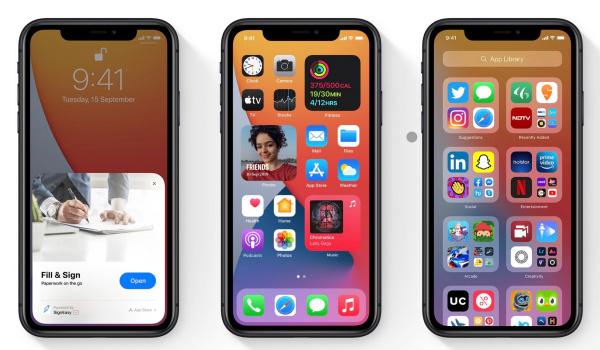
- Text notifications not showing: A significant number of users have complained that their text notifications do not appear as it should, with the notification bubbles no longer popping up. This rather annoying bug means that you may miss important messages and to avoid this, you’d need to check your messages app from time to time.
The good thing is, this glitch has a rather straightforward solution… an update! As part of the iOS 14.3 update, Apple has added a bug fix for this iOS 14 glitch, simply meaning that when you update your device to the iOS 14.3, this issue will be a thing of the past.
Widgets not working properly: One of the more important features of this update, the iOS 14 widgets brought a new lease of life to the iPhone, letting users stay up-to-date with some of the latest information from different apps. However, a number of users have been unable to add or edit widgets, missing out on the wonderful advantages these widgets offer. If you are currently facing this issue, you can take a look at our article that shows you how to add and edit widgets on iOS 14. If this still does not work out, open up the app, hit the + icon and then close it, it should appear on the widgets list after this.
Delayed Text When Messaging: Not one of the common iOS 14 glitches, this rather pesky glitch means that users experience a time lag between when they type certain words and when they appear in the field. While this is not particularly common, a quick reboot can temporarily solve this issue. However, the iOS 14.4 update brings a bug fix for delayed typing, so getting this update should help you solve this rather uncommon glitch.
Here are a number of rather common iOS 14 glitches and the best ways to get around them, but if none of the above tips work for your device, then try updating to a newer version or visit an Apple Service Centre close to you to get a specialist to check your device.
Author:Alfa Baye
Staff Writer
